Secure DFU OTA for nRF52840 solution modules: Guide to create hex/zip file for implementation – #1(Bootloader)

Below are the following steps to implement Secure DFU OTA by using nRF52840 chip set, SDK17.1.0.
It consists of 3 parts:

Part A: Bootloader

Part B: Application (Click for article link)

Part C: Combining and merging built files (Click for article link)

In this article, we will be focusing on Part A: Bootloader.

Path: nRF5_SDK_17.1.0_ddde560\examples\dfu\secure_bootloader\pca10056_s140_ble\arm5_no_packs


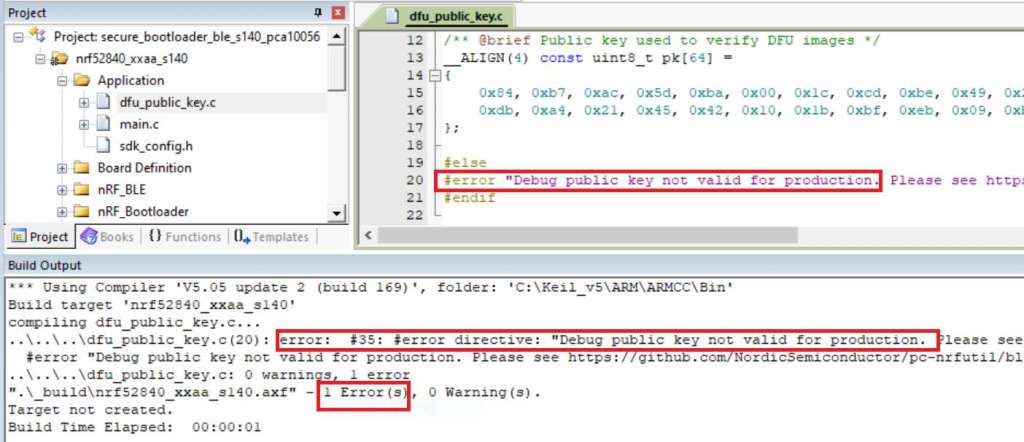
Step 1. An error may occur while building bootloader without a public key:
(Shown in red frames in below screenshot)


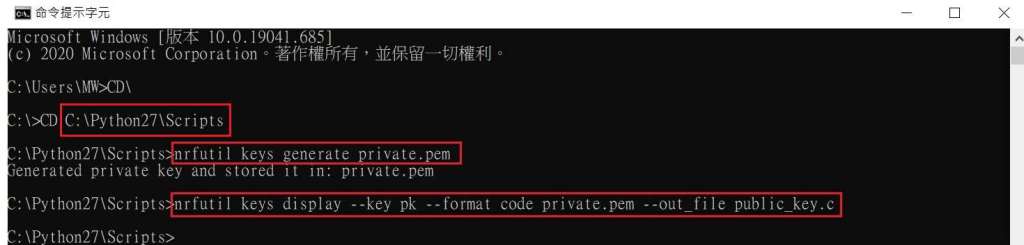
Step 2. How to generate the public key file in Bootloader?
A. Visit DOS at path: ..\Python27\Scripts
B. Then execute:

nrfutil keys generate private.pem
nrfutil keys display --key pk --format code private.pem --out_file public_key.c


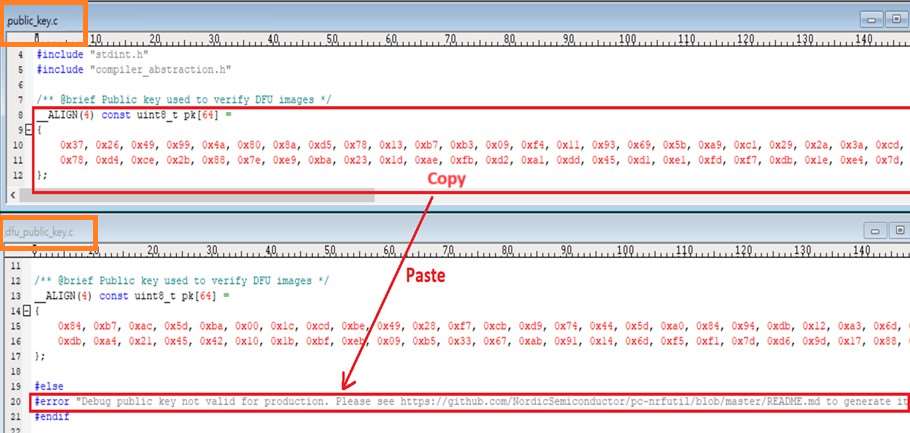
Step 3. Copy the pk[64] code from (public_key.c) into (dfu_public_key.c)
(Shown in red frames in below screenshot)

※Note: Make sure to save the 3 generated files:
private.pem
public_key.c
dfu_public_key.c


Step 4. Generate the bootloader file: nrf52840_xxaa_s140.hex after re-compiling the code files.


※Stay tuned for #2 – Part B: Application in the next article, scheduled release in next week(29/05/2024).


Technical guidelines provided by R&D Manager: Mr. MW Lee
Edited by Sales Manager: Mr. Tony Yin


Raytac Corporation 勁達國際電子股份有限公司 
Bluetooth & WiFi module maker based on Nordic nRF54, nRF53, nRF52, nRF7002 solution
BT5.4 &BT5.3 & BT5.2 & BT5.1 Qualified, FCC/IC/CE/Telec/KC/RCM/SRRC/NCC Pre-Certified.
Bluetooth Solution: nRF54, nRF5340, nRF52840, nRF52833, nRF52832, nRF52820, nRF52811, nRF52810, nRF52805, nRF51822
WiFi Solution: nRF7002
http://www.raytac.com
email: service@raytac.com
Tel: +886-2-3234-0208

How To Use nRF52840/nRF52833 module DevKit(MDBT50Q series) – 2024 Update – Applied to nRF5 SDK

Preface:
Here provides an easy introduction of How to set up of nRF52840 & nRF52833 Module Demo board MDBT50Q-DB-40 (for nRF52840) & MDBT50Q-DB-33 (for nRF52833)


MDBT50Q-DB-40  is a Demo Board built by Raytac’s MDBT50Q-1MV2  with Red PCBA deployed nRF52840 SoC with Bluetooth 5 & Thread Combo, with 1MB Flash Memory and 256KB RAM and Chip Antenna.
 
MDBT50Q-DB-33 is a Demo Board built by Raytac’s MDBT50Q-512K with Green PCBA deployed nRF52833 SoC with Bluetooth 5 & Thread Combo, with 512KB Flash Memory and 128KB RAM and Chip Antenna.
 
Both demo boards are Bluetooth BT5.4 qualified and FCC, IC, CE, Telec, KC, SRRC, RCM, NCC, WPC pre-certified.

Table of contents:

1.1 Hardware Set Up

1.2 Software Kits resources & preparations

1.3 Flash the ready firmware into Raytac’s module

1.4 DFU to MDBT50Q-DB-XX through USB interface 


1.1 Hardware Set Up
 
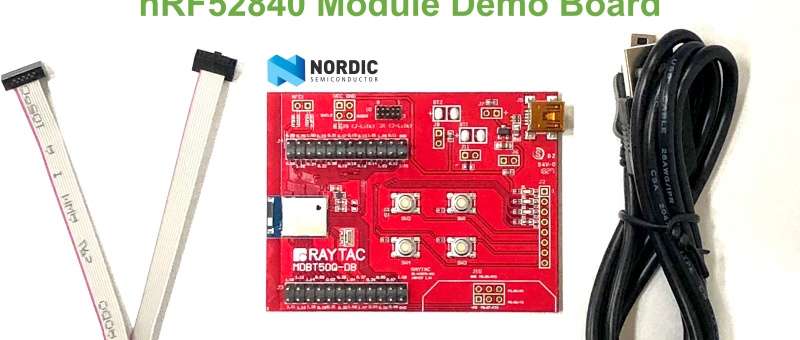
MDBT50Q-DB-XX package contains:
  • 1 x MDBT50Q-DB-40/MDBT50Q-DB-33
  • 1 x IDC Wire
  • 1 x Data/Power Mini USB Wire(for data transferring)

Where to buy MDBT50Q-DB-XX?

MDBT50Q-DB-40 (nRF52840 Solution)

MDBT50Q-DB-33 (nRF52833 Solution)
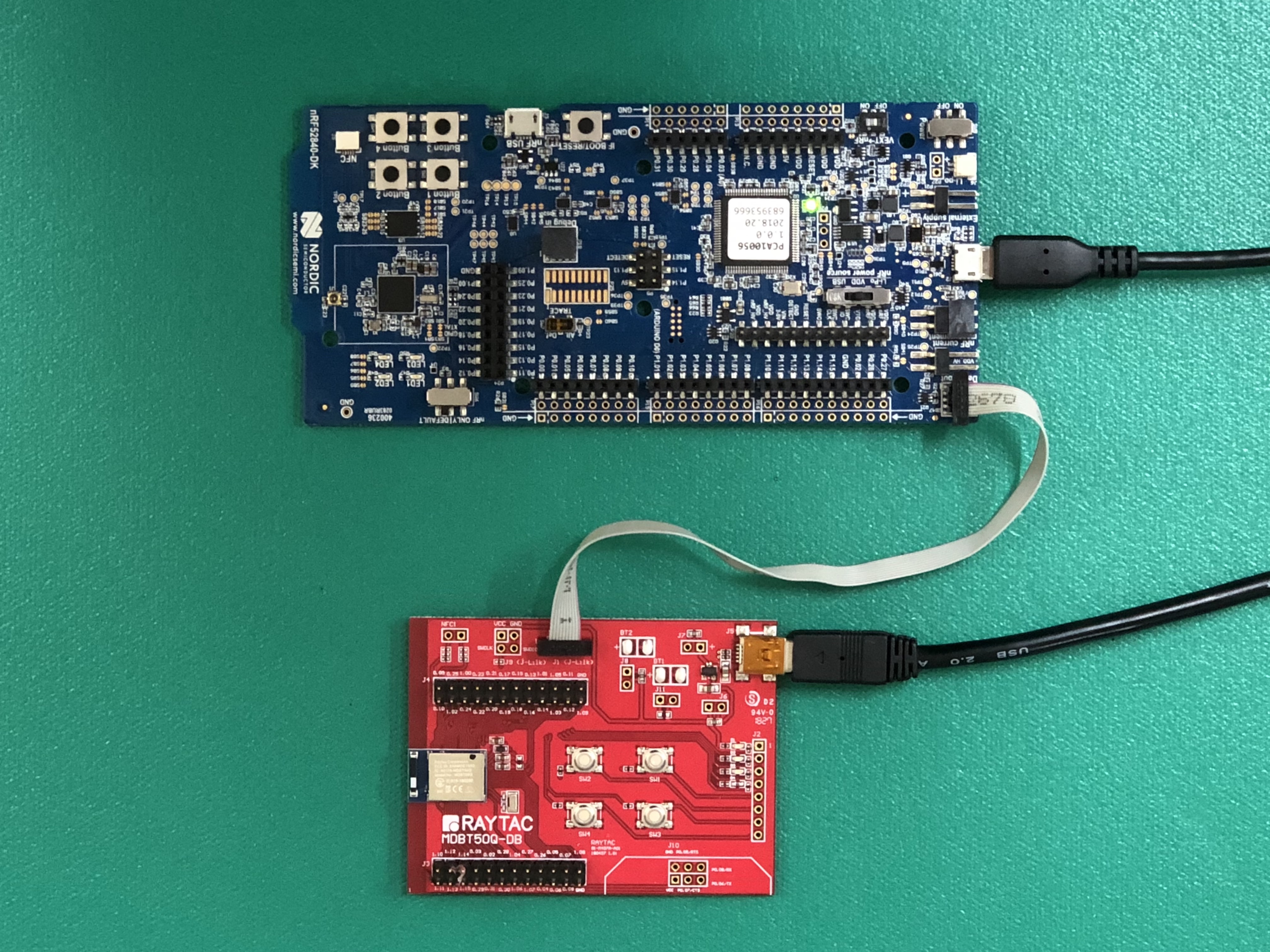
Connect Nordic NRF52-DK/NRF52840-DK Connect with MDBT50Q-DB-40 by IDC Wire

※Note: PCA10056 (NRF52840-DK) / PCA10040 (NRF52832-DK) / PCA10100(NRF52833-DK)

Power up MDBT50Q-DB-XX using Mini USB

IMG_0064.jpg
MDBT50Q-DB-40

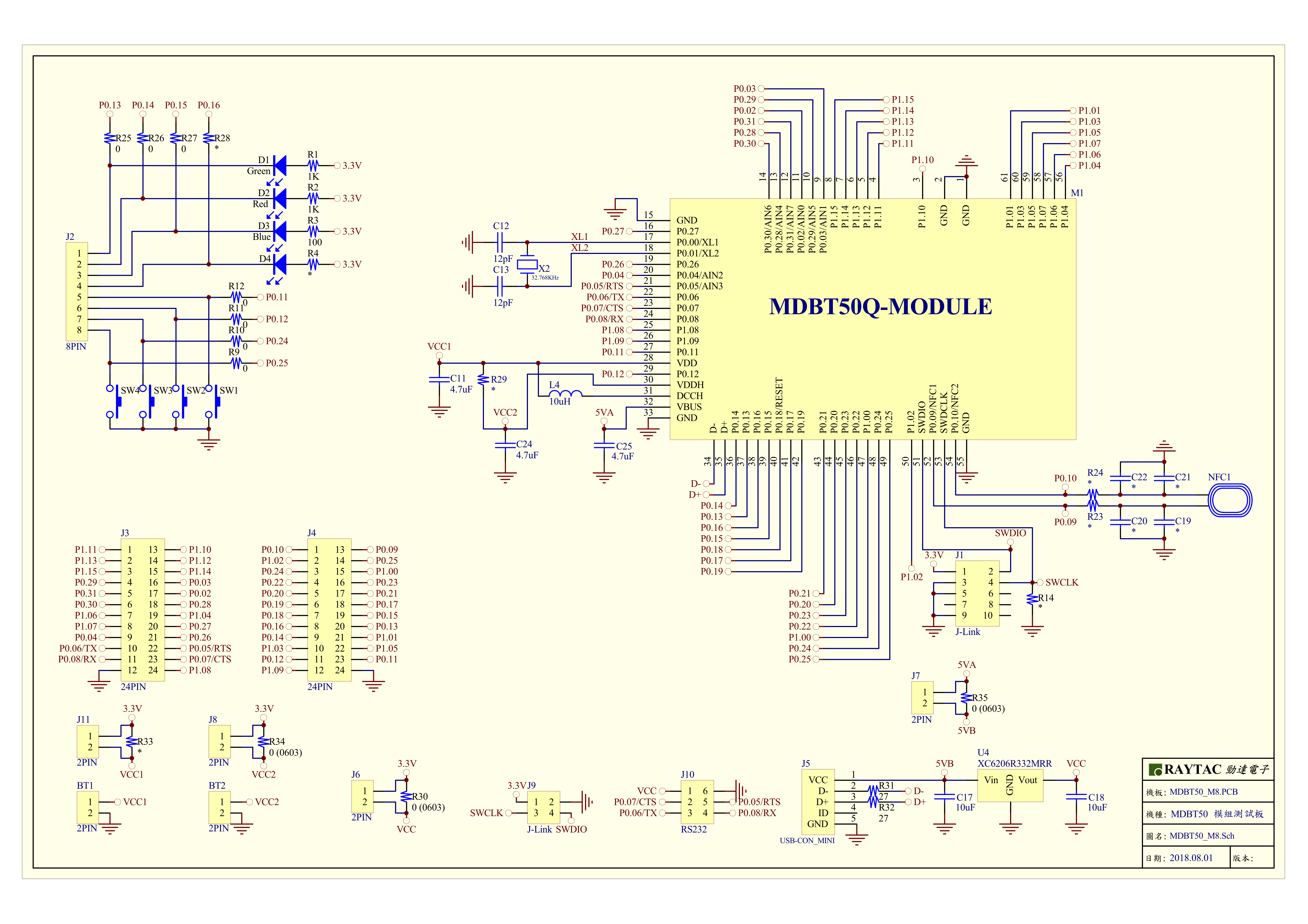
MDBT50Q-DB-40 Schematic:

MDBT50Q Demo Board Schematic-V2.jpg

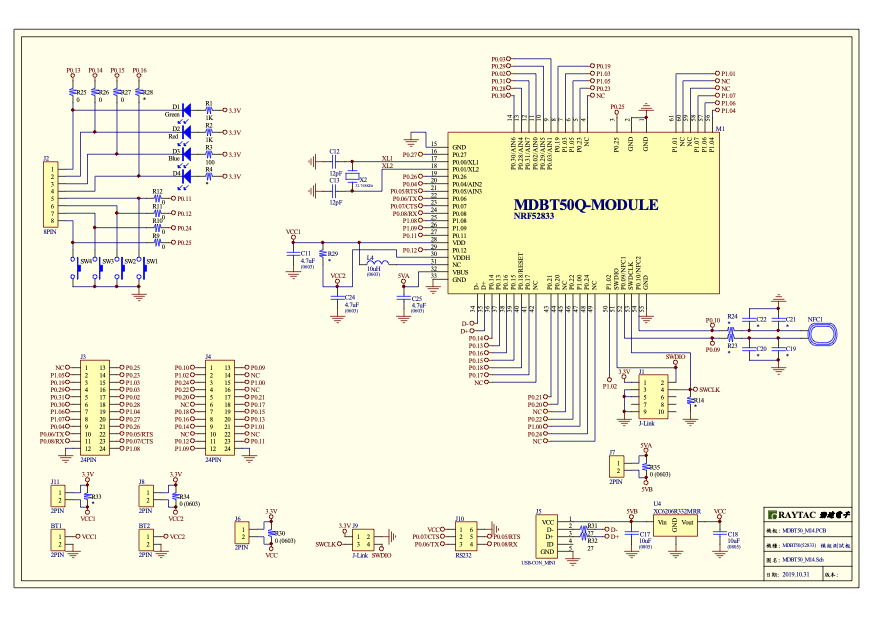
MDBT50Q-DB-33 Schematic:

MDBT50Q-DB-33 Schematic


1.2 Software kits resources & preparations

Resources:

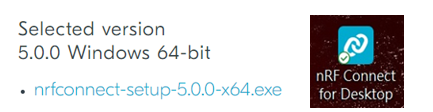
Download nRF Connect For Desktop (Please Click Me)

Download nRF Command Line Tools (Please Click Me)

Download NRF5 SDK (The latest V17.1.0) (Please Click Me)

Download Visal Studio Code(Please Click Me)

Preparations:

Option 1.  NRF5 SDK (The latest version V17.1.0)

  1. 1.0_ddde560\components\softdevice\s140\hex\ s140_nrf52_7.2.0_softdevice.hex
  2. 1.0_ddde560\examples\ble_peripheral\ble_app_uart\pca10056\s140\arm5_no_packs\_build\ nrf52840_xxaa.hex

*Tips: If you go with nRF5 SDK option, please consider to add a bootloader hex file if you’re going to make DFU requests in the future.

Option 2.  NCS (Recommended version V2.6.0)

螢幕擷取畫面 2024-06-04 161138

2A.  Find “Toolchain Manager” in app nRFConnect for Desktop
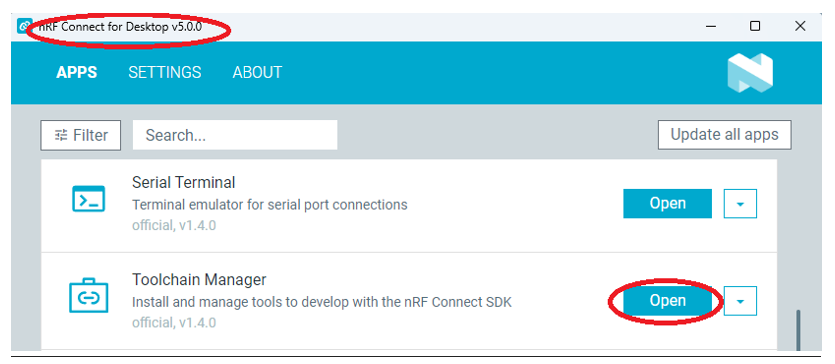
螢幕擷取畫面 2024-06-04 161251

2B.  Install nRFConnect SDK V2.6.0 to your working site.

螢幕擷取畫面 2024-06-04 161333

2C. Prepared with the latest version of nRF Command Line Tools
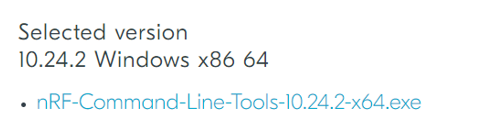
螢幕擷取畫面 2024-06-04 161627
 
**Note: SEGGER J-LINK Upgrade message might pop up while you’re doing above download.
螢幕擷取畫面 2024-06-04 161724
 
2D. Locate all the necessary kits for programming in PC
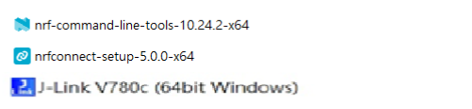
螢幕擷取畫面 2024-06-04 161810


1.3 Flash the ready firmware into Raytac’s module

Intro:

With the ready built code of zephyr.hex (Made through NCS) or nrf52840_xxaa.hex & s140_nrf52_7.2.0_softdevice.hex (Made through nRF5-SDK) file for application, we would like to move onto  flashing code into the MDBT50Q BLE module(mounted on MDBT50Q-DB-XX demo board).

Step1.  

Execute nRF Connect >>  Programmer  > > Open

螢幕擷取畫面 2024-06-04 161858

Step2.

Click “SELECT DEVICE” >> Find icon “nRF52840 DK” which is detected by the programmer app
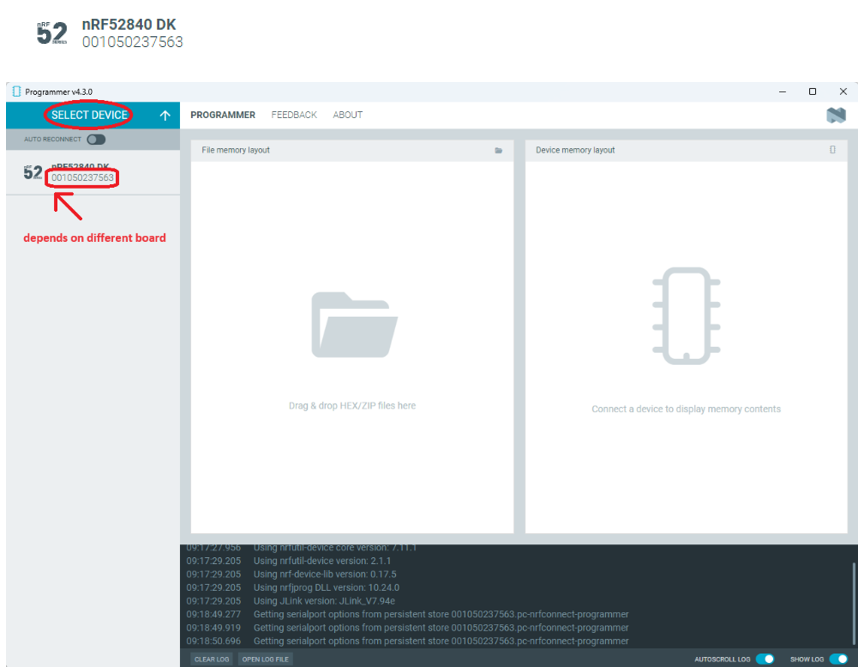
螢幕擷取畫面 2024-06-04 162005

Step3.

Click “nRF52840 DK”>> “Erase All” to remove flash memory inside MDBT50Q BLE Module
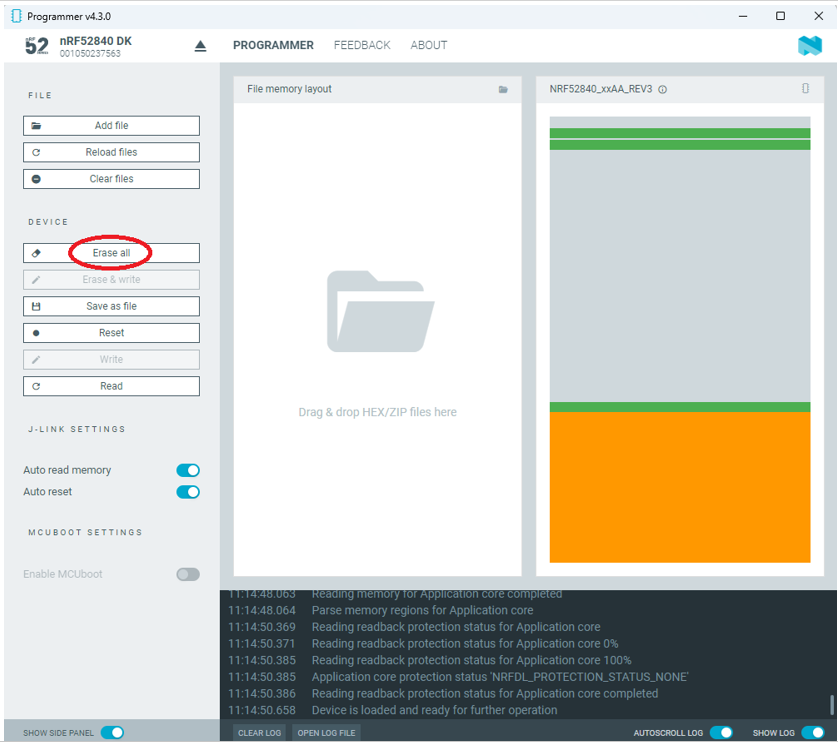
螢幕擷取畫面 2024-06-04 162106

Step4.

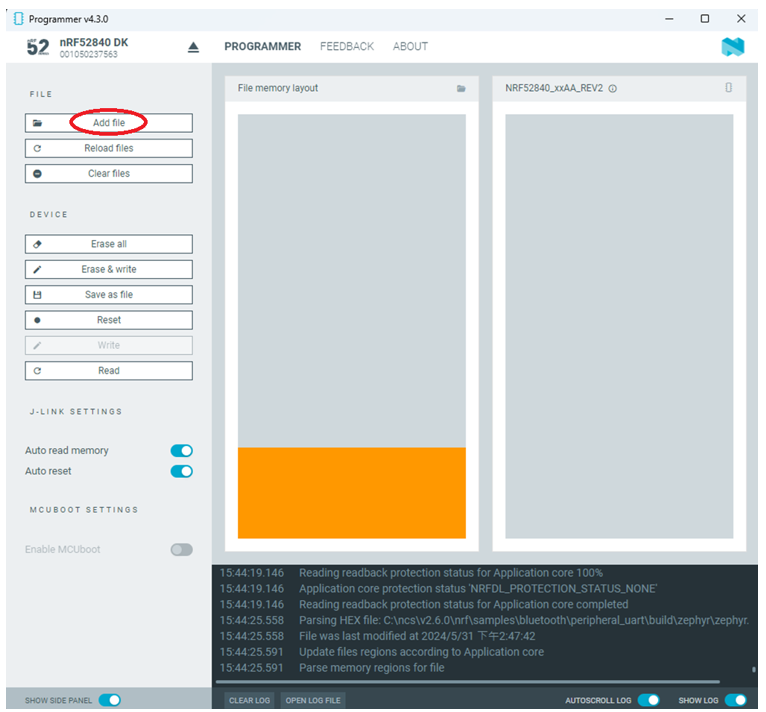
Click “Add File” to load application zephyr.hex into programmer
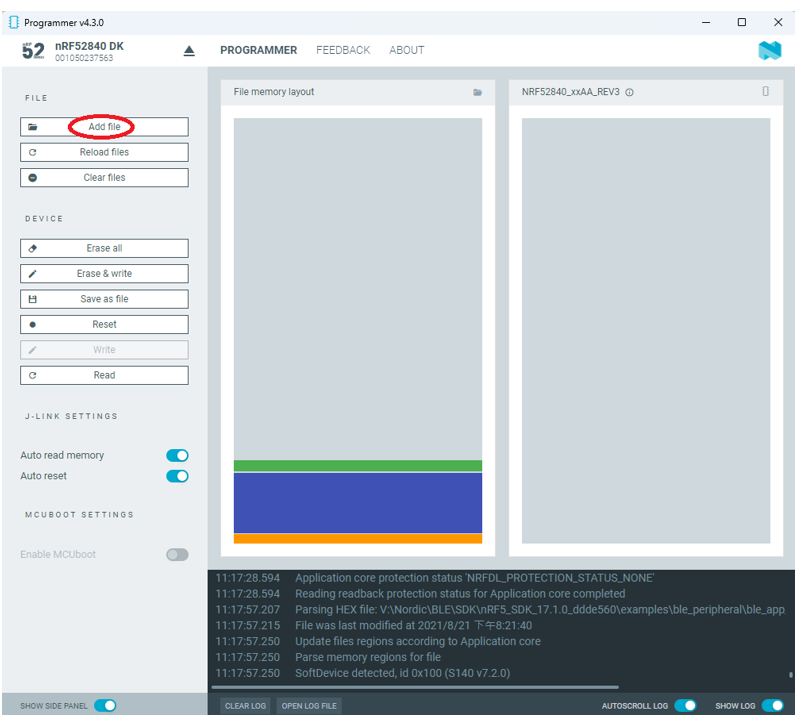
螢幕擷取畫面 2024-06-04 162202

!! Important Tips:!!


  • If you’re using nRF Connect SDK for code compiling as above, Program the hex file to MDBT50Q BLE module on the MDBT50Q-DB Demo board:
    – C:\ncs\v2.6.0\nrf\samples\bluetooth\peripheral_uart\build\zephyr\zephyr.hex
  • If you’re using NRF5 SDK for code compiling, do make the 4-in-1 hex file (merged ready) before programming it to MDBT50Q BLE module.  It includes the 4 hex files below:

(1) bootloader.hex

(2) bootloader_setting_file.hex

(3) s140_nrf52_7.2.0_softdevice.hex

(4) nrf52840_xxaa.hex
螢幕擷取畫面 2024-06-04 162300


1.4 DFU to MDBT50Q-DB-XX through USB interface

Intro : Before DFU implement , Please make sure the bootloader file has been installed in your MDBT50Q BLE module.

※Note: NRF52840 SoC supports USB interface to utilize Device Firmware Update (DFU).

How do I prepare the software??

  • Download nrfutil.exe file from Nordic website .
  • It is workable to do List, Program, Recover, Erase, and operations with nRFutil device command to Nordic device.
  • Open DOS mode to install device command type: nrfutil install device

(Jocelyn) How To Use NRF52840 NRF52833 module Dev Kit (MDBT50Q Series) 2024 version - Release file

How do I setup the hardware??

  1. Press Switch 4 and hold
  2. Power up Demo Board
  3. Blue LED Lights on
  4. Demo Board successfully enters into USB DFU Mode

螢幕擷取畫面 2024-06-04 162504

How do I prepare the firmware??

**USB DFU works only in DOS mode.

**USB DFU only works when USB Bootloader installed in current loaded firmware (inside BLE Module)

A single, merged 4-in-1 hex file is required, which includes:

Bootloader, Bootloader setting, Softdevice, and Application.

Firmware DFU requires a .zip file.

USB DFU Execution Steps:

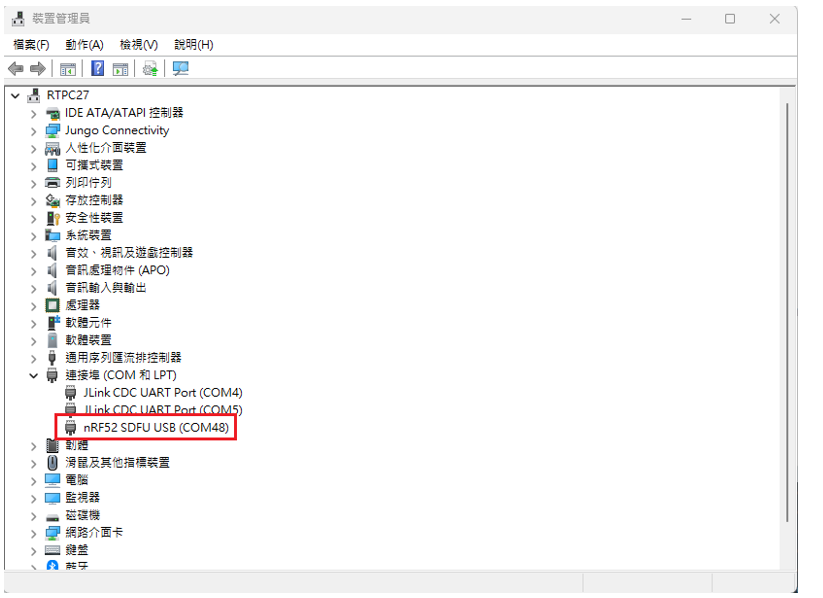
Step 1. When Blue LED Lights on with MDBT50Q-DB (Ready to enter USB DFU Mode)

Step 2. Find out Com Port No. “nRF52 SDFU USB(COMxx)”
螢幕擷取畫面 2024-06-04 162542


Step 3. Execute USB DFU

Option 1. Using device program command:

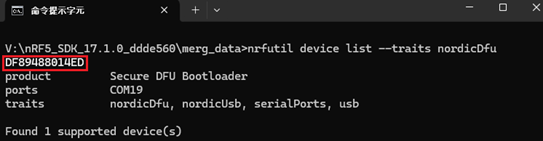
(1) List the devices with a DFU trigger interface by running:

nrfutil device list –traits nordicDfu
Option1-1

(2) Program new firmware to a device identified by its serial number by running:

nrfutil device program –firmware .zip nrf52840_xxaa.zip –serial-number XXXXXXXXXXXX

Option1-2

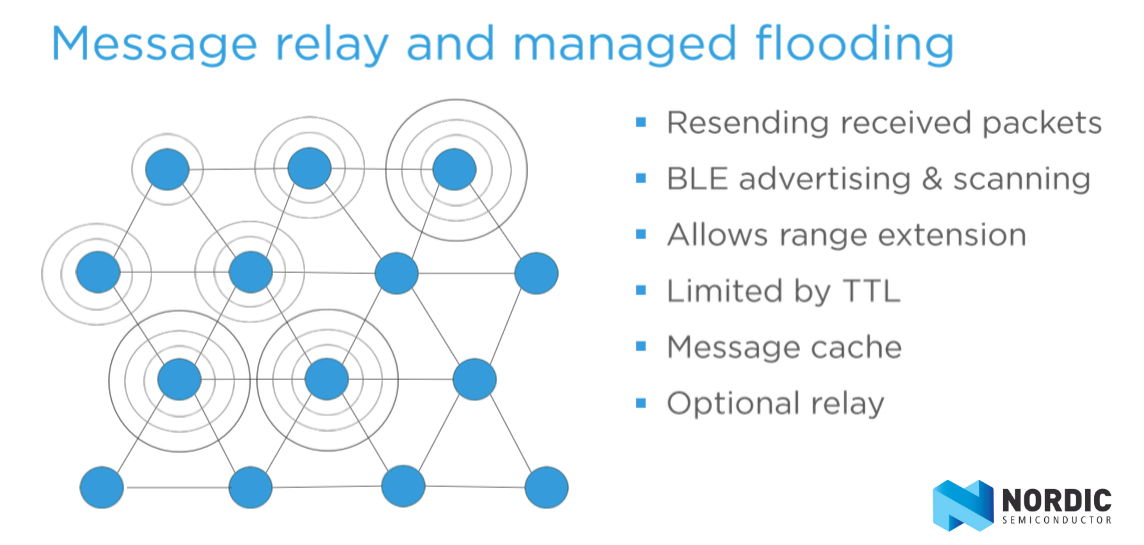
Nordic Mesh Network Development Update

Mesh Network has grabbed the highlight of BLE development.
To keep all Nordic users get the updated information post, Raytac keep closely watching for every step Nordic achieved and summarized current status in below.
Mesh-Message Relay & Flooding.png

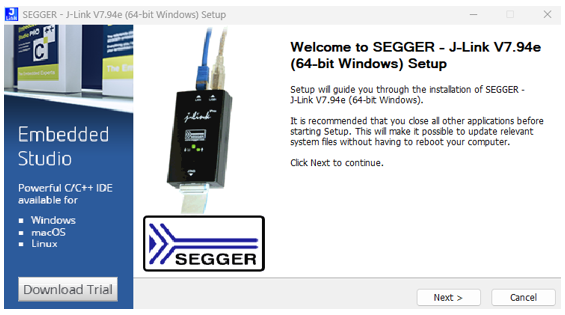
Nordic Licensed A Free Development IDE-Embedded Studio

Nordic announced it recently has signed with SEGGER to license all developers allowed to use Embedded Studio to develop Nordic nRF51 & nRF52 application freely without any limitations.

Getting started with SEGGER Embedded Studio and the nRF5 SDK Tutorial Video:

Nordic nRF52810 Module MDBT42Q-P192K by Raytac in Mass Production

With Nordic nRF52810 SoC volume production, Raytac announced nRF52810 module MDBT42Q-P192K and MDBT42Q-192K will be available by 2017/11

Nordic Semiconductor News Release For Raytac’s BT5.0 Module

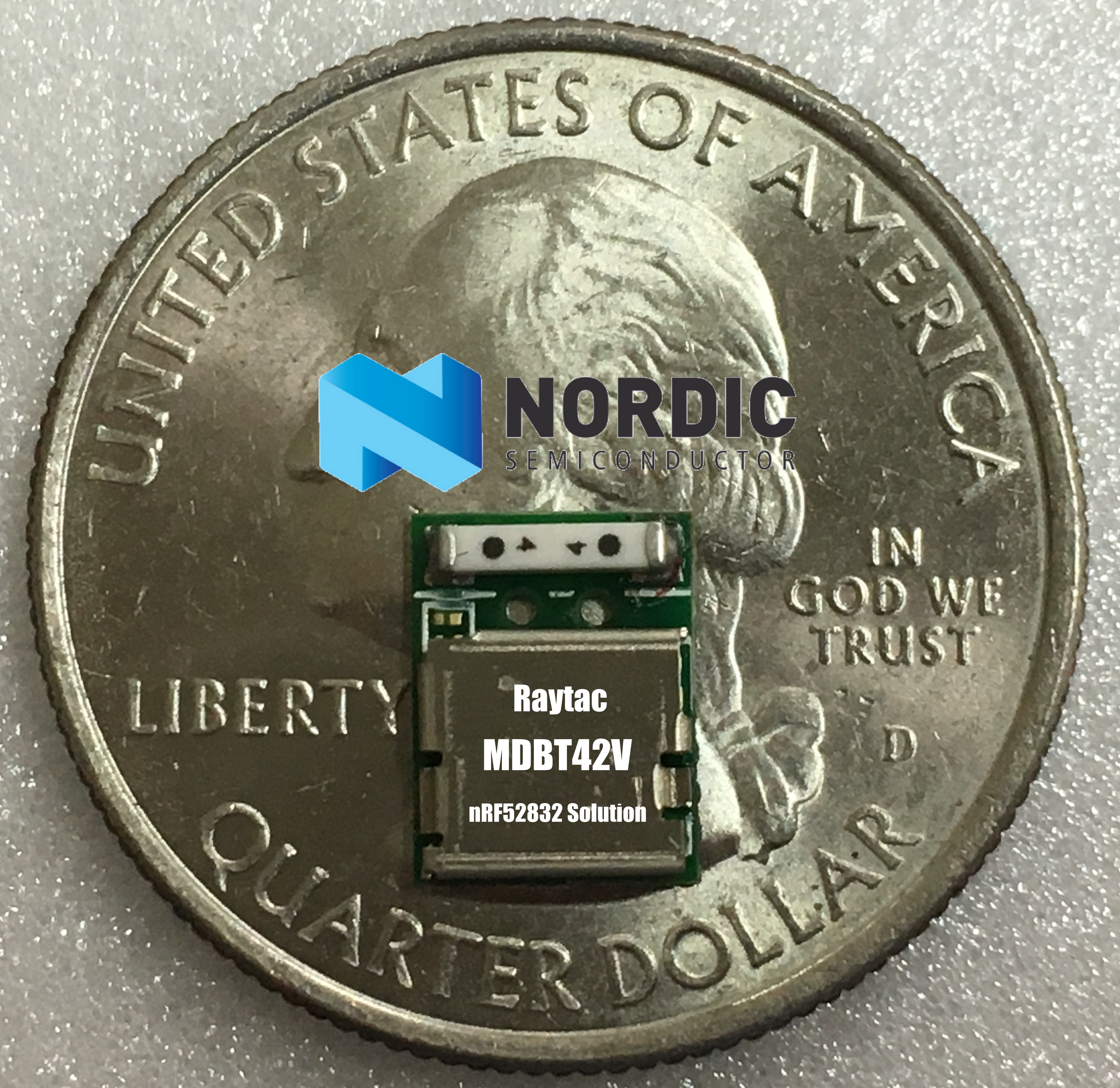
Nordic Semiconductor announces that Raytac Corporation has selected Nordic’s nRF52832 wafer level-chip scale package (WL-CSP) System-on-Chip (SoC) for its compact Bluetooth low energy, Bluetooth® 5 ready MDBT42V and MDBT42V-P modules……… The modules comes in an 8.4 by 6.4 by 1.75mm form factor and offers a high performance ceramic chip antenna delivering a wireless connectivity range of over 100m in open space according to Raytac.
For more detail, please refer to below link of Nordic News Releases Press
 img_0467-1
Raytac Nordic Module Line
Raytac Corporation
A BT4.1 & BT4.2 & BT5 module maker based on Nordic nRF51 & nRF52 solution 
(nRF51822 & nRF51422 & nRF52832 & nR52810 & nRF52840)
www.raytac.com            Tel: +886.2.3234.0208
email: service@raytac.com

New NFC feature on nRF52 Series: Read/write capable Type 4 Tag NFC library in nRF5 SDK

beacon_config-01.png
NFC feature is an interesting function in nRF52 series which can help developers and consumers to extent the device flexibility and accessibility.
Mostly, people knows that the NFC for nRF52 can work for paring work only.
Here Nordic Developer Zone introduced the new features of nRF52 for Type 4 Tag in nRF5 SDK.
Thus, not only used as a standard tag type for storing a web link or a text to launch apps and secure BLE pairing as known as Type 2 Tag. (The library already in nRF5 SDK), but also supports more features which enhance a faster communication and exposing data (known as NFC Type 4 Tag). Thus, nRF52 now can even write data to a tag with an NFC Reader/Writer such as smartphone and used in many secure transactions systems.
For more detail information, you can continue the reading in below which quoted from original post, or simply visit Nordic Developer Zone

Bluetooth 5-ready Nordic nRF52840 multi-protocol SoC released!


Raytac Corporation

Bluetooth module maker based on Nordic nRF51 & nRF52 solution 
(Nordic nRF51822 & nRF5142 & nRF52832 & nRF52840)
Bluetooth Specification Version: BT4.0 & BT4.1 & BT4.2
Tel: +886.2.3234.0208
email: service@raytac.com
http://raytaccorp.blogspot.tw/2016/12/bluetooth-5-ready-nordic-nrf52840-multi.html

Quoted from Nordic Press released!
https://www.nordicsemi.com/eng/News/News-releases/Product-Related-News/Bluetooth-5-ready-SoC-from-Nordic-redefines-scope-for-smart-home-IoT-and-wearables-by-delivering-4x-range-2x-bandwidth-and-best-in-class-security

Nordic Semiconductor has today released the new nRF52840 multi-protocol SoC with on-chip support for the upcoming Bluetooth 5 specification. In addition to Bluetooth 5 the nRF52840 also introduces on-chip support for the 802.15.4 standard. With Bluetooth 5’s new high throughput and long range modes and 802.15.4, it offers unparalleled development opportunities for connected devices for IoT. These opportunities include advanced single-chip wearables, wearables with payment options and connected home devices.
 
Bluetooth 5 will undergo ratification by the Bluetooth SIG beginning December 6th2016. Upon completion, we will provide Bluetooth 5-ready SoftDevices to support nRF52840 and the nRF52832 (high-throughput mode only).

Nordic nRF5 SDK v.12.1.0 Released

Raytac Corporation
A BT4.1 & BT4.2 module maker based on Nordic nRF51 & nRF52 solution 
(nRF51822 & nRF51422 & nRF52832 & nRF51802)
Tel: +886.2.3234.0208
Nordic relleased nRF5 SDK V12.1.0

Software Update

nRF5 SDK v.12.1.0
Software Development Kit for the nRF51 Series and nRF52 Series.
Highlights of this release:
  • Added serialization of the S132 SoftDevice v3.0.0. Serialization of S130 is now deprecated.
  • Included the latest MDK v8.9.0 with a crucial workaround for nRF52832 Errata 108.
More information in the release notes (inside the download).

nRF5 SDK supports IoT over Bluetooth Smart

Raytac Corporation
A BT4.1 & BT4.2 module maker based on Nordic nRF51 & nRF52 solution 
(nRF51822 & nRF51422 & nRF52832 & nRF51802)
Tel: +886.2.3234.0208
email: service@raytac.com
 
Now both ‪#‎nRF51‬ & ‪#‎nRF52‬ Support IPv6 Over Bluetooth Smart.‪#‎nRF5SDK‬
Quoted from Nordic: http://www.nordicsemi.com/eng/Products/Bluetooth-Smart-Bluetooth-low-energy/nRF5-SDK-for-IoT
This SDK is a IPv6 capable Bluetooth® Smart software stack that provides drivers, libraries, examples, and APIs for nRF52 Series devices. It includes an IPv6 over Bluetooth Smart adaptation layer (6LoWPAN) and a complete Internet Protocol Suite including IPv6, ICMP, UDP, TCP, DTLS, TLS, CoAP and MQTT. It brings native IPv6 support to Bluetooth Smart applications, letting them talk directly to cloud services and other connected ‘things’ over IP-based networks.
The SDK includes examples that configure the nRF52 device as a Bluetooth Smart 6LoWPAN node and that interface with the IP layers at transport level (UDP amd TCP) and with security (DTLS and TLS), to the application level CoAP and MQTT and LWM2M. Examples of how to connect to cloud services is also included in the documentation. The SDK also includes an implementation to for over the air upgrade for Bluetooth Smart IPv6 nodes over IP using the trivial file transport protocol (TFTP).
As a router for development an off-the-shelf router running OpenWRT or a Raspberry Pi can be used. A solution for commissioning of Bluetooth Smart IPv6 nodes to a router with a mobile phone as a trusted third party is also included. Source code for the commissioning app and the needed OpenWRT daemon is also available. All this is described in the documentation.
The nRF5 IoT SDK documentation are available at our infocenter.
The nRF5 IoT SDK zip and pack version are available for download developer.nordicsemi.com.

FEATURES

6LoWPAN and IPSP library:
  • 6LoWPAN compression/decompression
  • 6LoWPAN node role
  • Packet flow control
  • IPv6 prefix management
IPv6 stack:
  • Support for multiple IPv6 addresses
  • ICMPv6 module
  • UDP socket APIs
  • DNS client
  • SNTP client
  • TFTP client
CoAP library:
  • CoAP message types CON, NON, ACK, and RESET
  • Token matching
  • Endpoint creation as resources
  • Support for observable resources and observing resources
  • Support for DTLS
  • Support for block transfer
MQTT library:
  • Publisher and Subscriber role
  • Support for QoS0, QoS1 and QoS2
  • Flow control messages to application
  • MQTT message encoder/decoder
  • Support for version 3.1.1 and 3.1.0
  • TLS support
LWM2M library:
  • Client initiated boostrap
  • Server registration/deregistration/update
  • “LWM2M" and “IPSO Smart Objects" objects
  • LWM2M TLV encoder/decoder
  • DTLS support
BSD Socket Interface:
  • Client UDP and TCP
  • Supports Blocking and Non-Blocking I/O
  • Compatible with POSIX Socket Interface