New Distributor Announcement (Turkey & Egypt) – Özdisan Elektronik A.Ş.

Raytac is glad to announce that we has expanded our distributor network to Turkey and Egypt. The distribution agreement with Özdisan Elektronik A.Ş. covers FAE, Engineering, Sales, Marketing and support for Raytac Corporation’s full range of module lines, including nRF52840, nRF52811, nR52832 and nRF51 series in territory.1640x856

Özdisan Elektronik A.Ş. was founded in 1980 and currently is the leading electronic components distributor in Turkey. The headquarter located in Istanbul and built up 4 sales offices and warehouse in major cities in Turkey cities(Istanbul, Ankara, Izmir, Bursa). Employed RD FAE capability to support the development and evaluation consultant and also Marketing & Sales service.

Not only distribution service, Özdisan Elektronik A.Ş. but also expanded business to PCB & PCB assembly, LED lighting solutions, aluminum coolers aimed to achieve the synergy collaboration all the way from product idea emerging, developing and mass production.

IoT now has become a part of people’s life experience and Bluetooth is the key protocol connecting between human and IoT appliance.

Raytac employees Nordic’s solution developed series of modules which is a recommended 3rd party module maker listed in Nordic website. All modules from Raytac comes with superior RF efficiency, reliable quality, Bluetooth certification granted, and FCC/IC/CE/Telec/KC/SRRC/NCC pre-certified. Developers who deployed Raytac’s module into products may save lots of efforts in RF design expertise and obtain the low cost and time-to-market efficiency.

With Raytac’ Bluetooth Low Energy module joined the line card, Özdisan Elektronik A.Ş.  expects to advance the service from the Bluetooth world connecting to an unlimited future.

logo

Contact Window

Okan Abdi
Genel Müdür Yardımcısı/Deputy General Manager
Özdisan Elektronik Paz. San. ve Tic. A.Ş.
email: oabdi@ozdisan.com Tel: +90 (61) 420 1882
website: www.ozdisan.com

İbrahim Ekmekçi
Saha Uygulama Mühendisi /Field Application Engineer
Özdisan Elektronik Paz. San. ve Tic. A.Ş.
email: iekmekci@ozdisan.com Tel: +90 (61) 420 1882 /Ext:230   Mobile: +90 (534) 014 78 76
website: www.ozdisan.com

CD卡-2

MDBT50Q-RX-ATM-1

Raytac Corporation 勁達國際電子有限公司
A BT5 & BT 4.2 & BTv4.1 module maker based on Nordic nRF51 & nRF52 solution
(nRF52840 & nRF52832 & nRF52810 & & nRF52811 &nRF51822)
www.raytac.com email: cs@raytac.com Tel: +886.2.3234.0208

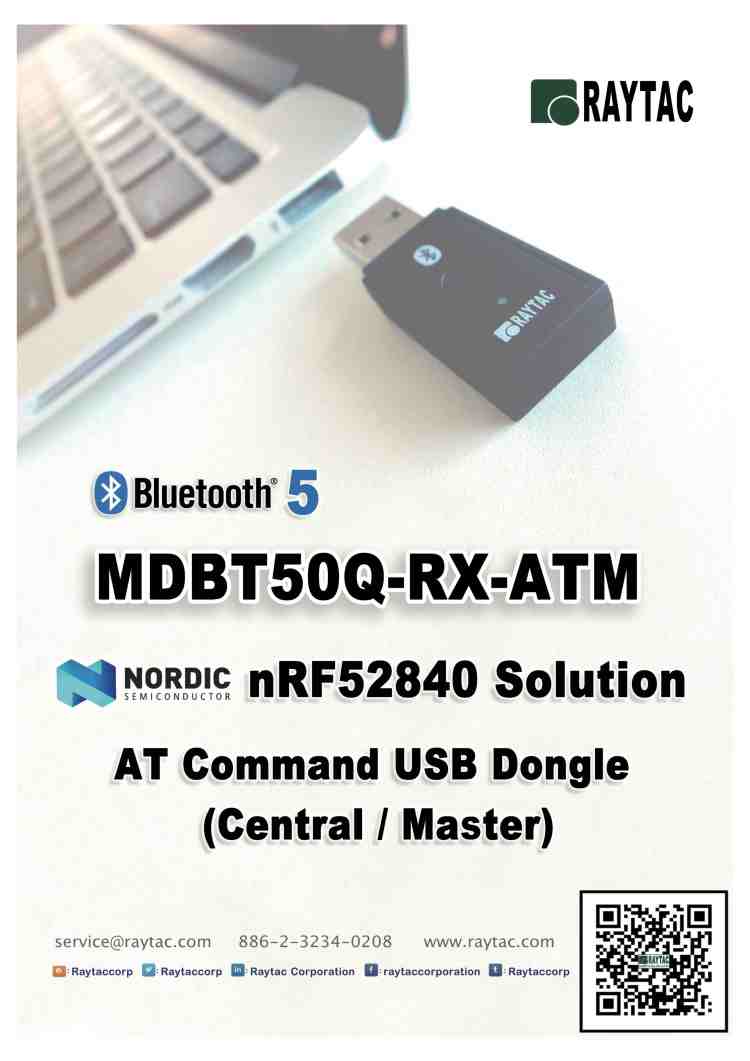
nRF52840 AT Command USB Dongle MDBT50Q-RX-ATM

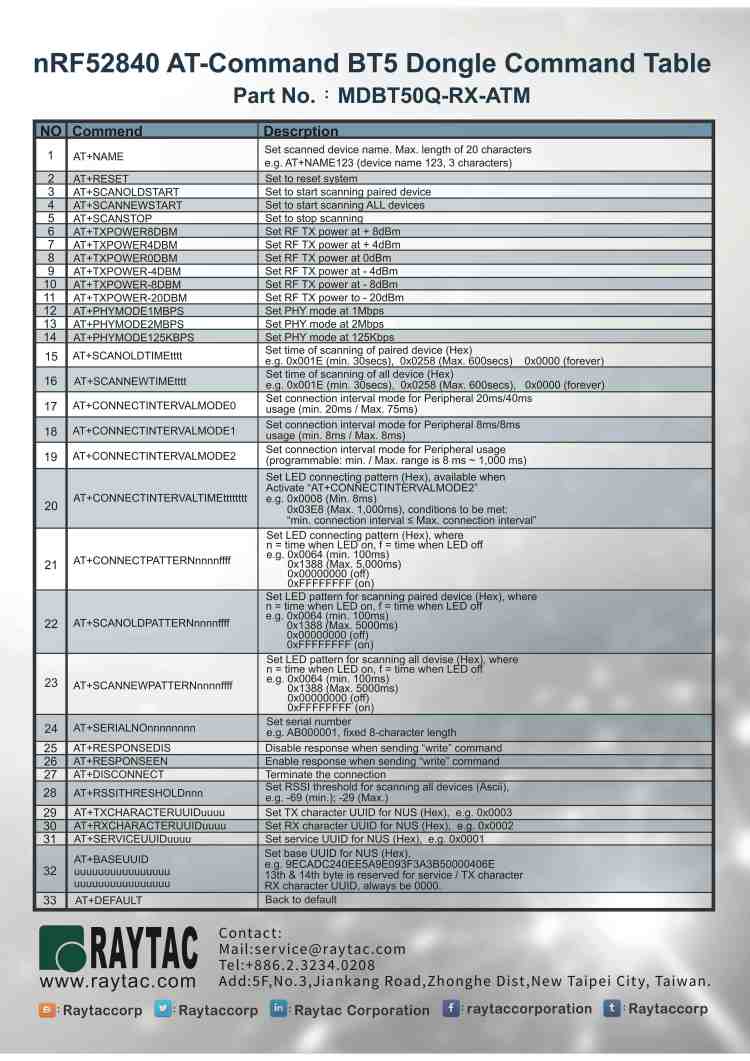
To have an easy understanding of Raytac’s AT Command USB Dongle, here provides the command table for reader’s easy reference.We encourage readers to visit Raytac’s website to obtain the detail information

MDBT50Q-RX-ATM

MDBT50Q-RX-ATM-1.jpg

Raytac AT command is built based on Nordic UART service, aka NUS, which is similar to SPP (Serial Port Profile) applied in Classic Bluetooth (BT2 and BT3)

To service the Bluetooth bridging works, AT command modules or dongle comes with both Central/Master & Peripheral/ Slave role available.

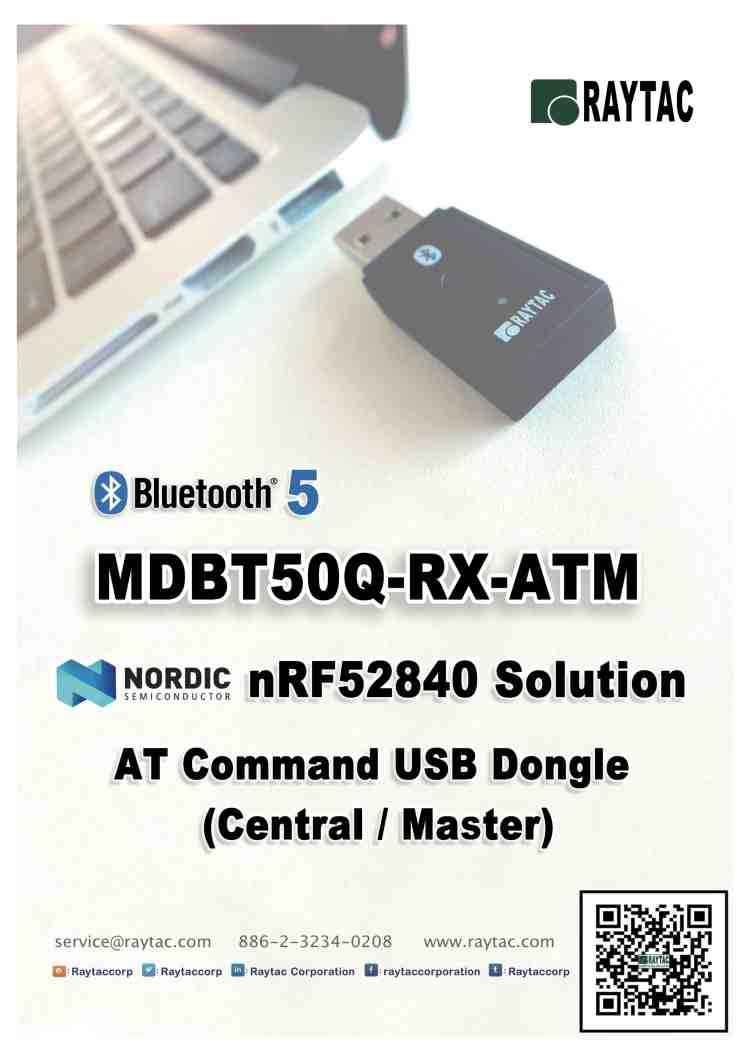
Latest released MDBT50Q-RX-ATM is a USB dongle designated to connect to PC or Machine acted as the Central / Mater role supporting below commands.

List of supported commands

  • Setting of scanned device name
  • Setting of scanned base UUID/service UUID/TX character/RX character
  • Setting of scanned RSSI threshold
  • Selective data rate of 1M bps, 2M bps or 125K bps on-air
  • Set TX output power in 6 levels.
  • Set scanning time
  • Enable/disable scanning
  • Set LED pattern indicating scanning or connecting status
  • Auto UART baud rates
  • Use external 32.768KHz oscillator
  • Recover-to-default setting with software method
  • System reset of software
  • Set serial number and retrieve
  • Retrieve MAC Address
  • Support maximum MTU 247bytes / data payload up to maximum 244 bytes

MDBT50Q-RX-ATM-2 Command Table.jpg

Raytac Corporation 勁達國際電子有限公司A BT5 & BT 4.2 & BTv4.1 module maker based on Nordic nRF51 & nRF52 solution

(nRF51822 & nRF52832 & nRF52810 & nRF52811 & nRF52840)

www.raytac.com email: cs@raytac.com Tel: +886.2.3234.0208

Raytac Central Role AT Command USB Dongle MDBT50Q-RX-ATM Released

Raytac today announced (Central / Master) AT command dongle released.

Part No.:

MDBT50Q-RX-ATM

Raytac AT Command Module Family

nRF52840 is Nordic’s latest and advanced solution, which brings a new interface “USB" from other lines, has drawn the attention among developers. 


Raytac developed AT Command  (Master / Central ) solution based on nRF52840 solution, fulfilled the demand of USB interface, missioned to deliver a full coverage of AT Command product line.


Raytac’s nRF52840 USB AT Command dongle, MDBT50Q-RX-ATM is a BT5, FCC/IC/CE/Telec/KC/SRRC/NCC/RCM/WPC pre-certified dongle which is  eliminating the need for RF design expertise, and speeding time to market for complex M2M IoT applications. 


AT command module is an easy solution provides developers a quick breakthrough to Bluetooth connection. Without firmware effort needed, simply have commands setting on MCU and the start to enjoy the implement of bridging connectivity between devices through Bluetooth.

After Raytac’s completed both Central (Master) & Peripheral (Salve) role AT command module projects, the USB interface has brought up the strongest demand by developers.

Raytac Corporation 勁達國際電子有限公司
A BT5 & BT 4.2 & BTv4.1 module maker based on Nordic nRF51 & nRF52 solution
(nRF51822 & nRF51422 & nRF52832 & nRF52810 & & nRF52811 &nRF52840)
www.raytac.com email: cs@raytac.com Tel: +886.2.3234.0208

Burn your firmware – onto MDBT50Q-RX that is

Hi there, folks!
So you have hopefully downloaded your IDE, you have written your code which you then plan to copy it over onto your MDBT50Q-RX and make it execute your master plan to take over the world!
Seriously, don’t underestimate the Nordic nRF52840 based MDBT50Q-RX. USB sticks with Bluetooth can do wonders 😉
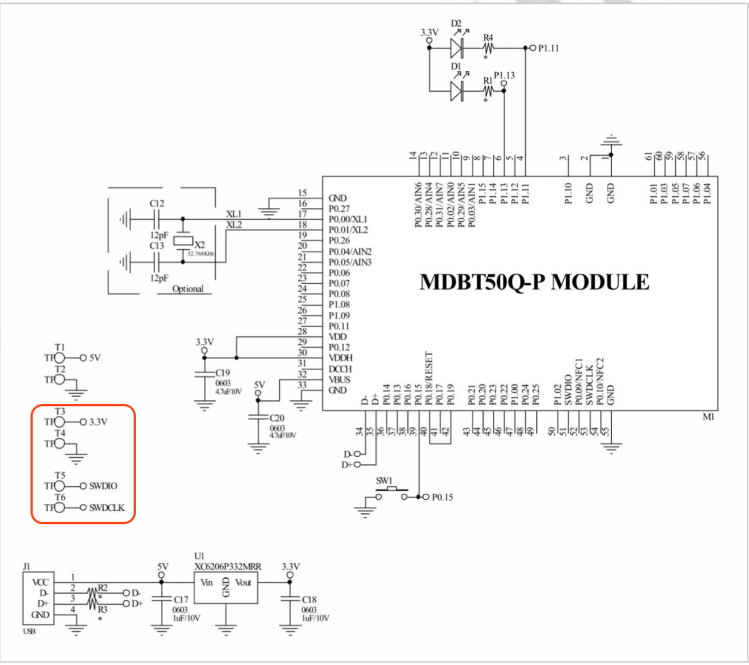
So, first of all, in order to be able to burn your code onto the USB Dongle, you will have to know the nerdy parts which includes which pins you will have to connect to. In our very well documented specification sheet for MDBT50Q-RX on section 8 which is called “Reference Circuit", you will find parts down to the left that has “3.3V/SWDIO/SWCLK/GND" marks on it:
MDBT50Q-RX Circuit
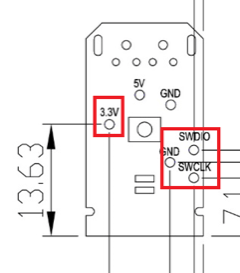
Further down in the specification sheet, in section 9, you will find pictures illustrating where exactly on the PCB you can find these pins:
Pin locationsNow we know what to look for and where they are, so now we have only got to tell you how to use them.Some people might not know this, but for developing these things, you need to get something called J-Link to connect your MDBT50Q-RX to your desktop. However, since this J-Link, when buying the official one from SEGGER, is very expensive, we strongly recommend you to just buy the nRF52840-DK from Nordic Semiconductor as it can be used as a J-Link through their software development kit (SDK) called nRFgo Studio and is MUCH CHEAPER than the official J-Link from SEGGER is.
Sidenote: There are a couple of other reasons why you should just get your hands on a nRF52840-DK from Nordic Semiconductor instead of getting a SEGGER J-Link, but that’s not the topic of this post ;)When this is done, this is finally how you connect your MDBT50Q-RX to your J-Link to make it all work:

MDBT50Q-RX and J-Link connection

Here you will have to pay attention to the fact that you have to connect J-Link pins 3, 5 & 9 to GND. Otherwise, you won’t be able to burn anything onto your dear MDBT50Q-RX.
The physical connection should look like this:

J-Link Cable Connection

Pay attention to the direction of the cable, because that will also matter. The direction we mean in this case is which way the slim strip of red is facing.

As we have just revised our MDBT50Q-RX, our customers who have been developing firmware for our USB dongle should take a look at our previous blog post in which we explain about the changes made or contact us directly at service@raytac.com

Have a good day and we at Raytac wish you smooth and happy tinkering 🙂

Raytac Corporation 勁達國際電子股份有限公司
A company of Abietec
Bluetooth & WiFi module maker based on Nordic nRF54, nRF53, nRF52, nRF7002 solution
BT5.4 &BT5.3 & BT5.2 & BT5.1 Qualified, FCC/IC/CE/Telec/KC/RCM/SRRC/NCC Pre-Certified. Bluetooth Solution: nRF54, nRF5340, nRF52840, nRF52833, nRF52832, nRF52820, nRF52811, nRF52810, nRF52805, nRF51822 WiFi Solution: nRF7002
www.raytac.com
email:service@raytac.com
Tel: +886.2.3234.0208

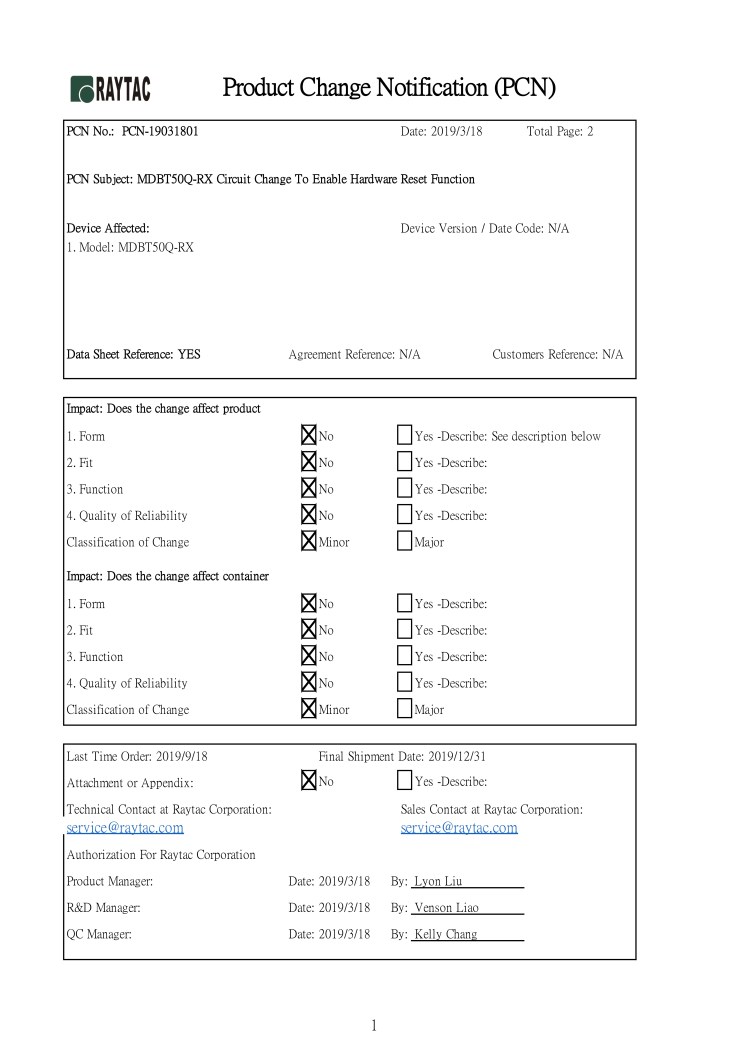
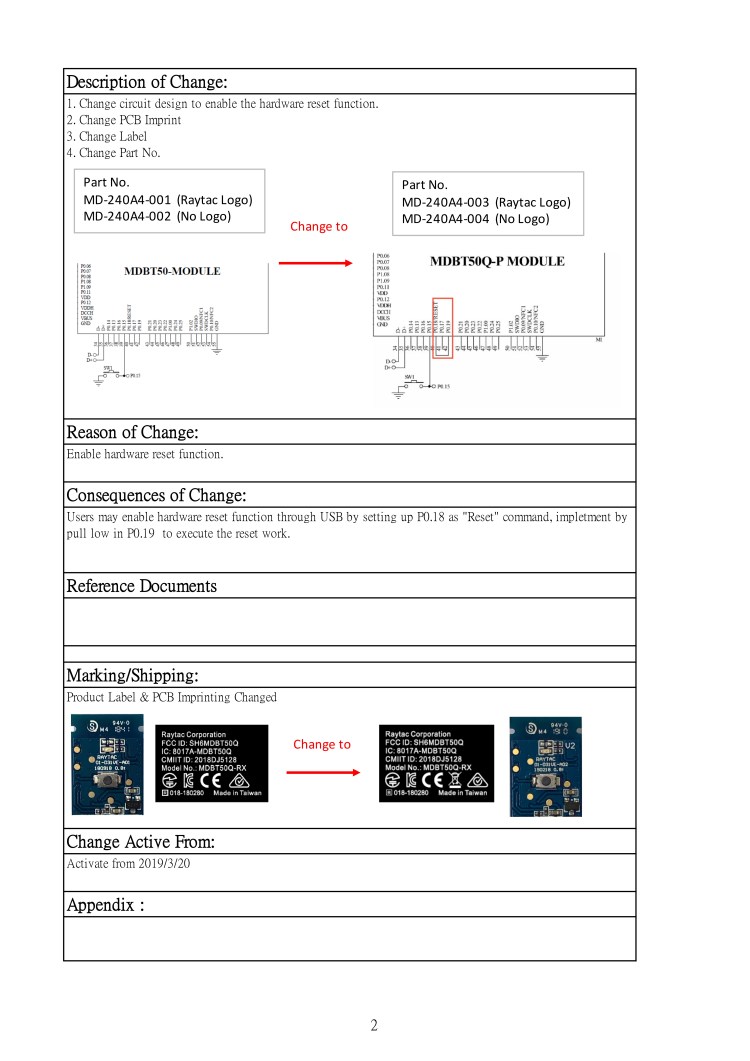
Raytac Product Change Notice (PCN) Announcement for nRF52840 Dongle: MDBT50Q-RX

Dear Customers,To enable hardware reset function in Raytac’s nRF52840 dongle (P/N: MDBT50Q-RX), Raytac’s has revised the circuit and issued the PCN accordingly.


Description of the Change:

1. Change circuit design to enable the hardware reset function.
2. Change PCB Imprint
3. Change Label
4. Change Part No.

Here provided the content of the PCN for customer’s reference.

PCN-19031801-1
PCN-19031801-2

Customers who have been developing firmware based on pervious dongle, please contact with service@raytac.com to request the latest sample version for evaluation.
Raytac Corporation 勁達國際電子有限公司
A BT5 & BT 4.2 & BTv4.1 module maker based on Nordic nRF51 & nRF52 solution
(nRF51822 & nRF51422 & nRF52832 & nRF52810 & nRF52840)
www.raytac.com email: cs@raytac.com Tel: +886.2.3234.0208

Raytac Corporation at IT Week Hall 3 & 4 / 11-22

With over 600 exhibitors gathering in Tokyo, Japan from April 10-12, IT Week has become one of the biggest exhibitions within the IoT Technology sector.
Raytac is pleased to be attending this years IT Week and present our full range of module family based on Nordic nRF51822, nRF52832 and nRF52840.

Meanwhile, the latest product, MDBT50Q-RX, a multi protocol nRF52840 dongle will make its second public appearance which powers up the most advanced IoT and Mesh network implementations.

Raytac Corporation 勁達國際電子有限公司
A BT5 & BT 4.2 & BTv4.1 module maker based on Nordic nRF51 & nRF52 solution (nRF51822 & nRF51422 & nRF52832 & nRF52810 & nRF52840)

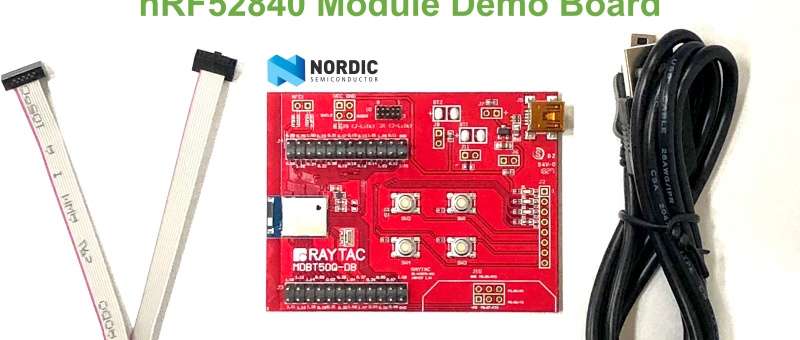
How To Use nRF52840/nRF52833 module DevKit(MDBT50Q series) – 2024 Update – Applied to nRF5 SDK

Preface:
Here provides an easy introduction of How to set up of nRF52840 & nRF52833 Module Demo board MDBT50Q-DB-40 (for nRF52840) & MDBT50Q-DB-33 (for nRF52833)


MDBT50Q-DB-40  is a Demo Board built by Raytac’s MDBT50Q-1MV2  with Red PCBA deployed nRF52840 SoC with Bluetooth 5 & Thread Combo, with 1MB Flash Memory and 256KB RAM and Chip Antenna.
 
MDBT50Q-DB-33 is a Demo Board built by Raytac’s MDBT50Q-512K with Green PCBA deployed nRF52833 SoC with Bluetooth 5 & Thread Combo, with 512KB Flash Memory and 128KB RAM and Chip Antenna.
 
Both demo boards are Bluetooth BT5.4 qualified and FCC, IC, CE, Telec, KC, SRRC, RCM, NCC, WPC pre-certified.

Table of contents:

1.1 Hardware Set Up

1.2 Software Kits resources & preparations

1.3 Flash the ready firmware into Raytac’s module

1.4 DFU to MDBT50Q-DB-XX through USB interface 


1.1 Hardware Set Up
 
MDBT50Q-DB-XX package contains:
  • 1 x MDBT50Q-DB-40/MDBT50Q-DB-33
  • 1 x IDC Wire
  • 1 x Data/Power Mini USB Wire(for data transferring)

Where to buy MDBT50Q-DB-XX?

MDBT50Q-DB-40 (nRF52840 Solution)

MDBT50Q-DB-33 (nRF52833 Solution)
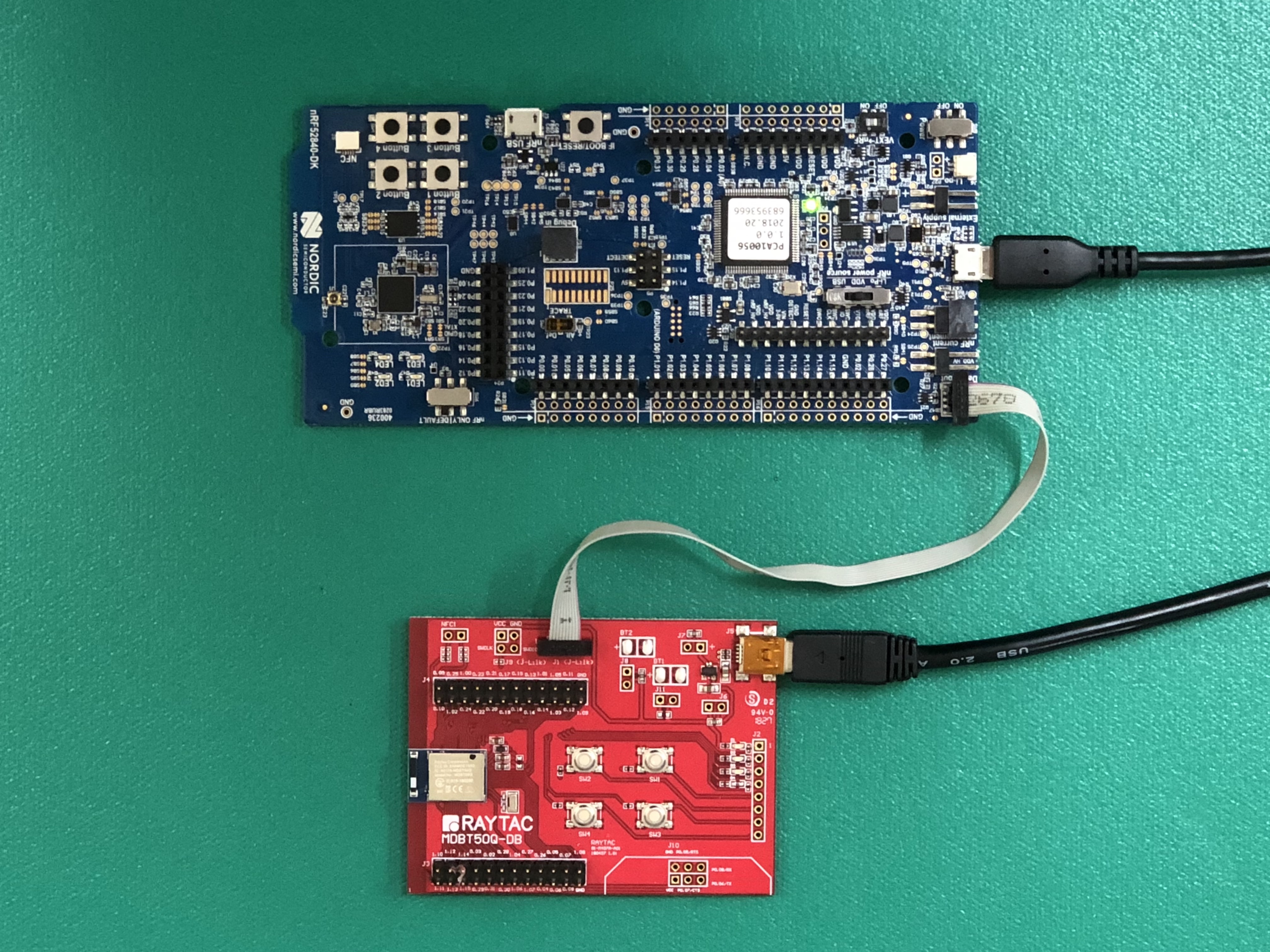
Connect Nordic NRF52-DK/NRF52840-DK Connect with MDBT50Q-DB-40 by IDC Wire

※Note: PCA10056 (NRF52840-DK) / PCA10040 (NRF52832-DK) / PCA10100(NRF52833-DK)

Power up MDBT50Q-DB-XX using Mini USB

IMG_0064.jpg
MDBT50Q-DB-40

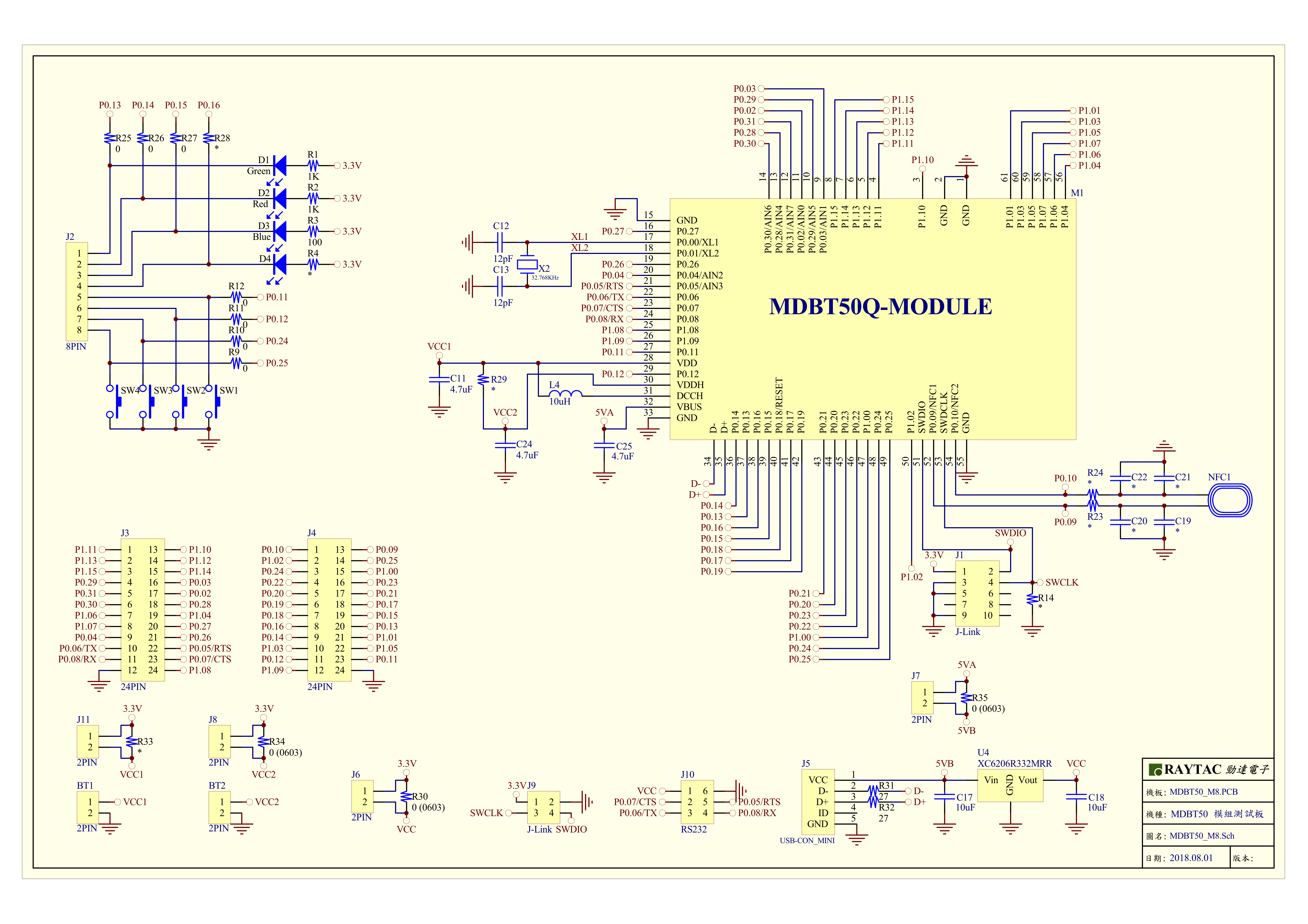
MDBT50Q-DB-40 Schematic:

MDBT50Q Demo Board Schematic-V2.jpg

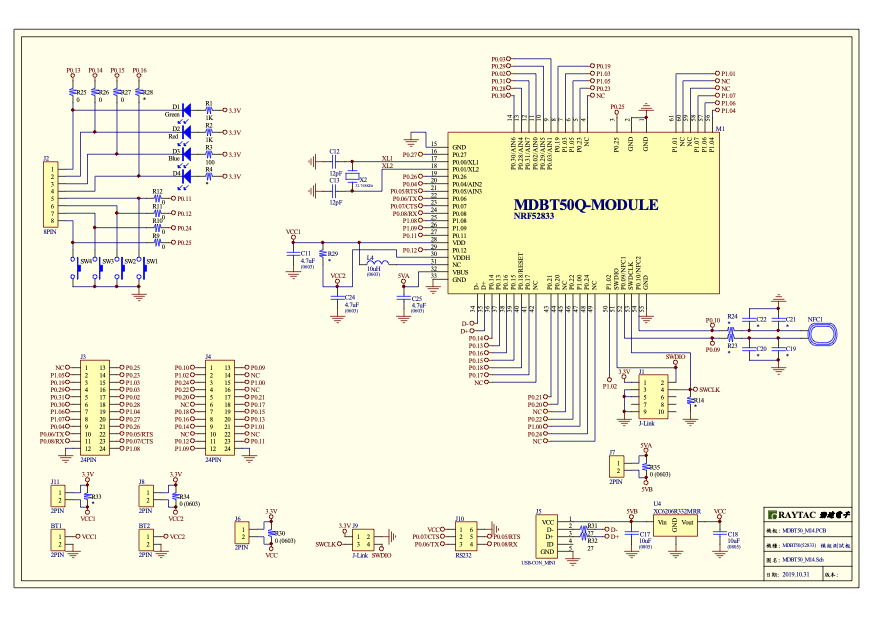
MDBT50Q-DB-33 Schematic:

MDBT50Q-DB-33 Schematic


1.2 Software kits resources & preparations

Resources:

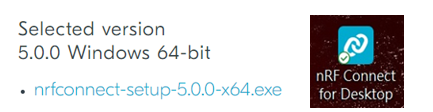
Download nRF Connect For Desktop (Please Click Me)

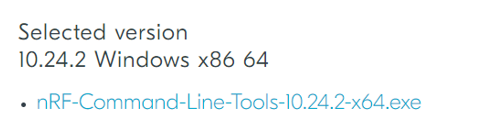
Download nRF Command Line Tools (Please Click Me)

Download NRF5 SDK (The latest V17.1.0) (Please Click Me)

Download Visal Studio Code(Please Click Me)

Preparations:

Option 1.  NRF5 SDK (The latest version V17.1.0)

  1. 1.0_ddde560\components\softdevice\s140\hex\ s140_nrf52_7.2.0_softdevice.hex
  2. 1.0_ddde560\examples\ble_peripheral\ble_app_uart\pca10056\s140\arm5_no_packs\_build\ nrf52840_xxaa.hex

*Tips: If you go with nRF5 SDK option, please consider to add a bootloader hex file if you’re going to make DFU requests in the future.

Option 2.  NCS (Recommended version V2.6.0)

螢幕擷取畫面 2024-06-04 161138

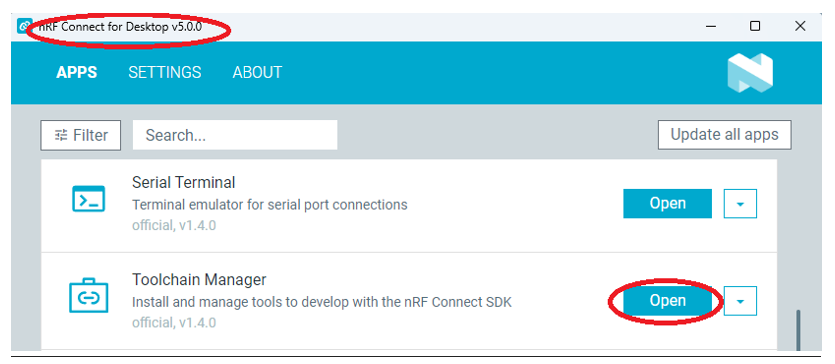
2A.  Find “Toolchain Manager” in app nRFConnect for Desktop

螢幕擷取畫面 2024-06-04 161251

2B.  Install nRFConnect SDK V2.6.0 to your working site.

螢幕擷取畫面 2024-06-04 161333

2C. Prepared with the latest version of nRF Command Line Tools
螢幕擷取畫面 2024-06-04 161627
 
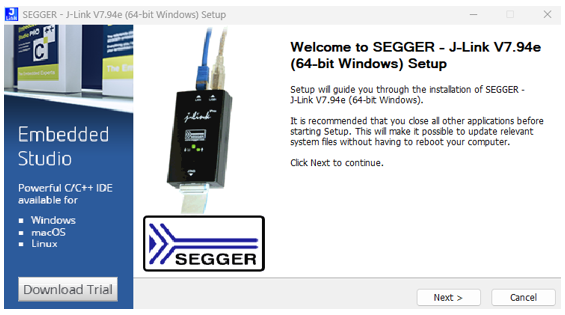
**Note: SEGGER J-LINK Upgrade message might pop up while you’re doing above download.
螢幕擷取畫面 2024-06-04 161724
 
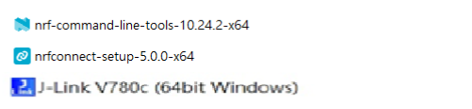
2D. Locate all the necessary kits for programming in PC

螢幕擷取畫面 2024-06-04 161810


1.3 Flash the ready firmware into Raytac’s module

Intro:

With the ready built code of zephyr.hex (Made through NCS) or nrf52840_xxaa.hex & s140_nrf52_7.2.0_softdevice.hex (Made through nRF5-SDK) file for application, we would like to move onto  flashing code into the MDBT50Q BLE module(mounted on MDBT50Q-DB-XX demo board).

Step1.  

Execute nRF Connect >>  Programmer  > > Open

螢幕擷取畫面 2024-06-04 161858

Step2.

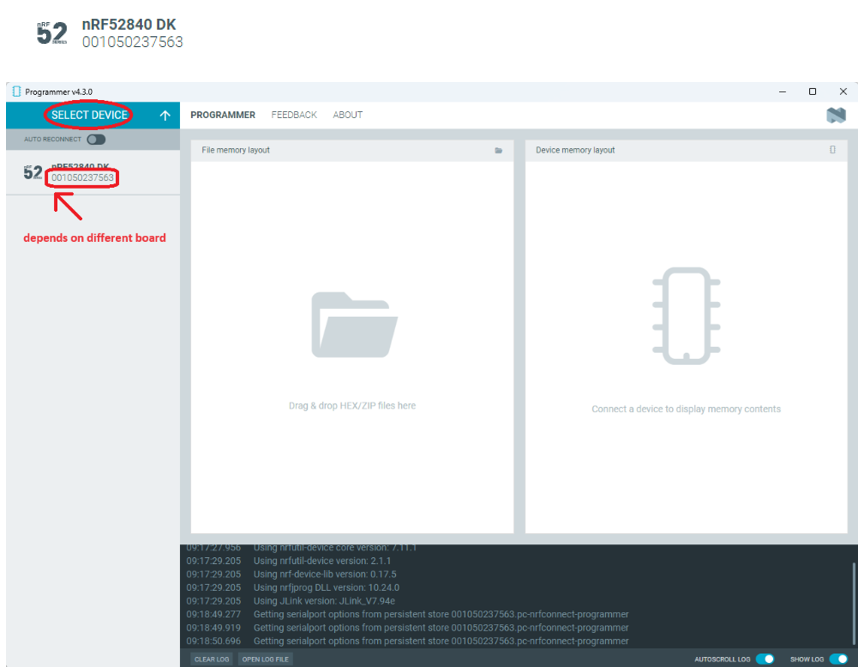
Click “SELECT DEVICE” >> Find icon “nRF52840 DK” which is detected by the programmer app

螢幕擷取畫面 2024-06-04 162005

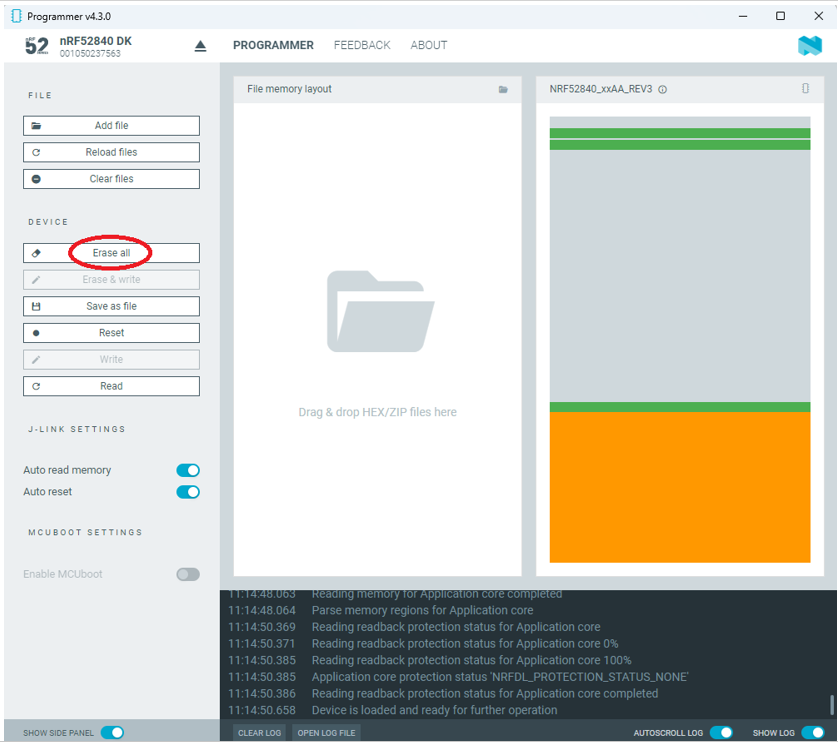
Step3.

Click “nRF52840 DK”>> “Erase All” to remove flash memory inside MDBT50Q BLE Module

螢幕擷取畫面 2024-06-04 162106

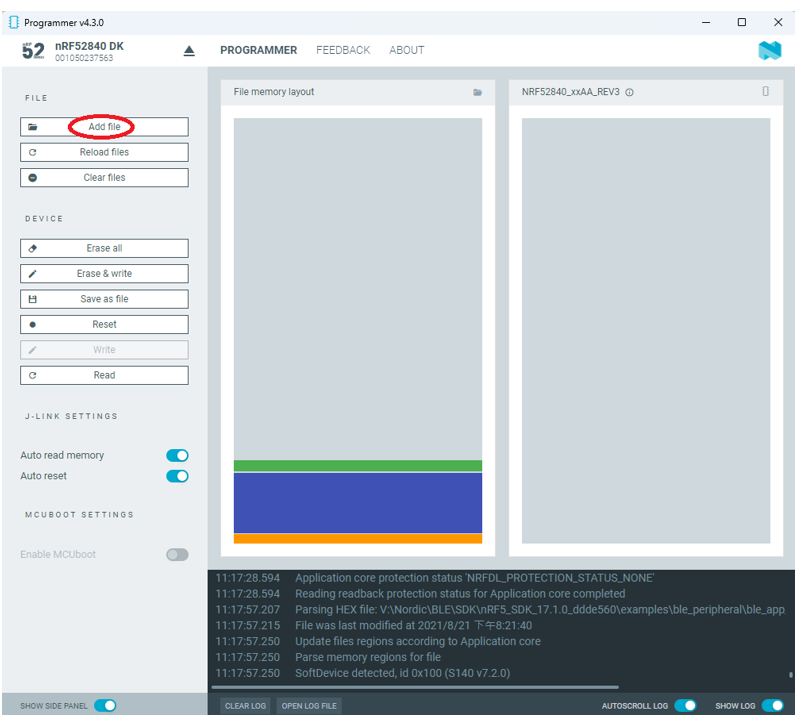
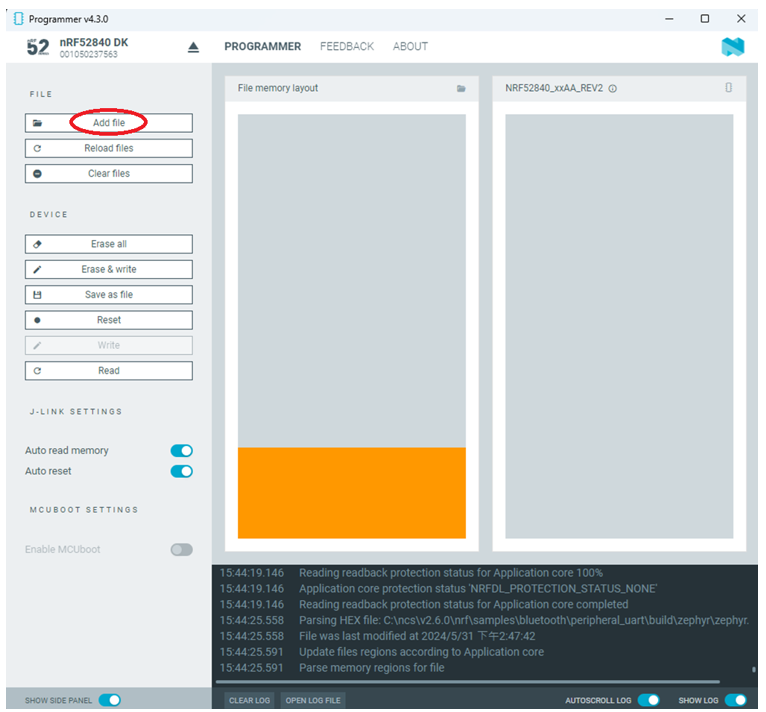
Step4.

Click “Add File” to load application zephyr.hex into programmer

螢幕擷取畫面 2024-06-04 162202

!! Important Tips:!!


  • If you’re using nRF Connect SDK for code compiling as above, Program the hex file to MDBT50Q BLE module on the MDBT50Q-DB Demo board:
    – C:\ncs\v2.6.0\nrf\samples\bluetooth\peripheral_uart\build\zephyr\zephyr.hex
  • If you’re using NRF5 SDK for code compiling, do make the 4-in-1 hex file (merged ready) before programming it to MDBT50Q BLE module.  It includes the 4 hex files below:

(1) bootloader.hex

(2) bootloader_setting_file.hex

(3) s140_nrf52_7.2.0_softdevice.hex

(4) nrf52840_xxaa.hex

螢幕擷取畫面 2024-06-04 162300


1.4 DFU to MDBT50Q-DB-XX through USB interface

Intro : Before DFU implement , Please make sure the bootloader file has been installed in your MDBT50Q BLE module.

※Note: NRF52840 SoC supports USB interface to utilize Device Firmware Update (DFU).

How do I prepare the software??

  • Download nrfutil.exe file from Nordic website .
  • It is workable to do List, Program, Recover, Erase, and operations with nRFutil device command to Nordic device.
  • Open DOS mode to install device command type: nrfutil install device

(Jocelyn) How To Use NRF52840 NRF52833 module Dev Kit (MDBT50Q Series) 2024 version - Release file

How do I setup the hardware??

  1. Press Switch 4 and hold
  2. Power up Demo Board
  3. Blue LED Lights on
  4. Demo Board successfully enters into USB DFU Mode

螢幕擷取畫面 2024-06-04 162504

How do I prepare the firmware??

**USB DFU works only in DOS mode.

**USB DFU only works when USB Bootloader installed in current loaded firmware (inside BLE Module)

A single, merged 4-in-1 hex file is required, which includes:

Bootloader, Bootloader setting, Softdevice, and Application.

Firmware DFU requires a .zip file.

USB DFU Execution Steps:

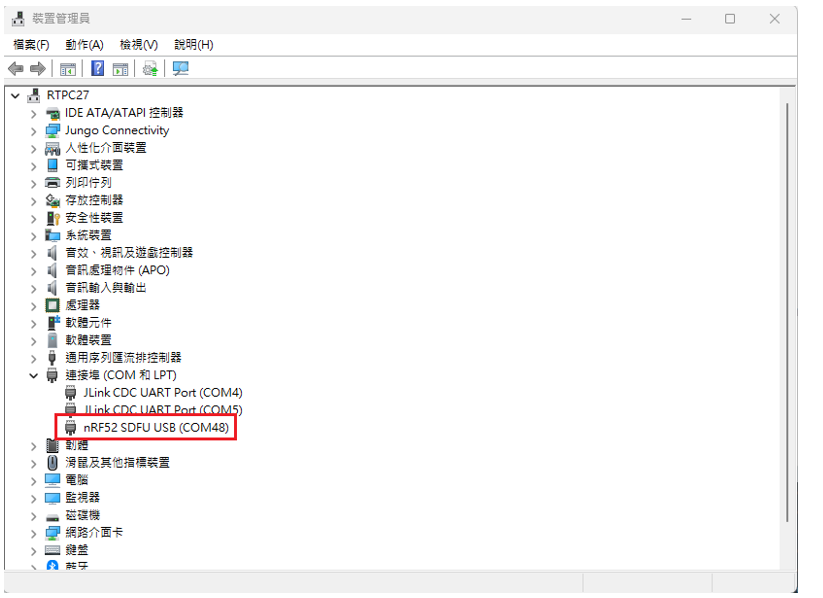
Step 1. When Blue LED Lights on with MDBT50Q-DB (Ready to enter USB DFU Mode)

Step 2. Find out Com Port No. “nRF52 SDFU USB(COMxx)”

螢幕擷取畫面 2024-06-04 162542


Step 3. Execute USB DFU

Option 1. Using device program command:

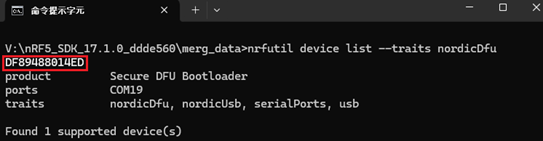
(1) List the devices with a DFU trigger interface by running:

nrfutil device list –traits nordicDfu

Option1-1

(2) Program new firmware to a device identified by its serial number by running:

nrfutil device program –firmware .zip nrf52840_xxaa.zip –serial-number XXXXXXXXXXXX

Option1-2

Bluetooth – Current and soon-to-perish versions

Bluetooth has been around for quite some time, but that doesn’t mean that no one is a beginner when it comes to developing Bluetooth-based products. In fact, due to their recent updates, Bluetooth is becoming increasingly popular as demand for power efficient gadgets and wireless technology is increasing. Smart watches is just one of the many examples out there.

For each and every single one of these devices, you’ll first have to register your new product with Bluetooth-functions built in on Bluetooth SIG’s website. You will eventually register (and pay for) your product based on what version of the Bluetooth protocol that you’re using in the product and do so by purchasing a so called Declaration ID (DID).

Yes, a little exaggeration in the title, but that’s essentially what it comes down to. Bluetooth SIG is doing some major updates and changes to the Bluetooth protocol which includes getting rid of the more outdated versions.

There are quite a few versions of the Bluetooth protocol out there, but nowadays you will basically be advised to choose from 2 versions:
v.4.2 or v.5.0
These two versions would be, as I mentioned in the title, the two current versions of Bluetooth.

Although it might seem very simple at first, there are a few things that you need to understand the content of the announcements to fully grasp what these updates and changes mean. That, my friends, is today’s topic of this post.

Archived specifications

Deprecated and Withdrawn Specifications

When a specification reaches the end of its useful life, the Bluetooth® SIG may choose either to deprecate the specification, ending maintenance and restricting its use, or to withdraw the specification from use.

Bluetooth SIG – https://www.bluetooth.com/specifications/archived-specifications

What has changed recently is nothing new, but it’s big. What I mean is that similar changes have been done in the past, but since the market is more dependent on the technology now than before, it matters far more for people when the Bluetooth SIG do the same changes nowadays. Those changes are as follows:

On 01/28/2019, the following policy changes will be enacted:
– Creating new designs that implement deprecated or withdrawn specifications will not be permitted
– New products cannot be added to designs that implement withdrawn specifications
– You cannot pay a $25,000 fee to qualify a new design that implements a deprecated specification
– Purchased but unused $25,000 Declaration IDs will no longer be valid and the cost of any unused $25,000 Declaration IDs will be credited to your account


Bluetooth SIG – bluetooth.com

This piece of information tells us that the process of withdrawing specifications comes down to two different steps, namely deprecation and withdrawal.
While deprecation literally means “to stop use", it is in this case the first step in the process of making a certain Bluetooth specification obsolete.
Then there’s a time gap between a certain specification gets deprecated until it’s withdrawn. During this gap, as mentioned above, no new designs can be paid for and/or registered and unused DID’s will be invalid. This is only to prevent new devices with deprecated Bluetooth specifications from being produced. To stop the “bloodline" of those specifications if you will. During this gap, however, you are still able to add new products that implement the same fundamental design (e.g. version updates) as you wish.

After this gap is over, when the specification in question is actually withdrawn, you will not be able to add any new products to any existing designs.

Got it? No? It’s alright. In fact, there’s a lot of information and it’s hard to put into context right away. Just to make things clear, let’s make an example:
Company R is currently developing a new device called RIC which implements Bluetooth 4.0 specifications. For now, everything’s alright and Company R can go right ahead with their developments.
When the Bluetooth core specification 4.0 becomes deprecated in Jan 28th, Company R can no longer come up with new product designs such as RIC-2 since that would count as a new design, but Company R can update their original device RIC as long as they don’t change the physical design.
Then, when the Bluetooth core specification 4.0 is finally withdrawn, Company R cannot update their product RIC anymore AND they cannot register new designs under Bluetooth core specification 4.0.

If you’re a developer who is very familiar with Bluetooth already, this information might already be, as certain people refer it as, “peanuts". If you’re new to the Bluetooth world, however, this is a lot to take in and you might want to read up more about it. We hope this explanation made things clearer for you though 🙂

You can find more info at:
Bluetooth SIG – https://www.bluetooth.com/specifications/archived-specifications

Don’t forget that Raytac Corporation’s modules are all pre-certified with FCC, TELEC, IC, CE, RCM, KC and SRRC. The best part is that more is yet to come!
Take a look at our modules on our website: http://www.raytac.com


Come to visit Raytac at Embedded World #Hall 3 / 3-520

With over 1,000 exhibitors gathering in Nuremberg, Germany on 26 Feb.~29 Feb., 2019 , Embedded World has become one of  the biggest trade fair among the IoT Technologies.

RAYTAC27-20181220_lo

Raytac Released nRF52840 USB Dongle “MDBT50Q-RX"

Raytac released nRF52840 USB Dongle which deployed MDBT50Q-P1M module offers a Bluetooth 5 specification granted, FCC/IC/Telec(MIC)/KC/SRRC/NCC/WPC pre-certified, and CE/RCM compliant solution.

Raytac nRF52840 Dongle MDBT50Q-RX
Abstract molecule structure on dark blue color background. Vector illustration of Communication – network for futuristic technology concept