nRF52840 Nordic SoC USB Dongle – MDBT50Q-CX-40, Now Supports Zephyr RTOS

Zephyr RTOS hosted in Linux system has become a leading IoT ecosystem and it has been widely adopted as an open-source , real-time operation system for embedded devices, making it easier for developers to integrate the project smoothly.

Nordic Semiconductor , a main contributor to Zephyr, from the Bluetooth LE controller and USB stack to test tools, DFU frameworks.. and more, is making great effort and strategic decisions to adopt the Zephyr open-source into its nRFConnect(NCS) SDK program.

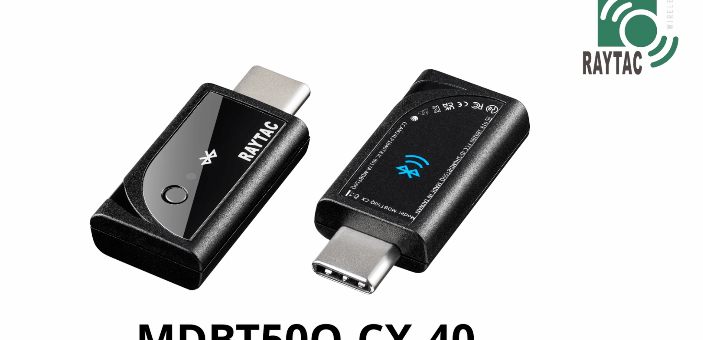
Raytac Corporation , a hardware-based manufacturer and a comprehensive solution developer with Nordic SoC development for multi-protocol complied wireless modules, now expands support for Zephyr RTOS ecosystem with its nRF52840 USB-C dongle – MDBT50Q-CX-40.

Zephyr support package for MDBT50Q-CX-40: https://docs.zephyrproject.org/latest/boards/raytac/mdbt50q_cx_40_dongle/doc/index.html


Reminder: The current Nordic released NCS SDK may NOT upgrade with Zephyr package at the same pace ; It is recommended to get the latest NCS SDK version to access the complete Zephyr support package.

If you’re interested in how Zephyr becomes powerful for a developer to start a project design easier and how the Nordic nRFConnect SDK community brings you to the world of Zephyr RTOS system, never hesitate to save the spot in the upcoming webinar on July 2nd, 2025. How Zephyr became the leading open-source RTOS for IoT (Click on the link to know more)

Resources:
– Begin your journey with Nordic nRFConnect SDK community – nRF Connect SDK Fundamentals
User Manual of MDBT50Q-CX (nRF52840/nRF52833-based USB-C Dongle)


Edited by Business Development Manager: Ms. Jocelyn Tsai


Raytac Corporation 勁達國際電子股份有限公司 / Raytac Corporation (USA)
A Bluetooth, Wi-Fi, and LoRa Module Maker/ODM & OEM Manufacturer based on
Nordic nRF54; nRF53: nRF52; nRF51; nRF7002
Semtech Specification: SX1262


Bluetooth Specification: BT6.1 ; BT6 ; BT5.4 ; BT5.3 ; BT5.2.
Wi-Fi Specification: Wi-Fi 6
LoRa Specification: LoRaWAN


All products are FCC/IC/CE/Telec/KC/RCM/SRRC/NCC/WPC Pre-Certified.
http://www.raytac.com
https://www.raytac.com/contact/
email: sales@raytac.com
Tel: +886-2-3234-0208(TW)/+1-626-217-3139(USA)

Secure DFU OTA for nRF52832 solution modules: Creating hex/zip file for implementation – Part 2(Combining/merging built files)

Following up – Part 1: Bootloader & Application (Click for article link),

We will be focusing on:

in this article.

IC: nRF52832
DK: PCA10040 (for nRF52832)
SDK: 16.0.0
Softdevice: s132_nrf52_7.0.1_softdevice.hex
IDE: Keil C
PC: Win 10


Step 1. Execute the combine batch file in bootloader (nrf52832_bootloader_setting_merge.bat) and generate file of nrf52832_bootloader_secure_combin_settings.hex :

@echo off
title = [ J-Link Tool ] %CD%
set nrfDir=C:\Program Files (x86)\Nordic Semiconductor\nrf5x\bin
set BS= nrf52832_bootloader_secure_settings.hex
set BL= nrf52832_xxaa_s132.hex
set BSBLCombind= nrf52832_bootloader_secure_combin_settings.hex
set path=%nrfDir%;%path%
pause
echo ———–merge image file——————-
mergehex.exe -m %BS% %BL% -o %BSBLCombind%
pause


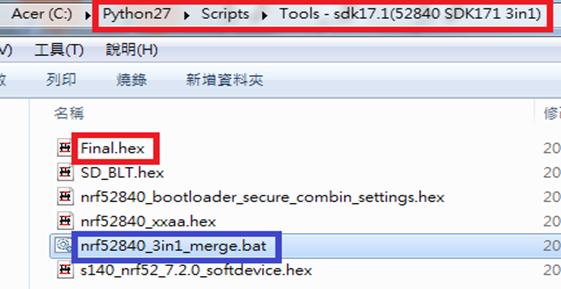
Step 2. Create a Final.hex file by 3-in-1 batch file(nrf52832_3in1_merge.bat)
※Note : This hex file is created for the production line to pre-load firmware into modules prior to shipment.

@echo off
title = [ J-Link Tool ] %CD%
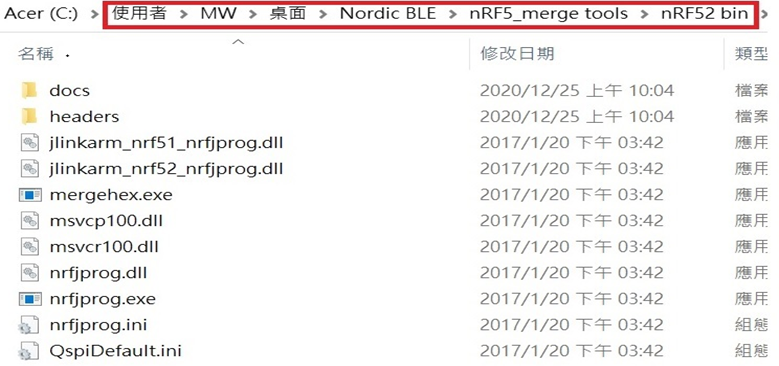
set nrfDir=C:UsersuserDesktopNordic BLEnRF5_merge toolsnRF52 bin
set SD= s140_nrf52_7.2.0_softdevice.hex
set BLT= nrf52832_bootloader_secure_combin_settings.hex
set APP= nrf52832_xxaa.hex
set SD_BLT=SD_BLT.hex
set Finalfile=Final.hex
set path=%nrfDir%;%path%
pause
echo ———–merge image file——————-
mergehex.exe -m %SD% %BLT% -o %SD_BLT%
pause
mergehex.exe -m %SD_BLT% %APP% -o %Finalfile%
pause


Step 3. Create a DFU(OTA).zip file of nrf52832_xxaa.zip
※Note : This zip file is created for end device DFU(OTA) implementation.
nrfutil pkg generate –hw-version 52 –sd-req 0xCB –application-version 0xFF –application
nrf52832_xxaa.hex –key-file private.pem nrf52832_xxaa.zip

The DFU OTA zip file will be derived.

※Note :
The “0xCB" appeared in the above DOS code(in red font) is the FWID(Firmware ID) for s140_nrf52_7.2.0_softdevice.hex;
FWID can be found from the soft device documents on the Nordic website.


Step 4: Run DFU OTA (On mobile in this example)


4A. Install the nRF Connect APP on mobile, with DFU OTA file: nrf52832_xxaa.zip. (Download link)


4B. Send nrf52832_xxaa.zip via email to mobile device after combination is done on PC, then download it.


4C. Open nRF Connect APP and run connection;


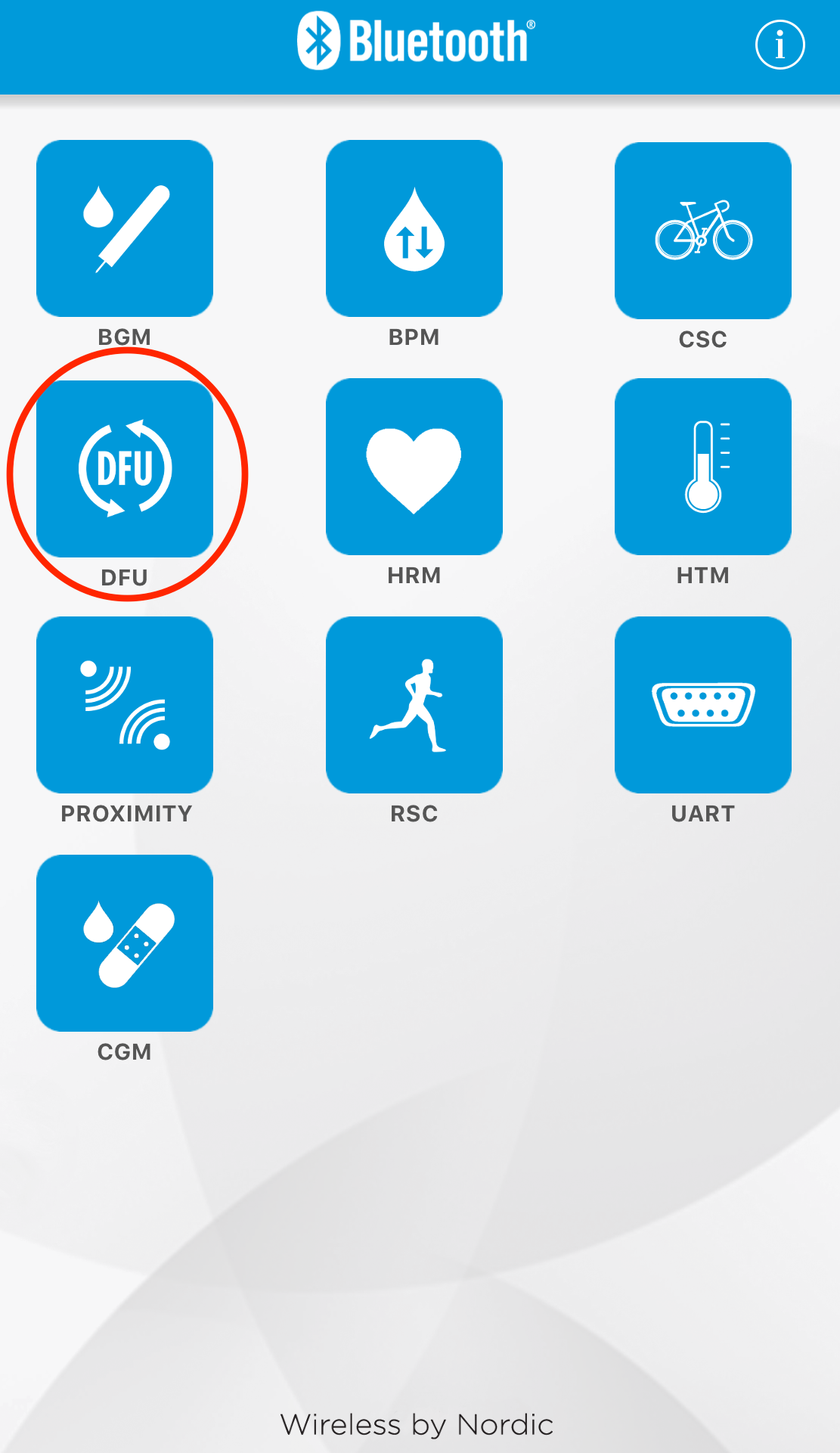
4D. Execute DFU and select “Distribution packet(ZIP)", thus starting the DFU OTA process.


4E. Start DFU OTA → exit the APP after DFU OTA is completed → restart the mobile device.


Secure DFU OTA for nRF52832 solution modules: Guide to create hex/zip file for implementation
Detailed links of articles:
Part 1: Bootloader & Application (Click for article link)
Part 2: Combining & merging built files


Technical guidelines provided by R&D Manager: Mr. MW Lee
Edited by Sales Manager: Ms. Mandy Chao


Raytac Corporation 勁達國際電子股份有限公司 
Raytac Corporation: A Bluetooth, Wi-Fi, and LoRa Module Maker based on
Nordic nRF54; nRF53: nRF52; nRF51; nRF7002
Semtech Specification: SX1262

Bluetooth Specification: BT5.4 ; BT5.3; BT5.2.
Wi-Fi Specification: Wi-Fi 6
LoRa Specification: LoRaWAN

All products are FCC/IC/CE/Telec/KC/RCM/SRRC/NCC Pre-Certified.
http://www.raytac.com
email: sales@raytac.com
Tel: +886-2-3234-0208

Secure DFU OTA for nRF52832 solution modules: Guide to create hex/zip file for implementation – Part 1(Bootloader & Application)

Below are the guidelines to implement Secure DFU OTA by using Raytac’s nRF52832 modules, SDK16.0.0.
It consists of 2 parts:

Part 1: Bootloader & Application


Part 2: Combining and merging built files (Article link)

In this article, we will be focusing on Part 1: Bootloader & Application.


Path: ..\nRF5_SDK_16.0.0_98a08e2\examples\dfu\secure_bootloader\pca10040_s132_ble\arm5_no_packs
Specifically for nRF52832, programmers need to embed ECC(Elliptic Curve Cryptography) into the bootloader.


Step 1. ’micro_ecc_lib_nrf52.lib’ library can be found in the path below, but we need to boot it up first.


Step 2. Unzip ’micro-ecc-master.zip’ to the below path(create a new “micro-ecc” file first).


Step 3. Run ’gcc-arm-none-eabi-7-2018-q2-update-win32.exe’.


Step 4. Make sure the Environment variables in Win10 are set as below. (Follow the steps 1 to 6)


Step 5. Open DOS → run the “make” command under armgcc path → generate’micro_ecc_lib_nrf52.lib’


Step 6. Add ’micro_ecc_lib_nrf52.lib’ into folder: nRF_micro-ecc


Step 7. An error may occur while building bootloader without a public key:
(Shown in red frames in below screenshot)


Step 8. How to generate the public key file in Bootloader?
A. Visit DOS at path: ..\Python27\Scripts
B. Then execute:

nrfutil keys generate private.pem
nrfutil keys display --key pk --format code private.pem --out_file public_key.c


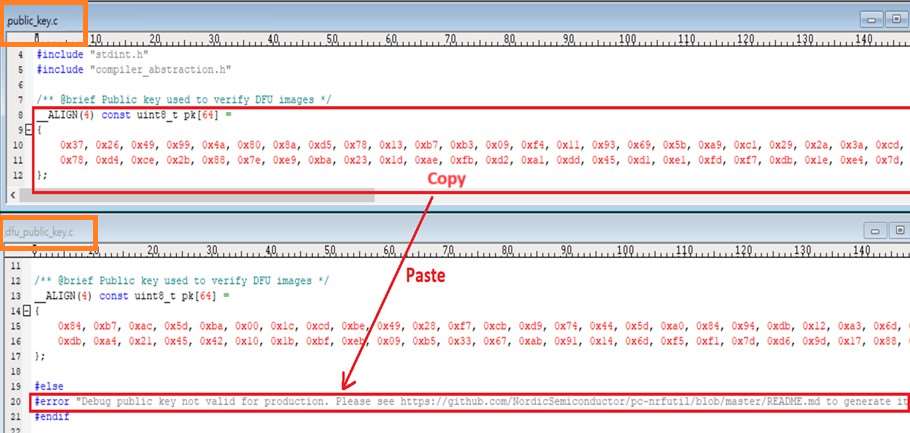
Step 9. Copy the pk[64] code from (public_key.c) into (dfu_public_key.c)
(Shown in red frames in below screenshot)

※Note: Make sure to save the 3 generated files:
private.pem
public_key.c
dfu_public_key.c


Step 10. Generate the bootloader file: nrf52832_xxaa_s132.hex after re-compiling the code files.


Application


Path:
..\nRF5_SDK_16.0.0_98a08e2\examples\ble_peripheral\ble_app_uart\pca10040\s132\arm5_no_packs
Before building Application code , some amendments need to be made regarding DFU-related settings and code inside Application:


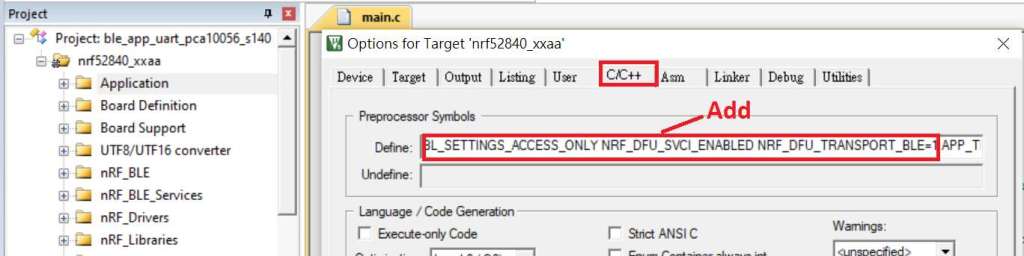
Step 1. Add code in definition in C/C++ :
BL_SETTINGS_ACCESS_ONLY NRF_DFU_SVCI_ENABLED NRF_DFU_TRANSPORT_BLE=1
(Total 3 steps definitions need to be set up)


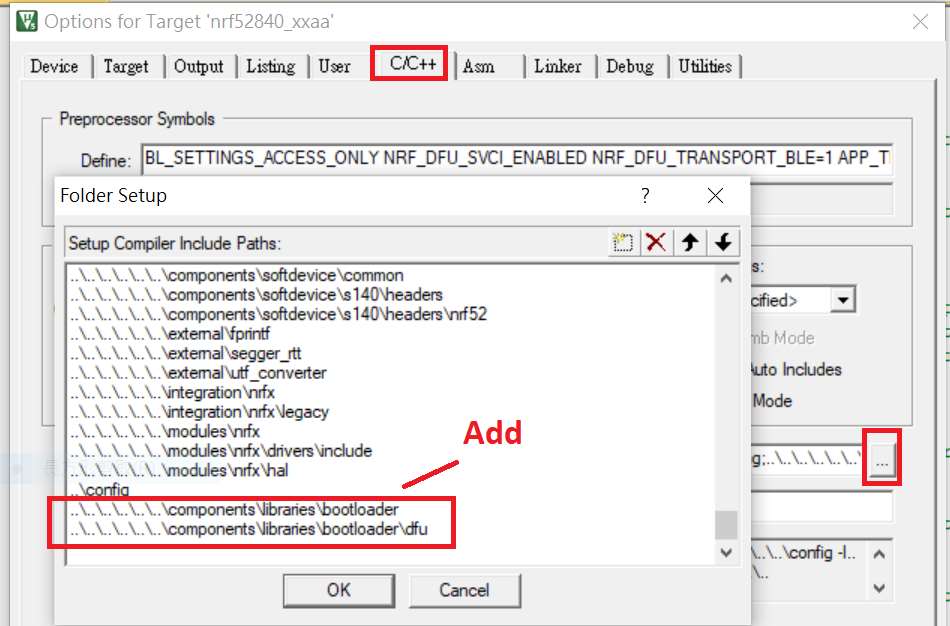
Step 2. Add the 3 paths shown below in C/C++ to make DFU work.


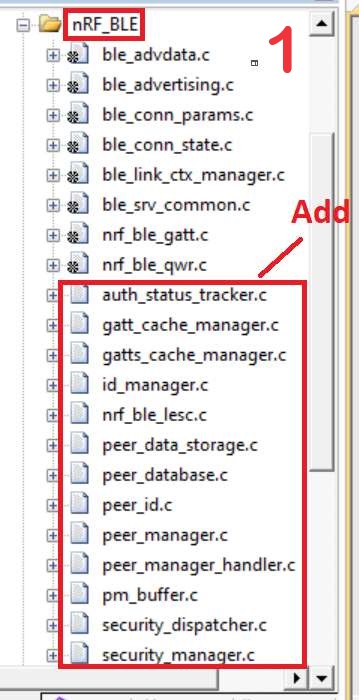
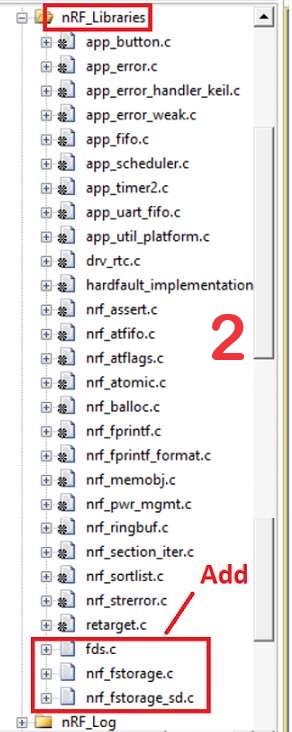
Step 3. Add the .c files inside red frame in (Screenshots 1 & 2)
and add the 2 groups of (nRF_DFU & nRF_SVC)(Screenshot 4) under Project(Screenshot 3)


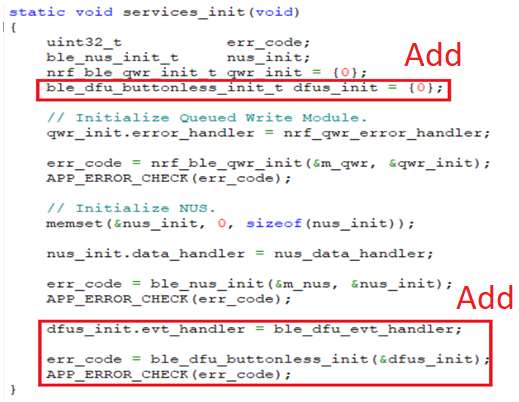
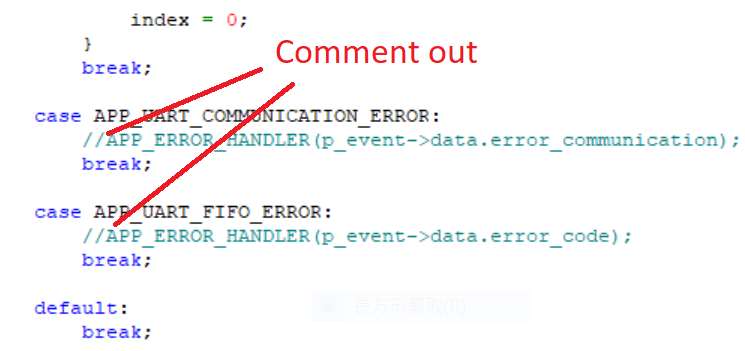
Step 4. Add code into main.c file in Application (..\examples\ble_peripheral\ble_app_uart\main.c)
(Please refer to: main.c file at: ..\examples\ble_peripheral\ ble_app_buttonless_dfu)


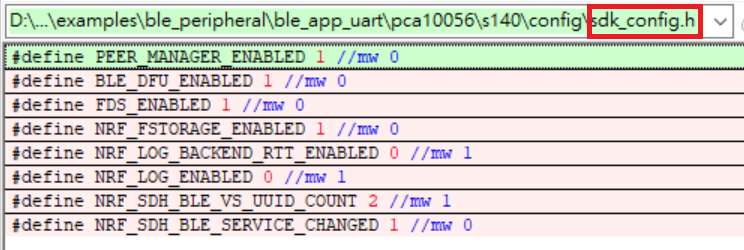
Step 5.
The code of file: sdk_config.h (..\examples\ble_peripheral\ble_app_uart\pca10040\s132\config\sdk_config.h)

inside Application needs to be modified.


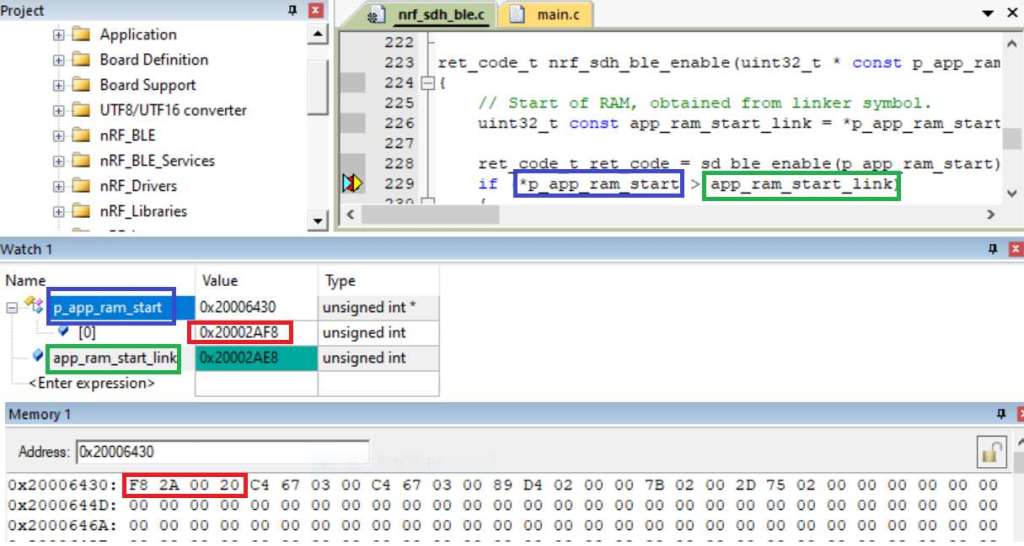
Step 6. Adjust the IRAM1 value in Target after implementing DFU service:
Make sure the IRAM1 Value of *p_app_ram_start is modified from default: 0x20002AD8 0xD528 to
0x20002AE8 0xD518, as shown in the red frame in the bottom right corner.
In this case, the program should run/advertise successfully.


Step 7. Create a file of: nrf52832_xxaa.hex after building application code files.


Step 8. Create a bootloader setting file of nrf52832_bootloader_secure_settings.hex via DOS.
nrfutil settings generate –family NRF52 –application nrf52832_xxaa.hex –application-version 3 —
bootloader-version 2 –bl-settings-version 1 nrf52832_bootloader_secure_settings.hex –no-backup

※Stay tuned for Part 2: Combining and merging built files in the next article, scheduled release in next week(04-Sep-2024).


Technical guidelines provided by R&D Manager: Mr. MW Lee
Edited by Sales Manager: Ms. Mandy Chao


Raytac Corporation 勁達國際電子股份有限公司 
Raytac Corporation: A Bluetooth, Wi-Fi, and LoRa Module Maker based on
Nordic nRF54; nRF53: nRF52; nRF51; nRF7002
Semtech Specification: SX1262

Bluetooth Specification: BT5.4 ; BT5.3; BT5.2.
Wi-Fi Specification: Wi-Fi 6
LoRa Specification: LoRaWAN

All products are FCC/IC/CE/Telec/KC/RCM/SRRC/NCC Pre-Certified.
http://www.raytac.com
email: sales@raytac.com
Tel: +886-2-3234-0208

Secure DFU OTA for nRF52840 solution modules: Guide to create hex/zip file for implementation – #3(Combining/merging built files)

Following up – Part A: Bootloader (Click for article link) and Part B: Application (Click for article link)

We will be focusing on:

in this article.

IC: nRF52840
DK: PCA10056 (for nRF52840)
SDK: 17.1.0
Softdevice: s140_nrf52_7.2.0_softdevice.hex
IDE: Keil C
PC: Win 10


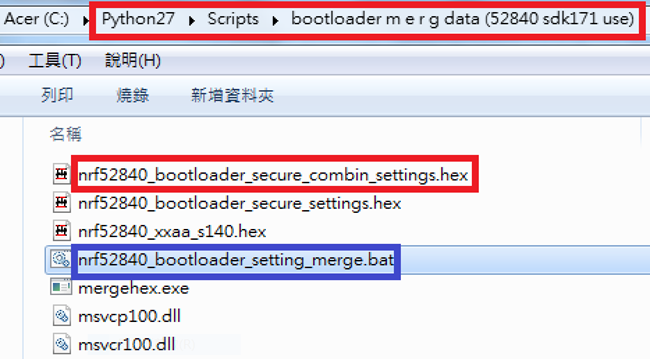
Step 1. Execute the combine batch file in bootloader (nrf52840_bootloader_setting_merge.bat) and generate file of nrf52840_bootloader_secure_combin_settings.hex :

@echo off
title = [ J-Link Tool ] %CD%
set nrfDir=C:\Program Files (x86)\Nordic Semiconductor\nrf5x\bin
set BS= nrf52840_bootloader_secure_settings.hex
set BL= nrf52840_xxaa_s140.hex
set BSBLCombind= nrf52840_bootloader_secure_combin_settings.hex
set path=%nrfDir%;%path%
pause
echo ———–merge image file——————-
mergehex.exe -m %BS% %BL% -o %BSBLCombind%
pause


Step 2. Create a Final.hex file by 3-in-1 batch file(nrf52840_3in1_merge.bat)
※Note : This hex file is created for the production line to pre-load firmware into modules prior to shipment.

@echo off
title = [ J-Link Tool ] %CD%
set nrfDir=C:\Users\user\Desktop\Nordic BLE\nRF5_merge tools\nRF52 bin
set SD= s140_nrf52_7.2.0_softdevice.hex
set BLT= nrf52840_bootloader_secure_combin_settings.hex
set APP= nrf52840_xxaa.hex
set SD_BLT=SD_BLT.hex
set Finalfile=Final.hex
set path=%nrfDir%;%path%
pause
echo ———–merge image file——————-
mergehex.exe -m %SD% %BLT% -o %SD_BLT%
pause
mergehex.exe -m %SD_BLT% %APP% -o %Finalfile%
pause


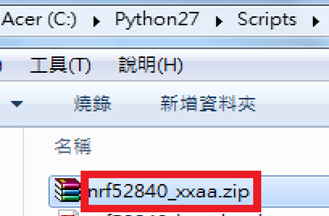
Step 3. Create a DFU(OTA).zip file of nrf52840_xxaa.zip
※Note : This zip file is created for end device DFU(OTA) implementation.

nrfutil pkg generate –hw-version 52 –sd-req 0x100 –application-version 0xFF –application
nrf52840_xxaa.hex –key-file private.pem nrf52840_xxaa.zip

The DFU OTA zip file will be derived.

※Note :
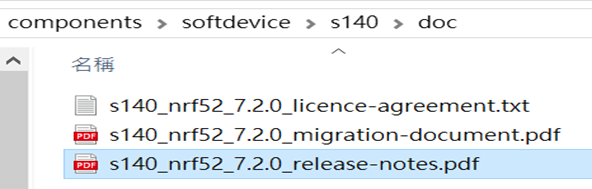
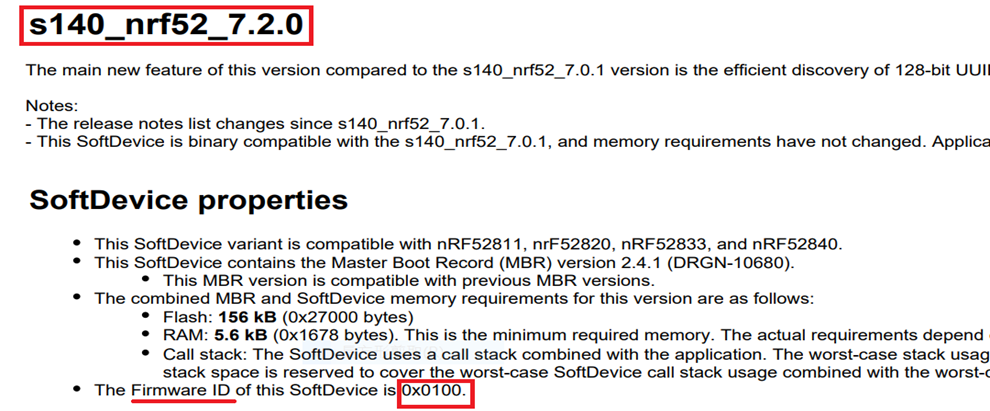
The “0x100" appeared in the above DOS code(in red font) is the FWID(Firmware ID) for s140_nrf52_7.2.0_softdevice.hex;
FWID can be found from the soft device documents on the Nordic website.


Step 4: Run DFU OTA (On mobile in this example)


4A. Install the nRF Connect APP on mobile, with DFU OTA file: nrf52840_xxaa.zip. (Download link)


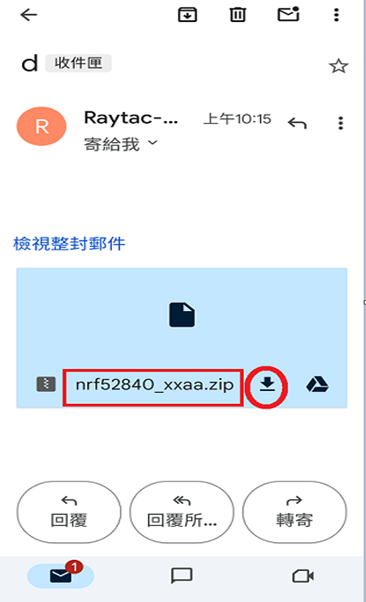
4B. Send nrf52840_xxaa.zip via email to mobile device after combination is done on PC, then download it.


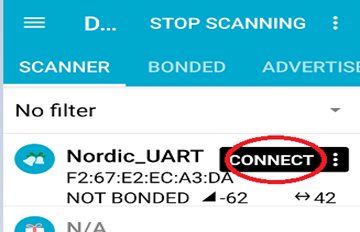
4C. Open nRF Connect APP and run connection;


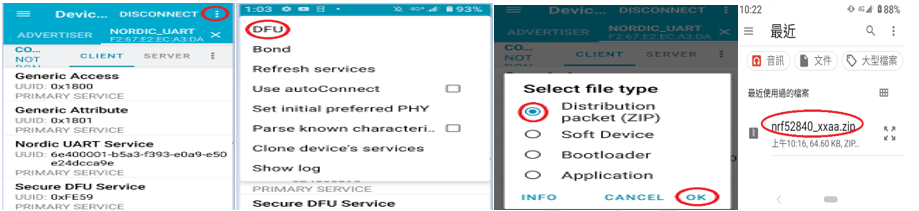
4D. Execute DFU and select “Distribution packet(ZIP)", thus starting the DFU OTA process.


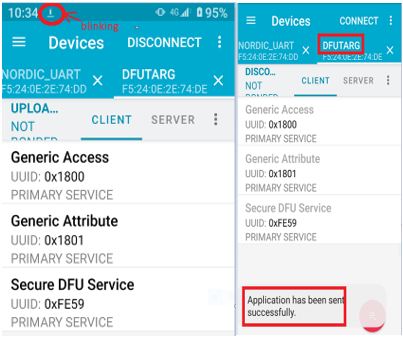
4E. Start DFU OTA → exit the APP after DFU OTA is completed → restart the mobile device.


Secure DFU OTA for nRF52840 solution modules: Guide to create hex/zip file for implementation
Detailed links of articles:
Part A: Bootloader (Click for article link)
Part B: Application
(Click for article link)
Part C: Combining and merging built files
(Click for article link)


Technical guidelines provided by R&D Manager: Mr. MW Lee
Edited by Sales Manager: Mr. Tony Yin

Raytac Corporation 勁達國際電子股份有限公司 
Bluetooth & WiFi module maker based on Nordic nRF54, nRF53, nRF52, nRF7002 solution
BT5.4 &BT5.3 & BT5.2 & BT5.1 Qualified, FCC/IC/CE/Telec/KC/RCM/SRRC/NCC Pre-Certified.
Bluetooth Solution: nRF54, nRF5340, nRF52840, nRF52833, nRF52832, nRF52820, nRF52811, nRF52810, nRF52805, nRF51822
WiFi Solution: nRF7002
http://www.raytac.com
email: service@raytac.com
Tel: +886-2-3234-0208

Secure DFU OTA for nRF52840 solution modules: Guide to create hex/zip file for implementation – #2(Application)

Following up-Part A: Bootloader (Click for article link)

We will be focusing on:

in this article.

IC: nRF52840
DK: PCA10056 (for nRF52840)
SDK: 17.1.0
Softdevice: s140_nrf52_7.2.0_softdevice.hex
IDE: Keil C
PC: Win 10


Path: nRF5_SDK_17.1.0_ddde560\examples\ble_peripheral\ble_app_uart\pca10056\s140\arm5_no_packs

Before building Application code , some amendments need to be made regarding DFU-related settings and code inside Application:

Step 1.


1A. Add code in definition in C/C++ :
BL_SETTINGS_ACCESS_ONLY NRF_DFU_SVCI_ENABLED NRF_DFU_TRANSPORT_BLE=1
(Total 3 steps definitions need to be set up)


1B. Add “include path” in C/C++


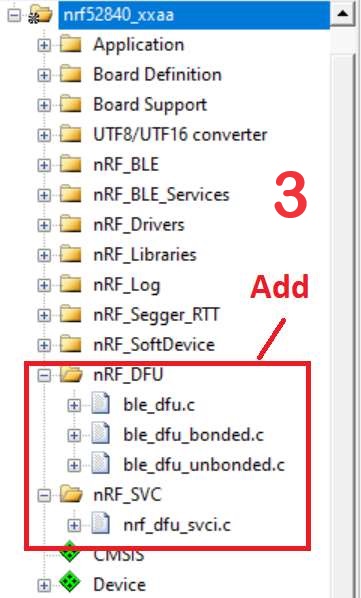
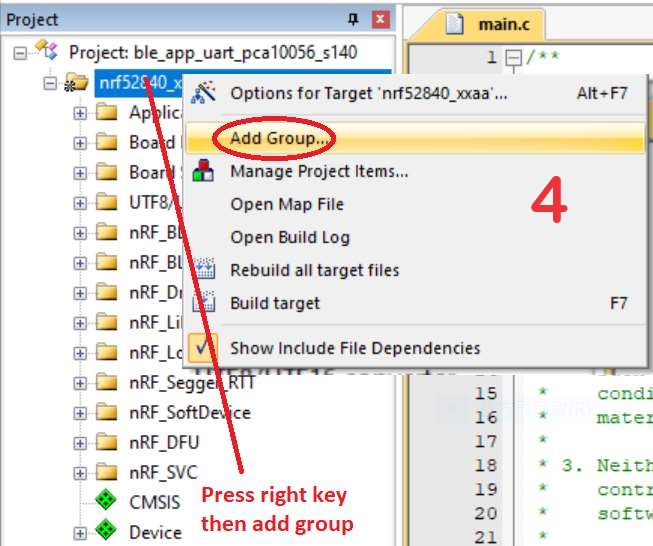
1C. Add the .c files inside red frame in (Screenshots 1 & 2)
and the 2 groups of (nRF_DFU & nRF_SVC)(Screenshot 3) under Project(Screenshot 4)


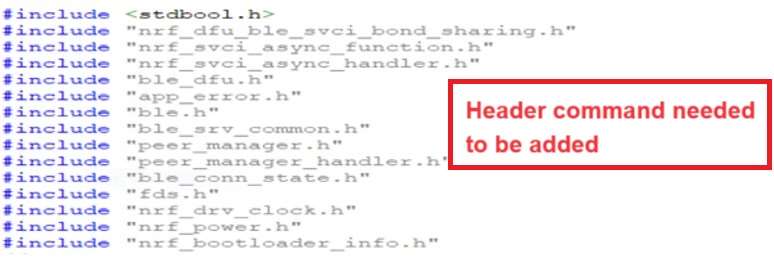
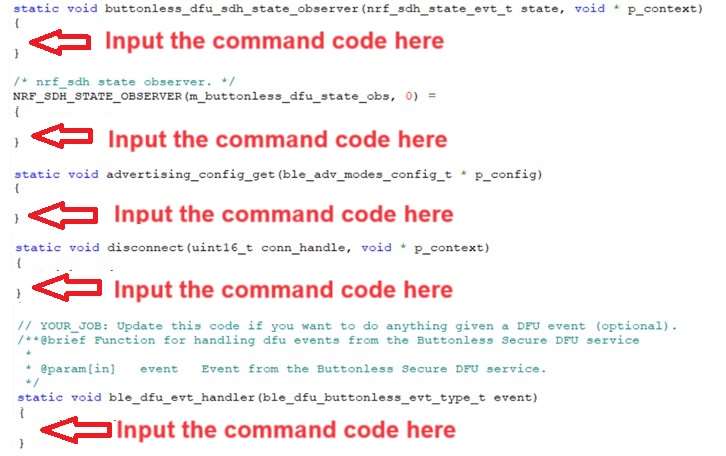
1D. Add code into main.c file in Application (..\examples\ble_peripheral\ble_app_uart\main.c)
(Please refer to: main.c file at: ..\examples\ble_peripheral\ ble_app_buttonless_dfu)


1E. The code of file: sdk_config.h (..\examples\ble_peripheral\ble_app_uart\pca10056\s140\config\
sdk_config.h) inside Application needs to be modified.


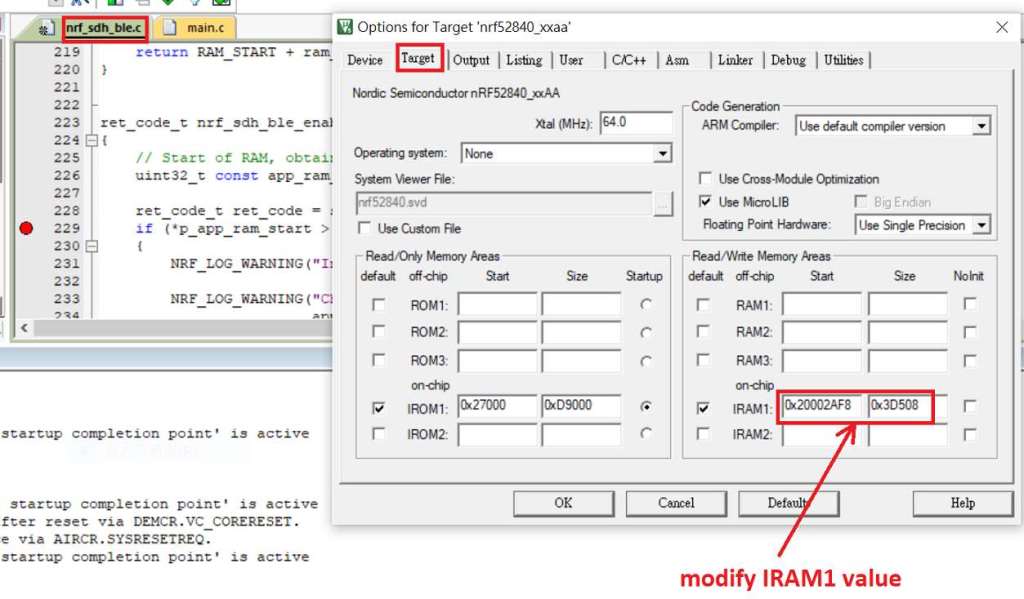
1F. Adjust the IRAM1 value in Target after implementing DFU service:
Check on the IRAM1 Value of *p_app_ram_start to be modified from default: 0x20002AE8 0x3D518 to 0x20002AF8 0x3D508, as shown in the red frame in the bottom right corner.
In this case, the program should run successfully.


1G: Create a file of: nrf52840_xxaa.hex after building application code files.


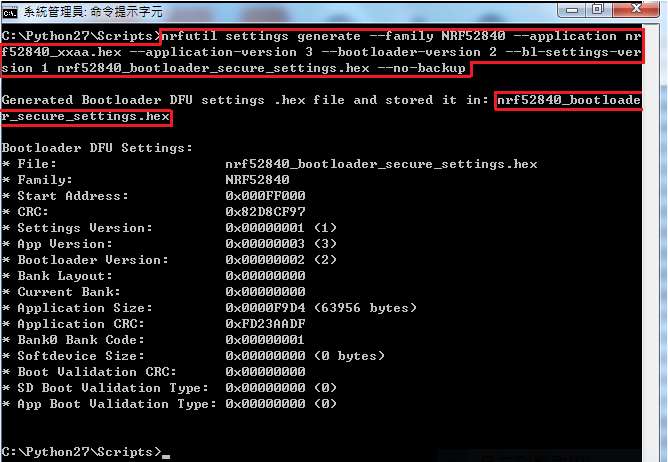
Step 2. Create a bootloader setting file of nrf52840_bootloader_secure_settings.hex : (via DOS)

nrfutil settings generate –family NRF52840 –application nrf52840_xxaa.hex –application-version 3 — bootloader-version 2 –bl-settings-version 1 nrf52840_bootloader_secure_settings.hex –no-backup


※Stay tuned for #3 – Part C: Combining and merging built files in the next article,

scheduled release in next week(05/06/2024).


Technical guidelines provided by R&D Manager: Mr. MW Lee
Edited by Sales Manager: Mr. Tony Yin

Raytac Corporation 勁達國際電子股份有限公司 
Bluetooth & WiFi module maker based on Nordic nRF54, nRF53, nRF52, nRF7002 solution
BT5.4 &BT5.3 & BT5.2 & BT5.1 Qualified, FCC/IC/CE/Telec/KC/RCM/SRRC/NCC Pre-Certified.
Bluetooth Solution: nRF54, nRF5340, nRF52840, nRF52833, nRF52832, nRF52820, nRF52811, nRF52810, nRF52805, nRF51822
WiFi Solution: nRF7002
http://www.raytac.com
email: service@raytac.com
Tel: +886-2-3234-0208

Secure DFU OTA for nRF52840 solution modules: Guide to create hex/zip file for implementation – #1(Bootloader)

Below are the following steps to implement Secure DFU OTA by using nRF52840 chip set, SDK17.1.0.
It consists of 3 parts:

Part A: Bootloader

Part B: Application (Click for article link)

Part C: Combining and merging built files (Click for article link)

In this article, we will be focusing on Part A: Bootloader.

Path: nRF5_SDK_17.1.0_ddde560\examples\dfu\secure_bootloader\pca10056_s140_ble\arm5_no_packs


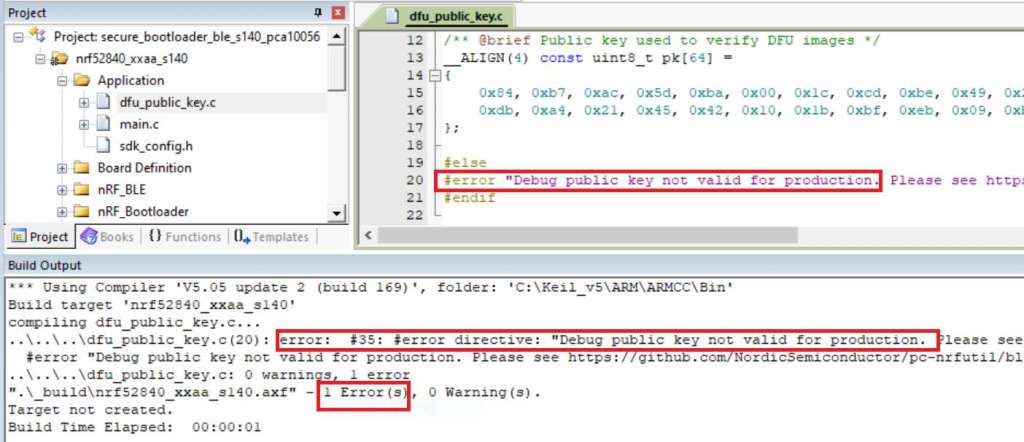
Step 1. An error may occur while building bootloader without a public key:
(Shown in red frames in below screenshot)


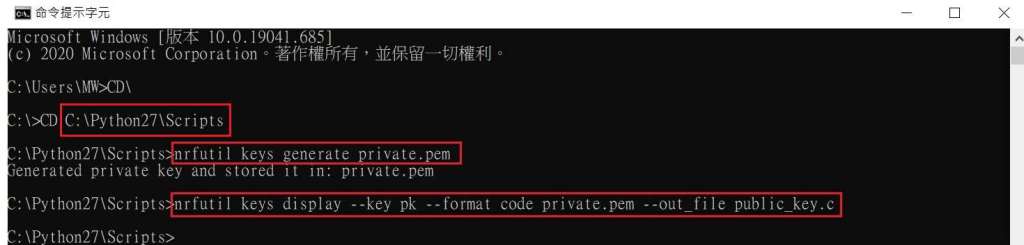
Step 2. How to generate the public key file in Bootloader?
A. Visit DOS at path: ..\Python27\Scripts
B. Then execute:

nrfutil keys generate private.pem
nrfutil keys display --key pk --format code private.pem --out_file public_key.c


Step 3. Copy the pk[64] code from (public_key.c) into (dfu_public_key.c)
(Shown in red frames in below screenshot)

※Note: Make sure to save the 3 generated files:
private.pem
public_key.c
dfu_public_key.c


Step 4. Generate the bootloader file: nrf52840_xxaa_s140.hex after re-compiling the code files.


※Stay tuned for #2 – Part B: Application in the next article, scheduled release in next week(29/05/2024).


Technical guidelines provided by R&D Manager: Mr. MW Lee
Edited by Sales Manager: Mr. Tony Yin


Raytac Corporation 勁達國際電子股份有限公司 
Bluetooth & WiFi module maker based on Nordic nRF54, nRF53, nRF52, nRF7002 solution
BT5.4 &BT5.3 & BT5.2 & BT5.1 Qualified, FCC/IC/CE/Telec/KC/RCM/SRRC/NCC Pre-Certified.
Bluetooth Solution: nRF54, nRF5340, nRF52840, nRF52833, nRF52832, nRF52820, nRF52811, nRF52810, nRF52805, nRF51822
WiFi Solution: nRF7002
http://www.raytac.com
email: service@raytac.com
Tel: +886-2-3234-0208

Nordic nRF52810 Module MDBT42Q-P192K by Raytac in Mass Production

With Nordic nRF52810 SoC volume production, Raytac announced nRF52810 module MDBT42Q-P192K and MDBT42Q-192K will be available by 2017/11

Why Nordic BLE Solution? OTA DFU is the Key!

img_0924
With recent booming demand related to IoT field all over the world, many companies are celebrating brilliant sales record achieved.
Raytac, as a part of IoT player, we are really expecting the coming era for a wildly IoT implements to enhance people’s life!
However, we sincerely appeal all developers do no forget to consider about risk control especially the risk raised at the stage when the products already in consumer’s hand!
Without risk control efficiently, the happiness earned from the success may become only a instant moment.

フラッシュメモリとOTA-DFUについて

Raytac Corporation

A BT4.1 & BT4.2 module maker based on Nordic nRF51 & nRF52 solution 
(nRF51822 & nRF51422 & nRF52832 & nRF51802)
Tel: +886.2.3234.0208
email: service@raytac.com
日本での代理店への連絡は下記の通り。
株式会社フクミ (Fukumi corporation)
消費材企画開発Gr. LBTチーム (Consumer Products R&D Group, LBT team)
榊 和優 (Kazumasa Sakaki)
Tel : 03-5687-2890 (+81-3-5687-2890)
Mail : lbt_bt@fukumi.co.jp
ブログから引用。詳細は下記Link先へ。
もしあなたが開発者であれば、簡単にファームウェアをアップデートできる様な
メモリー技術を選択するのは非常に重要であることは理解されていると思います。
何故なら、エラーを見つけたときに製品を捨てる必要がありませんし、
もしそれが市場にリリースした後であれば、大きな損害から避けることが出来るためです。
ファームウェアは不揮発性メモリ(ROM、EPROM、フラッシュメモリ等)に格納されています。
今回はDFUが可能なフラッシュメモリとその恩恵についてもう少し見てみましょう。
*DFU・・・Device FirmWare Update

●無線通信で製品をアップデート
過去においてはファームウェアをROMに書き込むのことは非常に大変で、
特に製造後に変更するという事は考えられませんでした。
またインターネットが普及する前においては、
不具合製品は製造元に戻され更新されるか、単純に廃番とされました。
この様に最初から製品を再構築する行為は、
最悪、経営困難な状態に陥れるほどの経済的なインパクトがあるケースもあります。
昨今においては無線でファームウェアを更新できるようになったため、
この様な状況を回避できるようになりましたし、
競合会社においても日々製品を改善するために、
無線通信で製品のアップグレードを定期的に行っているところもあります。
●十分な試験と評価をしてリリースしているのに、なぜ更新が必要なのか?
もし自身の製品が100%完璧だと思っても、
セキュリティー面であったり、バグの解消を伴うアップデートは必要不可欠です。
問題は遅かれ早かれやってくるものが常です。
また、サードパーティーに対応する事にも準備することは忘れてはいけません。
例えば、Bluetooth自体の仕様更新や、iOSやAndroidの更新などがそれに該当します。
台湾Raytacが供給するBLEモジュールはNordic Semiconductorのチップを搭載しており、
それは他のソリューションと比べても少ないメモリ要求でOTA-DUFを可能としています。
*OTA-DFU・・・Over The Air – Device Firmware Update
これによって、いつでもプログラムメモリ全体(若しくは一部)において
更新を掛けることが可能です。
もしスマートフォンのOS更新によって、あなたの製品も更新が必要となる状況が発生したら
ユーザーは元々約束された機能を果たすことを引き続き期待されるはずです。
(それがサードパーディーのOSに依存している製品であってもです)
したがって、更新が出来る様に設計されていない製品は
その都度ユーザーからの支持を失ってしまう結果を招いてしまいます。
●ファームウェア更新の恩恵
-市場投入の時間短縮
-無線通信でパッチの適用が可能に
-市場環境変化への適用
●市場投入の時間短縮
あなたの市場において、競争力のあるポジションをキープしようとする場合、
トレンドに対して目を光らせて、機会に対して素早い対応が必要となります。
もし市場投入前に市場に合わせた完璧な製品を企画し、作り上げていくスタイルであれば、
既に競合は先に行っていることでしょう。
100%以前の段階で市場に投入し、そこで無線通信を使用して更新・磨き上げていく事が
OTA-DFUの利点を活かす方法になります。
●無線通信でパッチを適用する
完璧なソフトウェアは有りません。
オプションとしてOTA-DFUがないときは、
市場投入する前に製品のテストに非常に多くの時間を費やすこととなりましたが、
今日では前述の通りそうではありません。
セキュリティーホールやバグフィックスの対応を回収することなく、
無線通信で素早く行えるのがOTA-DFUの最大の魅力と言えます。
●市場環境変化への適用
製品を完成する事ばかり気にしていてはいけません。
競合はその間に新しい機能を追加して、あなたのユーザーもそれを知ることになります。
OTA-DFUを使用することにより、上述の通りすぐ対応できる体制が整っています。
市場からの声に耳を傾け、競争力のある製品作りを目指しましょう。
●更新情報をユーザーに通知する
これには幾つかの方法があります。
一つは定期的にファームウェアの更新情報を定期的に読み込みに行く機能を付加する事ですが、
インターネットに直接つながっている必要があり、モノによっては現実的でありません。
他には直接的なインターネットとの接続ではなくモバイルAPPを介して更新する方法です。
これは互換性のあるソフトウェアを選択してアップデートをかけられるメリットがあります。
もし、ユーザーが製品を登録している場合は、メールやSMS等のメッセージサービスを利用して
ユーザーに通知する事も出来ます。
ユーザーには必要なアクションを取ってもらうセミオート式のアプローチですが、
マニュアル操作は最小限に抑えられるでしょう。
またもしあなたの製品がポピュラーな場合は、OTA更新をリリースすることも検討できます。
製品サービスの加入者をグループに分け、個々に通知を分けることで
サーバーへの負荷も分散できるメリットがあります。
以上の様にOTA-DFUが出来る設計はユーザーの期待に応えるうえでも
競争力の観点からもメリットが非常に多い事がわかります。
またメモリを最小限に利用する為にもNordicのソリューションを検討することは
他社に差をつける一つの要素になりそうです。