Tips for Nordic’s nRF52840 DK to successfully detect Raytac’s MDBT50Q-DB-40 Demo Board

WHY Nordic’s DK cannot DETECT Raytac’s modules?

Some tips to fix this problem

Nordic’S board no : PCA10056 (nRF52840)

Raytac’s board no : MDBT50Q-DB-40 (nRF52840)


1. Update the version of nRF Command Line Tools from below link
https://www.nordicsemi.com/Products/Development-tools/nRF-Command-Line-Tools/Download?lang=en#infotabs

2. Update the version of jlink driver from below link.
https://www.segger.com/downloads/jlink/JLink_Windows_V780c_x86_64.exe


3. Update the version of nRF Connect for desktop.
nRF connect for desktop V4.1.2
Programmer V3.0.9


4. Add jumper wire for GND shown as the below red arrow to avoid the different power reference between these 2 boards.


5. Make sure that IDE cable connects correctly. Red edge of IDE cable should connect to PIN 1 of both boards.

6. Supply power to VDD of Raytac’s demo board before flashing.


Edited by Sales Manager: Ms. Gracie Chuang

Raytac Corporation 勁達國際電子股份有限公司

Bluetooth & WiFi module maker based on Nordic nRF54, nRF53, nRF52, nRF7002 solution
BT5.4 &BT5.3 & BT5.2 & BT5.1 Qualified, FCC/IC/CE/Telec/KC/RCM/SRRC/NCC Pre-Certified.
Bluetooth Solution: nRF54, nRF5340, nRF52840, nRF52833, nRF52832, nRF52820, nRF52811, nRF52810, nRF52805, nRF51822 WiFi Solution: nRF7002
https://www.raytac.com
email:service@raytac.com
Tel: +886.2.3234.0208

AT-Command Module Tutorial ~ About First Time Connect To The DK Demo Board

Raytac AT Command Family

With strong demand for AT command module coming up from markets, here provides an easy introduction about hardware and software setup work for Raytac’s AT command module demo board for quick start.

AT-Command Module Tutorial ~ How To Read Battery Status?

After AT Command Module, MDBT42Q-PAT, released, Raytac has received several feedback from developers about “How to read battery status through AT command?

In order to help developers quickly set up the environment, the tutorial hereby is using a AT command DK board which deployed MDBT42Q-AT, to demonstrate how to work out this function.

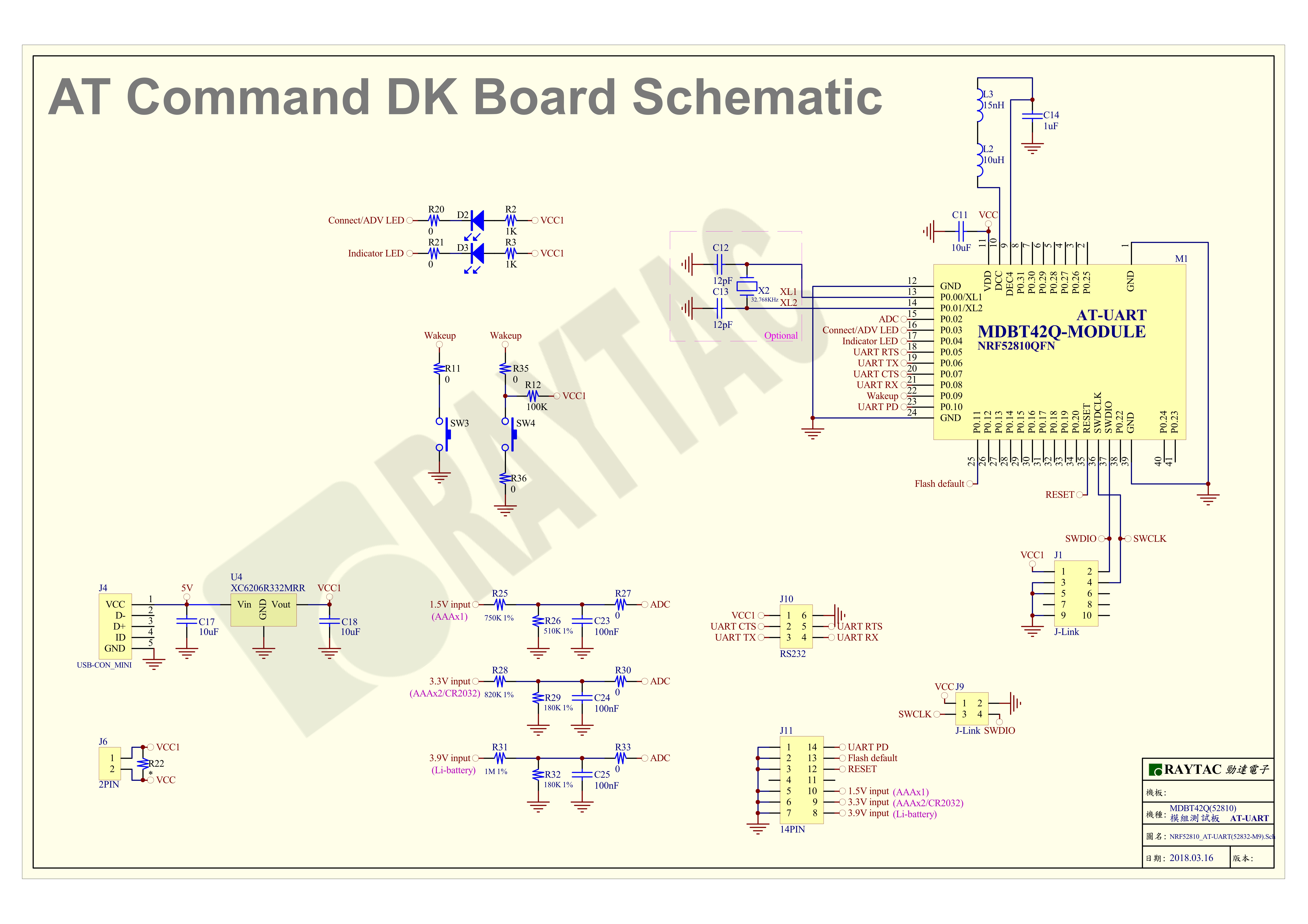
First of all, the DK board schematic is provided in below for reference.

MDBT42Q-AT-UART- How to read battery-1 .jpg

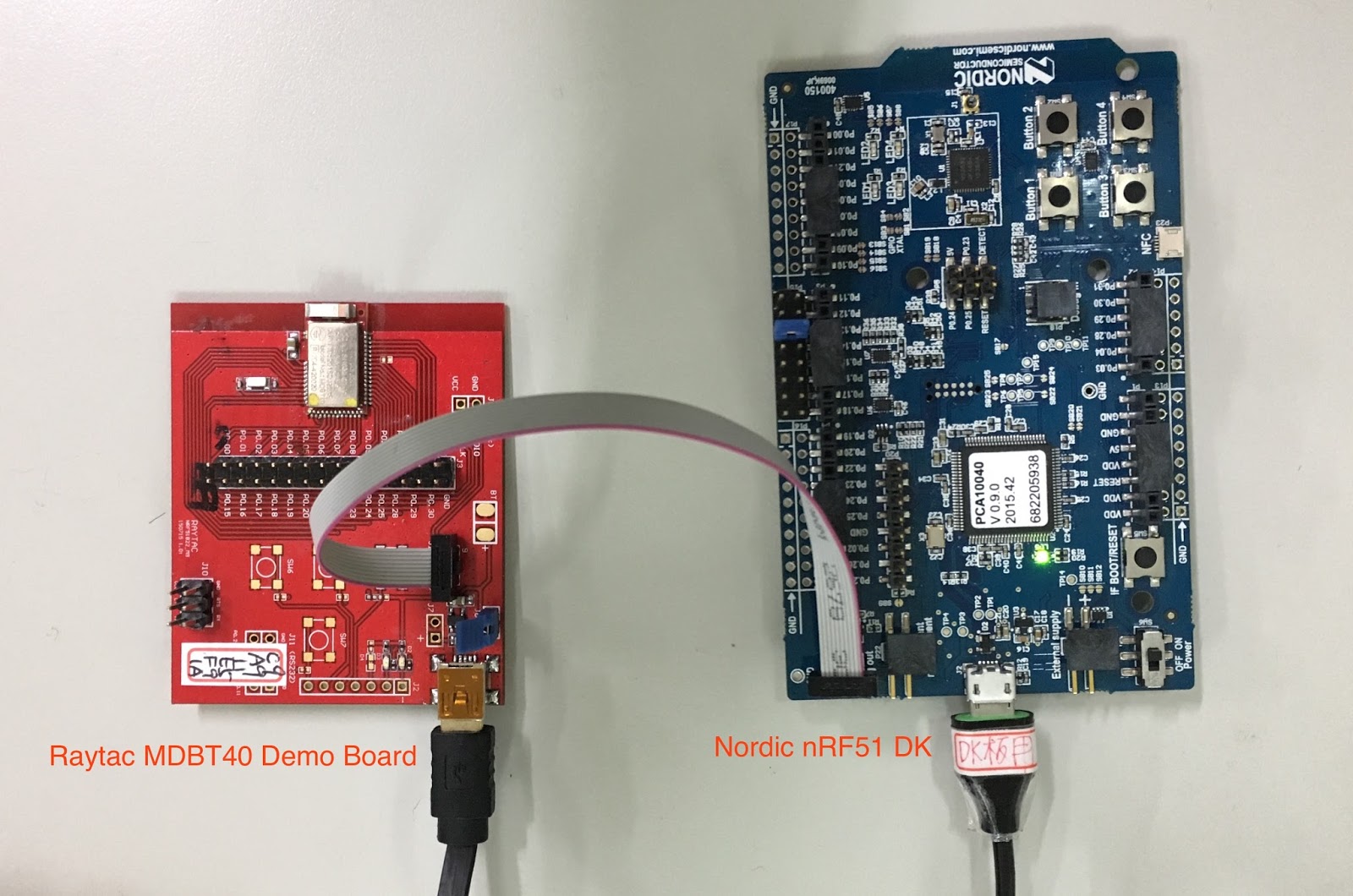
How to use Raytac MDBT40 & MDBT42Q Demo Board


Many customers are using Raytac’s Demo board for firmware development and debug.

Here we provide easy setup way for customer reference.

Programming software: Nordic nRFgo

MDBT40 Series


MBT40 Demo Board Schematic (Click picture to retrieve clear image)


MDBT42Q Series


MDBT42Q Demo Board Schematic(Click picture to retrieve clear image)


Raytac Corporation 勁達國際電子有限公司
A BT5.2 & BT5.1 & BT5 module maker based on Nordic nRF53 & nRF52 solution 
(nRF5340 & nRF52840 & nRF52833 & nRF52832 & nRF52820 & nRF52811 & nRF52810 & nRF52805)
www.raytac.com email: service@raytac.com Tel: +886.2.3234.0208