Raytac with Nordic nRF54L15: Modules designed to Outlast & Outdo!

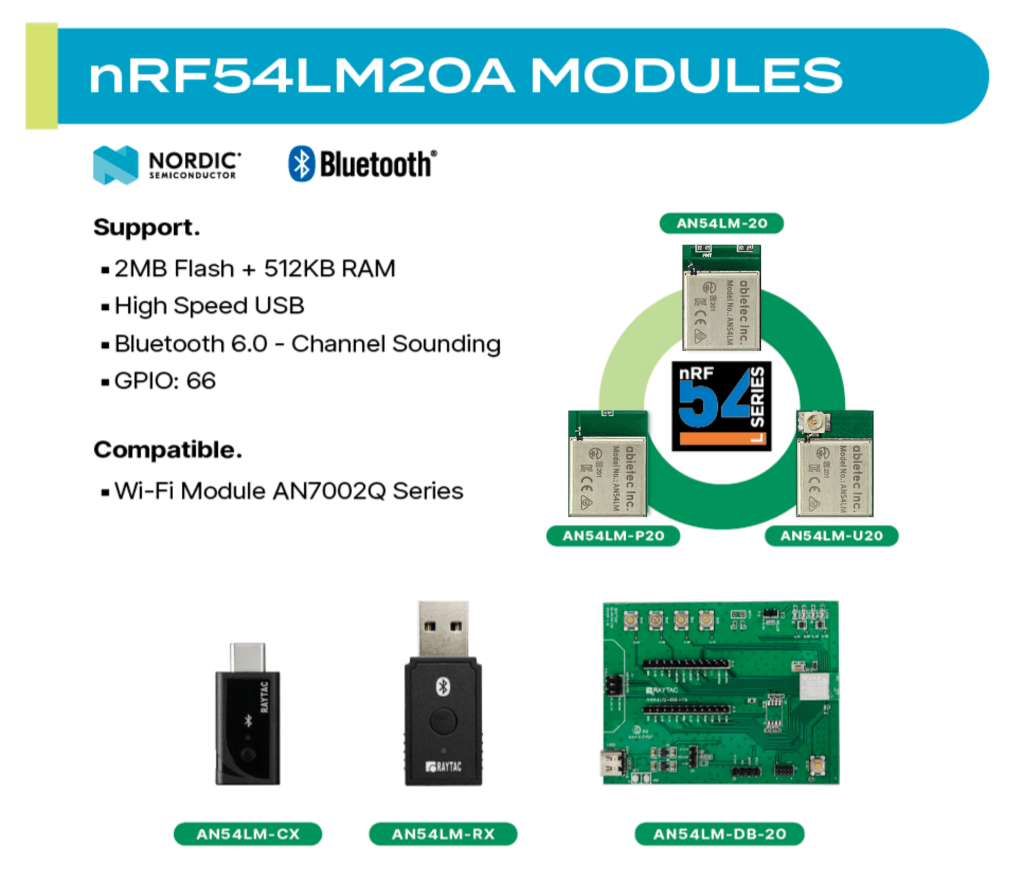
Raytac’s AN54LQ & AN54LV modules, powered by Nordic Semiconductor’s nRF54L family SoCs, come in multiple form factors and antenna options, ensuring your seamless integration into compact, RF-sensitive, or performance-driven designs.

Whether you need a:
☑ Chip antenna;
☑ PCB antenna;
☑ u.FL connector;
☑ Antenna Pin,

Or you want Small, Smaller, or Smallest, we always have a solution that fits best!
*All products are pre-certified with FCC, IC, CE, UKCA, Telec, KC, SRRC, NCC, RCM, WPC.


All our modules are available now on our website: https://www.raytac.com/product/:
nRF54L15 modules – AN54LQ Family

ModelAntenna TypeProduct Website
AN54LQ-15Ceramic Chiphttps://www.raytac.com/product/ins.php?index_id=158
AN54LQ-P15PCB Tracehttps://www.raytac.com/product/ins.php?index_id=159
AN54LQ-U15u.FL Connectorhttps://www.raytac.com/product/ins.php?index_id=160


nRF54L15 modules – AN54LV Family


ModelAntenna TypeProduct Website
AN54LV-15Ceramic Chiphttps://www.raytac.com/product/ins.php?index_id=169
AN54LV-P15PCB Tracehttps://www.raytac.com/product/ins.php?index_id=171
AN54LV-U15u.FL Connectorhttps://www.raytac.com/product/ins.php?index_id=176
AN54LV-K15Antenna Pinhttps://www.raytac.com/product/ins.php?index_id=177


nRF54L10 modules – AN54LQ Family

ModelAntenna TypeProduct Website
AN54LQ-10Ceramic Chiphttps://www.raytac.com/product/ins.php?index_id=165
AN54LQ-P10PCB Tracehttps://www.raytac.com/product/ins.php?index_id=163
AN54LQ-U10u.FL Connectorhttps://www.raytac.com/product/ins.php?index_id=164


nRF54L05 modules – AN54LQ Family

ModelAntenna TypeProduct Website
AN54LQ-05Ceramic Chiphttps://www.raytac.com/product/ins.php?index_id=166
AN54LQ-P05PCB Tracehttps://www.raytac.com/product/ins.php?index_id=167
AN54LQ-U05u.FL Connectorhttps://www.raytac.com/product/ins.php?index_id=168


For more information, please contact: sales@raytac.com


Raytac Corporation 勁達國際電子股份有限公司 / Raytac Corporation (USA) / abietec Inc.
A Bluetooth, Wi-Fi, and LoRa Module Maker/ODM & OEM Manufacturer based on
Nordic nRF54; nRF53: nRF52; nRF51; nRF7002
Semtech Specification: SX1262


Bluetooth Specification: BT6 ; BT5.4 ; BT5.3 ; BT5.2.
Wi-Fi Specification: Wi-Fi 6
LoRa Specification: LoRaWAN


All products are FCC/IC/CE/Telec/KC/RCM/SRRC/NCC/WPC/RoHS/Reach Pre-Certified.
http://www.raytac.com
https://www.raytac.com/contact/
email: sales@raytac.com
Tel: +886-2-3234-0208(TW)/+1-626-217-3139(USA)

How to set up Hardware & Software, Build & Compile Firmware, Validate DFU, and Wifi SCAN using Raytac’s Nordic nRF7002+nRF5340 WiFi+BLE Devkit-AN7002Q-DB-5340-M

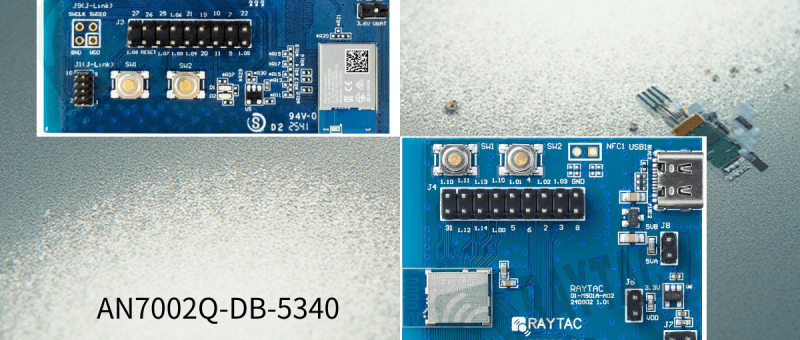
Raytac has advanced the dev kit version of bundle offer – WIFI+BLE: AN7002Q-DB-
5340-M with an on-board flash memory(MX25R64) to create easy evaluation
for Wi-Fi project developments.

Table of Content———————————————————————————————————

  1. Hardware Set Up
    A. Project WITHOUT External Flash MX25R64 needed
    B. Project WITH External Flash MX25R64 needed
  2. Software Resources & Preparations
  3. Firmware Build & Compile
    A. Project WITHOUT External Flash MX25R64 needed
    B. Project WITH External Flash MX25R64 needed
  4. Validate DFU Process & WIFI SCAN

—————————————————————————————————————————-


1. Hardware Set Up

Hardware Kit on hand:

Note: Pease make sure to have both “Nordic nRF5340-DK” and “AN7002Q-DB-5340-M” connected and running during the WIFI+BLE (nRF7002+nRF5340) project development.

Hardware Network:
IDC Ribbon Wire(J-Link Cable): Connect nRF5340-DK to AN7002Q-DB-5340-M
USB Wire –Type C USB: Power supply to AN7002Q-DB-5340-M through USB TYPE-C
USB Wire-Micro USB: Power supply to nRF5340-DK through Micro USB

A. Project WITHOUT External Flash MX25R64 needed
– Allocate QSPI for communication between MDBT53 (BLE) and AN7002Q (WIFI)
– External flash MX25R64 flash memory is not activated
NO additional resistor swapping needed, keep it as it is on board now. The Resistors on board align with the Nordic board definition (same as nRF7002-DK).
– Please closely follow the definition chart printed on back side of board AN7002Q-DB-5340-M.
“Component Options Table” > “AN7002Q active with QSPI (Typ)”


– Photo showing the resistor allocation:


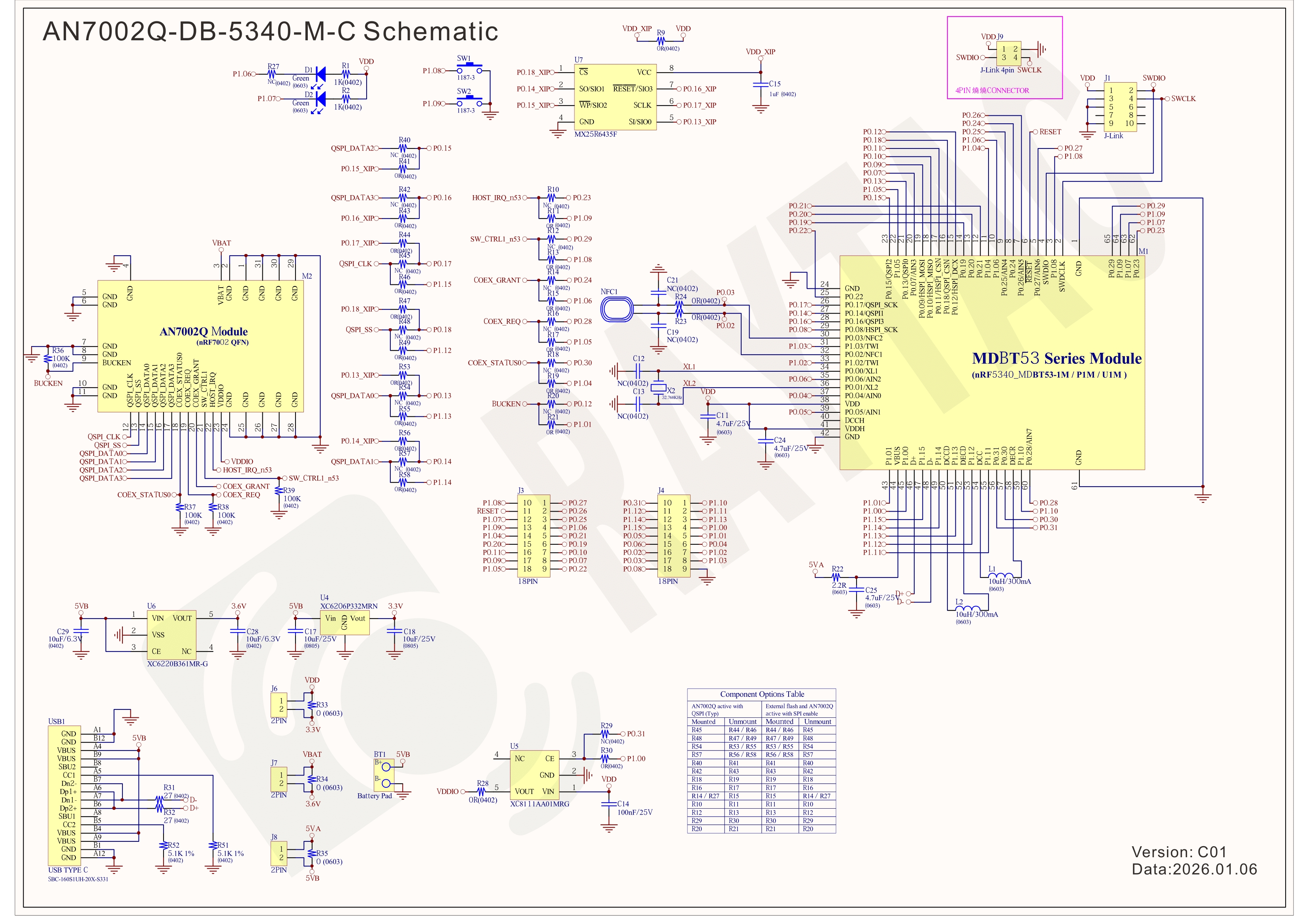
– Schematic of the AN7002Q-DB-5340-M(Click on the image to zoom in):


B. Project WITH External Flash MX25R64 needed
– Allocate SPI for communication between MDBT53 (BLE) and AN7002Q (WIFI)
– Allocate QSPI for XIP: External flash MX25R64 is activated
– It is REQUIRED to reallocate resistors to swap the QSPI and SPI on the AN7002Q-DB-5340-M in order to activate the circuit for MX25R64.
Do necessary resistors swapping manually (closely follow the definition chart printed on back side of board AN7002Q-DB-5340-M.)
Component Options Table” >  “External flash and AN7002Q active with SPI enable


– Photo showing the resistor allocation:
Detach the resistor -R27
Component Options Table” >  “External flash and AN7002Q active with SPI enable
<<< Necessary resistors swapping manually needed ↓ >>>


– Schematic of the AN7002Q-DB-5340-M(Click on the image to zoom in):
Modify the above resistors swapped and necessary component based on the chart:
“Component Options Table” >  “External flash and AN7002Q active with SPI enable”


!! Important Note:!!
The circuit of SW1(p1.08)/SW2(p1.09)/LED1(p1.06) on AN7002Q-DB-5340-M is NOT COMPATIBLE to Nordic WI-FI Control Pin of swctrl1(p1.08)/host_irq(p1.09)/grant(p1.06).
In this case, if you’re working with external flash MX25R64 for the WIFI project, Please avoid pin SW1/SW2/LED1 usage while LED2(p1.07) remains available as normal usage.
For the design perspective of mother board/carrier board /target board (mounted with AN7002Q & MDBT53 modules), it is required to design the circuit align to SW1(p0.23)/SW2(p0.24)/LED1(p0.28).


2. Software Resources & Preparations
Download nRF Connect For Desktop (Please Click Me)
Download nRF Command Line Tools (Please Click Me)

Step 1: Prepared with the latest version of nRF Connect for Desktop, using Windows 64-bit – 5.2.0
Step 2: Prepared with the latest version of Command Line Tools, using Windows X86 64 – 10.24.2

**Note: SEGGER J-LINK Upgrade message might pop up while you’re doing above downloads.

 If you’re initiating Segger Embedded Studio (SES) application, please check the guideline here(Click me) 

Step 3: Locate all the necessary kits for programming in PC


3. Firmware Build & Compile
After you download and set up nRFConnect SDK (NCS), you will be able to apply free VS (Visual Studio) Code IDE as firmware programming tool.
Here’re the guidelines to developing programs without/with External Flash MX25R64.

A. Project WITHOUT External Flash MX25R64 needed
You can directly build/compile on Nordic NCS without any additional configurations/modifications needed.

B. Project WITH External Flash MX25R64 needed
– Allocate SPI for communication between MDBT53 (BLE) and AN7002Q (WIFI)
– Allocate QSPI for XIP: External flash MX25R64 is activated

The below example uses NCS v3.1.1 and runs the under: C:\ncs

Step 1: Start with a Wi-Fi Scan project and run the program under: C:\ncs\v3.1.1\raytac
<<Create a new application and Copy a sample>>


Step 2: Select SDK v3.1.1 to copy the sample


Step 3: Select example by entering keyword: wifi scan(Wi-Fi Scan)


Step 4: Enter application location and name the project as: wifi_scan_uart_dfu


Step 5: Open an existing application and find the registered project: wifi_scan_uart_dfu

★★How to activate the Devicetree setting of Wi-Fi nRF7002 and Create file: nrf5340dk_nrf5340_cpuapp.overlay
Code example is as follows:
/ {
  chosen {
              aliases {
                       /delete-node/ leds;
                       /delete-node/ buttons;               
              }; 
          }; 

          leds {
                   compatible = “gpio-leds";

                   led1: led_1 {
                             gpios = <&gpio1 7 GPIO_ACTIVE_HIGH>;
                             label = “Green LED 1″;
                   };

          };

          /* These aliases are provided for compatibility with samples */
          aliases {
                   led1 = &led1;
          };
};

&mx25r64 {
  status = “okay";
};

/ {
          chosen {
                   nordic,pm-ext-flash = &mx25r64;
                   zephyr,wifi = &wlan0;
          };
};

&gpio_fwd {
    /delete-node/ uart;
};

&gpio_fwd
{
  status = “disabled";
};

&qspi {
          status = “okay";
          pinctrl-0 = <&qspi_default>;
          pinctrl-1 = <&qspi_sleep>;
          pinctrl-names = “default", “sleep";
          mx25r64: mx25r6435f@0 {
                   compatible = “nordic,qspi-nor";
                   reg = <0>;
                   /* MX25R64 supports only pp and pp4io */
                   writeoc = “pp4io";
                   /* MX25R64 supports all readoc options */
                   readoc = “read4io";
                   sck-frequency = <8000000>;
                   jedec-id = [c2 28 17];
                   sfdp-bfp = [
                             e5 20 f1 ff  ff ff ff 03  44 eb 08 6b  08 3b 04 bb
                             ee ff ff ff  ff ff 00 ff  ff ff 00 ff  0c 20 0f 52
                             10 d8 00 ff  23 72 f5 00  82 ed 04 cc  44 83 68 44
                             30 b0 30 b0  f7 c4 d5 5c  00 be 29 ff  f0 d0 ff ff
                   ];
                   size = <67108864>;
                   has-dpd;
                   t-enter-dpd = <10000>;
                   t-exit-dpd = <35000>;
          };
};

&spi1 {
    status = “okay";
    compatible = “nordic,nrf-spim";
    pinctrl-0 = <&spi1_default>;
    pinctrl-1 = <&spi1_sleep>;
    pinctrl-names = “default", “sleep";
cs-gpios = <&gpio1 12 GPIO_ACTIVE_LOW >;
nrf70: nrf7002@0 {
    status = “okay";
compatible = “nordic,nrf7002-spi";
reg = <0>;
spi-max-frequency = <24000000>;
/* Wi-Fi Pins used */
iovdd-ctrl-gpios = <&gpio1 0 GPIO_ACTIVE_HIGH>;
bucken-gpios = <&gpio1 1 GPIO_ACTIVE_HIGH>;
host-irq-gpios = <&gpio1 9 GPIO_ACTIVE_HIGH>;
wlan0: wlan {
compatible = “nordic,wlan";
};
wifi-max-tx-pwr-2g-dsss = <21>;
wifi-max-tx-pwr-2g-mcs0 = <16>;
wifi-max-tx-pwr-2g-mcs7 = <16>;
wifi-max-tx-pwr-5g-low-mcs0 = <9>;
wifi-max-tx-pwr-5g-low-mcs7 = <9>;
wifi-max-tx-pwr-5g-mid-mcs0 = <11>;
wifi-max-tx-pwr-5g-mid-mcs7 = <11>;
wifi-max-tx-pwr-5g-high-mcs0 = <13>;
wifi-max-tx-pwr-5g-high-mcs7 = <13>;       
};

nrf_radio_coex: nrf7002-coex {
status = “okay";
compatible = “nordic,nrf700x-coex";
req-gpios = <&gpio1 5 GPIO_ACTIVE_HIGH>;
status0-gpios = <&gpio1 4 GPIO_ACTIVE_HIGH>;
grant-gpios = <&gpio1 6 (GPIO_PULL_DOWN | GPIO_ACTIVE_LOW)>;
swctrl1-gpios = <&gpio1 8 GPIO_ACTIVE_HIGH>; 
};         
};

&pinctrl {
  spi1_default: spi1_default {
group1 {
psels = <NRF_PSEL(SPIM_SCK, 1, 15)>,
<NRF_PSEL(SPIM_MOSI, 1, 13)>,
<NRF_PSEL(SPIM_MISO, 1, 14)>;
};
  };
  spi1_sleep: spi1_sleep {
group1 {
psels = <NRF_PSEL(SPIM_SCK, 1, 15)>,
<NRF_PSEL(SPIM_MOSI, 1, 13)>,
<NRF_PSEL(SPIM_MISO, 1, 14)>;
low-power-enable;
};
  };
};

/ {
chosen {
zephyr,console = &uart2;
zephyr,shell-uart = &uart2;                                 
};
};

&uart2 {
status = “okay";
current-speed = <115200>;
pinctrl-0 = <&uart2_default>;
pinctrl-1 = <&uart2_sleep>;
pinctrl-names = “default", “sleep";
};

&pinctrl {
uart2_default: uart2_default {
                  group1 {
                          psels = <NRF_PSEL(UART_TX, 1, 2)>,
                                     <NRF_PSEL(UART_RX, 1, 3)>;
                          bias-pull-up;
                  };
};
uart2_sleep: uart2_sleep {
                  group1 {
                          psels = <NRF_PSEL(UART_TX, 1, 2)>,
                                     <NRF_PSEL(UART_RX, 1, 3)>;
                          low-power-enable;
                  };
};
};


Step 7: It is required to do MCUBoot before working with DFU using External Flash
Please do the code configuration in sysbuild.conf as following reference code.

SB_CONFIG_BOOTLOADER_MCUBOOT=y
# DFU with UART
SB_CONFIG_MCUBOOT_MODE_SINGLE_APP=n

# DFU with external flash
SB_CONFIG_PM_EXTERNAL_FLASH_MCUBOOT_SECONDARY=y

Step 8: It is required to do MCUMGR before working with DFU over UART
Please do the code configuration in prj.conf as following reference code.

# Enable QSPI driver for Application
CONFIG_NORDIC_QSPI_NOR=y

# Enable mcumgr DFU in application
CONFIG_MCUMGR=y    
CONFIG_NET_BUF=y
CONFIG_ZCBOR=y  
CONFIG_CRC=y    

# Enable mcumgr management for both OS and Images
CONFIG_MCUMGR_GRP_OS=y 
CONFIG_MCUMGR_GRP_IMG=y
CONFIG_FLASH=y
CONFIG_IMG_MANAGER=y
CONFIG_STREAM_FLASH=y
CONFIG_FLASH_MAP=y

# Configure MCUMGR transport to UART
CONFIG_MCUMGR_TRANSPORT_UART=y
CONFIG_BASE64=y

Step 9: Add with MCUBoot setting , and create a root for sysbuild ; Build with file mucboot.overlay & file mcuboot.conf

9A. With mucboot.overlay
&mx25r64 {
status = “okay";
};

/ {
          chosen {
                   nordic,pm-ext-flash = &mx25r64;
          };
};

&gpio_fwd {
/delete-node/ uart;
};

&gpio_fwd
{
status = “disabled";
};

9B. With file: mcuboot.conf

CONFIG_NORDIC_QSPI_NOR=y
CONFIG_BOOT_MAX_IMG_SECTORS=512

Step 10: Create a VERSION file by referencing the following code when testing DFU over UART.
VERSION_MAJOR = 99
VERSION_MINOR = 0
PATCHLEVEL = 0
VERSION_TWEAK = 0
EXTRAVERSION =

Step 11: Add build configuration.


Step 12: Add build configuration >> Choose Board target: nrf5340dk/nrf5340/cpuapp


Step 13: Generate and Build


Step 14: Generate a Merged.hex file after compiling the program


Step15: You can choose Build/Debug/Flash under ACTIONS during development
<< Build >>


<< Debug >>


<< Flash >>


Step 16: Go to ACTIONS >> Memory report


Now you can see partitions available in the system. mcu_secondary has already been located in MX25R64 flash memory.


4. Test/Validate DFU Process & WIFI SCAN
After the firmware programmed to MDBT53 module on board, we use the USB to UART adaptor board for connection AN7002Q-DB-5340-M through: A. MCUMGR UART to PC and through: B. WiFi Scan UART to PC respectively.
Note: We suggest you finish connecting A. and B. before running tests.


Now we can run the tests.

A. DFU over UART – Using AuTerm Program
1. We can locate Image version=V99.0.0 under the current VERSION file


It also indicates Image version: 99.0.0 in MCUmgr-Slot 0.


2. Try to modify the file version from V99 to V100 under VERSION file:
VERSION_MAJOR = 100

VERSION_MINOR = 0

PATCHLEVEL = 0

VERSION_TWEAK = 0

EXTRAVERSION =

And go with “Pristine Build”


3. We’re about to run DFU over UART , Please DO NOT do “Flash” or “Erase”.


Proceed with “Force reboot”


4. It’s now Version 100.0.0 in Slot 0 under MCUgr ⭢ DFU over UART successfully done!


Before it was Version 99.0.0 in Slot 1 under MCUgr.


B. WIFI SCAN – PuTTY Console
WIFI SCAN credentials can be located under PC Console – PuTTY.


Useful references:
Nordic Developer Academy
nRF Connect SDK Documentation
Wi-Fi Samples
Nordic DevZone – Technical Forum


Edited by Business Development Manager: Jocelyn Tsai
Technical Guidance by R&D Manager: MW Lee

Raytac Corporation 勁達國際電子股份有限公司 / Raytac Corporation (USA) / abietec Inc.
A Bluetooth, Wi-Fi, and LoRa Module Maker/ODM & OEM Manufacturer based on
Nordic nRF54; nRF53: nRF52; nRF51; nRF7002
Semtech Specification: SX1262

Bluetooth Specification: BT6 ; BT5.4 ; BT5.3 ; BT5.2.
Wi-Fi Specification: Wi-Fi 6
LoRa Specification: LoRaWAN

All products are FCC/IC/CE/Telec/KC/RCM/SRRC/NCC/WPC/RoHS/Reach Pre-Certified.
http://www.raytac.com
https://www.raytac.com/contact/
email: sales@raytac.com
Tel: +886-2-3234-0208(TW)/+1-626-217-3139(USA)


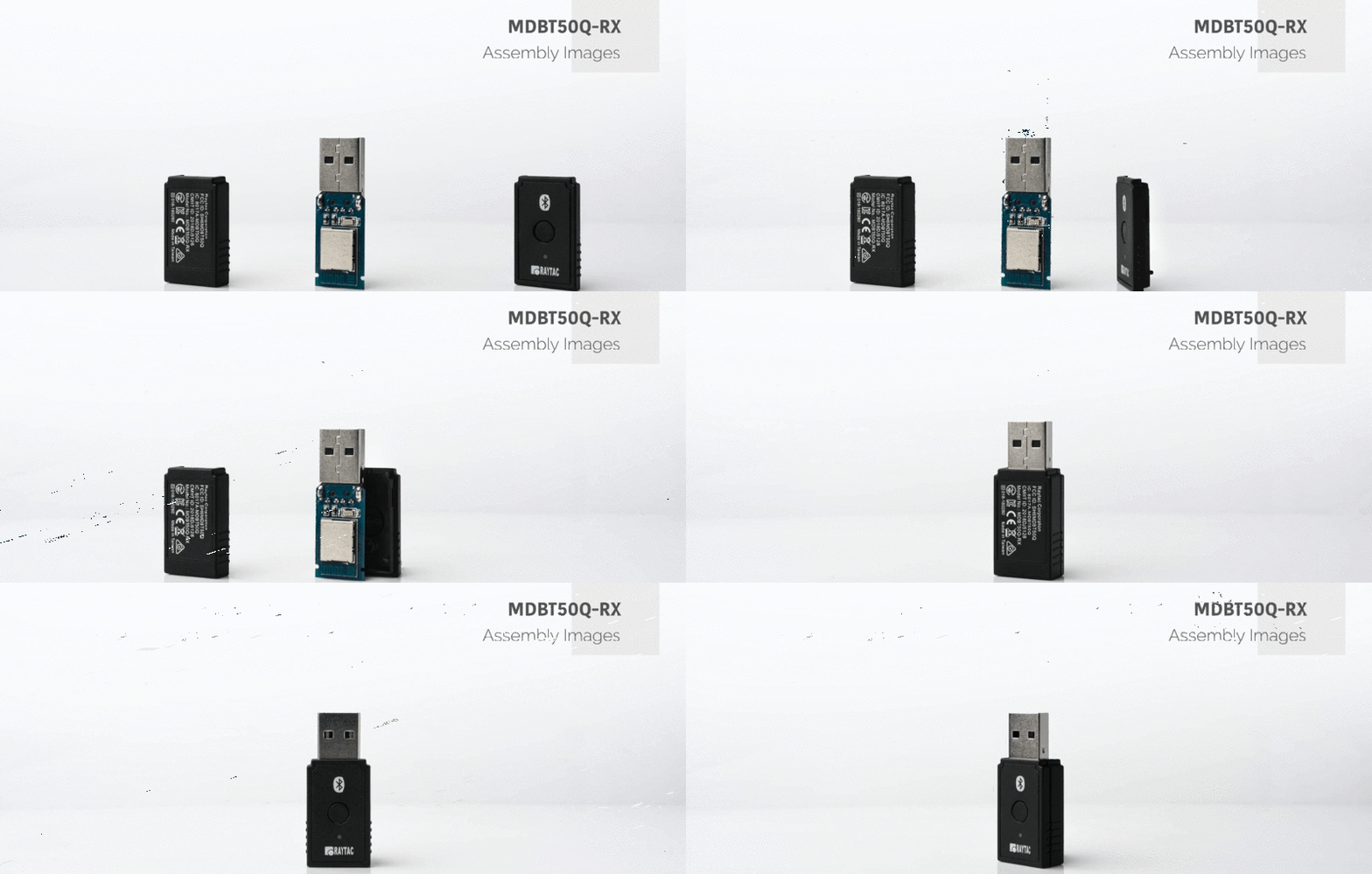
Raytac Product Change Notice(PCN) Announcement for Nordic SoC USB-A Dongle – MDBT50Q-RX Series

Raytac Corporation would like to inform all customers and partners of an official Product Change Notice: PCN-25100801 regarding the following product series:

Affected Series
MDBT50Q-RX Series (nRF52840/833 based USB-A dongles)

Affected Models
MDBT50Q-RX (Product Link)
MDBT50Q-RX-33
MDBT50Q-RX-ATM (Product Link)
MDBT50Q-RX-ATMS

Reminder
This PCN involves:

  1. Update of Raytac’s company logo on the nameplate, and
  2. Addition of NCC logo on the back label.

There are no changes to product function, performance, quality, form factor, or safety compliances. All existing certifications and technical documentations remain valid.

We kindly invite our customers, distributors, and partners to update your records accordingly. For any questions or support regarding this update, feel free to reach out via: service@raytac.com.

Full details of the PCN please see below(Click on the images to zoom in).
Remark: Please take note of the final shipment date.


Edited by Business Development Manager: Tony Yin

Raytac Corporation 勁達國際電子股份有限公司 / Raytac Corporation (USA) / abietec Inc.
A Bluetooth, Wi-Fi, and LoRa Module Maker/ODM & OEM Manufacturer based on
Nordic nRF54; nRF53: nRF52; nRF51; nRF7002
Semtech Specification: SX1262


Bluetooth Specification: BT6 ; BT5.4 ; BT5.3 ; BT5.2.
Wi-Fi Specification: Wi-Fi 6
LoRa Specification: LoRaWAN


All products are FCC/IC/CE/Telec/KC/RCM/SRRC/NCC/WPC/RoHS/Reach Pre-Certified.
http://www.raytac.com
https://www.raytac.com/contact/
email: sales@raytac.com
Tel: +886-2-3234-0208(TW)/+1-626-217-3139(USA)

Raytac’s Impact on the Zephyr Ecosystem – Little Module, Huge Potential

In this article, Stanley Huang, MSc, Deputy Manager of Firmware Development at Raytac, shares insights on how Raytac’s modules and development kits strengthen the Zephyr ecosystem.

[Stanley Huang, New Taipei City]
When we talk about open-source platforms like Zephyr RTOS, most people immediately think of major chip manufacturers such as ST Micro, NXP, or Nordic. But to me, what truly makes Zephyr famous amongst the developer community is through modules that developers can actually touch: those they can instantly plug in and start using right away. In these terms, Raytac is one of the most underrated and important contributors in this ecosystem.

Raytac Modules Make Zephyr More Accessible
Instead of being a chip vendor, we specialize in producing high-quality, globally certified modules – especially Bluetooth and Wi-Fi modules based on Nordic chipsets, such as the AN7002Q, AN54LQ, AN54LV, MDBT53, MDBT50Q, and MDBT42Q.
All these modules are already certified with Regional RF compliances(FCC, IC, CE, KC, etc.) and the latest Bluetooth Specifications, offering developers the assurance of “plug and play” and “production-ready” solutions.
We assure that our modules have become one of the easiest platforms for Zephyr developers to test BLE functionality.

I paired Zephyr with Raytac’s MDBT50Q-DB-40 development board when I first applied Zephyr in a BLE Peripheral project . With a simple west build -b nrf52840dk_nrf52840 followed by flashing the firmware using J-Link or nRF Connect for Desktop, the BLE beacon immediately showed up on my phone. Clean, simple, noise-free, and developer-friendly – that’s Raytac’s style.

Modules play an invaluable role in product development
Many would say Raytac only makes modules and the real core is still Nordic’s SoC.
But I believe that in an open-source system like Zephyr, the hardware that helps your project runs first is that which contributes the most.
Our Zephyr-registered development kits eliminate the hassles of manual soldering, regulatory certification, and antenna design, allowing engineers to fully focus on developing applications based on Zephyr.
They can run Zephyr’s BLE peripheral, central, GATT, and HCI samples directly on the Raytac kits that act as a one-stop hardware solution.
In many ways, Raytac has pushed Zephyr’s usability a significant step forward.

Raytac Also Expands Zephyr’s Application Horizon
Many of Raytac’s modules are ultra-compact- ideal for wearables, smart sensors, and low-power beacons…etc. These are the scenarios where Zephyr excels, and Raytac’s modules provide the physical platform to enable companies to build their “dream devices".
When running Zephyr on a tiny module like the AN54LV-15(Product Link), developers will be amazed that something smaller than a piece of corn kernel can run a full RTOS, manage the BLE stack, trigger timers, drive I2C sensors, and even connect to the cloud, all by itself.  This combination doesn’t just make development easier – it inspires developers to realize that: “they can build their projects using Raytac’s hardware.”

Raytac may not be the star, but we’re always ready for you
On Zephyr’s main stage, companies like Nordic, STM, and Intel take the spotlight, but Raytac plays an essential supporting role – supporting the performance from behind the scenes. We offer stable, high quality, and low-power platforms, giving every line of Zephyr code a place to run and every feature a cornerstone.
Our greatest value lies in helping developers skip antenna design and RF interference concerns – so they can jump right into the Zephyr ecosystem with ease.

Our products deliver the reliability you need and the efficiency you expect.

We invite you to explore more about how Raytac supports the Zephyr ecosystem and discover our range of development kits and modules designed for seamless integration.
Visit our Zephyr page here: https://docs.zephyrproject.org/latest/boards/raytac/index.html
Visit Zephyr’s Ecosystem Vendors page: https://www.zephyrproject.org/ecosystem-vendor-offerings/

For more information, please contact:
Raytac Contact Form: https://www.raytac.com/contact/
Raytac Sales email: sales@raytac.com
abietec Service email: service@abietec.com


Article by Firmware Deputy Manager: Stanley Huang
Edited by Business Development Manager: Tony Yin

Raytac Corporation 勁達國際電子股份有限公司 / Raytac Corporation (USA) / abietec Inc.
A Bluetooth, Wi-Fi, and LoRa Module Maker/ODM & OEM Manufacturer based on
Nordic nRF54; nRF53: nRF52; nRF51; nRF7002
Semtech Specification: SX1262

Bluetooth Specification: BT6 ; BT5.4 ; BT5.3 ; BT5.2.
Wi-Fi Specification: Wi-Fi 6
LoRa Specification: LoRaWAN


All products are FCC/IC/CE/Telec/KC/RCM/SRRC/NCC/WPC/RoHS/Reach Pre-Certified.
http://www.raytac.com
https://www.raytac.com/contact/
email: sales@raytac.com
Tel: +886-2-3234-0208(TW)/+1-626-217-3139(USA)

Essential Tips for nRF54L15 HEX File Verification

Hi readers, did you know that Raytac offers a special service exclusively for our customers? 😉
We offer support services: HEX file verification and flashing firmware into modules per customer’s requests.
Compared to the series nRF52 and nRF53’s 2 in 1 or 3 in 1 merged hex files, nRF54L15 requires something slightly different. Following are the tips and suggestions.

Before building your own .hex file on Raytac’s nRF54L15 modules(Product link), please configure some settings(shown below) in advance.

In VS Code:

  1. Go to Add Build Configuration
  2. Find System Build (sysbuild) ➝ Choose Build System Default
  3. Click Generate and Build


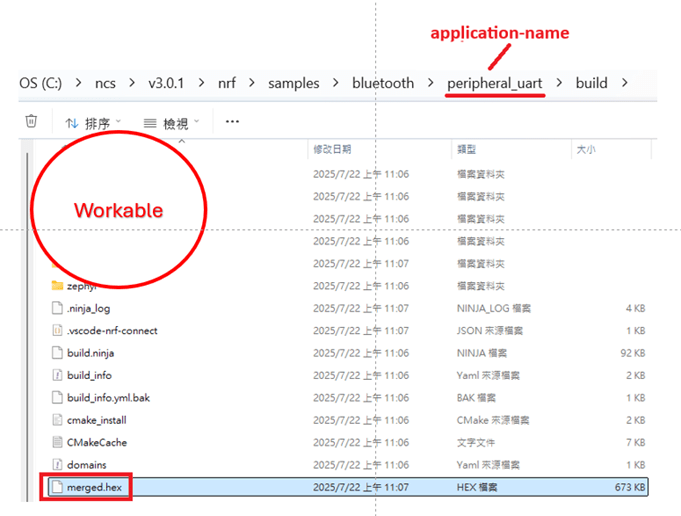
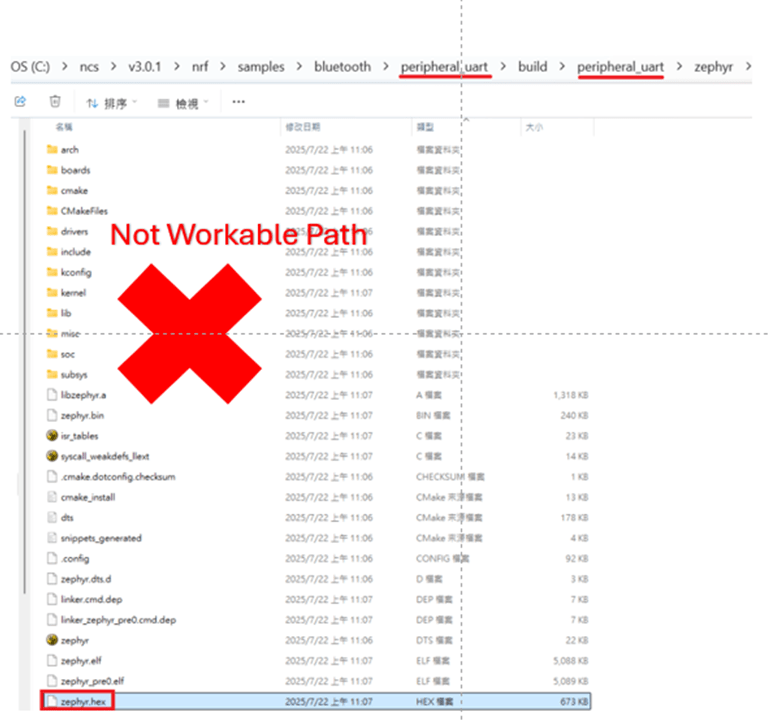
Starting from NCS v2.8.0 (including later versions), the .hex file can be generated in two different paths.
1. ..\nrf\samples\bluetooth\application-name\build\merged.hex
2. ..\nrf\samples\bluetooth\application-name\build\application-name\zephyr\zephyr.hex


Using the AN54LQ/AN54LV series as an example:
When you provide the programming file (.hex) for production, please ensure that the file is taken from the following path:
1. ..\nrf\samples\bluetooth\application-name\build\merged.hex
And we also do not recommend renaming the merged HEX file due to Nordic suggestions.

For more details behind this suggestion, please refer to the Nordic DevZone link below.
https://devzone.nordicsemi.com/f/nordic-q-a/120313/how-to-modify-the-name-of-the-merged-hex-file


Suggested path:
1. ..\nrf\samples\bluetooth\application-name\build\merged.hex

Not recommended path:
2. ..\nrf\samples\bluetooth\application-name\build\application-name\zephyr\zephyr.hex
The zephyr.hex file is not recommended to be used for flashing or verification in the production process.

Thank you all for your patience in reading!
Best wishes for your projects – your success is Raytac’s success! 😊


For more information, please contact:
Raytac Contact Form: https://www.raytac.com/contact/
Raytac Sales email: sales@raytac.com
abietec Service email: service@abietec.com


Edited by Account Manager: Ms. Elfreda Guo


Raytac Corporation 勁達國際電子股份有限公司 / Raytac Corporation (USA) / abietec Inc.
A Bluetooth, Wi-Fi, and LoRa Module Maker/ODM & OEM Manufacturer based on
Nordic nRF54; nRF53: nRF52; nRF51; nRF7002
Semtech Specification: SX1262


Bluetooth Specification: BT6 ; BT5.4 ; BT5.3 ; BT5.2.
Wi-Fi Specification: Wi-Fi 6
LoRa Specification: LoRaWAN


All products are FCC/IC/CE/Telec/KC/RCM/SRRC/NCC/WPC/RoHS/Reach Pre-Certified.
http://www.raytac.com
https://www.raytac.com/contact/
email: sales@raytac.com
Tel: +886-2-3234-0208(TW)/+1-626-217-3139(USA)

Nordic’s nRF54L15/L10/L05 BLE Modules from Raytac now in Mass Production

Raytac AN54LQ series Modules: Guiding Your Project at Every Turn, While Saving Power at Every Step

[28/07/2025, New Taipei, Taiwan]
We are proud to officially announce Mass Production (MP) for Raytac’s next-gen Nordic-based Bluetooth LE modules:

Just like traffic lights that direct every journey safely and efficiently, Raytac’s nRF54L series modules guide your wireless development—keeping you on the right path with cutting-edge performance and exceptional power savings.

🚦 Each light signals a different member of the nRF54L15 / nRF54L10 / nRF54L05 module family—showcasing a clear path for your Bluetooth Low Energy (LE) applications, no matter which industry you’re from and where you’re headed.

These modules are now available for your design-in, offering:
✅ Powerful performance
✅ Ultra-low power consumption
✅ Compact footprints
✅ Full Global certifications: FCC/IC/CE/UKCA/Telec/KC/NCC/SRRC/RCM/WPC
✅ BT 6.0 certified
✅ Full Nordic nRF54 Series compatibility
✅ Pin-to-pin compatible amongst AN54LQ series

Whether you’re building for consumer IoT, industrial sensors, healthcare, or wearables—Raytac’s modules deliver the reliability you need and the efficiency you expect.

For more information, please contact:
Raytac Contact Form: https://www.raytac.com/contact/
Raytac Sales email: sales@raytac.com
abietec Service email: service@abietec.com


Edited by Business Development Manager: Tony Yin


Raytac Corporation 勁達國際電子股份有限公司 / Raytac Corporation (USA) / abietec Inc.
A Bluetooth, Wi-Fi, and LoRa Module Maker/ODM & OEM Manufacturer based on
Nordic nRF54; nRF53: nRF52; nRF51; nRF7002
Semtech Specification: SX1262

Bluetooth Specification: BT6 ; BT5.4 ; BT5.3 ; BT5.2.
Wi-Fi Specification: Wi-Fi 6
LoRa Specification: LoRaWAN


All products are FCC/IC/CE/Telec/KC/RCM/SRRC/NCC/WPC/RoHS/Reach Pre-Certified.
http://www.raytac.com
https://www.raytac.com/contact/
email: sales@raytac.com
Tel: +886-2-3234-0208(TW)/+1-626-217-3139(USA)

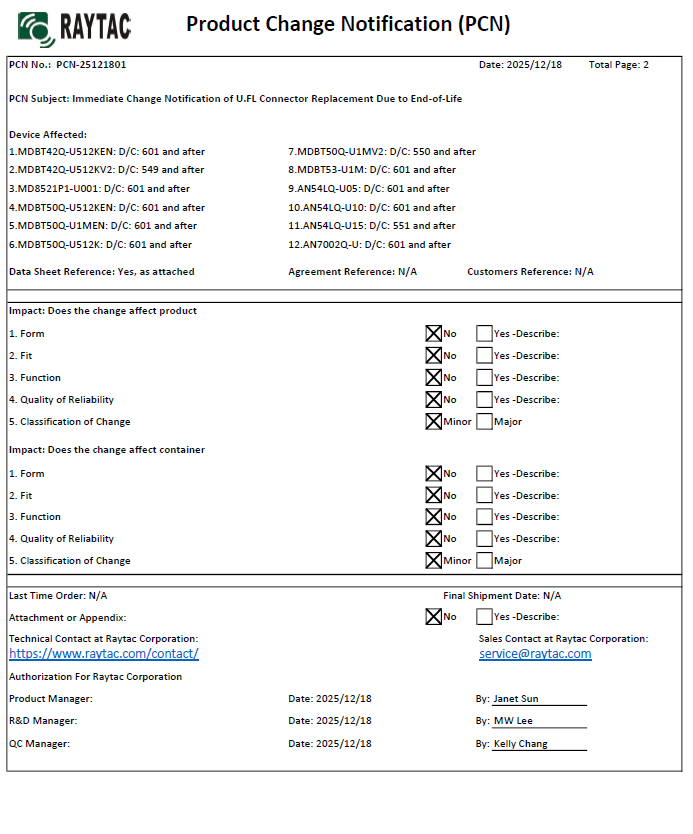
Raytac Product Change Notice(PCN) Announcement for Nordic nRF54L modules series

Raytac would like to officially announce a Product Change Notice (PCN) for our Bluetooth Low Energy modules based on Nordic Semiconductor’s nRF54L series SoCs, including the nRF54L15, nRF54L10, and nRF54L05.
This update specifically concerns the Part Number (PN) changes for improved clarity and product identification across our lineup.

Affected Models
Please refer to the table/list below for the full details of the updated part numbers.
(Click on the image to zoom in)


Reminder
This PCN involves part number naming only.
There are no changes to product function, performance, quality, form factor, or safety compliance. All existing certifications and technical documentations remain valid.

We kindly invite our customers, distributors, and partners to update your records accordingly. For any questions or support regarding this update, feel free to reach out via: service@raytac.com


Raytac Corporation 勁達國際電子股份有限公司 / Raytac Corporation (USA)
A Bluetooth, Wi-Fi, and LoRa Module Maker/ODM & OEM Manufacturer based on
Nordic nRF54; nRF53: nRF52; nRF51; nRF7002
Semtech Specification: SX1262


Bluetooth Specification: BT6 ; BT5.4 ; BT5.3 ; BT5.2.
Wi-Fi Specification: Wi-Fi 6
LoRa Specification: LoRaWAN


All products are FCC/IC/CE/Telec/KC/RCM/SRRC/NCC/WPC/RoHS/Reach Pre-Certified.
http://www.raytac.com
https://www.raytac.com/contact/
email: sales@raytac.com
Tel: +886-2-3234-0208(TW)/+1-626-217-3139(USA)

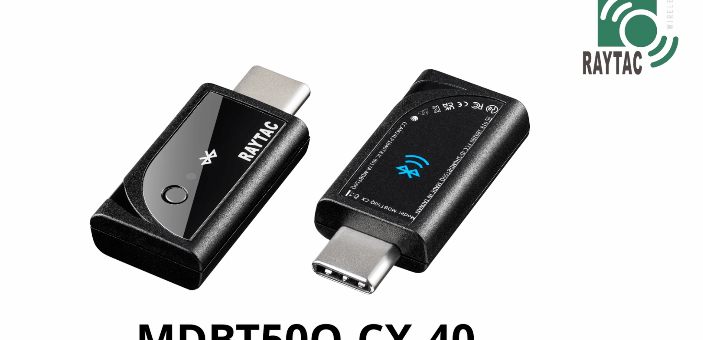
nRF52840 Nordic SoC USB Dongle – MDBT50Q-CX-40, Now Supports Zephyr RTOS

Zephyr RTOS hosted in Linux system has become a leading IoT ecosystem and it has been widely adopted as an open-source , real-time operation system for embedded devices, making it easier for developers to integrate the project smoothly.

Nordic Semiconductor , a main contributor to Zephyr, from the Bluetooth LE controller and USB stack to test tools, DFU frameworks.. and more, is making great effort and strategic decisions to adopt the Zephyr open-source into its nRFConnect(NCS) SDK program.

Raytac Corporation , a hardware-based manufacturer and a comprehensive solution developer with Nordic SoC development for multi-protocol complied wireless modules, now expands support for Zephyr RTOS ecosystem with its nRF52840 USB-C dongle – MDBT50Q-CX-40.

Zephyr support package for MDBT50Q-CX-40: https://docs.zephyrproject.org/latest/boards/raytac/mdbt50q_cx_40_dongle/doc/index.html


Reminder: The current Nordic released NCS SDK may NOT upgrade with Zephyr package at the same pace ; It is recommended to get the latest NCS SDK version to access the complete Zephyr support package.

If you’re interested in how Zephyr becomes powerful for a developer to start a project design easier and how the Nordic nRFConnect SDK community brings you to the world of Zephyr RTOS system, never hesitate to save the spot in the upcoming webinar on July 2nd, 2025. How Zephyr became the leading open-source RTOS for IoT (Click on the link to know more)

Resources:
– Begin your journey with Nordic nRFConnect SDK community – nRF Connect SDK Fundamentals
User Manual of MDBT50Q-CX (nRF52840/nRF52833-based USB-C Dongle)


Edited by Business Development Manager: Ms. Jocelyn Tsai


Raytac Corporation 勁達國際電子股份有限公司 / Raytac Corporation (USA)
A Bluetooth, Wi-Fi, and LoRa Module Maker/ODM & OEM Manufacturer based on
Nordic nRF54; nRF53: nRF52; nRF51; nRF7002
Semtech Specification: SX1262


Bluetooth Specification: BT6.1 ; BT6 ; BT5.4 ; BT5.3 ; BT5.2.
Wi-Fi Specification: Wi-Fi 6
LoRa Specification: LoRaWAN


All products are FCC/IC/CE/Telec/KC/RCM/SRRC/NCC/WPC Pre-Certified.
http://www.raytac.com
https://www.raytac.com/contact/
email: sales@raytac.com
Tel: +886-2-3234-0208(TW)/+1-626-217-3139(USA)

MCUboot DFU Guide For Raytac MDBT50Q-DB-40 (Using NCS V2.9.1)

This guide teaches you how to use MCUboot for DFU (Device Firmware Update),
Combined with nRF Connect SDK (NCS) V2.9.1 to upgrade firmware on Raytac’s MDBT50Q series modules.


Table of contents:

  1. Hardware Set Up
  2. Software Kits resource download & install
  3. Compile and load the program
    a. Open VS Code
    b. Project setup
    c. Setup the situation for DFU over UART or DFU over USB
    d. Start compiling your project
    e. Load your compiled program into the MDBT50Q-DB-40 demo board
  4. DFU to MDBT50Q-DB-40 over UART / USB
  5. Execute USB DFU using AuTerm
  6. DFU using your custom keys

1. Hardware setup
– Equip Raytac’s MDBT50Q-DB-40 development board
– Ensure the board is connected via USB to your PC


2.Software Kits resources download & install
– Resources download:
nRF Connect for Desktop – Download nRF Connect for Desktop (Please Click Me)
nRF Command Line Tools – Download nRF Command Line Tools (Please Click Me)
Visual Studio Code – Download Visual Studio Code(Please Click Me)

Install nRF Connect for Desktop ➔ install Programmer and Toolchain Manager.


Open Toolchain Manager and install SDK V2.9.1.


Install Visual Studio Code


3. Compile and load the program
a. Open VS Code(Visual Studio Code)


Note:
If it’s your first time using the software: after installing all the extensions, you should see the same on your screen.


b. Project setup
b.1 Create an example code(In this article: peripheral_uart)
Please refer to the following steps:
Create a new application ➔ Copy a sample ➔ NCS V2.9.1


b.2 Name the Project: peripheral_uart
Input peripheral_uart and the corresponding example program will appear in the options section below.


Note: We named the project peripheral_uart_mcuboot to distinguish it.
This project will create a directory named peripheral_uart_mcuboot.

c. Build an environment for DFU over UART or DFU over USB
– Create a new application ➔ Open

Right click on the project name you just created (peripheral_uart_mcuboot), a pop-up menu will appear. Select the first option “Show in Explorer" from the pop-up menu to display all project files.


Then select New File to create a sysbuild.conf file.


select sysbuild.conf, left-click on it, and a blank box will show.


Input the file name and write: SB_CONFIG_BOOTLOADER_MCUBOOT=y


Parameters and instructions
Add a new file mcuboot.conf, in the sysbuild folder, and input the following parameters into the file. (Add relevant parameters according to UART or USB)
(Note: Please be informed if you want to use DFU over UART in the end, you should use UART when you first create the environment. Similarly, if you want to use DFU over USB, you should create the USB environment at the beginning.)

For DFU over UART
# Enable logging for MCUboot
CONFIG_LOG=y
CONFIG_MCUBOOT_LOG_LEVEL_WRN=y
# Enable Serial Recovery over UART
CONFIG_MCUBOOT_SERIAL=y
# Disable UART, since Serial Recovery uses it
CONFIG_UART_CONSOLE=n
# Configure the bootloader to use two slots
CONFIG_SINGLE_APPLICATION_SLOT=n
# Turn on a LED so we can see when Serial Recovery mode is active
CONFIG_MCUBOOT_INDICATION_LED=y


For DFU over USB
# Enable logging for MCUboot
CONFIG_LOG=y
CONFIG_MCUBOOT_LOG_LEVEL_WRN=y
# Enable Serial Recovery over UART
CONFIG_MCUBOOT_SERIAL=y
# Disable UART, since Serial Recovery uses it
CONFIG_UART_CONSOLE=n
# Configure bootloader to use two slots
CONFIG_SINGLE_APPLICATION_SLOT=n
# Turn on a LED so we can see when Serial Recovery mode is active
CONFIG_MCUBOOT_INDICATION_LED=y
# Configure serial recovery to use CDC_ACM, which by default uses the USB
CONFIG_BOOT_SERIAL_CDC_ACM=y
# Increase flash space for the MCUboot image to fit USB drivers
CONFIG_PM_PARTITION_SIZE_MCUBOOT=0x10000


Create a new file: mcuboot.overlay and add the following parameters.


For DFU over UART
/* Configure button and LED for Serial Recovery */
/ {
    aliases {
          mcuboot-button0 = &button0;
          mcuboot-led0 = &led0;
    };
  };


For DFU over USB
/* Configure button and LED for Serial Recovery */
/ {
    aliases {
          mcuboot-button0 = &button0;
          mcuboot-led0 = &led0;
    };
  };
/* Configure CDC ACM */
&zephyr_udc0 {
            cdc_acm_uart0: cdc_acm_uart0 {
                        compatible = “zephyr,cdc-acm-uart";
            };
};


Note: if you use DFU over USB, please enable the USB subsystem in prj.conf.


After all the setup is completed, you can start compiling your project.


d. Start compiling your project
Add Build Configuration ➔ Select target board ➔ In this example, choose raytac_mdbt50q_db_40/nrf52840.


Start compiling by clicking “Generate and Build" at the bottom-right corner.


e. Load your compiled program into the MDBT50Q-DB-40 demo board
After compiling without error, select the flash function to load your program into the MDBT50Q-DB-40 demo board.


If the below is shown, it means that you have successfully loaded your program into the demo board.


4. DFU to MDBT50Q-DB-40 through UART / USB
DFU over UART
Hold the SW2 button then plug the power into the USB connector.
The system will enter the bootloader mode.
You can then DFU the new firmware via the UART.


DFU over USB
If you update your firmware through USB, please also hold the SW2 button and connect the USB cable.


5. Execute USB DFU using AuTerm
AuTerm is a free-for-download PC software on Windows.
It allows you to update your new firmware on the MDBT50Q-DB-40 demo board.
Download link:
https://github.com/thedjnK/AuTerm/releases/download/v0.35a-pre/AuTerm_test_Win_x64_v0.35a.7z

Steps:
Select the tab Config to set the correct COM port.


Follow the sequences in the below screenshot.


You can use the file peripheral_uart_mcuboot.signed.bin for testing.
It is located in peripheral_uart_mcuboot/build.
Then follow the sequences in the below screenshot.
DFU will be completed when the progress reaches 100%.


6. DFU using your custom keys
When you compile the code, you will see the below warning.
Reason: It’s required to have your own private key to ensure your product’s security.
Following are the steps to enable security features.


Step 1. Create the key
First, install the imgtool program using pip.


Then use the following command to generate your private key in your project folder.
After the private key is generated, you can access it in your directory.


Step 2. Configure the project to use this key in sysbuild.conf

# Add MCUboot
SB_CONFIG_BOOTLOADER_MCUBOOT=y
#Add private key for MCUboot
SB_CONFIG_BOOT_SIGNATURE_KEY_FILE="\${APP_DIR}/private_key.pem"
# Configure key type
SB_CONFIG_BOOT_SIGNATURE_TYPE_ECDSA_P256=y


Step 3. Build and flash the project again. Your firmware will have security features.


Edited by Account Manager: Mr. Welson Kuo


Raytac Corporation 勁達國際電子股份有限公司 / Raytac Corporation (USA)
A Bluetooth, Wi-Fi, and LoRa Module Maker/ODM & OEM Manufacturer based on
Nordic nRF54; nRF53: nRF52; nRF51; nRF7002
Semtech Specification: SX1262


Bluetooth Specification: BT6.1 ; BT6 ; BT5.4 ; BT5.3 ; BT5.2.
Wi-Fi Specification: Wi-Fi 6
LoRa Specification: LoRaWAN


All products are FCC/IC/CE/Telec/KC/RCM/SRRC/NCC/WPC Pre-Certified.
http://www.raytac.com
https://www.raytac.com/contact/
email: sales@raytac.com
Tel: +886-2-3234-0208(TW)/+1-626-217-3139(USA)


Raytac’s nRF54L15 module Demo Board: AN54LQ-DB-15 is now officially supported in the Zephyr Project

We’re excited to announce that the Raytac AN54LQ-DB-15 development board is now listed and fully supported in the Zephyr Project’s official board documentation! This milestone provides developers with seamless access to hardware abstraction, sample code, and configuration tools—directly within the Zephyr RTOS environment.

Based on Nordic Semiconductor’s latest nRF54L15 SoC, this board offers a cutting-edge platform for developing Bluetooth® Low Energy and other 802.15.4 protocol-related applications. The features include:

– Module Demo Board built by AN54LQ-15 module
– Built-in debug interface for streamlined development and testing
– Compatibility with Zephyr’s device tree and board configuration system
– Antenna variants: Ceramic Chip / PCB Trace / u.FL Connector
– Nordic nRF54L15 Solution
– A recommended 3rd-party module by Nordic Semiconductor.
– Intended for BT specification BT6, including Channel Sounding features
– Pre-certified with FCC, IC, CE, Telec (MIC), KC, SRRC, NCC, RCM, WPC
– Intended for EU new Cyber Security Standard: EN 18031
– RoHS & Reach Compliant.
– 128 MHz ARM® Cortex™-M33 processor with TrustZone® technology
– 128 MHz RISC-V co-processor with TrustZone® technology
– 1.5MB Flash Memory / 256KB RAM
– 31 GPIO
– Interfaces: QSPI(Software), SPI, UART, I2C, I2S, PDM, PWM, ADC, and NFC
– Highly flexible multiprotocol, ideally suited for
Bluetooth® Low Energy, ANT+, Zigbee, Thread (802.15.4), and Matter ultra low-power wireless applications.


Reference:
AN54L15Q-DB Zephyr Documentation
nRF54L15 module: AN54LQ-15(Chip antenna)
nRF54L15 module: AN54LQ-P15(PCB antenna)
nRF54L15 module: AN54LQ-U15(u.FL connector for external antenna)
nRF54L15 module demo board: AN54LQ-DB-15
nRF54L15 ultra compact module: AN54LV-15(Chip antenna)
nRF54L15 ultra compact module: AN54LV-P15(PCB antenna)
Nordic Third-party modules/modems


By being integrated into the Zephyr ecosystem, developers gain direct access to well-maintained upstream code, continuous integration support, and community-driven updates. Whether you’re building IoT sensors, connected medical devices, or industrial automation systems, using the AN54LQ-DB-15 with Zephyr ensures a modern, scalable, and open-source-ready development experience.


Start building faster—with less setup and more confidence—thanks to this powerful combination of Raytac hardware and the Zephyr real-time operating system!


Our other Demo boards that are also listed on Zephyr:
MDBT50Q-DB-33 (nRF52833 module Demo Board)
MDBT50Q-DB-40 (nRF52840 module Demo Board)
MDBT53-DB-40 (nRF5340 module Demo Board)
MDBT53V-DB-40 (nRF5340 module Demo Board)


Edited by Business Development Manager: Mr. Tony Yin


Raytac Corporation 勁達國際電子股份有限公司 / Raytac Corporation (USA)
A Bluetooth, Wi-Fi, and LoRa Module Maker/ODM & OEM Manufacturer based on
Nordic nRF54; nRF53: nRF52; nRF51; nRF7002
Semtech Specification: SX1262


Bluetooth Specification: BT6.1 ; BT6 ; BT5.4 ; BT5.3 ; BT5.2.
Wi-Fi Specification: Wi-Fi 6
LoRa Specification: LoRaWAN


All products are FCC/IC/CE/Telec/KC/RCM/SRRC/NCC/WPC Pre-Certified.
http://www.raytac.com
https://www.raytac.com/contact/
email: sales@raytac.com
Tel: +886-2-3234-0208(TW)/+1-626-217-3139(USA)