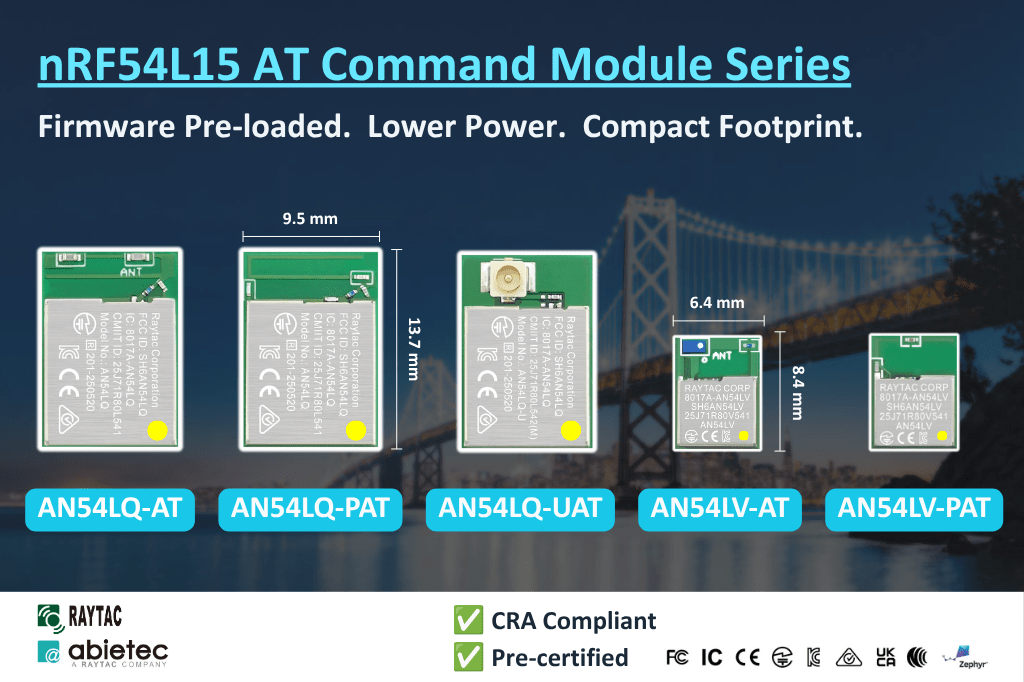
Introducing Raytac’s nRF54L15 AT Command Module Series – Pre-loaded firmware with Lower Power Consumption


[CA, USA/Taipei, Taiwan]

Raytac Group, a worldwide leader in wireless modules, wireless solutions, and a Nordic-recommended third-party module manufacturer, is pleased to announce the official release of the AN54LQ-AT and AN54LV-AT series, our newest Bluetooth® Low Energy AT Command modules built upon Nordic Semiconductor’s nRF54L15 ultra-low-power wireless SoC.

Designed for engineers who want to integrate BLE quickly and easily, the AT Command series comes with pre-loaded peripheral (slave) role firmware, enabling straightforward UART communication with a host MCU through simple AT Commands.
Built on Nordic’s next-generation nRF54L15 SoC, the series delivers exceptional power efficiency, reducing power consumption by approximately 50% compared to previous-generation nRF52-based AT Command modules.


The nRF54L15 AT Command family is available in five variants to satisfy different RF and mechanical requirements.

AN54LQ Series
– Ceramic chip antenna: AN54LQ-AT (Click here for full product details)
– PCB trace antenna: AN54LQ-PAT (Click here for full product details)
– u.FL connector for external antenna: AN54LQ-UAT (Click here for full product details)

AN54LV Series
– Ceramic chip antenna: AN54LV-AT (Click here for full product details)
– PCB trace antenna: AN54LV-PAT (Click here for full product details)

AT Command Development Kit
– AN54LQ Series: AN54LQ-AT-UART-S (Click here for full product details)
– AN54LV Series AN54LV-AT-UART-S (Click here for full product details)


The standard AN54LQ family measures only 9.5 × 13.7 × 1.8 mm, while the AN54LV family further reduces the footprint to just 6.4 × 8.4 × 1.5 mm, making it an excellent choice for wearable devices, portable products, industrial sensors, medical devices, and other space-constrained applications.

Engineers can integrate Bluetooth communication(peripheral role) into an existing MCU platform without implementing the Bluetooth LE protocol or maintaining a Bluetooth LE firmware stack.

Acting as a seamless bridge between the host MCU and Bluetooth devices, the AT Command module enables easy wireless communication without any complexity of firmware development.


Technical Overview

CategorySpecification
SeriesAN54LQ and AN54LV
Antenna OptionsChip antenna, PCB antenna, u.FL (external antenna)
Bluetooth® CertificationBluetooth® 6.0 certified
RF CertificationsFCC, IC, UKCA, CE, TELEC (MIC), KC, SRRC, NCC, RCM, WPC
Processor128 MHz Arm® Cortex®-M33 processor + 128 MHz RISC-V coprocessor
SecurityEnhanced security aligned with EU Cyber Resilience Act (CRA) requirements
InterfacesUART(Bluetooth Connectivity via UART AT Commands)
Key Features– Rich AT Command(Peripheral/Slave Role) set, No firmware development needed
– Up to 50% Lower Power Consumption vs. nRF52-based AT Command Modules
– Selectable 1 Mbps / 2 Mbps PHY Data Rate
– Custom UUID Configuration (Hex Format)
– Built-in Power Saving & GPIO Wake-Up Functions
– Advertising/Connection Control
– RSSI, Battery Monitoring & Device Management


List of supported commands

  • Setting of device name
  • Choose data rate of 1Mbps or 2Mbps on-air
  • Set TX output power in 6 levels.
  • Set advertising time
  • Set connection interval under Mode 2
  • Enable/disable advertising
  • 8 sets of UART baud rates
  • Enable/disable UART flow control
  • Enable/disable interface of UART hardware
  • Power-down mode for power saving and GPIO wake-up
  • Recover-to-default setting with hardware and software method
  • System reset of hardware and software
  • Set serial number and retrieve
  • Set or retrieve MAC Address
  • Retrieve ADC value for battery detection, delivering the information through battery service.
  • Enable/disable connection command mode
  • Setting of advertising interval
  • Retrieve RSSI value of the connected


The modules are already in Mass Production.

Please subscribe to Raytac’s WordPress blog: https://raytac.blog for more upcoming information.

Welcome to send an inquiry to any of the below links:
Raytac Corporation contact form: https://www.raytac.com/contact/
Raytac Corporation mailbox: sales@raytac.com

abietec Inc. contact form: https://www.abietec.com/contact
abietec Inc. mailbox: service@abietec.com

to discuss how Raytac/abietec can support your project.

Let’s keep in touch!


Raytac Corporation 勁達國際電子股份有限公司 / Raytac Corporation (USA) / abietec Inc.
A Bluetooth, Wi-Fi, and LoRa Module Maker/ODM & OEM Manufacturer based on
Nordic nRF54; nRF53: nRF52; nRF51; nRF7002
Infineon: CYW55912
NXP: RW610, RW612
Semtech: SX1262

Bluetooth Specification: BT6 ; BT5.4 ; BT5.3 ; BT5.2.
Wi-Fi Specification: Wi-Fi 6
LoRa Specification: LoRaWAN
Zephyr Project Silver Member

All products are FCC/IC/CE/Telec/KC/RCM/SRRC/NCC/WPC/RoHS/Reach Certified.

Tel: +886-2-3234-0208(TW)/+1-626-328-3827(USA)

Raytac’s Impact on the Zephyr Ecosystem – Little Module, Huge Potential

In this article, Stanley Huang, MSc, Deputy Manager of Firmware Development at Raytac, shares insights on how Raytac’s modules and development kits strengthen the Zephyr ecosystem.

[Stanley Huang, New Taipei City]
When we talk about open-source platforms like Zephyr RTOS, most people immediately think of major chip manufacturers such as ST Micro, NXP, or Nordic. But to me, what truly makes Zephyr famous amongst the developer community is through modules that developers can actually touch: those they can instantly plug in and start using right away. In these terms, Raytac is one of the most underrated and important contributors in this ecosystem.

Raytac Modules Make Zephyr More Accessible
Instead of being a chip vendor, we specialize in producing high-quality, globally certified modules – especially Bluetooth and Wi-Fi modules based on Nordic chipsets, such as the AN7002Q, AN54LQ, AN54LV, MDBT53, MDBT50Q, and MDBT42Q.
All these modules are already certified with Regional RF compliances(FCC, IC, CE, KC, etc.) and the latest Bluetooth Specifications, offering developers the assurance of “plug and play” and “production-ready” solutions.
We assure that our modules have become one of the easiest platforms for Zephyr developers to test BLE functionality.

I paired Zephyr with Raytac’s MDBT50Q-DB-40 development board when I first applied Zephyr in a BLE Peripheral project . With a simple west build -b nrf52840dk_nrf52840 followed by flashing the firmware using J-Link or nRF Connect for Desktop, the BLE beacon immediately showed up on my phone. Clean, simple, noise-free, and developer-friendly – that’s Raytac’s style.

Modules play an invaluable role in product development
Many would say Raytac only makes modules and the real core is still Nordic’s SoC.
But I believe that in an open-source system like Zephyr, the hardware that helps your project runs first is that which contributes the most.
Our Zephyr-registered development kits eliminate the hassles of manual soldering, regulatory certification, and antenna design, allowing engineers to fully focus on developing applications based on Zephyr.
They can run Zephyr’s BLE peripheral, central, GATT, and HCI samples directly on the Raytac kits that act as a one-stop hardware solution.
In many ways, Raytac has pushed Zephyr’s usability a significant step forward.

Raytac Also Expands Zephyr’s Application Horizon
Many of Raytac’s modules are ultra-compact- ideal for wearables, smart sensors, and low-power beacons…etc. These are the scenarios where Zephyr excels, and Raytac’s modules provide the physical platform to enable companies to build their “dream devices".
When running Zephyr on a tiny module like the AN54LV-15(Product Link), developers will be amazed that something smaller than a piece of corn kernel can run a full RTOS, manage the BLE stack, trigger timers, drive I2C sensors, and even connect to the cloud, all by itself.  This combination doesn’t just make development easier – it inspires developers to realize that: “they can build their projects using Raytac’s hardware.”

Raytac may not be the star, but we’re always ready for you
On Zephyr’s main stage, companies like Nordic, STM, and Intel take the spotlight, but Raytac plays an essential supporting role – supporting the performance from behind the scenes. We offer stable, high quality, and low-power platforms, giving every line of Zephyr code a place to run and every feature a cornerstone.
Our greatest value lies in helping developers skip antenna design and RF interference concerns – so they can jump right into the Zephyr ecosystem with ease.

Our products deliver the reliability you need and the efficiency you expect.

We invite you to explore more about how Raytac supports the Zephyr ecosystem and discover our range of development kits and modules designed for seamless integration.
Visit our Zephyr page here: https://docs.zephyrproject.org/latest/boards/raytac/index.html
Visit Zephyr’s Ecosystem Vendors page: https://www.zephyrproject.org/ecosystem-vendor-offerings/

For more information, please contact:
Raytac Contact Form: https://www.raytac.com/contact/
Raytac Sales email: sales@raytac.com
abietec Service email: service@abietec.com


Article by Firmware Deputy Manager: Stanley Huang
Edited by Business Development Manager: Tony Yin

Raytac Corporation 勁達國際電子股份有限公司 / Raytac Corporation (USA) / abietec Inc.
A Bluetooth, Wi-Fi, and LoRa Module Maker/ODM & OEM Manufacturer based on
Nordic nRF54; nRF53: nRF52; nRF51; nRF7002
Semtech Specification: SX1262

Bluetooth Specification: BT6 ; BT5.4 ; BT5.3 ; BT5.2.
Wi-Fi Specification: Wi-Fi 6
LoRa Specification: LoRaWAN


All products are FCC/IC/CE/Telec/KC/RCM/SRRC/NCC/WPC/RoHS/Reach Pre-Certified.
http://www.raytac.com
https://www.raytac.com/contact/
email: sales@raytac.com
Tel: +886-2-3234-0208(TW)/+1-626-217-3139(USA)

Raytac Released MDBT50Q (Dual Roles / BT5 Long Range) AT Command Module

Raytac is glad to announce a brand new AT command module line released today.

Highlight 

* Supports BT5.1/ BT5 Long Range Feature
* Works either as Central (Master) or Peripheral (Slave)
Module
Demo Board
MDBT50Q-AT-UART-ATMS

Raytac’s UART Service (AT Command) – How do you get started?

Easy! At least when you know what to do. Many of our customers just want a device that provides Bluetooth technology to their product or solution that they’ve developed. However, utilizing the full capacity of the Bluetooth protocol is not always easy and sometimes not even necessary. For these customers, choosing Raytac’s modules/dongles loaded with AT Command, such as MDBT50Q-RX-ATM, is the best choice.
But even a product such as MDBT50Q-RX-ATM that is supposed to make it easy for customers to wirelessly transfer data from one device to the next can be difficult to use – especially when you don’t know HOW.So, I thought we’d take this in two simple steps.

  1. Device Name

To be really sure that you can connect to the device thus making you able to pair with it, you will have to make sure that the device name setting in the AT Command list is set to the name you want or need.
For example, if you have a device set to have the name “I_love_Bluetooth" and you haven’t changed the settings in the AT Command, you will not be able to pair your MDBT50Q-RX-ATM with this device.
As you can see in the picture below, the default setting for this device’s name is “Raytac AT-UART".

When editing this name, you get a smaller window like this popping up:

Make sure that the name set on your device that you wish to connect with the dongle AND this name in the AT-Command device’s list are the same.

  1. RSSI

This is a trickier part – especially when you don’t know what it is.
RSSI stands for Received Signal Strength Indicator and, just like the name implies, is a value of strength of which the incoming signal has to be in order to even be considered by the scanning device.
In other words, the lower the value is set to, the weaker signals the scanning device will show.
The standard value of Raytac’s AT-Command modules/dongle is -51 and the setting screen looks like this:

  1. Slave device’s SDK

What many new customers seem to believe is that if you use our AT-Command modules/dongles, you won’t need to do anything – they will just magically communicate with each other somehow.
I hate to break it to you, but no… that’s not how it works. You will have to at least make sure that the two devices “speak the same language". As for our AT-Command modules/dongles, or in this case MDBT50Q-RX-ATM, it is through a “language" (a.k.a. protocol) called UART.
First of all, “UART" is not “U-ART" although it’s kind of pronounced that way, but it’s an abbreviation that stands for Universal Asynchronous Receiver/Transmitter. You can read about it here.
I will spare you all the details about the UART protocol itself, but one thing that we will need to make sure of is that you have it installed onto your slave device.

Hopefully, you’ve downloaded Nordic’s latest SDK and you have it ready on your computer. You can download them directly HERE.
Note: This file is quite big (~130MB), so DO NOT click on the last link if you don’t want to download this on your current device.

Inside this file, you will find a lot of stuff. However, for this particular case, we only really need to care about the “examples" folder.

31bcd-nordic2bsdk2bfolder

In this folder, we will have (surprise surprise!) even more folders 😀
As per usual, we don’t have to check them all out. In this case, we specifically only want to check the “ble_peripheral" and the “peripheral" folders.

003e6-nordic2bsdk2bfolder2b2528examples2b-2bble_peripheral2529

Go into the former folder and you’ll find see the following folders in which you will want to enter the “ble_app_uart" folder.:

484a6-nordic2bsdk2bfolder2b2528examples2b-2bble_peripheral2b-2bble_app_uart2529

In this folder, you will see five more folders and two files, but we only want to check out one of them depending on which chip type you’re using in your slave device. Let’s say you’re using a nRF52832 chip (or module such as MDBT42Q-P512KV2), then you’d want to enter the first folder called pca10040. Check the picture below to see which folder you’d want to enter:

ab33e-nordic2bsdk2bfolder2b2528examples2b-2bble_peripheral2b-2bble_app_uart2b-2bboardversionselection2529

Assuming you entered the folder that I mentioned above, you will then want to enter the “s132″ folder.
91608-nordic2bsdk2bfolder2b2528examples2b-2bble_peripheral2b-2bble_app_uart2b-2bboardversionselection2b-2bs1322529

Once you’re in here, I am pretty sure you developers out there know what to pick 🙂

In the beginning of this section, however, I also mentioned another folder called “peripheral" which we will guide you through now – even if it’s very similar to what we just did.
692fd-nordic2bsdk2bfolder2b2528examples2b-2bperipheral2529
As you can see, there are a TON of folders in here, but we will cherry-pick our folders here too.
Let’s say that you’d like to be able to make your slave device to read and transmit information from a sensor. Supposedly, most sensors use either the I2C or the SPI interface. In each respective folder, you will find the same folder layout as in the previous picture – folders representing what chip/module you have.
The main point of showing you this is simply because from these two folders, you can snatch the small amount of code that you need to edit the main code of your UART main-code so that you can both read and send the data from the sensor you might have.

Hopefully, you’ve now started to realize how these things come together and we can finally start to connect these devices. This takes us to the next step:

  1. ATSCANNEW

Once that’s done, you will need to use your AT-Command module/dongle (here MDBT50Q-RX-ATM) to scan for the slave device that you want to pair. To do this, you first have to make sure your slave device is broadcasting, then execute a command called ATSCANNEW.
Once you’ve done so, your MDBT50Q-RX-ATM’s blue LED will hopefully go from fast blinking to a slower blinking. This means that your two devices, master and slave, have now paired successfully. Wohoo! 🙂

We hope that this makes our AT-Command modules/dongles even easier to use!
Raytac wishes you all happy tinkering 🙂

Raytac Corporation 勁達國際電子有限公司 A BT 5.1 & BT 5 & BT 4.2 module maker based on Nordic nRF53 & nRF52 solution (nRF5340 & nRF52840 & nRF52832 & nRF52811 & nRF52810 & nRF51822)

www.raytac.com email:service@raytac.com Tel: +886.2.3234.0208