nRF52 Raytac Module Reflow Profile Reference

Raytac Corporation
A BT4.1 & BT4.2 module maker based on Nordic nRF51 & nRF52 solution 
(nRF51822 & nRF51422 & nRF52832 & nRF51802)
Tel: +886.2.3234.0208
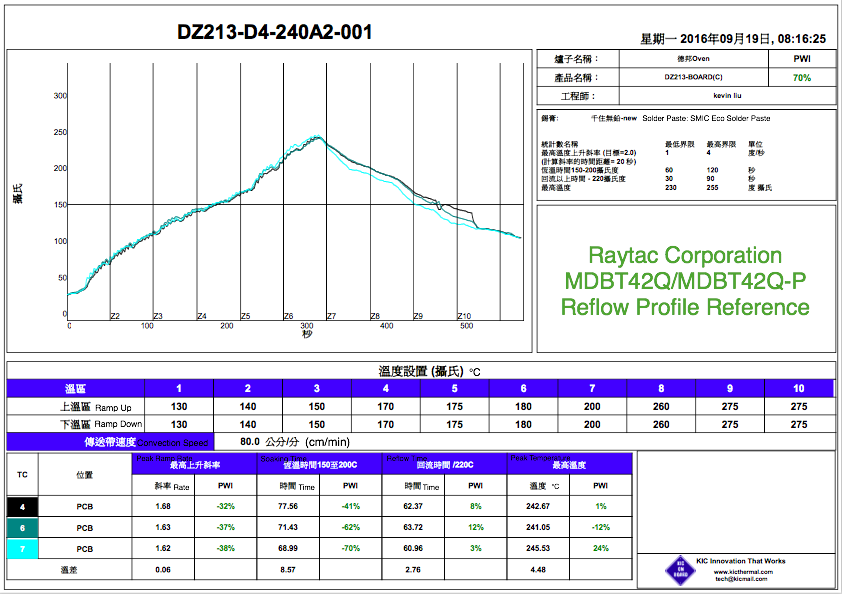
To help customers to proceed the SMT process, Raytac provides the Reflow Profile reference.
The Reflow Profile provided in below is considered as the reference only.
Due to SMT facility and solder paste may be different by each factory, Raytac is strongly suggesting all customers may proceed the trial run first to get the best and right reflow profile which works for their own facility.

Tutorial about Bluetooth low energy By Nordic

Raytac Corporation
A BT4.1 & BT4.2 & BT5 module maker based on Nordic nRF51 & nRF52 solution 
(nRF51822 & nRF51422 & nRF52832 & nR52810 & nRF52840)
www.raytac.com          email: cs@raytac.com          Tel: +886.2.3234.0208
Check out our two-part video tutorial about #Bluetooth low energy. In this tutorial, Nordic gives a developer’s introduction to Bluetooth and the development tools offered.

Part 1/2: Introduction to Bluetooth low energy (BLE)

An application oriented introduction to Bluetooth low energy.

Part 2/2: Nordic Semiconductor’s development resources

An introduction to the development tools offered by Nordic:
  • Code walk-through of an SDK example
  • Tools: mobile apps, pc application (nRF Connect), sniffer
  • Information resources: devzone, infocenter

認証取得済みBLEモジュールと開発環境

Raytac Corporation

A BT4.1 & BT4.2 module maker based on Nordic nRF51 & nRF52 solution 
(nRF51822 & nRF51422 & nRF52832 & nRF51802)
Tel: +886.2.3234.0208
email: service@raytac.com
日本での代理店への連絡は下記の通り。
株式会社フクミ (Fukumi corporation)
消費材企画開発Gr. LBTチーム (Consumer Products R&D Group, LBT team)
榊 和優 (Kazumasa Sakaki)
Tel : 03-5687-2890 (+81-3-5687-2890)
Mail : lbt_bt@fukumi.co.jp
 
ブログから引用。詳細は下記Link先へ。

認証取得済みBLEモジュールと開発環境

BLEモジュールを選定する際に各国の認証取得状況やBluetoothロゴ認証の有無は
初期費用予算との関係や信頼性の点で、判断材料としては大きな要素かと思います。
ただし、取得済みだからといって
自身が想定している環境で組み込めるとは限りません。
giteki mark singleBluetooth_FM_Color
開発環境において
モジュールの評価段階において以下のことを確認しておくと良いと思います。
①電波法の出力設定
例えば、NordicのnRF52832の場合、送信出力を+4dBm ~ -20dBmの範囲で
プログラムが可能です。
現在選考されているBLEモジュールが電波法の技適マークを取得している場合、
どの送信出力設定で空中線電力の規定値内であると評価を受けているか確認が必要です。
もし、最大値の+4dBm未満での取得の場合は、
自身の開発時に送信出力を+4dBmでプログラムしてしまった場合、
基準値以上の空中線電力となる可能性があり、違法となってしまうので注意が必要です。
Raytacのモジュールは+4dBmの設定にて技適マークを取得していますので、
プログラマブルな範囲では規定値を超すことは有りませんので安心です。
②QDID vs SDK+SoftDevice
選考されているBLEモジュールがNordicのSoCを採用している場合は、
Nordicが用意するSDKとSoftDeviceを利用するかと思います。
その際注意が必要なのが、どのバージョンを選択するか?という事です。
まずはQDIDからどのSoftDeviceのバージョンが対応しているか確認する必要があります。
(例えば、RaytacのBLEモジュールの場合)
品番「MDBT40(SoC nRF51822)シリーズ」はBluetooth 4.1にてQDIDが登録されています。
これは直近のSoftDeviceで言うところのS11xにあたります。
この場合、S130とそれに対応するSDK11.0.0の組み合わせで開発を進めてしまった場合、
Core ICSの結果とQDIDの情報に不一致が発生してしまうため、新たにDIDの取得が必要です。
したがってS13xで開発を進める場合はMDBT42Q(SoC nRF52832)を検討する必要があります。
以上の様に、モジュールの提供者に認証取得範囲で使用するための各種条件を
事前に確認されることをお勧めいたします。

Nordic nRF52 Module Solution Evaluation Board Now Available!

Raytac Corporation
A BT4.1 & BT4.2 module maker based on Nordic nRF51 & nRF52 solution 
(nRF51822 & nRF51422 & nRF52832 & nRF51802)
Tel: +886.2.3234.0208
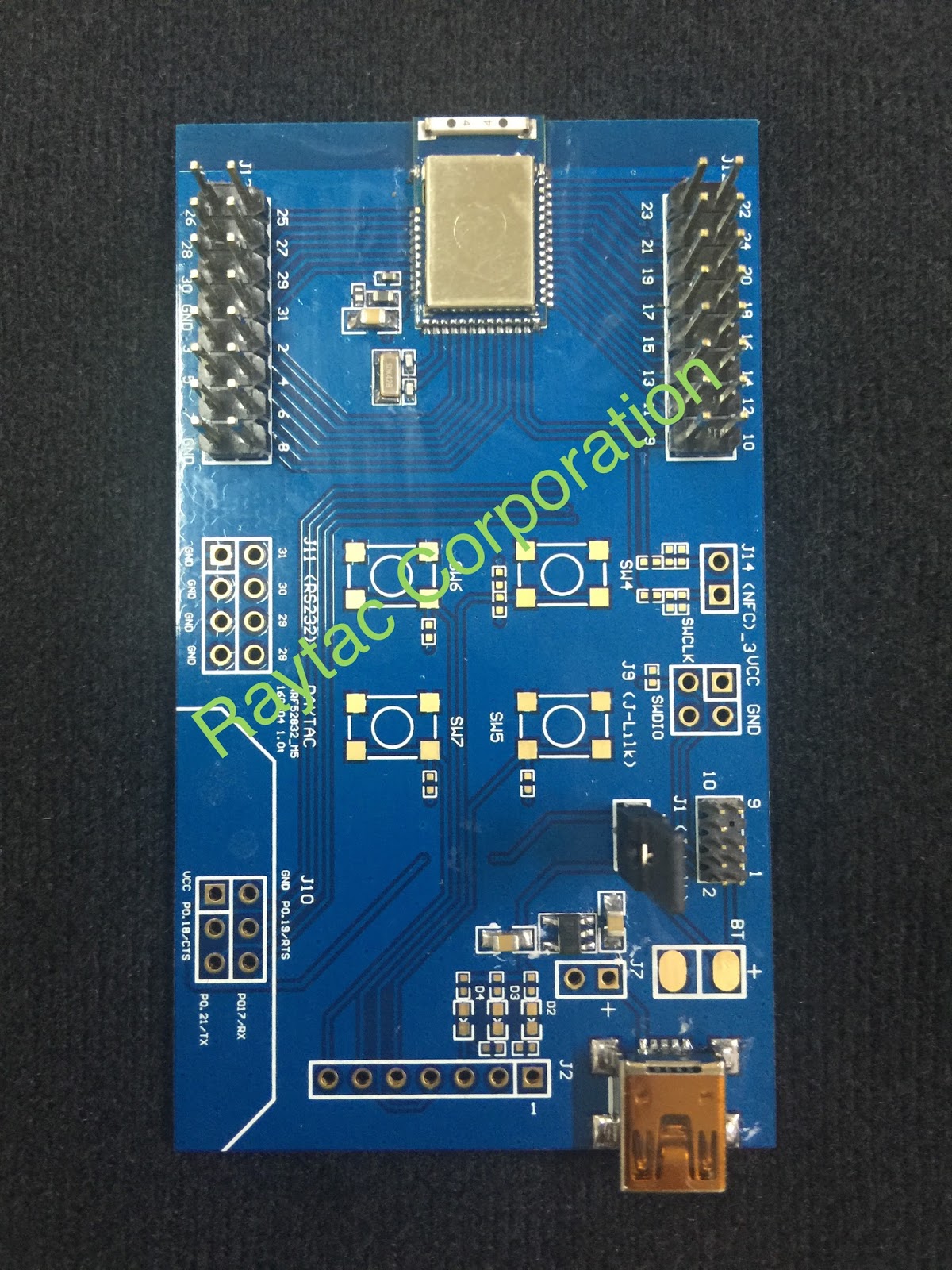
To implement the solution by module, the evaluation board is necessary and practical.
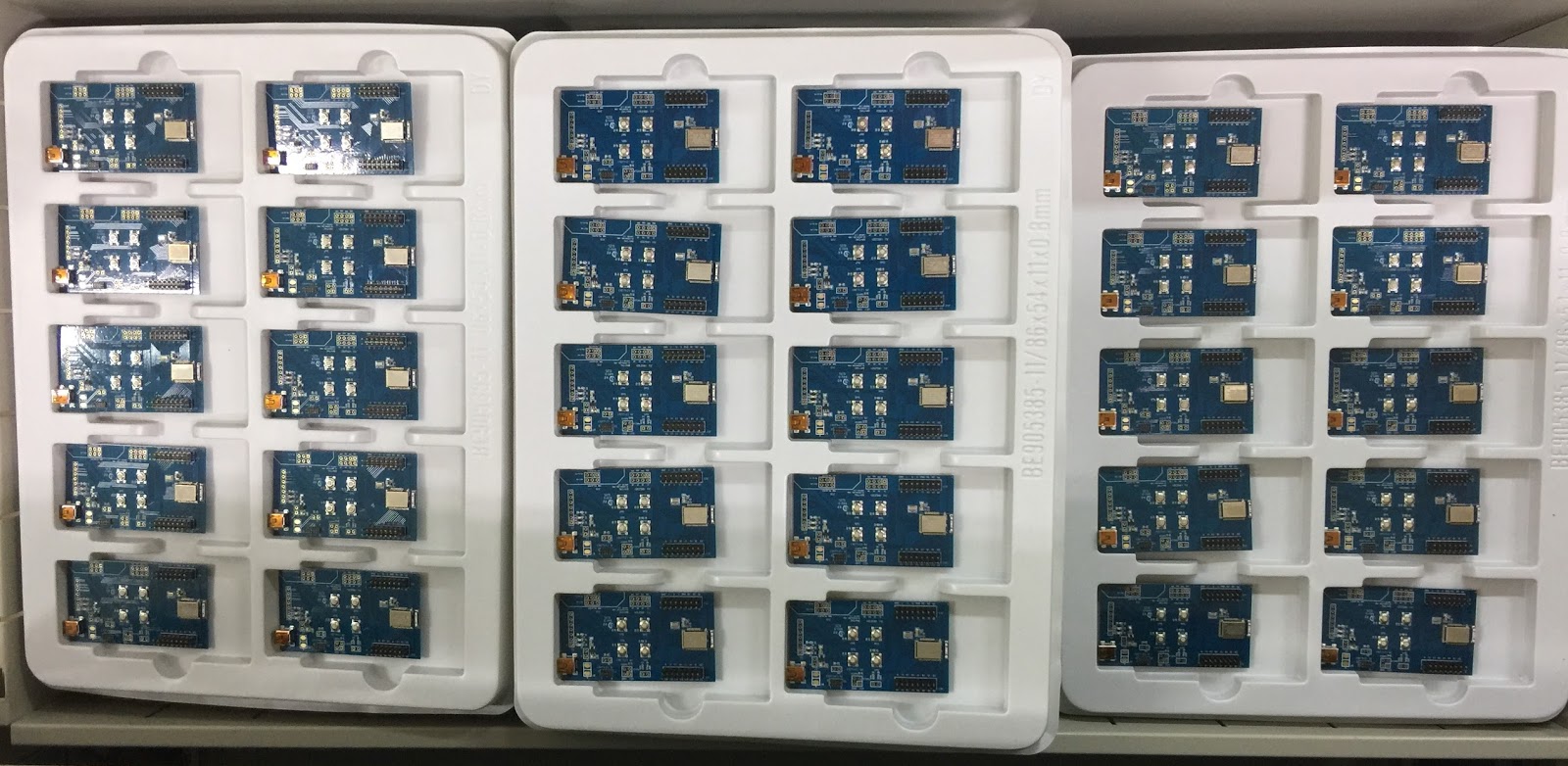
Raytac Corporation has released 3 series of module solution based on Nordic nRF52832 (nRF52 series).
MDBT42 / MDBT42Q / MDBT42N
The evaluation board is designed and made up based on MDBT42Q, which has 32 GPIO that may satisfy all developers’ demand, and now is available for all developers to have a quick and easy experience to explore the Bluetooth world.
Those who are interested in the evaluation board may access Raytac’s Distributor or come up to contact with Raytac directly.

GPIOって???

Raytac Corporation

A BT4.1 & BT4.2 module maker based on Nordic nRF51 & nRF52 solution 
(nRF51822 & nRF51422 & nRF52832 & nRF51802)
Tel: +886.2.3234.0208
email: service@raytac.com
日本での代理店への連絡は下記の通り。
株式会社フクミ (Fukumi corporation)
消費材企画開発Gr. LBTチーム (Consumer Products R&D Group, LBT team)
榊 和優 (Kazumasa Sakaki)
Tel : 03-5687-2890 (+81-3-5687-2890)
Mail : lbt_bt@fukumi.co.jp
ブログから引用。詳細は下記Link先へ。
 
Bluetoothのチップ等の製品仕様などを見ていると
「GPIO 32ピン プログラマブルGPIO」なんて言葉が出てきたりしますが、
そもそも、この「GPIO」って何?について解説する回です。
GPIOはGeneral Purpose Input/Output(汎用入出力)の略語で
簡単に言うと「入力にも出力にも使えるデジタル信号の出入口」です。
そもそもマイコンは「CPU」と「メモリ」、「周辺機能」で構成されていて、
CPUはプログラムに従って、演算やデータの読み書き、条件判断などを行います。
メモリは、そのプログラムを格納します。
周辺機能は、マイコンを便利に使うためのさまざまな機能となります。
例えば、CPUと外部のセンサやスイッチなどの信号のやり取りをするために、
周辺機能である「入出力ポート(I/Oポート)」が必要です。
この入出力ポートのうちデジタル信号の出入口がGPIOです。
例えば、たくさんのセンサを積んだ製品には
このGPIOピンをたくさん使用することになりますが、その分サイズが大きくなります。
RaytacではNordic SoC nRF52832のWL-CSPパッケージを積んだモジュールを現在開発中で、
近々GPIO 31ピンと20ピンの2バージョンのリリース情報が報告できると思います。

Open source Bluetooth low energy beacon is so simple to program and debug almost anyone can do it wirelessly from a website with JavaScript

Raytac Corporation
A BT4.1 & BT4.2 module maker based on Nordic nRF51 & nRF52 solution 
(nRF51822 & nRF51422 & nRF52832 & nRF51802)
Tel: +886.2.3234.0208
This open source Bluetooth low energy beacon is like a development kit and finished product all in one small package that needs no wires or software
Entering its last week on Kickstarter for delivery in December (campaign ends Friday August 5 at 8pm GMT) the $30 Puck.js has all the required programing and debug software tools built-in, and runs from a single Nordic Semiconductor nRF52832 Bluetooth low energy System-on-Chip (SoC) with built-in ARM Cortex M4F processor
,
Nordic Semiconductor today announces the availability on Kickstarter of a Nordic nRF52832 SoC based Bluetooth® low energy (formerly Bluetooth Smart) beacon, named Puck.js, that is said to be so simple to program almost anyone can do it wirelessly from a website using a graphical editor or easy-to-learn JavaScript instead of C or C++ traditionally used by Bluetooth low energy beacon developers.
“Most manufacturers conveniently gloss over the difficulties of programming their hardware, and other beacons are provided without software or left crippled by their boring factory-installed firmware,” says UK-based Puck.js creator, Gordon Williams. “Puck.js is different. It comes with our Open Source JavaScript interpreter ‘Espruino’ pre-installed, which makes it incredibly easy-to-use and means you can get started in just seconds, without any prior programming experience.”
The intentionally hacker-friendly Puck.js is open source, supports both the iBeacon and Eddystone beacon formats, and will be supplied with firmware updates for the forthcoming Bluetooth v5.0 specification that will quadruple the range and double the speed of Bluetooth v4.2. Puck.js has a circular 35mm diameter form-factor that is 10mm thick, with a silicone rubber cover and plastic base. It is powered from a CR2032 coin cell battery and includes a magnetometer (digital compass), user-assignable tactile button, and four (Red, Green, Blue, and Infrared) LEDs.
Thanks to the Nordic Semiconductor nRF52832 SoC, the Puck.js benefits from an extremely powerful ARM® Cortex®-M4F processor, 64MHz clock speed, an extremely generous 64kB of RAM and 512kB of Flash, built-in Near-Field Comms (NFC™), Over-the-Air firmware updates, 12-bit ADC, timers, SPI, I2C, and serial interfaces that can be used on any available pins, plus a temperature sensor.
Williams says that in summary this means the Puck.js can measure rotation (e.g. using the Puck as a control knob), light, temperature, magnetic fields (e.g. magnets used on doors to detect opening and closing or water level via a magnet on a float), can control Infrared devices, and produce any color light.
“JavaScript is probably the most popular programming language at the moment and the majority of web developers, makers, and students at school wouldn’t usually have used C or C++,” Williams continues. “So what I aimed to do with Puck.js was lower the barrier-to-entry and make development easier and more fun – allowing a whole bunch of people to use Bluetooth low energy beacon and IoT technologies that may otherwise be restricted to professional embedded developers.”
Williams says Puck.js is like a development kit that’s also a finished product. “You insert a battery, put the case on, and it’s a ready-to-go Bluetooth low energy beacon straight-out-the-box with no wires of software required,” he adds. “At the same time it’s very easy to add new functions and features for home automation projects, IoT prototyping, or education purposes.”

MDBT42Q Development Board Now Available

Raytac Corporation

A BT4.1 & BT4.2 module maker based on Nordic nRF51 & nRF52 solution 

(nRF51822 & nRF51422 & nRF52832 & nRF51802)

Tel: +886.2.3234.0208

MDBT42Q / MDBT42Q-P which are built based on Nordic nRF52832 solution.

The modules now are already in mass production stage for volume shipment.

Raytac would like to announce that MDBT42Q Series Development Board now is available.

Developers may access through Raytac’s Distributors or direct to Raytac Corporation for inquiry.

iBeacon VS. Eddystone

Raytac Corporation

A BT4.1 & BT4.2 module maker based on Nordic nRF51 & nRF52 solution 

(nRF51822 & nRF51422 & nRF52832 & nRF51802)

Tel: +886.2.3234.0208

What is Eddystone

Eddystone is the standard for the beacon using the BLE that Google announced in July 2015.

It is available includes a number of broadcast frame types on all platforms that use the BLE, such as iOS as well as Android open standards, designed to give developers and venue owners flexibility in their beacon developments and applications. Eddystone helps beacons using the Proximity Beacon API, including adding attachments in the cloud and monitoring their health.

https://developers.google.com/beacons/

Feature

Eddystone’s biggest feature is not intended to become a black box such like iBeacon service, works only for iOS. Eddystone program code is designed to be an open standard and has been published in GitHub.

The difference between iBeacon and Eddystone is the “broadcast frame type"

iBeacon transmits ID only (1 Type)

Eddystone transmits not only ID, but also URL and TLM. (3 Types)

Unlike iBeacon, Eddystone provides target users to receive the message through URL without app installing as long as the Bluetooth is turned on. 

Packet

Eddystone is allowed to transmit 17 bytes every packet.

Thus, in case of URL broadcast frame type, the data must be downsize to fit in this 17 bytes limitation

User Scence Example

  • Real time Bus location and operation status
  • Approaching or nearby the poster, the URL link will pup up feeding immediately
  • Nearby Restaurant information feeding.
  • Nearby Shops information feeding

Eddystone is designed to compensate the demerit of iBeacon’s, which is standardization.

However, iBeacon so far is still the most well-known and widely applied service right now as well as iPhone is the most well selling single mobile phone all over the word. 

Thus, the trend of which one will prevail the competition between Eddystone Vs. iBeacon is still a interesting topic and lead the delimma for developers and user to observe closely.

Steps to Qualify Your Bluetooth Products

Raytac Corporation
A BT4.1 & BT4.2 module maker based on Nordic nRF51 & nRF52 solution 
(nRF51822 & nRF51422 & nRF52832 & nRF51802)
Tel: +886.2.3234.0208
To qualify a Bluetooth product always the issue make people headache.
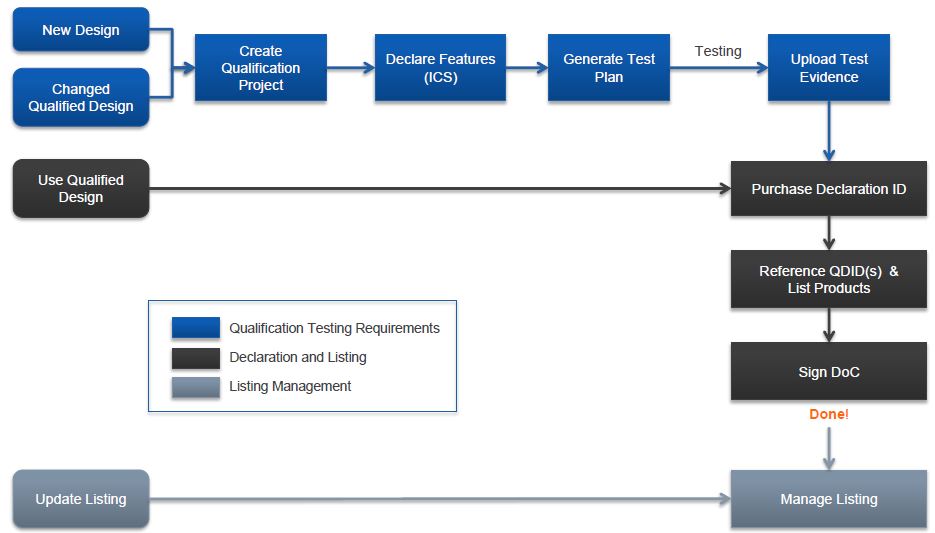
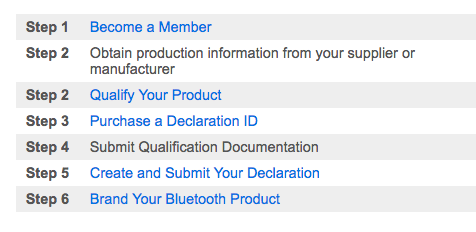
Here, we summarized the procedure become simple steps to help readers to easy to follow
From Step 3~5, we are sincerely suggest readers to entrust BQB (Bluetooth Qualify Body) to provide the professional service to save time and energy according to our experience.

STEP 1 Become a membership

Adopter Membership: Free–> “Most customers pick"
Associated Membership: US$7,500 or US$35,000 (depends on company size)
For more detail of the benefit between different membership, please visit the link as below

STEP 2. Obtain Production Information from supplier or manufacturer

Make sure your chip supplier or module manufacturer has well certified or not.
All information can be refer to SIG’s QDID information in public.
Makes sure the supplier or manufacturers’ QDID has well certified including both Hardware and Profile QDID

STEP 2-1. Qualify Your Products

a. Customers can log in SIG’s website to create a project in Test Plan Generator.
b. Pick up the type of qualification, such as End Product/Subsystem/Component/Development tool/Test equipment…etc.)
c. Link Layer, Spec, Profile

STEP 3. Purchase the Declaration ID (DID)

Readers can buy the DID from SIG’s website directly.

STEP 4. Submit Qualification Document

The Qualification Documents must been signed by BQE (Bluetooth Qualify Engineer) by BQB

STEP 5. Create and Submit the qualification

STEP 6. Brand Your Bluetooth Product