Raytac Group, together with Raytac Corporation (USA) and abietec Inc., will exhibit at Embedded World 2026, taking place March 10–12, 2026, at the Nürnberg Convention Center, Germany.
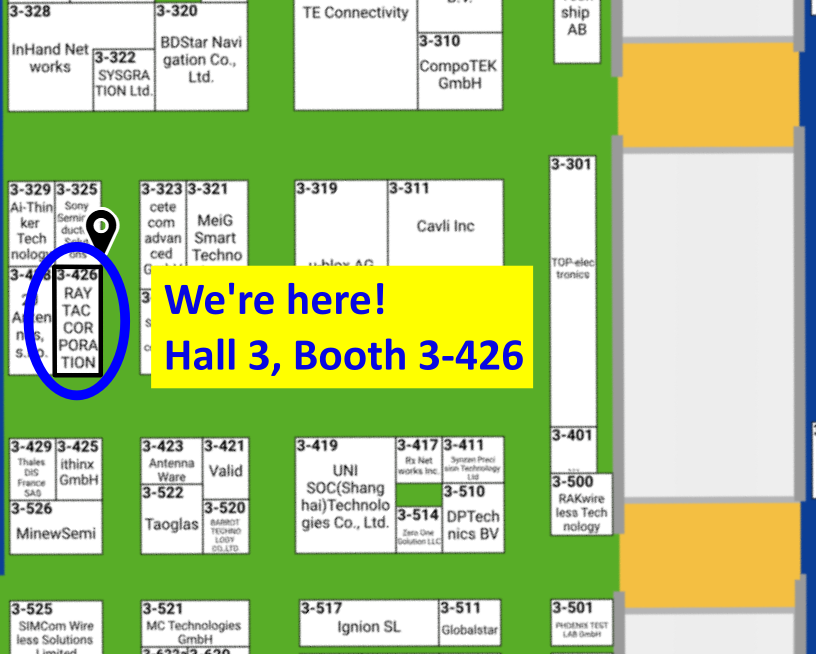
Visit us at Hall 3, Booth 3-426 to discover how Raytac is driving the future of wireless connectivity — from ultra-low-power Bluetooth® modules to advanced Wi-Fi and system-level solutions.
At the show, Raytac will showcase:
Announcement on our AN54LM series: NordicSemi nRF54LM20A modules and dongles that powers up the IoT market with lower power consumption and High speed USB. (Product link click me)
New Nordic nRF54L15 & 10 & 05 series modules: AN54LQ and AN54LV, built for Bluetooth 6.0 with ultra-low power, strong RF performance, coming up with 4 form factors and 7 antenna types
New Wi-Fi + BLE dongle based on the Nordic nRF7002 and nRF5340 solutions
live demos from our partners’ applications
Channel Sounding demo showcasing enhanced ranging accuracy and RF performance
How Raytac’s ecosystem and design partners help you accelerate product development.
abietec Inc. will showcase:
Bluetooth + Wi-Fi combo modules powered by Infineon CYW55912 chipset
Comprehensive OEM/ODM design services supporting a wide range of wireless applications.
Stop by our booth to see live demos, discuss your next project with our engineers, and learn how Raytac and abietec can help bring your wireless ideas to life.
We’re waiting for you at: Embedded World 2026 📍 Nürnberg Convention Center, Germany 📅 March 10–12, 2026 📌 Hall 3, Booth 3-426
Let Raytac and abietec power your next innovation: from concept to connected reality!
Edited by Business Development Manager: Tony Yin
Raytac Corporation 勁達國際電子股份有限公司 / Raytac Corporation (USA) / abietec Inc. A Bluetooth, Wi-Fi, and LoRa Module Maker/ODM & OEM Manufacturer based on Nordic nRF54; nRF53: nRF52; nRF51; nRF7002 Infineon: CYW55912 NXP: RW61 Series Semtech Specification: SX1262
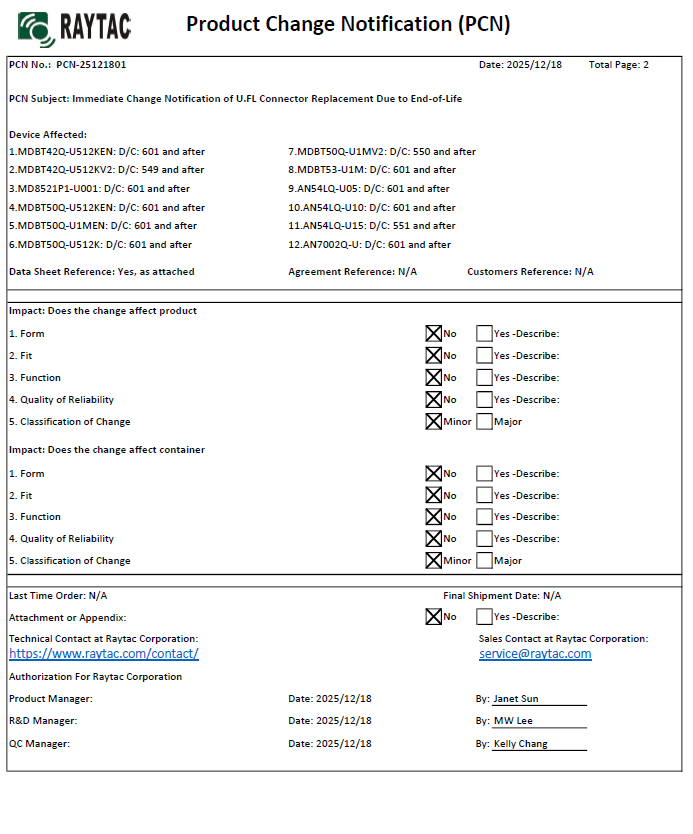
There are no changes on Form, Fit, Function, and Quality of Reliability. Only change in u.FL Connector Appearance. All existing certifications and technical documentations remain valid.
We kindly invite our customers, distributors, and partners to update your records accordingly. For any questions or support regarding this update, feel free to reach out via: sales@raytac.com.
Raytac Corporation 勁達國際電子股份有限公司 / Raytac Corporation (USA) / abietec Inc. A Bluetooth, Wi-Fi, and LoRa Module Maker/ODM & OEM Manufacturer based on Nordic nRF54; nRF53: nRF52; nRF51; nRF7002 Semtech Specification: SX1262
Raytac’s AN54LQ & AN54LV modules, powered by Nordic Semiconductor’s nRF54L family SoCs, come in multiple form factors and antenna options, ensuring your seamless integration into compact, RF-sensitive, or performance-driven designs.
Whether you need a: ☑ Chip antenna; ☑ PCB antenna; ☑ u.FL connector; ☑ Antenna Pin,
Or you want Small, Smaller, or Smallest, we always have a solution that fits best! *All products are pre-certified with FCC, IC, CE, UKCA, Telec, KC, SRRC, NCC, RCM, WPC.
Bluetooth Channel Sounding adds a new dimension to wireless connectivity by combining secure data transfer with the low‑power, low‑cost Bluetooth technology already trusted worldwide — now extended to deliver precise location awareness. This evolution means IoT devices can gain both communication and ranging capabilities in a single, efficient platform. With tens of centimeter distance accuracy, Channel Sounding enables practical new use cases such as secure access, proximity‑based services, indoor navigation, and ‘Find My’ functionality.
Android 16 now supports Channel Sounding APIs, making it possible for developers to access this capability directly on flagship devices like the Pixel 10. With anticipated pervasive adoption across the mobile ecosystem, Channel Sounding is positioned to scale broadly and become a standard feature for IoT applications.
The onceLabs demo was reported as the first of its kind in August, gaining notability on LinkedIn(Post link) — and is now being shown for the first time in a public venue. onceLabs’ free BLE Hero app(Download Link) is a sniffer, analyzer, and development tool, available in app stores, and can be seen in action during the live demo. The Android version has been updated to capture and display Channel Sounding data, giving developers clear insight into ranging accuracy and system performance. Since 2018, Raytac and onceLabs have collaborated to bring new Bluetooth capabilities from specification to market‑ready solutions. Raytac’s proven hardware platforms and onceLabs’ application‑layer software expertise combine to accelerate adoption of emerging standards, showing how partnership can translate advanced technology into product‑ready functionality.
QR code on the left: watch the Channel Sounding Live Demo; QR code on the right: download the BLE Hero app on Google Play.
“Our collaboration with onceLabs has always been about enabling customers to move quickly and confidently with the latest Bluetooth technology,” said Lyon Liu, CEO of Raytac Corporation. “This live demo of Channel Sounding is another example of how our partnership delivers not just modules, but complete solutions that inspire new applications.”
Together, Raytac and onceLabs are demonstrating how Bluetooth Channel Sounding can move from specification to practical demonstrations that product companies can act on.
“With Raytac providing the hardware foundation and onceLabs delivering the application software, we continue to support customers in translating new Bluetooth features into real use cases,” said Joseph Bakalor, President and CTO of onceLabs. “Channel Sounding is a perfect example — and with our expertise in Zephyr RTOS, developers can build on open, production‑ready software that scales from prototype to deployment.”
The Raytac + onceLabs demo will be featured in Raytac Booth 5067 at embedded world North America, November 4–6, 2025, at the Anaheim Convention Center. Attendees are invited to visit the booth to see the demo in action and learn how Raytac and onceLabs can support their next wireless product.
About Raytac Raytac Corporation is a leading provider of wireless modules, offering one of the industry’s broadest portfolios of pre‑certified solutions built on Nordic Semiconductor SoCs. With a focus on quality, reliability, and ease of integration, Raytac helps product companies accelerate development and reduce risk when bringing wireless products to market. From consumer devices to industrial applications, Raytac modules are trusted worldwide for their performance, compliance, and long‑term availability. Company website: www.raytac.com
About onceLabs onceLabs delivers custom embedded firmware and mobile application software with a passion for translating client use cases into cloud‑enabled applications that leverage the latest wireless innovations. Known for delivering quality user experiences while optimizing performance and power consumption, onceLabs helps bring products to life through custom software. With design expertise spanning Bluetooth LE, Wi‑Fi, cellular, and other wireless protocols — and a strong engineering foundation in both embedded and mobile software — onceLabs accelerates time‑to‑market through a systems approach to architecture, continuous integration, and real‑world reliability. Company website: www.oncelabs.com
Edited by Business Development Manager: Tony Yin
Raytac Corporation 勁達國際電子股份有限公司 / Raytac Corporation (USA) / abietec Inc. A Bluetooth, Wi-Fi, and LoRa Module Maker/ODM & OEM Manufacturer based on Nordic nRF54; nRF53: nRF52; nRF51; nRF7002 Semtech Specification: SX1262
Hi readers, did you know that Raytac offers a special service exclusively for our customers? 😉 We offer support services: HEX file verification and flashing firmware into modules per customer’s requests. Compared to the series nRF52 and nRF53’s 2 in 1 or 3 in 1 merged hex files, nRF54L15 requires something slightly different. Following are the tips and suggestions.
Find System Build (sysbuild) ➝ Choose Build System Default
Click Generate and Build
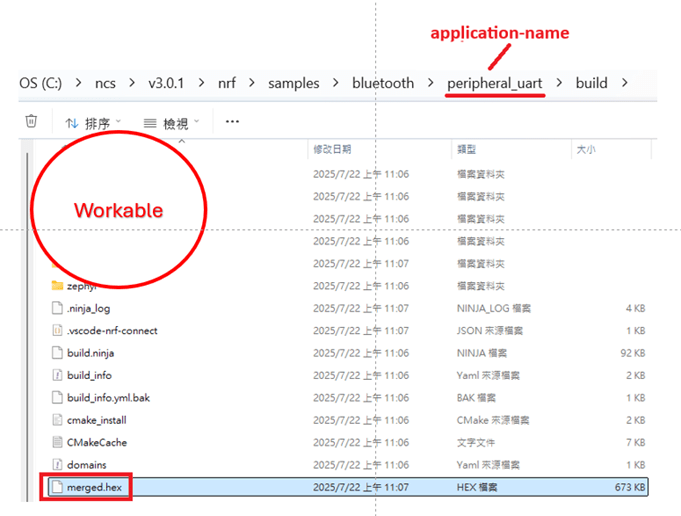
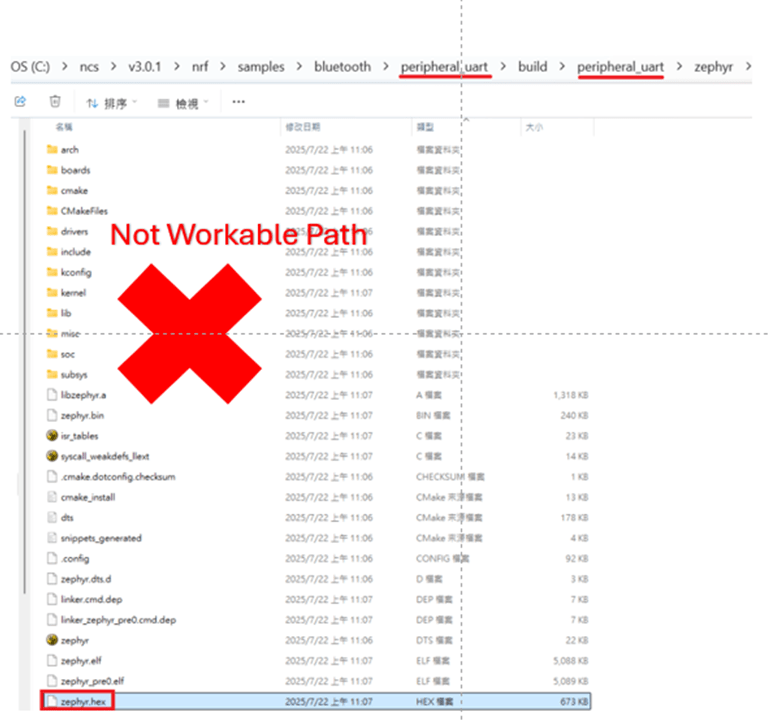
Starting from NCS v2.8.0 (including later versions), the .hex file can be generated in two different paths. 1. ..\nrf\samples\bluetooth\application-name\build\merged.hex 2. ..\nrf\samples\bluetooth\application-name\build\application-name\zephyr\zephyr.hex
Using the AN54LQ/AN54LV series as an example: When you provide the programming file (.hex) for production, please ensure that the file is taken from the following path: 1. ..\nrf\samples\bluetooth\application-name\build\merged.hex And we also do not recommend renaming the merged HEX file due to Nordic suggestions.
Not recommended path: 2. ..\nrf\samples\bluetooth\application-name\build\application-name\zephyr\zephyr.hex The zephyr.hex file is not recommended to be used for flashing or verification in the production process.
Thank you all for your patience in reading! Best wishes for your projects – your success is Raytac’s success! 😊
AN54LQ-X05 Series (nRF54L05, red PCB): Product page
Just like traffic lights that direct every journey safely and efficiently, Raytac’s nRF54L series modules guide your wireless development—keeping you on the right path with cutting-edge performance and exceptional power savings.
🚦 Each light signals a different member of the nRF54L15 / nRF54L10 / nRF54L05 module family—showcasing a clear path for your Bluetooth Low Energy (LE) applications, no matter which industry you’re from and where you’re headed.
These modules are now available for your design-in, offering: ✅ Powerful performance ✅ Ultra-low power consumption ✅ Compact footprints ✅ Full Global certifications: FCC/IC/CE/UKCA/Telec/KC/NCC/SRRC/RCM/WPC ✅ BT 6.0 certified ✅ Full Nordic nRF54 Series compatibility ✅ Pin-to-pin compatible amongst AN54LQ series
Whether you’re building for consumer IoT, industrial sensors, healthcare, or wearables—Raytac’s modules deliver the reliability you need and the efficiency you expect.
Raytac would like to officially announce a Product Change Notice (PCN) for our Bluetooth Low Energy modules based on Nordic Semiconductor’s nRF54L series SoCs, including the nRF54L15, nRF54L10, and nRF54L05. This update specifically concerns the Part Number (PN) changes for improved clarity and product identification across our lineup.
Affected Models Please refer to the table/list below for the full details of the updated part numbers. (Click on the image to zoom in)
Reminder This PCN involves part number naming only. There are no changes to product function, performance, quality, form factor, or safety compliance. All existing certifications and technical documentations remain valid.
We kindly invite our customers, distributors, and partners to update your records accordingly. For any questions or support regarding this update, feel free to reach out via: service@raytac.com
Raytac Corporation 勁達國際電子股份有限公司 / Raytac Corporation (USA) A Bluetooth, Wi-Fi, and LoRa Module Maker/ODM & OEM Manufacturer based on Nordic nRF54; nRF53: nRF52; nRF51; nRF7002 Semtech Specification: SX1262
This guide teaches you how to use MCUboot for DFU (Device Firmware Update), Combined with nRF Connect SDK (NCS) V2.9.1 to upgrade firmware on Raytac’s MDBT50Q series modules.
Table of contents:
Hardware Set Up
Software Kits resource download & install
Compile and load the program a. Open VS Code b. Project setup c. Setup the situation for DFU over UART or DFU over USB d. Start compiling your project e. Load your compiled program into the MDBT50Q-DB-40 demo board
Install nRF Connect for Desktop ➔ install Programmer and Toolchain Manager.
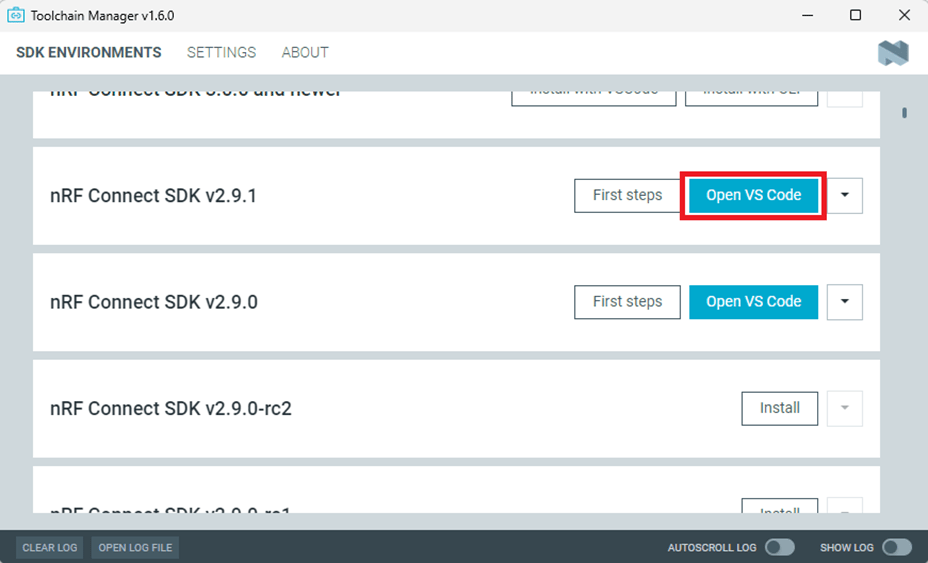
Open Toolchain Manager and install SDK V2.9.1.
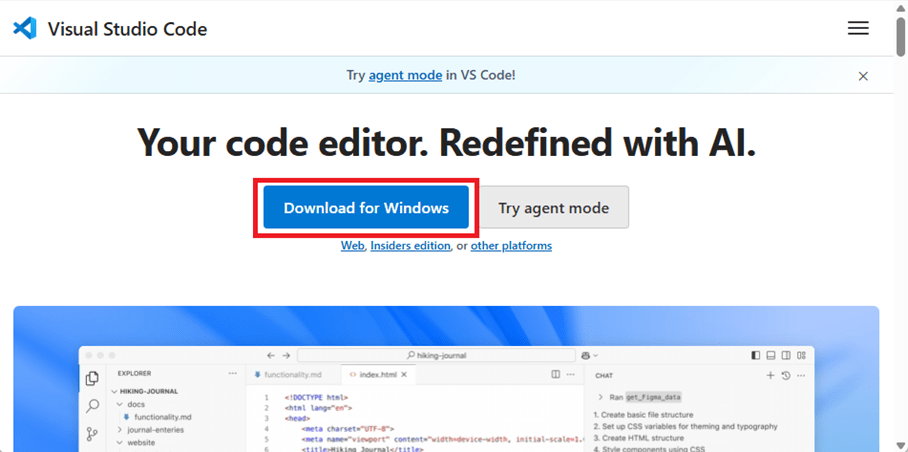
Install Visual Studio Code
3. Compile and load the program a. Open VS Code(Visual Studio Code)
Note: If it’s your first time using the software: after installing all the extensions, you should see the same on your screen.
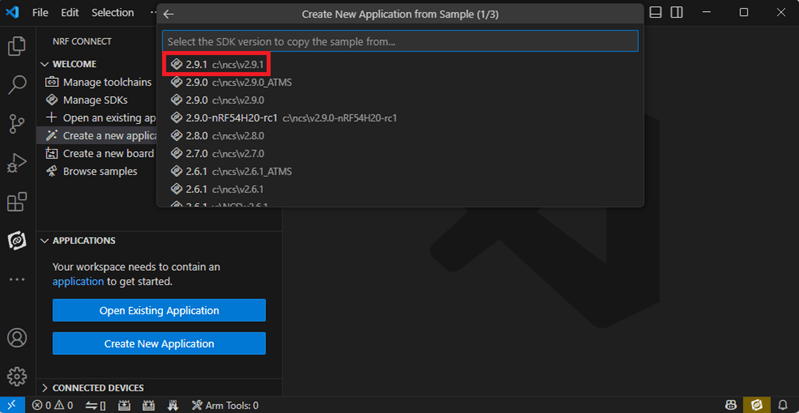
b. Project setup b.1 Create an example code(In this article: peripheral_uart) Please refer to the following steps: Create a new application ➔ Copy a sample ➔ NCS V2.9.1
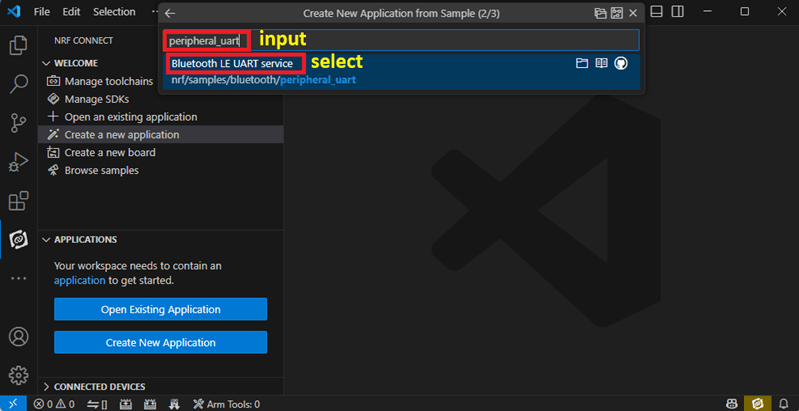
b.2 Name the Project: peripheral_uart Input peripheral_uart and the corresponding example program will appear in the options section below.
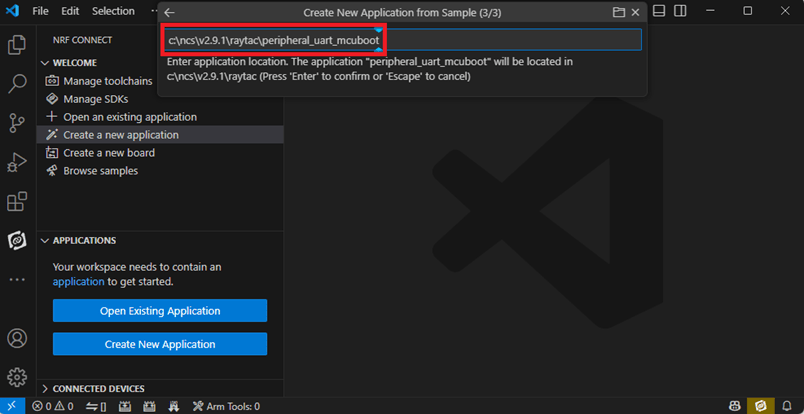
Note: We named the project peripheral_uart_mcuboot to distinguish it. This project will create a directory named peripheral_uart_mcuboot.
c.Build an environment for DFU over UART or DFU over USB – Create a new application ➔ Open
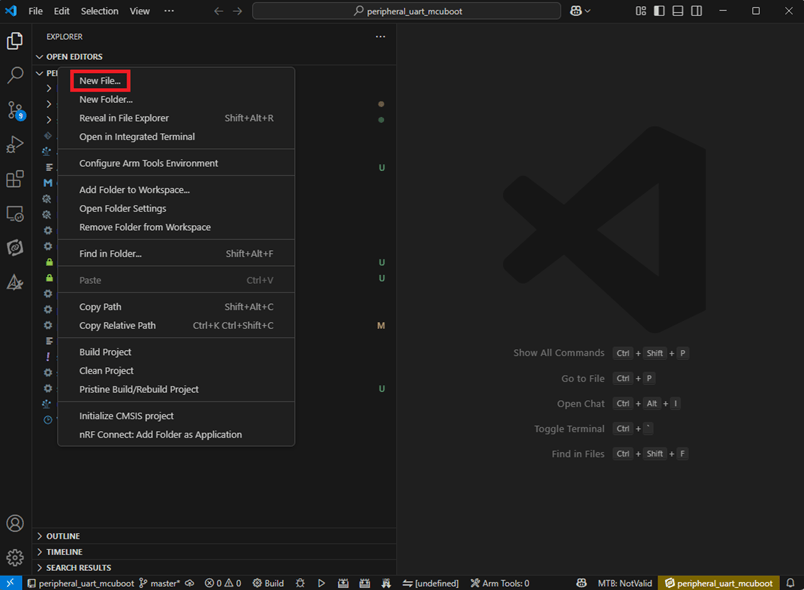
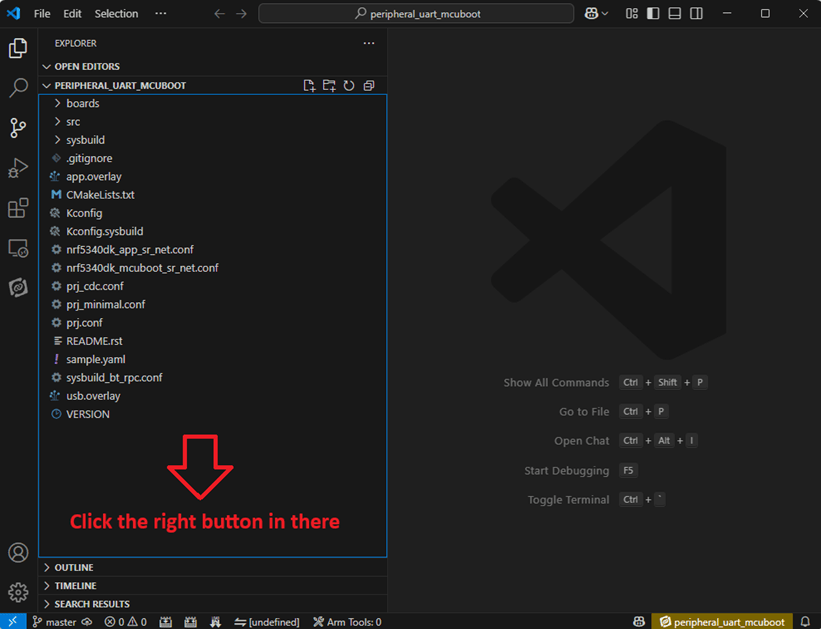
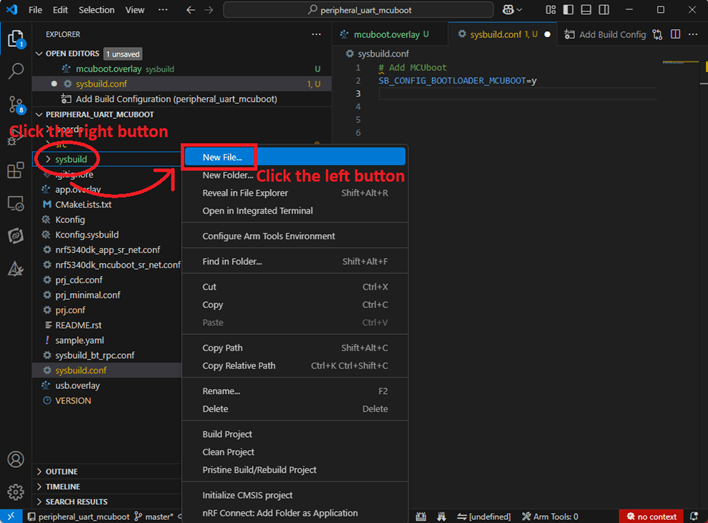
Right click on the project name you just created (peripheral_uart_mcuboot), a pop-up menu will appear. Select the first option “Show in Explorer" from the pop-up menu to display all project files.
Then select New File to create a sysbuild.conf file.
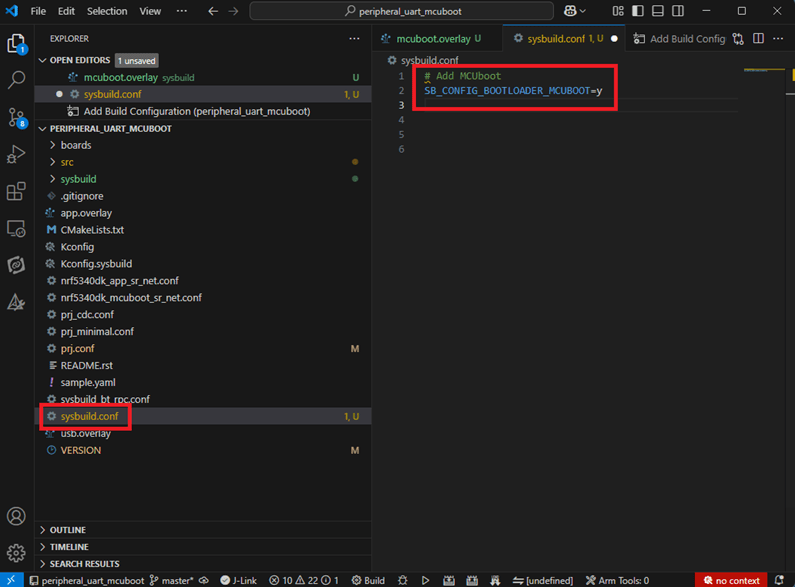
select sysbuild.conf, left-click on it, and a blank box will show.
Input the file name and write: SB_CONFIG_BOOTLOADER_MCUBOOT=y
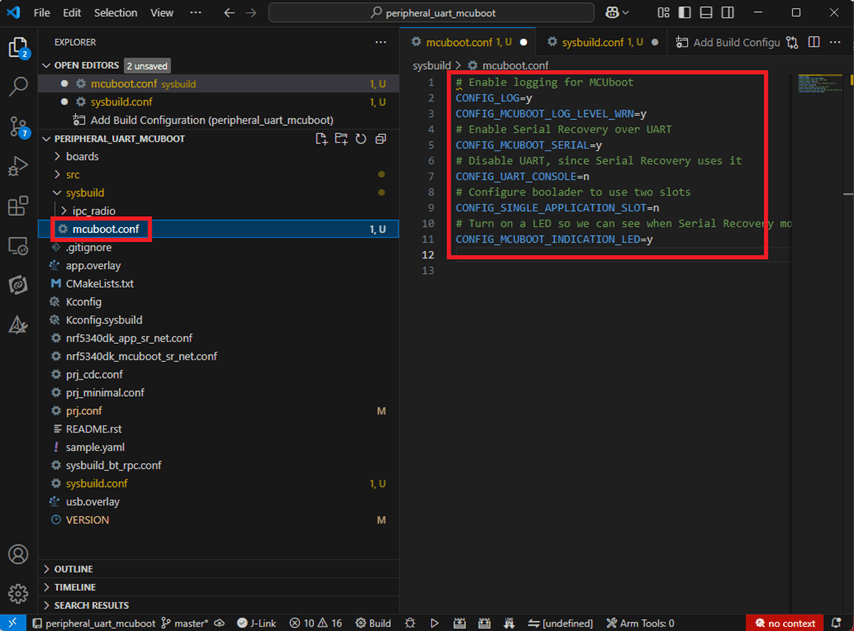
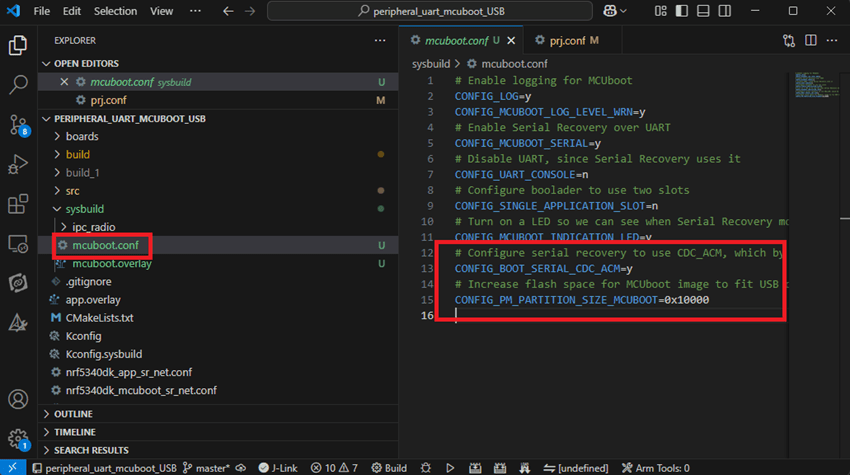
Parameters and instructions Add a new file mcuboot.conf, in the sysbuild folder, and input the following parameters into the file. (Add relevant parameters according to UART or USB) (Note: Please be informed if you want to use DFU over UART in the end, you should use UART when you first create the environment. Similarly, if you want to use DFU over USB, you should create the USB environment at the beginning.)
For DFU over UART # Enable logging for MCUboot CONFIG_LOG=y CONFIG_MCUBOOT_LOG_LEVEL_WRN=y # Enable Serial Recovery over UART CONFIG_MCUBOOT_SERIAL=y # Disable UART, since Serial Recovery uses it CONFIG_UART_CONSOLE=n # Configure the bootloader to use two slots CONFIG_SINGLE_APPLICATION_SLOT=n # Turn on a LED so we can see when Serial Recovery mode is active CONFIG_MCUBOOT_INDICATION_LED=y
For DFU over USB # Enable logging for MCUboot CONFIG_LOG=y CONFIG_MCUBOOT_LOG_LEVEL_WRN=y # Enable Serial Recovery over UART CONFIG_MCUBOOT_SERIAL=y # Disable UART, since Serial Recovery uses it CONFIG_UART_CONSOLE=n # Configure bootloader to use two slots CONFIG_SINGLE_APPLICATION_SLOT=n # Turn on a LED so we can see when Serial Recovery mode is active CONFIG_MCUBOOT_INDICATION_LED=y # Configure serial recovery to use CDC_ACM, which by default uses the USB CONFIG_BOOT_SERIAL_CDC_ACM=y # Increase flash space for the MCUboot image to fit USB drivers CONFIG_PM_PARTITION_SIZE_MCUBOOT=0x10000
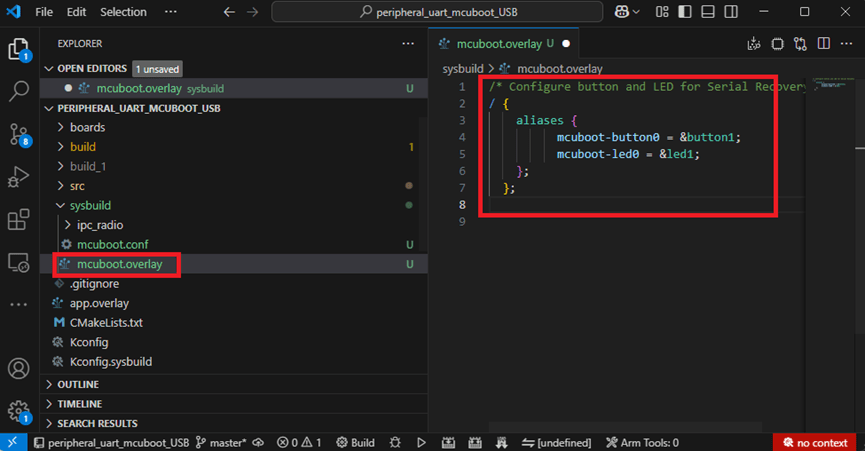
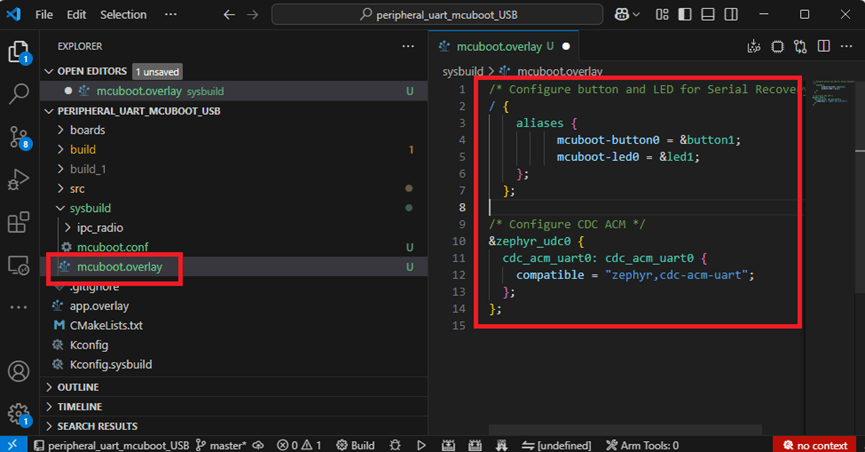
Create a new file: mcuboot.overlay and add the following parameters.
For DFU over UART /* Configure button and LED for Serial Recovery */ / { aliases { mcuboot-button0 = &button0; mcuboot-led0 = &led0; }; };
For DFU over USB /* Configure button and LED for Serial Recovery */ / { aliases { mcuboot-button0 = &button0; mcuboot-led0 = &led0; }; }; /* Configure CDC ACM */ &zephyr_udc0 { cdc_acm_uart0: cdc_acm_uart0 { compatible = “zephyr,cdc-acm-uart"; }; };
Note: if you use DFU over USB, please enable the USB subsystem in prj.conf.
After all the setup is completed, you can start compiling your project.
d. Start compiling your project Add Build Configuration ➔ Select target board ➔ In this example, choose raytac_mdbt50q_db_40/nrf52840.
Start compiling by clicking “Generate and Build" at the bottom-right corner.
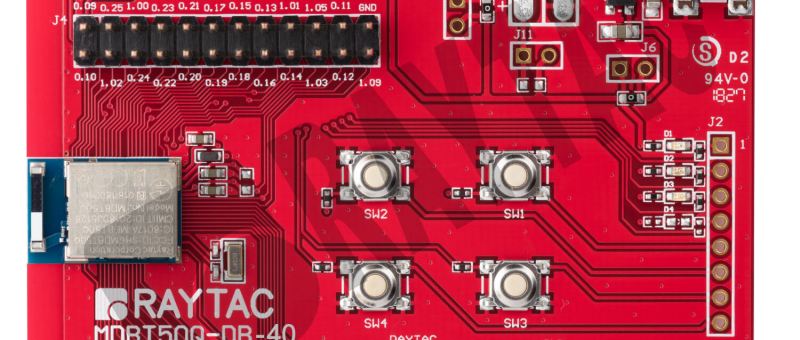
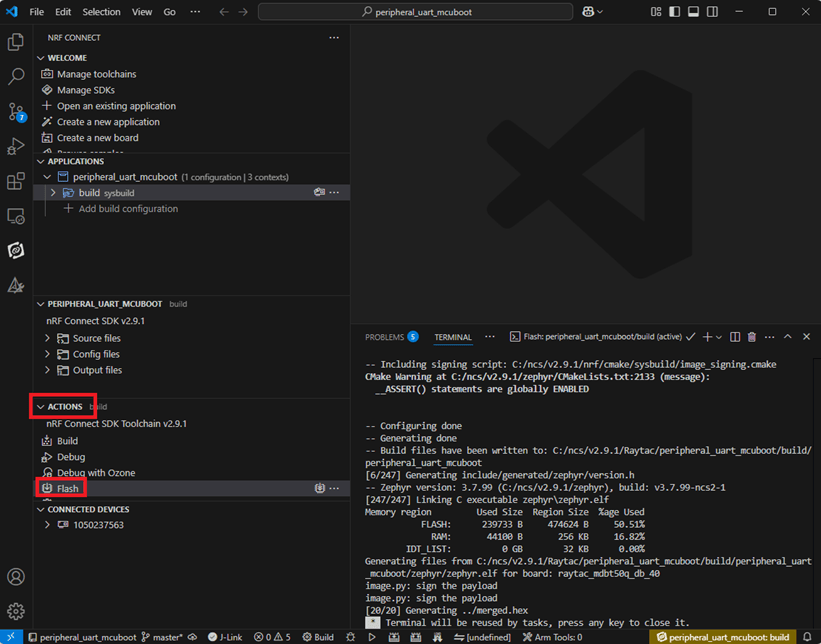
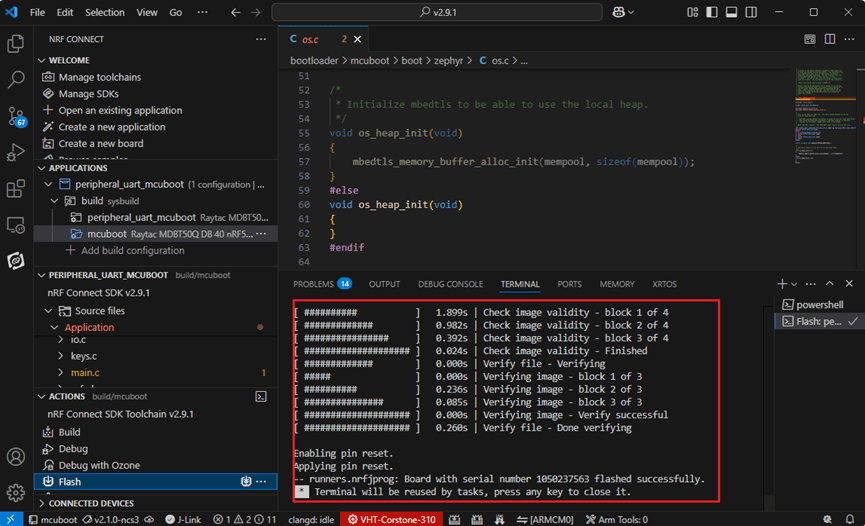
e. Load your compiled program into the MDBT50Q-DB-40 demo board After compiling without error, select the flash function to load your program into the MDBT50Q-DB-40 demo board.
If the below is shown, it means that you have successfully loaded your program into the demo board.
4. DFU to MDBT50Q-DB-40 through UART / USB DFU over UART Hold the SW2 button then plug the power into the USB connector. The system will enter the bootloader mode. You can then DFU the new firmware via the UART.
DFU over USB If you update your firmware through USB, please also hold the SW2 button and connect the USB cable.
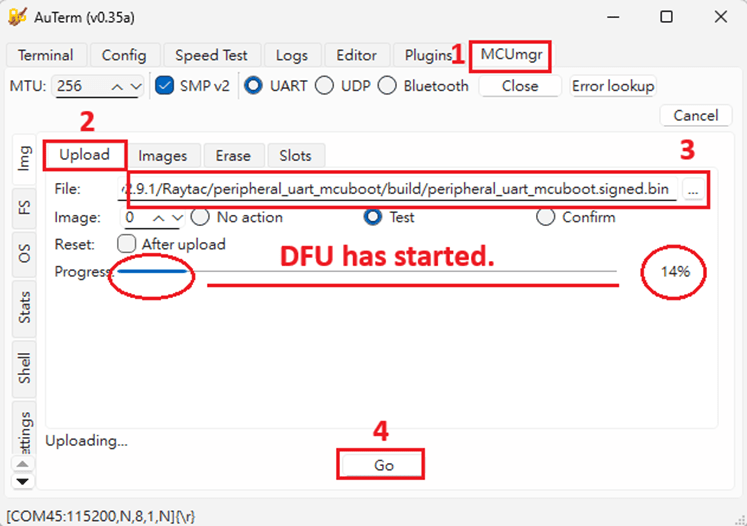
Steps: Select the tab Config to set the correct COM port.
Follow the sequences in the below screenshot.
You can use the file peripheral_uart_mcuboot.signed.bin for testing. It is located in peripheral_uart_mcuboot/build. Then follow the sequences in the below screenshot. DFU will be completed when the progress reaches 100%.
6. DFU using your custom keys When you compile the code, you will see the below warning. Reason: It’s required to have your own private key to ensure your product’s security. Following are the steps to enable security features.
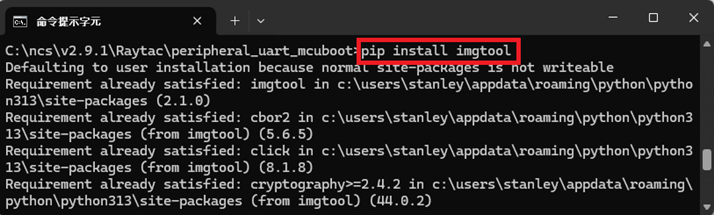
Step 1. Create the key First, install the imgtool program using pip.
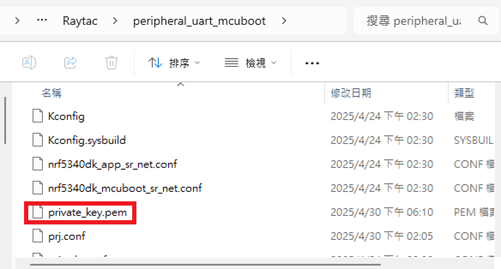
Then use the following command to generate your private key in your project folder. After the private key is generated, you can access it in your directory.
Step 2. Configure the project to use this key in sysbuild.conf
# Add MCUboot SB_CONFIG_BOOTLOADER_MCUBOOT=y #Add private key for MCUboot SB_CONFIG_BOOT_SIGNATURE_KEY_FILE="\${APP_DIR}/private_key.pem" # Configure key type SB_CONFIG_BOOT_SIGNATURE_TYPE_ECDSA_P256=y
Step 3. Build and flash the project again. Your firmware will have security features.
Edited by Account Manager: Mr. Welson Kuo
Raytac Corporation 勁達國際電子股份有限公司 / Raytac Corporation (USA) A Bluetooth, Wi-Fi, and LoRa Module Maker/ODM & OEM Manufacturer based on Nordic nRF54; nRF53: nRF52; nRF51; nRF7002 Semtech Specification: SX1262
We are thrilled to announce that Raytac Corporation will be participating in Embedded World 2025 from March 11 to March 13, 2025, at the Nuremberg Exhibition Centre in Germany.
IoT and Wireless technologies such as Bluetooth Low Energy (BLE), Wi-Fi, and LoRa…etc. continue to reshape industries worldwide, that’s why Raytac is at the forefront, providing cutting-edge solutions that accelerate product development. Together with our partner, Nordic Semiconductor, we offer a comprehensive range of modules designed to meet the increasing demands of today’s connected world.
This year, we have exciting innovations to showcase:
Unveiling our new service: Customized OEM/ODM designing for customers.
These are just a few of the groundbreaking solutions we’ll be unveiling. You won’t want to miss the chance to experience these with us!
What to Expect at Our Booth:
Live demonstrations showing how Raytac’s modules can be implemented in multiple industries.
Discover how our modules can reduce development time and costs, making your projects more efficient.
One-on-one consultations with our experts to help you find the right solutions for your needs.
Stop by and visit us at: HALL 3 Booth 3-111 M2M Area
We would love to connect with you and discuss how Raytac can support your next project. Whether you’re an engineer, developer, or business decision-maker, we have something for everyone at Embedded World 2025.
Uncertainties in Bluetooth Application Development Bluetooth’s growing popularity comes with challenges during development. Common issues include hardware instability, software incompatibilities, and environmental interference. Accurate issue identification and resolution are keys to successful development.
Common Uncertainties Unstable Connections: Disruptions from wireless signals or physical obstacles. Pairing Failures: Devices unable to establish connections. Data Errors: Packet loss or corruption during transmission. Compatibility Problems: Protocol version mismatches affecting interoperability.
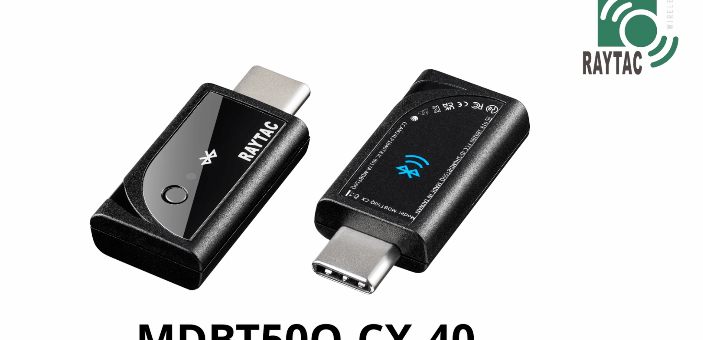
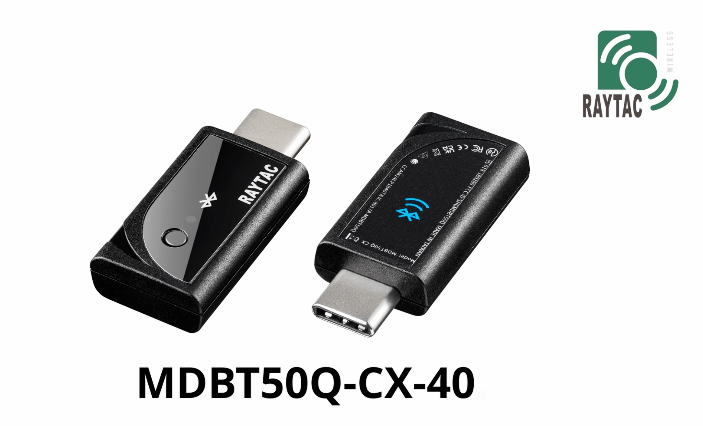
Efficient Bluetooth Issue Analysis Challenges like transmission speed limitations, data loss, connection failures, or protocol violations can arise. As Bluetooth signals travel wirelessly, precise analysis requires specialized tools. Nordic offers firmware integrated with Wireshark, flashable onto the Raytac MDBT50Q-CX-40 Dongle, enabling engineers to capture and analyze Bluetooth broadcast signals via USB. This setup streamlines issue identification and resolution. Below’s how to configure the Dongle for Wireshark reception.
Step 3: Press and hold the button on MDBT50Q-CX-40 and plug it into a PC USB port. Bootloader mode will be activated after the LED light is turned on. Then flash the firmware using nRF Programmer.
Step 4: Open the nRF Programmer and follow the below steps: Select the Device:
The device will appear as the name shown in below:
Add Firmware File:
Load sniffer_nrf52840dongle_nrf52840_4.1.1.hex into the Programmer:
Press “Write" to flash the firmware. After flashing, press “Select Device" again. If the Device name appears as nRF Sniffer for Bluetooth, the flashing is successful.
Set Up Wireshark Software Environment Step 1: Download & install nRF-Util: https://www.nordicsemi.com/Products/Development-tools/nRF-Util Step 2: Open MS-DOS and use the command nrfutil list to check if the ble-sniffer item is available. If not, install it using nrfutil install ble-sniffer.
Step 3: Download and Install Wireshark: https://www.wireshark.org/download.html. Step 4: Open Wireshark and navigate to: Help → About Wireshark → Folders. Step 5: Locate the string under Personal Extcap Path for the extcap directory, which will be an empty folder.
Step 6: Copy the files from nrf_sniffer_for_bluetooth_le_4.1.1\extcap (downloaded earlier) into Wireshark\extcap directory.
Step 7: After reopening, you should see an interface with a configurable icon next to the dongle.
Step 8: Edit → Configuration Profiles → Import → From Directory → Navigate to the directory nrf_sniffer_for_bluetooth_le_4.1.1\Profile_nRF_Sniffer_Bluetooth_LE and click “Select Folder".
Step 9: The profile will be imported. Click OK to confirm.
After all the above is done, the setup shall be completed.
Capturing and analyzing Bluetooth packets After launching the program, you can see the following devices and Dongle settings. Double-click to start the packet capture process:
If you want to capture packets with PHY=125K, you can use the following settings:
Packet Analysis Method In Wireshark, select the device from the “Device" menu to capture and analyze broadcast packets.
User Cases – What sniffer can offer 1. Disconnection when transmitting over 20 bytes between Tablet and Raytac’s AT-Command Module: Through sniffer analysis, it was discovered that Raytac’s module requested a packet length of 251 bytes, but the tablet’s TX setting was limited to 27 bytes.
2. Broadcast Device Name containing invisible characters: The device could connect using a mobile app but failed to connect using Central’s code. From the sniffer interface shown below, the device name length is 11, but the Length field shows 13. The actual data length (Type length + Device Name) = 1 + 11 = 12, indicating an issue with the program’s broadcast name length.
3. Incorrect parameter settings causing issues with throughput or packet reception: Improper settings can lead to reduced throughput, incorrect data reception, or disconnections. The diagram below shows a correct setup with high-volume data transmission. The Protocol Length is 251, and the data transmission intervals are consistent, achieving optimal throughput.
Summary Mastering hardware and software setups and effectively using packet analysis tools can boost development efficiency and enable high-performance Bluetooth applications.




























 Raytac Corporation