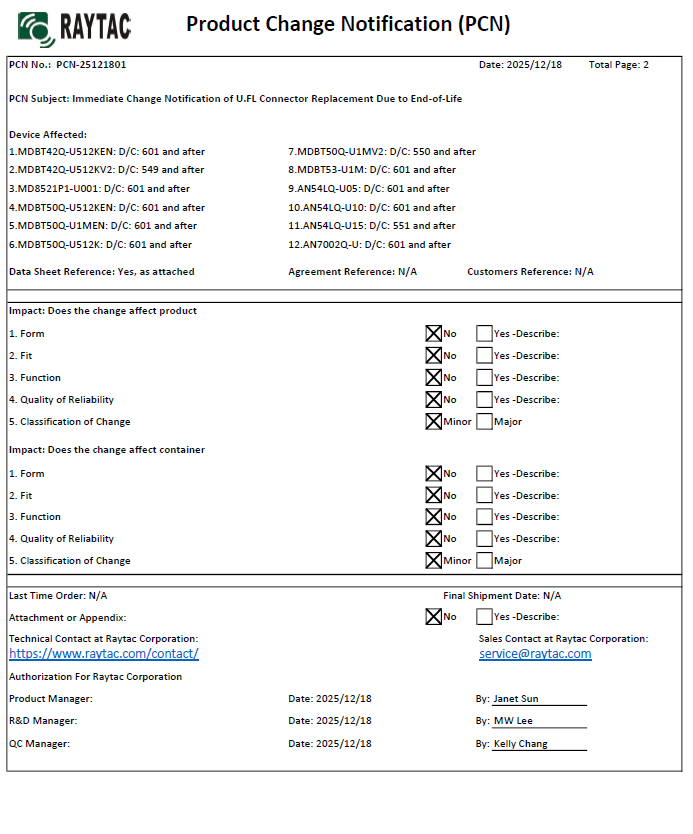
There are no changes on Form, Fit, Function, and Quality of Reliability. Only change in u.FL Connector Appearance. All existing certifications and technical documentations remain valid.
We kindly invite our customers, distributors, and partners to update your records accordingly. For any questions or support regarding this update, feel free to reach out via: sales@raytac.com.
Raytac Corporation 勁達國際電子股份有限公司 / Raytac Corporation (USA) / abietec Inc. A Bluetooth, Wi-Fi, and LoRa Module Maker/ODM & OEM Manufacturer based on Nordic nRF54; nRF53: nRF52; nRF51; nRF7002 Semtech Specification: SX1262
[08/14/2025, California, USA] To better support our customers in the United States, Raytac Corporation(USA) now offers inland domestic shipping and a local support team based in California.
By bringing our services closer to U.S. clients, we can provide faster assistance for ongoing projects, significantly shorten lead times, and maintain the high quality and global compliance standards Raytac is known for.
This guide teaches you how to use MCUboot for DFU (Device Firmware Update), Combined with nRF Connect SDK (NCS) V2.9.1 to upgrade firmware on Raytac’s MDBT50Q series modules.
Table of contents:
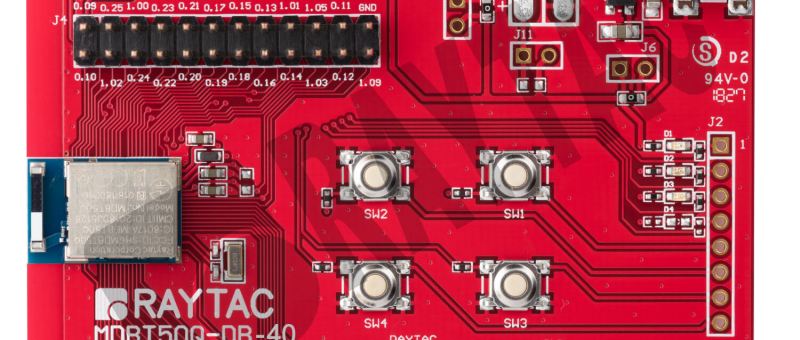
Hardware Set Up
Software Kits resource download & install
Compile and load the program a. Open VS Code b. Project setup c. Setup the situation for DFU over UART or DFU over USB d. Start compiling your project e. Load your compiled program into the MDBT50Q-DB-40 demo board
Install nRF Connect for Desktop ➔ install Programmer and Toolchain Manager.
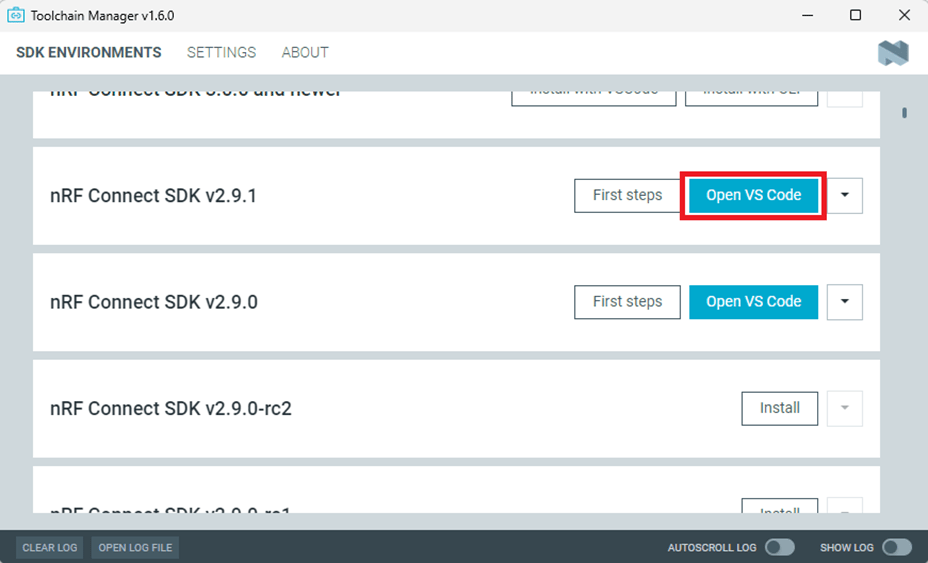
Open Toolchain Manager and install SDK V2.9.1.
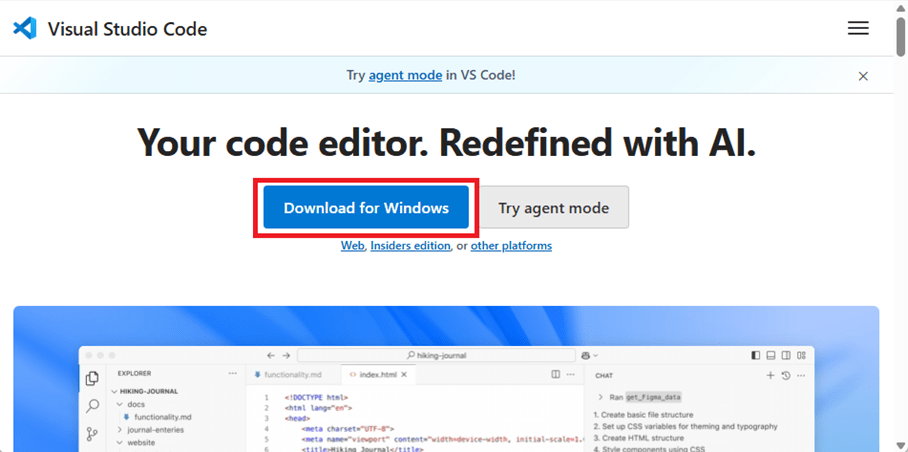
Install Visual Studio Code
3. Compile and load the program a. Open VS Code(Visual Studio Code)
Note: If it’s your first time using the software: after installing all the extensions, you should see the same on your screen.
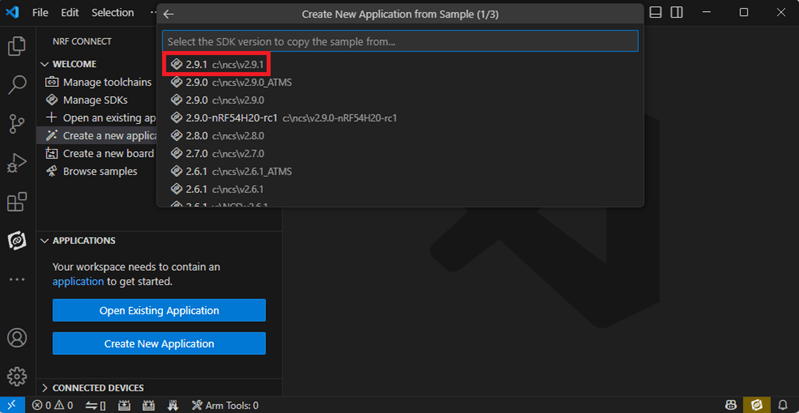
b. Project setup b.1 Create an example code(In this article: peripheral_uart) Please refer to the following steps: Create a new application ➔ Copy a sample ➔ NCS V2.9.1
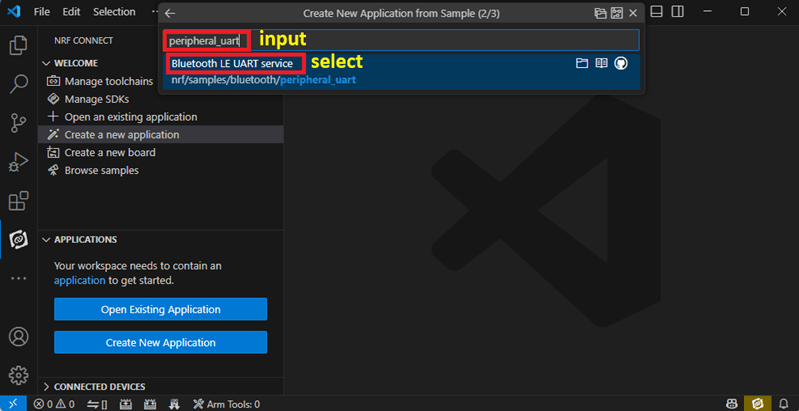
b.2 Name the Project: peripheral_uart Input peripheral_uart and the corresponding example program will appear in the options section below.
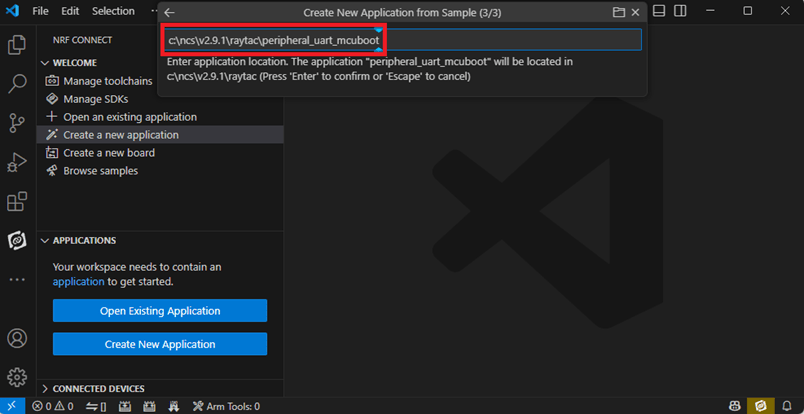
Note: We named the project peripheral_uart_mcuboot to distinguish it. This project will create a directory named peripheral_uart_mcuboot.
c.Build an environment for DFU over UART or DFU over USB – Create a new application ➔ Open
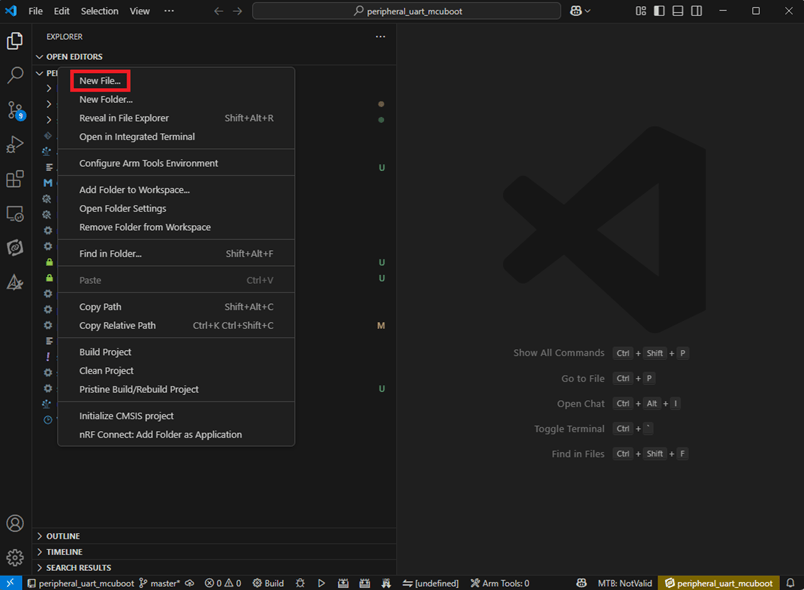
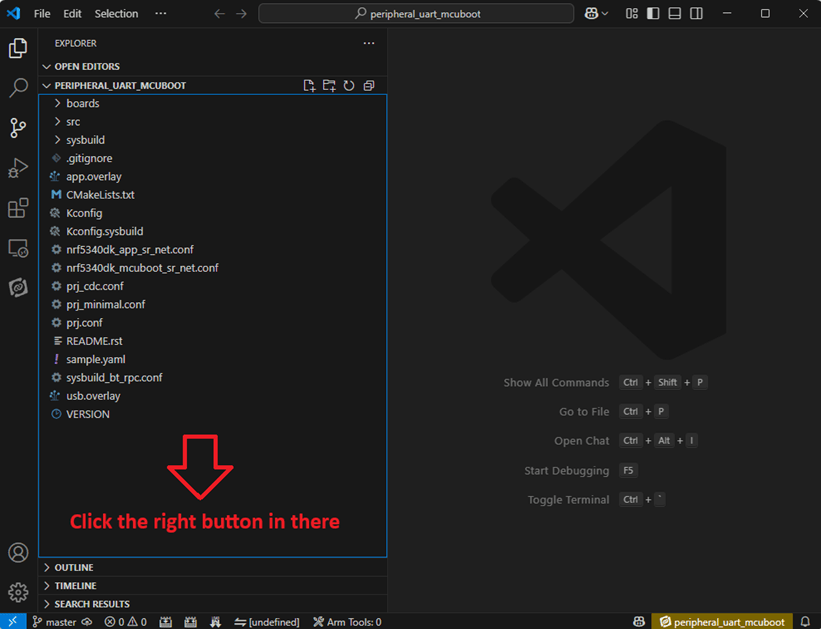
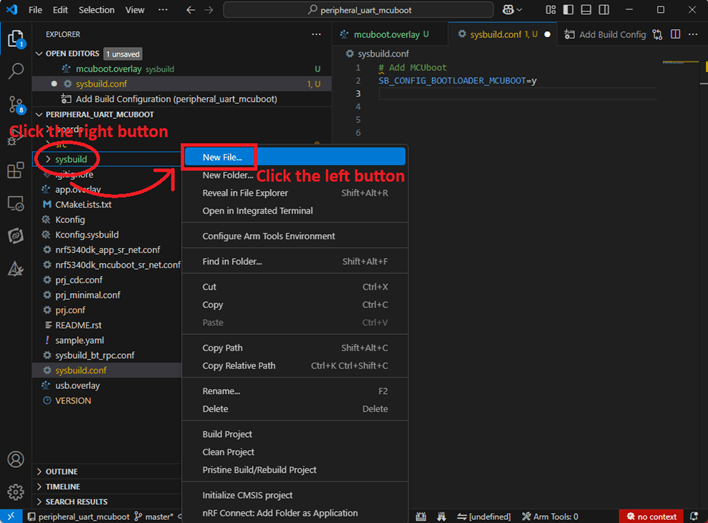
Right click on the project name you just created (peripheral_uart_mcuboot), a pop-up menu will appear. Select the first option “Show in Explorer" from the pop-up menu to display all project files.
Then select New File to create a sysbuild.conf file.
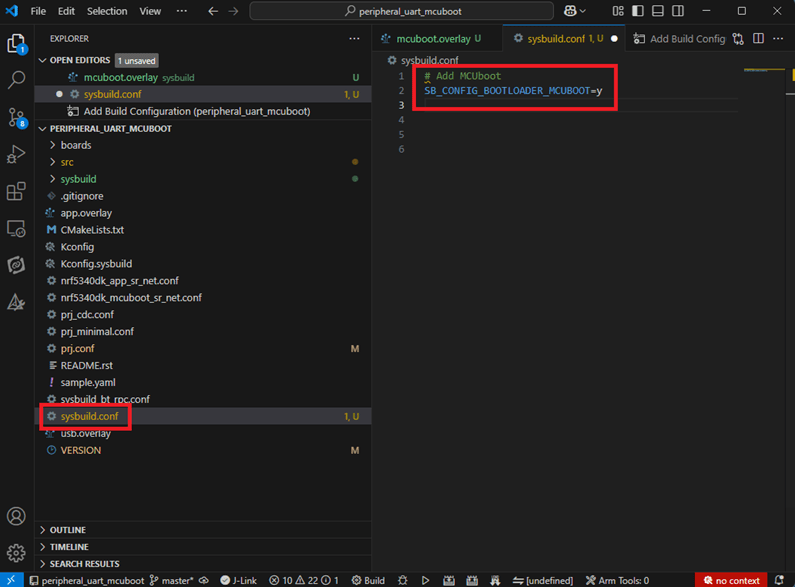
select sysbuild.conf, left-click on it, and a blank box will show.
Input the file name and write: SB_CONFIG_BOOTLOADER_MCUBOOT=y
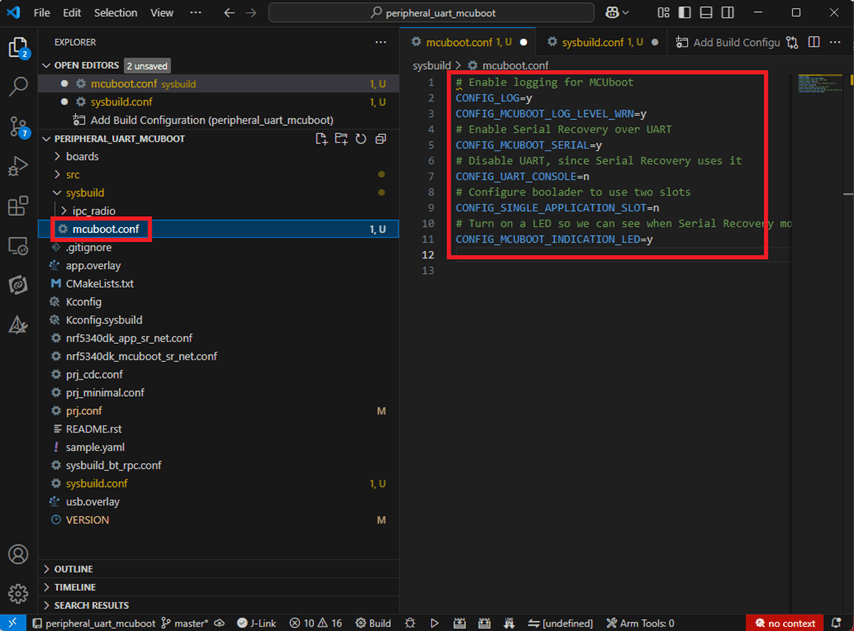
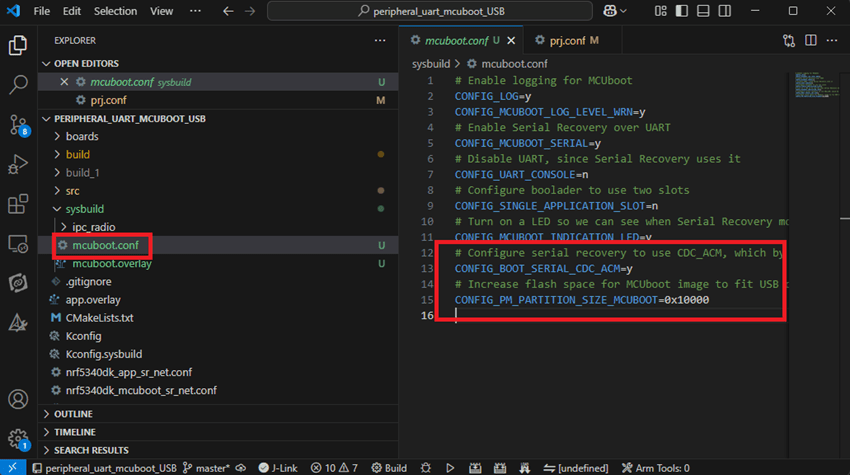
Parameters and instructions Add a new file mcuboot.conf, in the sysbuild folder, and input the following parameters into the file. (Add relevant parameters according to UART or USB) (Note: Please be informed if you want to use DFU over UART in the end, you should use UART when you first create the environment. Similarly, if you want to use DFU over USB, you should create the USB environment at the beginning.)
For DFU over UART # Enable logging for MCUboot CONFIG_LOG=y CONFIG_MCUBOOT_LOG_LEVEL_WRN=y # Enable Serial Recovery over UART CONFIG_MCUBOOT_SERIAL=y # Disable UART, since Serial Recovery uses it CONFIG_UART_CONSOLE=n # Configure the bootloader to use two slots CONFIG_SINGLE_APPLICATION_SLOT=n # Turn on a LED so we can see when Serial Recovery mode is active CONFIG_MCUBOOT_INDICATION_LED=y
For DFU over USB # Enable logging for MCUboot CONFIG_LOG=y CONFIG_MCUBOOT_LOG_LEVEL_WRN=y # Enable Serial Recovery over UART CONFIG_MCUBOOT_SERIAL=y # Disable UART, since Serial Recovery uses it CONFIG_UART_CONSOLE=n # Configure bootloader to use two slots CONFIG_SINGLE_APPLICATION_SLOT=n # Turn on a LED so we can see when Serial Recovery mode is active CONFIG_MCUBOOT_INDICATION_LED=y # Configure serial recovery to use CDC_ACM, which by default uses the USB CONFIG_BOOT_SERIAL_CDC_ACM=y # Increase flash space for the MCUboot image to fit USB drivers CONFIG_PM_PARTITION_SIZE_MCUBOOT=0x10000
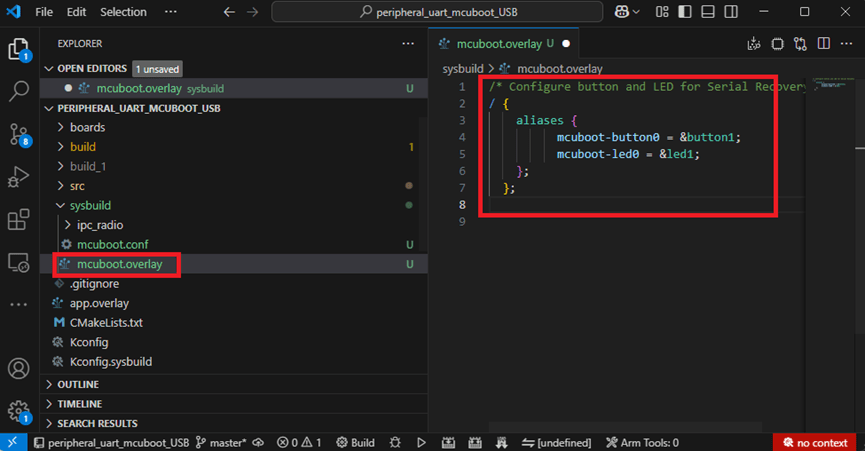
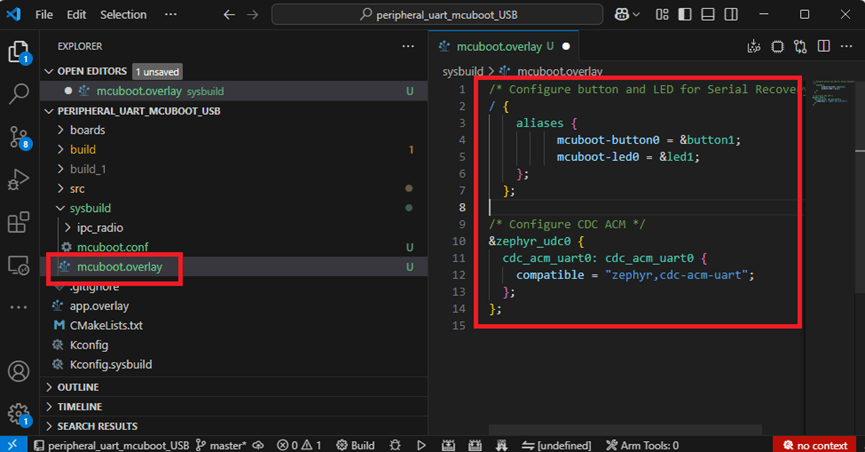
Create a new file: mcuboot.overlay and add the following parameters.
For DFU over UART /* Configure button and LED for Serial Recovery */ / { aliases { mcuboot-button0 = &button0; mcuboot-led0 = &led0; }; };
For DFU over USB /* Configure button and LED for Serial Recovery */ / { aliases { mcuboot-button0 = &button0; mcuboot-led0 = &led0; }; }; /* Configure CDC ACM */ &zephyr_udc0 { cdc_acm_uart0: cdc_acm_uart0 { compatible = “zephyr,cdc-acm-uart"; }; };
Note: if you use DFU over USB, please enable the USB subsystem in prj.conf.
After all the setup is completed, you can start compiling your project.
d. Start compiling your project Add Build Configuration ➔ Select target board ➔ In this example, choose raytac_mdbt50q_db_40/nrf52840.
Start compiling by clicking “Generate and Build" at the bottom-right corner.
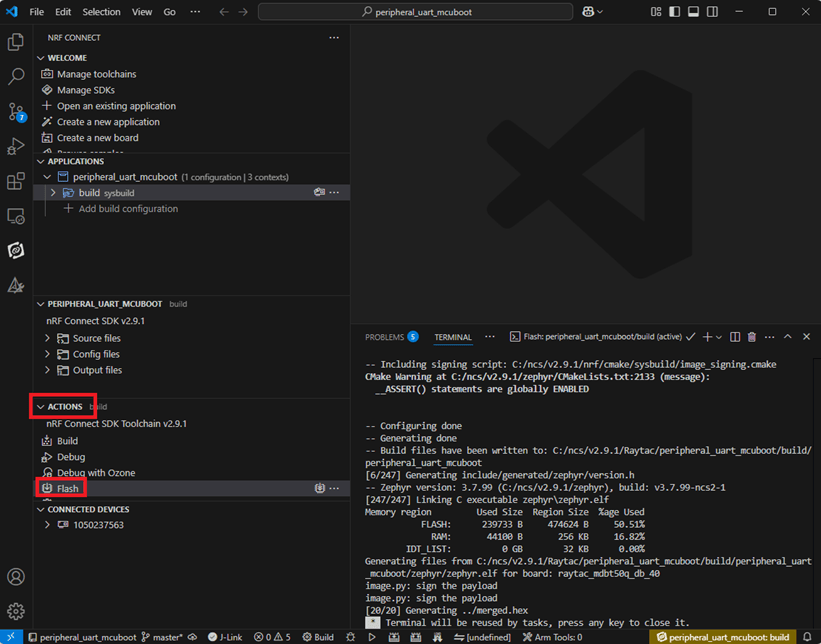
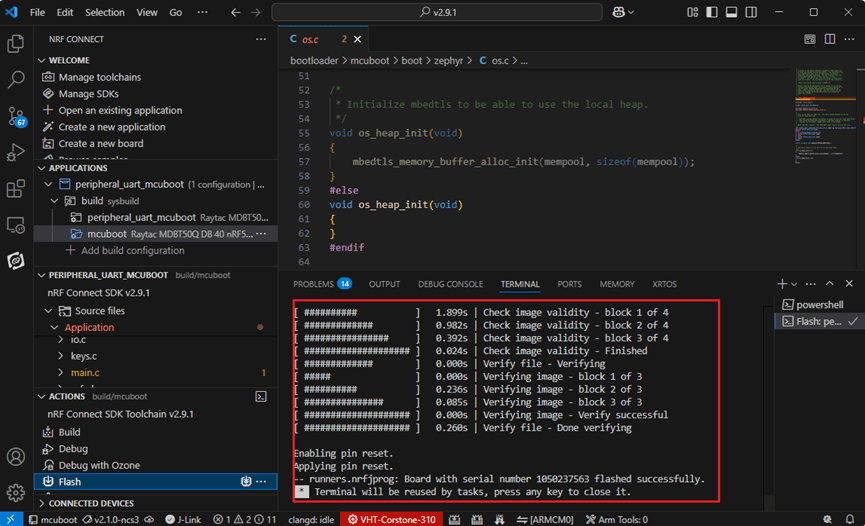
e. Load your compiled program into the MDBT50Q-DB-40 demo board After compiling without error, select the flash function to load your program into the MDBT50Q-DB-40 demo board.
If the below is shown, it means that you have successfully loaded your program into the demo board.
4. DFU to MDBT50Q-DB-40 through UART / USB DFU over UART Hold the SW2 button then plug the power into the USB connector. The system will enter the bootloader mode. You can then DFU the new firmware via the UART.
DFU over USB If you update your firmware through USB, please also hold the SW2 button and connect the USB cable.
Steps: Select the tab Config to set the correct COM port.
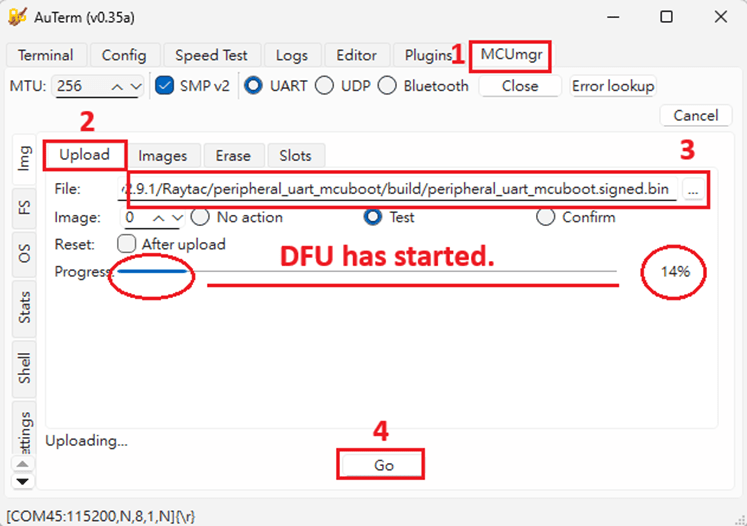
Follow the sequences in the below screenshot.
You can use the file peripheral_uart_mcuboot.signed.bin for testing. It is located in peripheral_uart_mcuboot/build. Then follow the sequences in the below screenshot. DFU will be completed when the progress reaches 100%.
6. DFU using your custom keys When you compile the code, you will see the below warning. Reason: It’s required to have your own private key to ensure your product’s security. Following are the steps to enable security features.
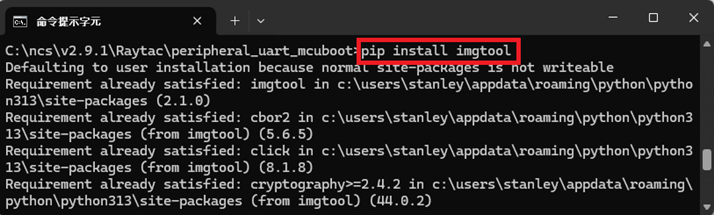
Step 1. Create the key First, install the imgtool program using pip.
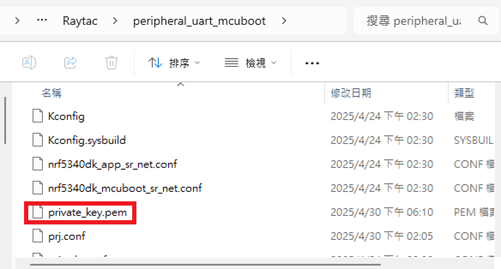
Then use the following command to generate your private key in your project folder. After the private key is generated, you can access it in your directory.
Step 2. Configure the project to use this key in sysbuild.conf
# Add MCUboot SB_CONFIG_BOOTLOADER_MCUBOOT=y #Add private key for MCUboot SB_CONFIG_BOOT_SIGNATURE_KEY_FILE="\${APP_DIR}/private_key.pem" # Configure key type SB_CONFIG_BOOT_SIGNATURE_TYPE_ECDSA_P256=y
Step 3. Build and flash the project again. Your firmware will have security features.
Edited by Account Manager: Mr. Welson Kuo
Raytac Corporation 勁達國際電子股份有限公司 / Raytac Corporation (USA) A Bluetooth, Wi-Fi, and LoRa Module Maker/ODM & OEM Manufacturer based on Nordic nRF54; nRF53: nRF52; nRF51; nRF7002 Semtech Specification: SX1262
The Bluetooth SIG Board of Directors(BoD) has granted its approval for a 15% increase in member fees, effective from January 1,2024. This decision comes after careful consideration of the organization’s financial situation and the need to cover the rising costs of current and futrue member services throughout 2024.
Feel free to explore the mission and operations of the Bluetooth SIG by visiting the provided web pages below:
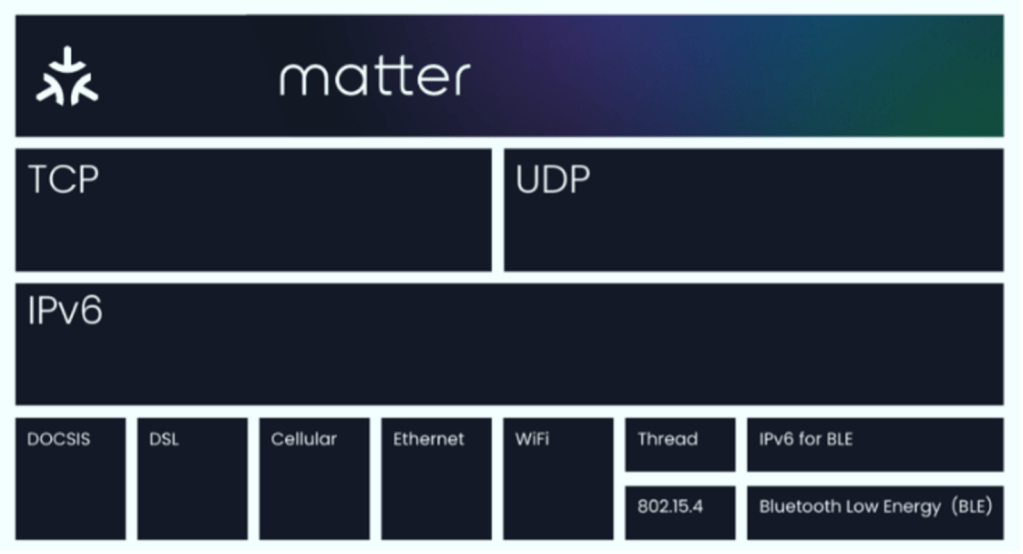
Matter aims to build a universal IPv6-based communication protocol to make it easier for smart home devices to communicate with each other. The protocol defines the application layer that will be deployed on devices as well as the different link layers to help maintain interoperability. Matter protocol built from the best pieces of existing trustworthy protocols, including Google Weave, Apple HomeKit, and Zigbee.
Matter is using Thread, Wi-Fi, and Ethernet for transport and Bluetooth Low Energy (BLE) for device commissioning to support a host of smart home devices. Any smart home gadgets you have that use these technologies should be able to be bridged into Matter.
Overall, Matter 1.0 simplifies the process of connecting smart home devices and enables seamless communication between them, regardless of their brand or manufacturer.
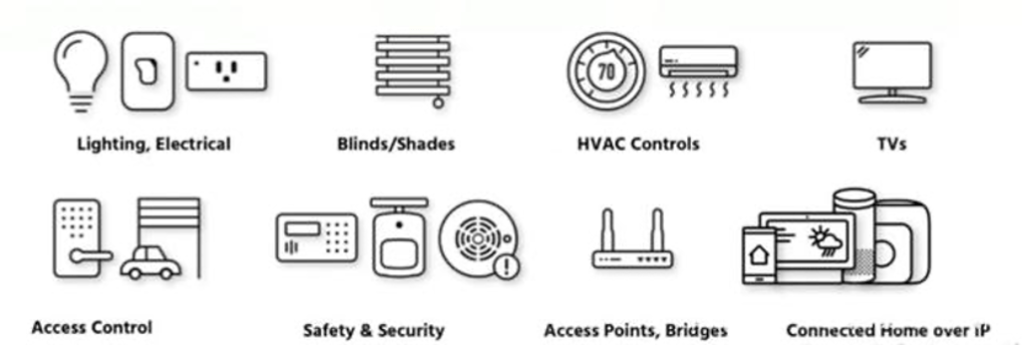
Matter 1.0 specs already support a variety of common smart home products, including lighting and electrical, HVAC controls, window coverings and shades, safety and security sensors, door locks, media devices including TVs, controllers as both devices and applications, and bridges. Support for security cameras, smart speakers, home appliances and robotic vacuums is already planned for subsequent versions of Matter. With the ecosystem expansion, new use cases and applications are expected to emerge.
Certification Process
Matter Testing
The Matter 1.0 standard launches with test cases and comprehensive test tools for Alliance members and a global certification program including nine authorized test labs who are primed to test not only Matter, but also Matter’s underlying network technologies, Wi-Fi and Thread. Wi-Fi enables Matter devices to interact over a high-bandwidth local network and allows smart home devices to communicate with the cloud. Thread provides an energy efficient and highly reliable mesh network within the home.
For protecting against National Security Threats reason, FCC newly announced a new request added in Equipment Authorization program. FCC Publication Number: 986446. date:01/24/2023
FCC amends the rules related to equipment authorization program to prevent any unacceptable risk result from communications networks and supply chains from equipment. DA/FCC #: FCC-22-84. FCC Amends Equipment Authorization Program require applicants for certification need to provide a written and signed attestation. Also, any equipment certification needs to identify a agent, located in United States for service or the process.
Raytac Corporation has pointed US subsidiary, Raytac USA LLC., poses as the US agent for Raytac Corporation to fulfill the FCC new requirements. Customers has any issues to adopt this new regulation may contact Raytac for further support.
Zephyr is hosted by The Linux Foundation, which is an open source to build a small, scalable, real-time operating system (RTOS) across multiple architectures. Zephyr Project’s is aiming to provide a collaborative effort between technologies to reduce the cost and accelerate time to market for Internet of Things (IoT) industry.
Nordic, the leading wireless solution provider across Bluetooth, WiFI, LTE, NB-IOT, provides documentation for developers which are interested in starting Zephyr projects. Nordic Zephyr Project Support Page.
Raytac, a Taiwan base professional module maker built up various form factor modules based on Nordic solution, has listed both nRF52833 / MDBT50Q-DB-33 and nRF52840 / MDBT50Q-DB-40 module demo boards in Zephyr support boards data base. Believed these completed and comprehensive support boards reference design can provide all developers a break through path toward success.
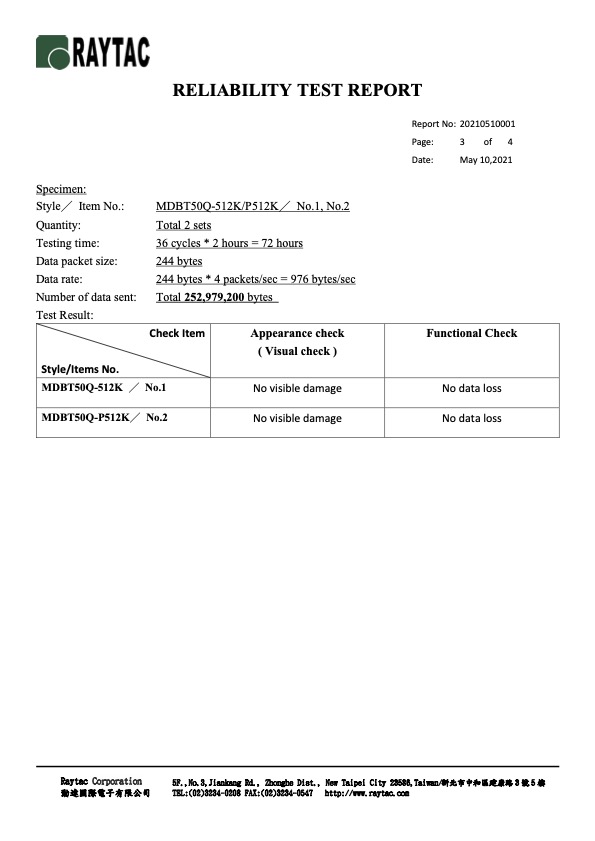
Reliability test is the measure which helps to predict future behavior during a period of usage of the product, component or material. In combination with the measurement of relevant parameters and the use of appropriate test methods, reliability test helps to ensure the function and qualify of the product or feature can perform as designated.
Nowadays, Bluetooth module has become the most important key part within whole IoT system, It is not only controlling the connection but also computing. Raytac understood how critical the module need to perform in the system no matter commercial or industrial applications. Therefore, Raytac conduct the reliability testing plans for all series modules in order to ensure all the module‘s duration can meet design request.
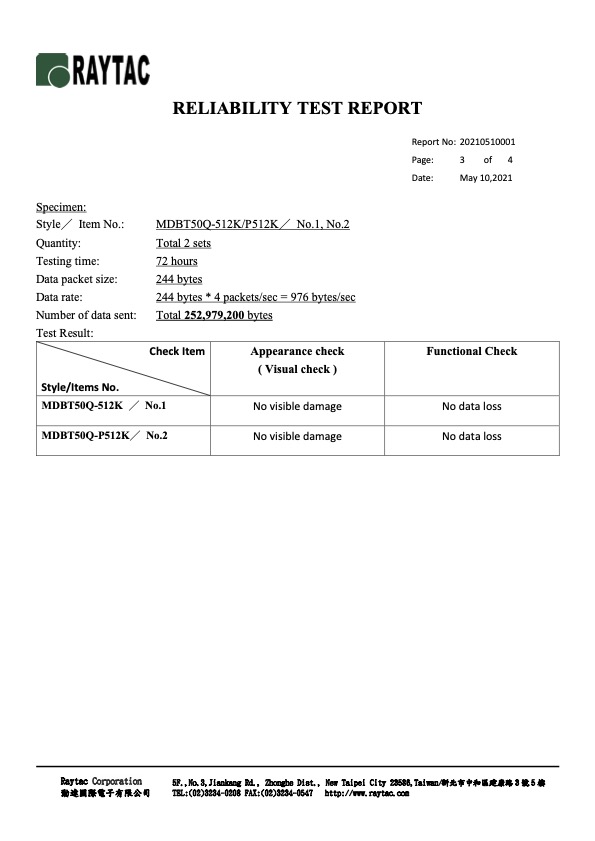
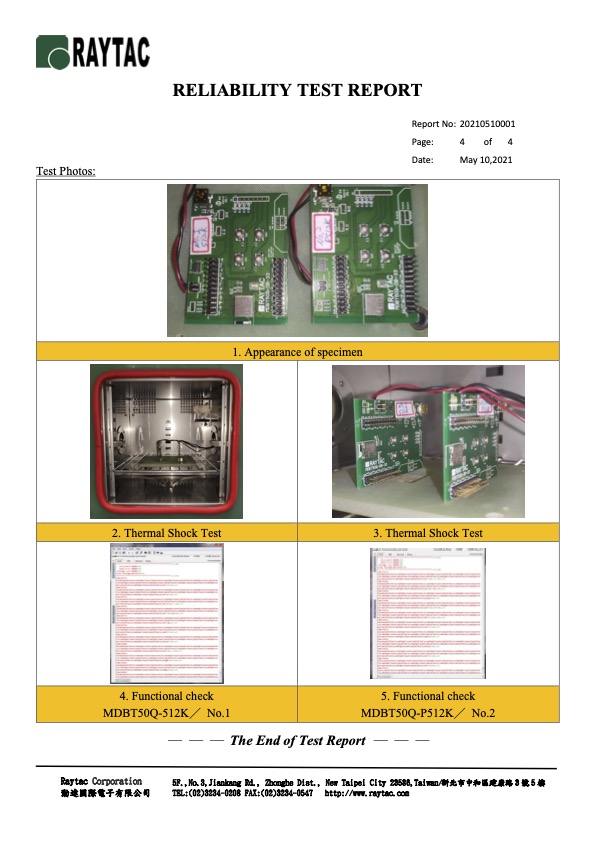
The Reliability test is following JASO D001-94, Clause 5.12, and testings are under below 3 environments.
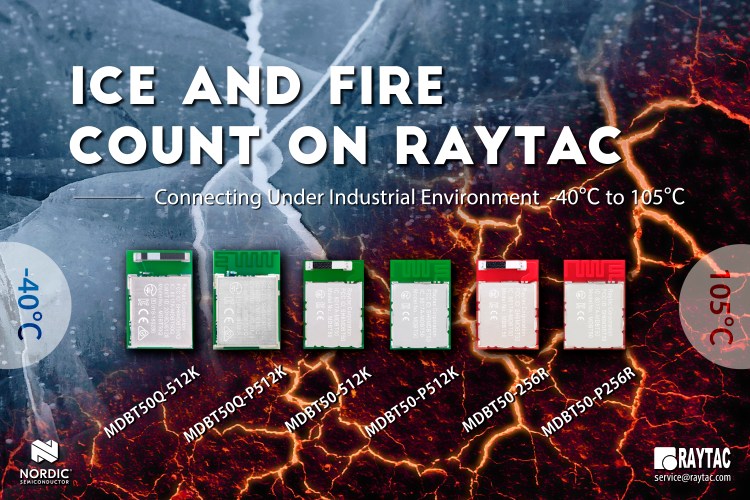
Low temperature maintain test under -40℃ and last for 72hr
High temperature maintain test under 105℃ and last for 72hr
Thermal shock testing under -40℃~105℃
Raytac’s modules have been recorded No data loss over Total 252,979,200 bytes communication during the test. The perfect result proof not only IC but also all components in the module are qualified to work for you!
nRF51422 is the first solution supports both Bluetooth and ANT+, different from pure Bluetooth Low Energy BLE solution, nRF51822 released earlier. The edge cutting technology enable nRF51422 suporting multiprotocol concurrency capable for both Bluetooth Low Energy and ANT+. At the same time Nordic released SDK S310 for nRF51422 which is a combined peripheral BLE and ANT+ protocol stack that supports concurrent operation and all ANT+ features.
When Nordic moved to nRF52, started from nRF52832, the game changed. Even nF52832 still supports ANT+, the technology support such as SDK releasing or developers’ forums, has moved to direct supported by ANT+ Wireless (formerly Dynastream Innovations). Since then, Raytac suggest developers who is interested in ANT+ product still able to select the modules based on core specification and form factor, but access the firmware development support from ANT+ directly. Developers who are interested to know more about ANT+ is encouraged visit ANT+ FAQ support page first for more information about membership, development, resource and certification.
All Nordic nRF52 solutions supports ANT+ feature, developers may refer to below Raytac module map and find what the protocol supports by the symbol stated besides the Nordic solution indication.

































 Raytac Corporation