Secure DFU OTA for nRF52832 solution modules: Creating hex/zip file for implementation – Part 2(Combining/merging built files)

Following up – Part 1: Bootloader & Application (Click for article link),

We will be focusing on:

in this article.

IC: nRF52832
DK: PCA10040 (for nRF52832)
SDK: 16.0.0
Softdevice: s132_nrf52_7.0.1_softdevice.hex
IDE: Keil C
PC: Win 10


Step 1. Execute the combine batch file in bootloader (nrf52832_bootloader_setting_merge.bat) and generate file of nrf52832_bootloader_secure_combin_settings.hex :

@echo off
title = [ J-Link Tool ] %CD%
set nrfDir=C:\Program Files (x86)\Nordic Semiconductor\nrf5x\bin
set BS= nrf52832_bootloader_secure_settings.hex
set BL= nrf52832_xxaa_s132.hex
set BSBLCombind= nrf52832_bootloader_secure_combin_settings.hex
set path=%nrfDir%;%path%
pause
echo ———–merge image file——————-
mergehex.exe -m %BS% %BL% -o %BSBLCombind%
pause


Step 2. Create a Final.hex file by 3-in-1 batch file(nrf52832_3in1_merge.bat)
※Note : This hex file is created for the production line to pre-load firmware into modules prior to shipment.

@echo off
title = [ J-Link Tool ] %CD%
set nrfDir=C:UsersuserDesktopNordic BLEnRF5_merge toolsnRF52 bin
set SD= s140_nrf52_7.2.0_softdevice.hex
set BLT= nrf52832_bootloader_secure_combin_settings.hex
set APP= nrf52832_xxaa.hex
set SD_BLT=SD_BLT.hex
set Finalfile=Final.hex
set path=%nrfDir%;%path%
pause
echo ———–merge image file——————-
mergehex.exe -m %SD% %BLT% -o %SD_BLT%
pause
mergehex.exe -m %SD_BLT% %APP% -o %Finalfile%
pause


Step 3. Create a DFU(OTA).zip file of nrf52832_xxaa.zip
※Note : This zip file is created for end device DFU(OTA) implementation.

nrfutil pkg generate –hw-version 52 –sd-req 0xCB –application-version 0xFF –application
nrf52832_xxaa.hex –key-file private.pem nrf52832_xxaa.zip

The DFU OTA zip file will be derived.

※Note :
The “0xCB" appeared in the above DOS code(in red font) is the FWID(Firmware ID) for s140_nrf52_7.2.0_softdevice.hex;
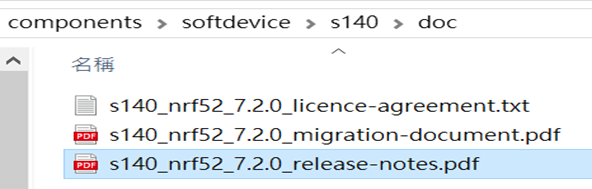
FWID can be found from the soft device documents on the Nordic website.


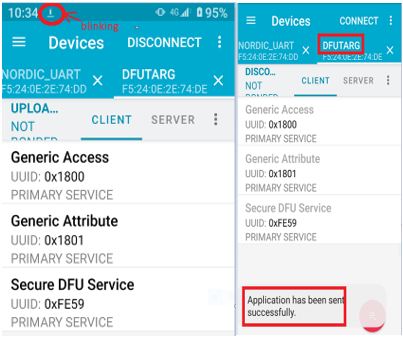
Step 4: Run DFU OTA (On mobile in this example)


4A. Install the nRF Connect APP on mobile, with DFU OTA file: nrf52832_xxaa.zip. (Download link)


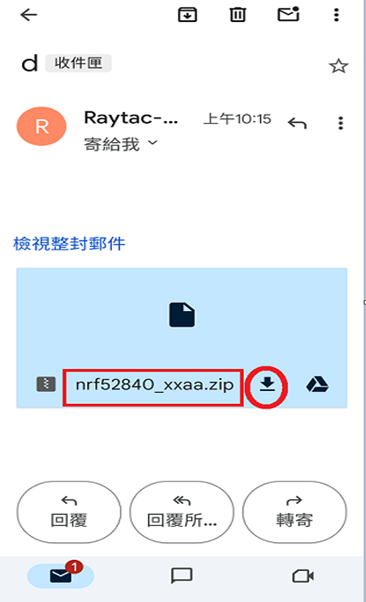
4B. Send nrf52832_xxaa.zip via email to mobile device after combination is done on PC, then download it.


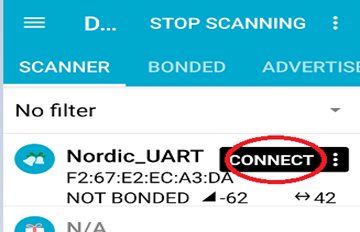
4C. Open nRF Connect APP and run connection;


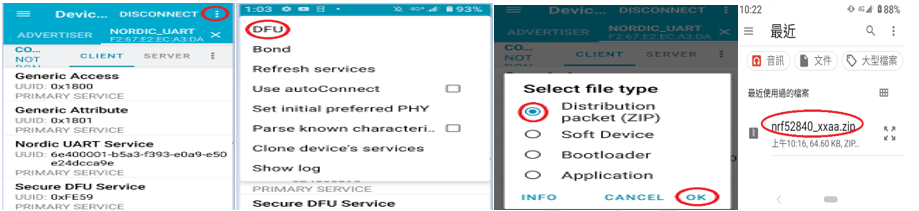
4D. Execute DFU and select “Distribution packet(ZIP)", thus starting the DFU OTA process.


4E. Start DFU OTA → exit the APP after DFU OTA is completed → restart the mobile device.


Secure DFU OTA for nRF52832 solution modules: Guide to create hex/zip file for implementation
Detailed links of articles:
Part 1: Bootloader & Application (Click for article link)
Part 2: Combining & merging built files


Technical guidelines provided by R&D Manager: Mr. MW Lee
Edited by Sales Manager: Ms. Mandy Chao


Raytac Corporation 勁達國際電子股份有限公司 
Raytac Corporation: A Bluetooth, Wi-Fi, and LoRa Module Maker based on
Nordic nRF54; nRF53: nRF52; nRF51; nRF7002
Semtech Specification: SX1262

Bluetooth Specification: BT5.4 ; BT5.3; BT5.2.
Wi-Fi Specification: Wi-Fi 6
LoRa Specification: LoRaWAN

All products are FCC/IC/CE/Telec/KC/RCM/SRRC/NCC Pre-Certified.
http://www.raytac.com
email: sales@raytac.com
Tel: +886-2-3234-0208

Secure DFU OTA for nRF52840 solution modules: Guide to create hex/zip file for implementation – #3(Combining/merging built files)

Following up – Part A: Bootloader (Click for article link) and Part B: Application (Click for article link)

We will be focusing on:

in this article.

IC: nRF52840
DK: PCA10056 (for nRF52840)
SDK: 17.1.0
Softdevice: s140_nrf52_7.2.0_softdevice.hex
IDE: Keil C
PC: Win 10


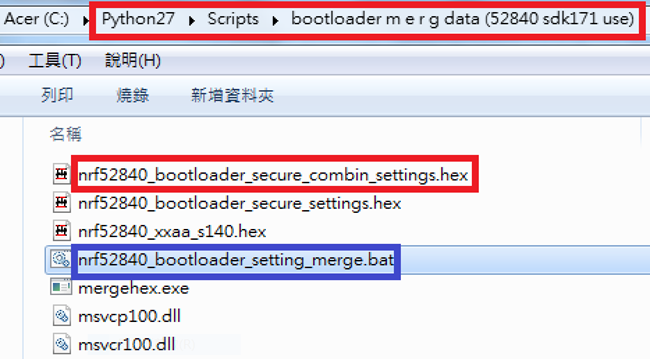
Step 1. Execute the combine batch file in bootloader (nrf52840_bootloader_setting_merge.bat) and generate file of nrf52840_bootloader_secure_combin_settings.hex :

@echo off
title = [ J-Link Tool ] %CD%
set nrfDir=C:\Program Files (x86)\Nordic Semiconductor\nrf5x\bin
set BS= nrf52840_bootloader_secure_settings.hex
set BL= nrf52840_xxaa_s140.hex
set BSBLCombind= nrf52840_bootloader_secure_combin_settings.hex
set path=%nrfDir%;%path%
pause
echo ———–merge image file——————-
mergehex.exe -m %BS% %BL% -o %BSBLCombind%
pause


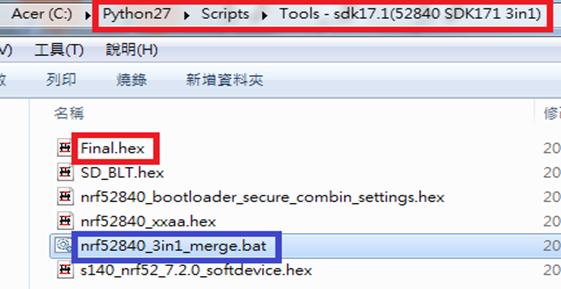
Step 2. Create a Final.hex file by 3-in-1 batch file(nrf52840_3in1_merge.bat)
※Note : This hex file is created for the production line to pre-load firmware into modules prior to shipment.

@echo off
title = [ J-Link Tool ] %CD%
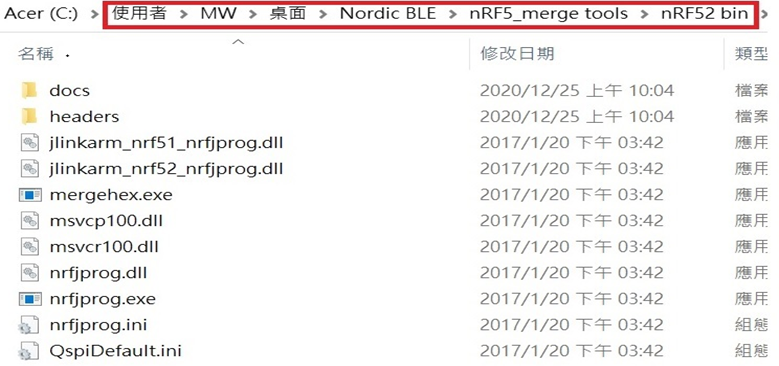
set nrfDir=C:\Users\user\Desktop\Nordic BLE\nRF5_merge tools\nRF52 bin
set SD= s140_nrf52_7.2.0_softdevice.hex
set BLT= nrf52840_bootloader_secure_combin_settings.hex
set APP= nrf52840_xxaa.hex
set SD_BLT=SD_BLT.hex
set Finalfile=Final.hex
set path=%nrfDir%;%path%
pause
echo ———–merge image file——————-
mergehex.exe -m %SD% %BLT% -o %SD_BLT%
pause
mergehex.exe -m %SD_BLT% %APP% -o %Finalfile%
pause


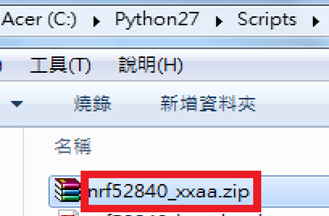
Step 3. Create a DFU(OTA).zip file of nrf52840_xxaa.zip
※Note : This zip file is created for end device DFU(OTA) implementation.

nrfutil pkg generate –hw-version 52 –sd-req 0x100 –application-version 0xFF –application
nrf52840_xxaa.hex –key-file private.pem nrf52840_xxaa.zip

The DFU OTA zip file will be derived.

※Note :
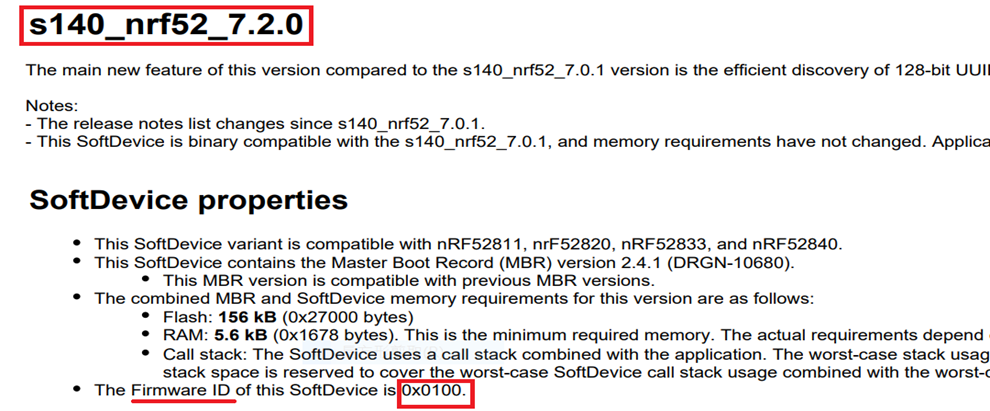
The “0x100" appeared in the above DOS code(in red font) is the FWID(Firmware ID) for s140_nrf52_7.2.0_softdevice.hex;
FWID can be found from the soft device documents on the Nordic website.


Step 4: Run DFU OTA (On mobile in this example)


4A. Install the nRF Connect APP on mobile, with DFU OTA file: nrf52840_xxaa.zip. (Download link)


4B. Send nrf52840_xxaa.zip via email to mobile device after combination is done on PC, then download it.


4C. Open nRF Connect APP and run connection;


4D. Execute DFU and select “Distribution packet(ZIP)", thus starting the DFU OTA process.


4E. Start DFU OTA → exit the APP after DFU OTA is completed → restart the mobile device.


Secure DFU OTA for nRF52840 solution modules: Guide to create hex/zip file for implementation
Detailed links of articles:
Part A: Bootloader (Click for article link)
Part B: Application
(Click for article link)
Part C: Combining and merging built files
(Click for article link)


Technical guidelines provided by R&D Manager: Mr. MW Lee
Edited by Sales Manager: Mr. Tony Yin

Raytac Corporation 勁達國際電子股份有限公司 
Bluetooth & WiFi module maker based on Nordic nRF54, nRF53, nRF52, nRF7002 solution
BT5.4 &BT5.3 & BT5.2 & BT5.1 Qualified, FCC/IC/CE/Telec/KC/RCM/SRRC/NCC Pre-Certified.
Bluetooth Solution: nRF54, nRF5340, nRF52840, nRF52833, nRF52832, nRF52820, nRF52811, nRF52810, nRF52805, nRF51822
WiFi Solution: nRF7002
http://www.raytac.com
email: service@raytac.com
Tel: +886-2-3234-0208
Raytac announces release of AN54H20 Series Module based on Nordic’s nRF54H20 chip solution

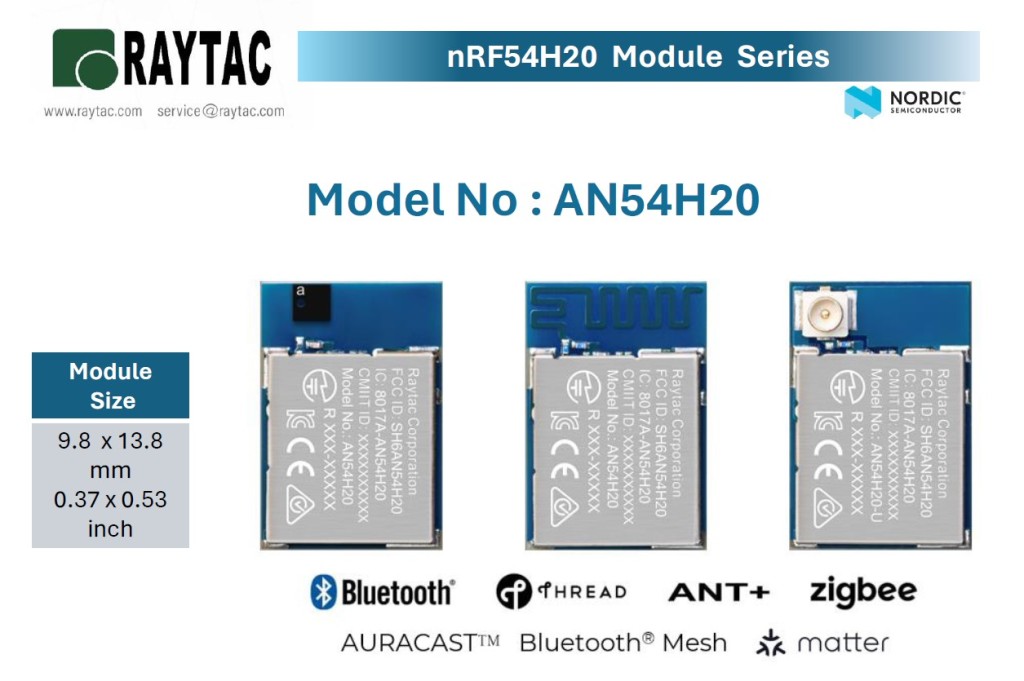
Raytac Corporation, a Nordic-recommended third-party module manufacturer based in Taiwan, today announces the upcoming release of the AN54H20 modules, which are built on the base of Nordic’s nRF54H20 SoC.

The AN54H20 module comes in a 9.8 x 13.8 x 1.8mm (0.37 by 0.53 by 0.07 inches) dimension factor and offers 3 versions of high-performance antennas, including ceramic chip antenna, PCB-mounted antenna, and uFL connector for external antenna. Output power is adjustable up to +10 dBm and data rate is adjustable up to 4Mbps to maximize RF performance.

Powered by multiple processors, AN54H20 modules provide the IoT field with access to a whole set of improved features, including 2MB flash memory/1MB RAM and bigger processing power for more complicated computations.  It also enhances protection against security threats, providing developers with protection while building technologically advanced IoT applications.

Hardware wise, AN54H20 inherits nRF54H20’s set of versatile, advanced, and low-power peripherals alongside DMA support, including high-speed USB, CAN-FD controller, 14-bit ADC, 2 x I3C and plenty more.  What’s more revolutionary is that AN54H20 brings power efficiency to a whole new level through accurately controlling currency consumptions under various modes, allowing smaller batteries to be implemented in the applications while increasing its life expectancy.

“We see the AN54H20 series as a potential market changer.  The compact size gives developers a seamless switch from the previous generation modules to AN54H20, and the remarkable power efficiency and characteristics AN54H20 brings will offer a magnificent effect to the inescapable hot trend of IoT and other various industries." – Lyon Liu, President of Raytac Corporation.

Product link: https://www.raytac.com/product/index.php?index_m1_id=81&index_m2_id=102

Features

 – Compact size: 9.8 mm x 13.8 mm x 1.8 mm (0.37″ x 0.53″ x 0.07″)

 – Ceramic chip, PCB, and u.FL connector variations available

 – 64 GPIOs

 – Dual Arm Cortex-M33 processors

 – Dual RISC-V co-processors

 – Flash memory: 2 MB and RAM: 1 MB

 – Max TX power: +10dBm

 – Max data rate: 4Mbps

 – Enhanced security features

 – Outstanding power efficiency

 – Advanced and expanded peripherals available 

– Highly flexible multiprotocol, ideal for Bluetooth Low Energy, LE Audio(Auracast), Bluetooth mesh, Thread, ANT+, Zigbee, and Matter applications

 – Pre-certified with multiple global regulations & Bluetooth qualification

 – RoHS-/REACH-compliant

Samples of AN54H20 will be available in Q3 2024, please subscribe to Raytac’s WordPress blog:

https://raytac.blog

For more upcoming information.

Welcome to send an inquiry to: service@raytac.com for further discussions.


Edited by Sales Manager: Mr. Tony Yin


Raytac Corporation 勁達國際電子股份有限公司 
Bluetooth & WiFi module maker based on Nordic nRF54, nRF53, nRF52, nRF7002 solution
BT5.4 &BT5.3 & BT5.2 & BT5.1 Qualified, FCC/IC/CE/Telec/KC/RCM/SRRC/NCC Pre-Certified.

Bluetooth Solution: nRF54, nRF5340, nRF52840, nRF52833, nRF52832, nRF52820, nRF52811, nRF52810, nRF52805, nRF51822

WiFi Solution: nRF7002
http://www.raytac.com
email: service@raytac.com
Tel: +886.2.3234.0208

Raytac Corporation at the “Embedded World 2024″

Dear Esteemed Participants,

Raytac Corporation is excited to extend our warm welcome to you once again at Embedded World 2024, scheduled to be held from April/9/2024 to April/11/2024 at the Nuremberg Exhibition Centre, Germany.

As IoT and Bluetooth Low Energy gain momentum, they emerge as essential catalysts for future development. Following Nordic Semiconductor’s lead in wireless technology, Raytac remains committed to releasing a wide range of modules to meet developers’ needs.

This year, we’re also introducing Wi-Fi modules AN 7002 alongside the nRF 7002 and nRF 54 series modules, so stay tuned for what’s to come.

Based on your requirements, we will showcase more applications of modules at the exhibition, as well as demonstrate how Raytac Corporation can save your time and expenses during the development stage and overall costs.


Raytac Corporation is delighted to invite you joining our team at:

HALL 3
Booth 3-111
M2M Area


To be a part of this dynamic convergence of ideas, innovations, and opportunities.


For more information and details into Raytac Corporation at embedded world 2024 can now be found in the preview of our digital event platform from following link:

https://www.talque.com/app#/mobile/ngx/org/wQD0JF2hF4nPuB9bezaD/vendor-detail/exibitor/MF2BLg9stimJBHyL7l6C

We eagerly anticipate your participation at the Embedded World Exhibition and the invaluable contributions you will bring to this vibrant gathering.

See you at the exhibition!


Best regards,

Edited by Sales Manager: Ms. Mandy Chao

Raytac Corporation 勁達國際電子股份有限公司

Bluetooth & WiFi module maker based on Nordic nRF54, nRF53, nRF52, nRF7002 solution

BT5.4 &BT5.3 & BT5.2 & BT5.1 Qualified, FCC/IC/CE/Telec/KC/RCM/SRRC/NCC Pre-Certified. Bluetooth Solution: nRF54, nRF5340, nRF52840, nRF52833, nRF52832, nRF52820, nRF52811, nRF52810, nRF52805, nRF51822 WiFi Solution: nRF7002

http://www.raytac.com

email:service@raytac.com

Tel: +886.2.3234.0208

Optimizing functionality on nRF52 – Introducing Raytac bluetooth module with enabled Access Port Protection

Definition of Approtect (Access Port Protection):

In Nordic Semiconductor products, the enhanced APprotect feature has been integrated into the nRF52 series microcontrollers. APprotect (Access Port Protection) is a crucial security feature designed to safeguard the device’s application, compiled code, with read-back protection mechanism, against unauthorized access and modifications. This protection is essential for preventing unauthorized access and software tampering.

Effectively leveraging the improved Approtect feature on nRF52 series microcontrollers to enhance device application security and reliability is a significant concern for current developers and engineers.

This year, Raytac Corporation has launched low-energy Bluetooth modules for the third edition IC nRF52840 APprotection Solution and nRF52832 APprotection Solution.

These modules not only retain the functionalities of the original nRF52840 and nRF52832 low-energy Bluetooth modules but also comprehensively upgrade security by adding the APprotect feature to prevent hackers from accessing and rewriting programs without authorization.

Here is a detailed explanation of the nRF52 third edition low-energy Bluetooth modules by Raytac Corporation:

  • Raytac Corporation APProtection Bluetooth Module Series:

The encoding principle is to use ‘EN’ after the original model number to represent ‘encrypted’ instead of ‘V2’.

For example, in the nRF52840 series, the Raytac model MDBT50Q-1MV2 has “V2″ replaced with “EN" for the third edition, hence the third edition model is named MDBT50Q-1MEN.

MDBT50Q Ceramic Antenna Series:

MDBT50Q-1MEN :
Equipped with a ceramic antenna module suitable for long-distance or complex environment wireless transmission.

MDBT50Q-P PCB Antenna Series:

MDBT50Q-P1MEN:
Equipped with a PCB antenna module suitable for general environment wireless transmission.


Designed for external antenna requirements,

MDBT50Q-U1MEN:

This module features a u.FL connector for external antenna use, suitable for ultra-long-distance wireless transmission.


Specification:
[nRF52840] MDBT50Q-1MEN & MDBT50Q-P1MEN Spec (Ver.A)
[nRF52840] MDBT50Q-U1MEN Spec (Ver.A)


Development Board:

MDBT50Q-DB : An excellent choice for those who want to delve deeper into and conduct more tests with the Nordic nRF52840. This development and debugging board based on the MDBT50Q-1MV2 (ceramic antenna) module has all GPIOs of the module pulled out, facilitating rapid connection to other devices for firmware development and verification using jumper wires.


The same encoding principle applies to the nRF52832 series, and the MDBT42Q series follows suit.


MDBT42Q Ceramic Antenna Series:

MDBT42Q-512KEN comes with a ceramic antenna module, suitable for long-distance or complex environment wireless transmissions.

MDBT42Q-P PCB Antenna Series:

MDBT42Q-P512KEN  features a PCB antenna module, suitable for general environment wireless transmissions.

MDBT42Q-U512KEN , designed for external antenna requirements, comes with a u.FL connector module suitable for ultra-long-distance wireless transmissions.


Specification:
[nRF52832] MDBT42Q-512KEN & MDBT42Q-P512KEN Spec (Ver.A)
[nRF52832] MDBT42Q-U512KEN Spec (Ver.A)


Development Board:

MDBT42Q-DB development board is based on the MDBT42Q-512KV2 (ceramic antenna) module and is designed for development and debugging purposes.


Other Reference Links:

Nordic 3rd Party Modules/Modems(Raytac’s modules are all qualified Nordic 3rd Party Bluetooth low energy module, please go following website for more detailed information.)

  • Module Appearance: The third edition features an additional black dot in the bottom left corner of the metal shell for easy identification of its purpose.
  • While the device with readback protection enabled, issuing ERASEALL command is a must and the only method to unlock the device before proceeding with programming.

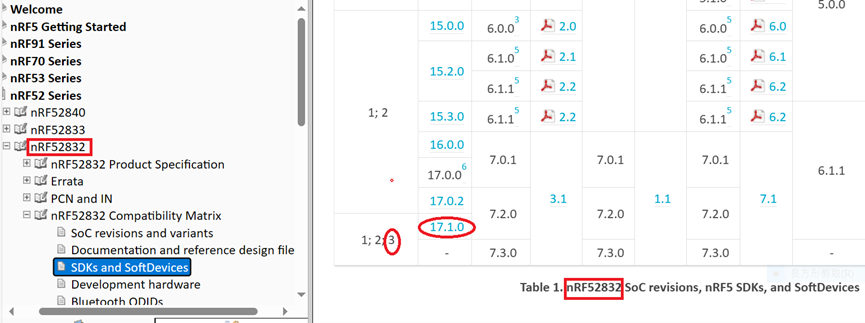
  • It is recommended to use nRF_SDK v17.1.0 or later versions to write code for the third edition.

Credit to Nordic Infocenter website :https://infocenter.nordicsemi.com/topic/comp_matrix_nrf52840/COMP/nrf52840/nRF52840_ic_rev_sdk_sd_comp_matrix.html

Credit to Nordic Infocenter website:
https://infocenter.nordicsemi.com/topic/comp_matrix_nrf52832/COMP/nrf52832/ic_rev_sdk_sd_comp_matrix.html


  • For further clarity on the differences between the second edition IC Bluetooth modules and the third edition IC Bluetooth modules, the following table and links are provided for reference:
Nordic nRF52840
* Supporting BT5 Long Range Feature
* Built in USB interface
Raytac nRF52840 module spectrum covers MDBT50Q-1MV2, MDBT50Q-P1MV2 and MDBT50Q-U1MV2 series with Chip Antenna, PCB Antenna and u.FL connector for External Antenna option for selection.
MDBT50Q-1MV2MDBT50Q-1MENMDBT50Q-P1MV2MDBT50Q-P1MENMDBT50Q-U1MV2MDBT50Q-U1MEN


* BT5.4 & BT5.2 & BT5.1 & BT5 Bluetooth Specification Certified.
32-bit ARM® Cortex™ M4F CPU
Chip AntennaPCB Antennau.FL connector for external antenna
Dimension: 10.5 x 15.5 x 2.05 mmDimension: 10.5 x 15.5 x 2.0 mmDimension: 10.5 x 15.5 x 2.05 mm
GPIO 48
1MB Flash  256kB RAM
Nordic nRF52840 V2 SoC Solution*Nordic nRF52840 V3 SoC SolutionNordic nRF52840 V2 SoC Solution*Nordic nRF52840 V3 SoC SolutionNordic nRF52840 V2 SoC Solution*Nordic nRF52840 V3 SoC Solution
 *Supports APProtect (Access Port Protection) Features * Supports APProtect (Access Port Protection) Features * Supports APProtect (Access Port Protection) Features
 *Recommend developing or recompiling the codes with nRF SDK v17.1.0 or latter version to have compatibility with this module *Recommend developing or recompiling the codes with nRF SDK v17.1.0 or latter version to have compatibility with this module *Recommend developing or recompiling the codes with nRF SDK v17.1.0 or latter version to have compatibility with this module
Nordic nRF52832
Raytac nRF52832 module spectrum covers MDBT42Q, MDBT42 and MDBT42V series with both Chip Antenna and PCB Antenna option for selection.
MDBT42Q-512KV2MDBT42Q-512KENMDBT42Q-P512KV2MDBT42Q-P512KENMDBT42Q-U512KV2MDBT42Q-U512KEN


BT5.4 & BT5.2 & BT5.1 & BT5 Bluetooth Specification Certified.
32-bit ARM® Cortex™ M4F CPU
Chip AntennaPCB Antennau.FL connector for external antenna
Dimension: 10 x 16 x 2.2 mm
GPIO 32
512kB Flash 64kB RAM
Nordic nRF52832 V2 SoC Solution*Nordic nRF52832 V3 SoC SolutionNordic nRF52832 V2 SoC Solution*Nordic nRF52832 V3 SoC SolutionNordic nRF52832 V2 SoC Solution*Nordic nRF52832 V3 SoC Solution
 *Supports APProtect (Access Port Protection) Features *Supports APProtect (Access Port Protection) Features *Supports APProtect (Access Port Protection) Features
 *Recommend developing or recompiling the codes with nRF SDK v17.1.0 or latter version to have compatibility with this module *Recommend developing or recompiling the codes with nRF SDK v17.1.0 or latter version to have compatibility with this module *Recommend developing or recompiling the codes with nRF SDK v17.1.0 or latter version to have compatibility with this module

Edited by Sales Manager: Ms. Mandy Chao

Raytac Corporation 勁達國際電子股份有限公司
Bluetooth & WiFi module maker based on Nordic nRF54, nRF53, nRF52, nRF7002 solution
BT5.4 &BT5.3 & BT5.2 & BT5.1 Qualified, FCC/IC/CE/Telec/KC/RCM/SRRC/NCC Pre-Certified. Bluetooth Solution: nRF54, nRF5340, nRF52840, nRF52833, nRF52832, nRF52820, nRF52811, nRF52810, nRF52805, nRF51822 WiFi Solution: nRF7002
www.raytac.com
email:service@raytac.com
Tel: +886.2.3234.0208

Wi-Fi Alliance (WFA) – Certification program –QuickTrack

Wi-Fi Alliance (WFA) – Certification program –QuickTrack

 -Collaboration between Solution provider & End product developer

Source: https://www.wi-fi.org/certification

Raytac Corp. is officially a member of Wi-Fi Alliance now!

Before stepping into Wi-Fi module selection and adoption, Wi-Fi regulatory compliance will be essential for you to know.

Let’s dig into the Wi-Fi certification program and investigate the possibility of WFA Qualified Solution (provided by Solution Provider) & WFA certificate (obtained by end product developer).

  • What benefits you (end product developer) by working with Rayta Corp. (Solution Provider) for QuickTrack program?
  1. Faster time-to-market : By using available WFA Qualified Solution (provided by solution provider) to waive (or partially waive) compliance test criteria/decrease testing days for end product (WiFi Device), shorter development days would be took before product launch.
  2. Reduce test and certification costs: it significantly reduces the cost and certification days for your project with minimal resource by working with Raytac Corp. (Solution Provider) using available WFA Qualified Solution.
  3. Avoid testing redundancies: Raytac Corp. (Solution Provider) has pre-certified the core Wi-Fi architecture and protocols in Nordic WiFi module AN7002Q, the necessary qualification tests has been conducted. You (end product developer) don’t need to test on those same criteria for end product (WiFi Device) if Raytac WiFi module is implemented in your end device.
  4. Allow flexibility of Wi-Fi functionality change: In case those minor change of Wi-Fi feature which is not relates to core/essential/architecture change may be raised someday in the future , QuickTrack program delivers the qualified product base (Source product) and lower cost with conformance test (QuickTrackTool) responding to the minor change.
  • How QuickTrack certification program works?

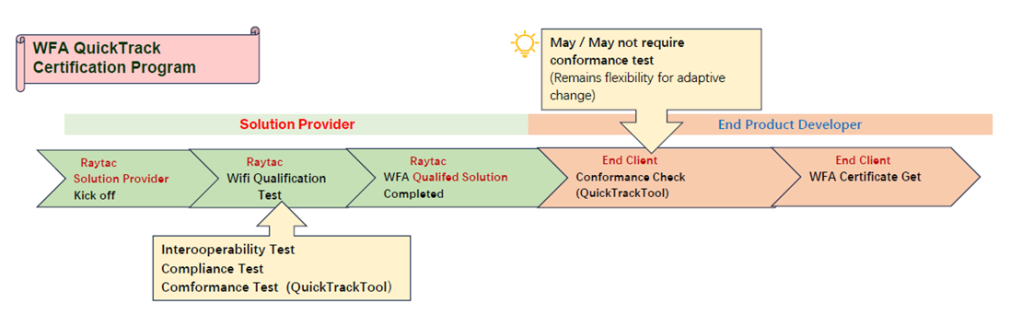
QuickTrack certification program shall be completed by 2 different parties, one is solution provider and the other is end product developer.

(Refer to the following image)

As a Solution Provider, Raytac would proceed the essential and fundamental Wi-Fi protocol/compliance test and develop this into a Qualified solution so that end product developer can leverage this solution as a base (Source Product) to obtain a certificate entitled to end product developer.

Please note the conformance check (named QuickTrack Tool) would be required before Wi-Fi alliance certifies the application.

Conformance check (QuickTrack Tool) will be reviewed for the 8 Wi-Fi components.

  1. Chipset
  2. Wi-Fi Component Firmware Version
  3. Driver
  4. RF Architecture
  5. Wi-Fi Component Operation System
  6. Physical Interface
  7. RF Components
  8. Antenna

When you adopt Raytac WFA Qualified solution, the core/essential/architecture components are pre-certified in the solution, in most of cases, no further conformance test is required, you (end product developer) will be granted to obtain the certificate after a couple of days applying process.

Raytac leaves the right to Wi-Fi alliance for the conformance review (run QuickTrackTool).

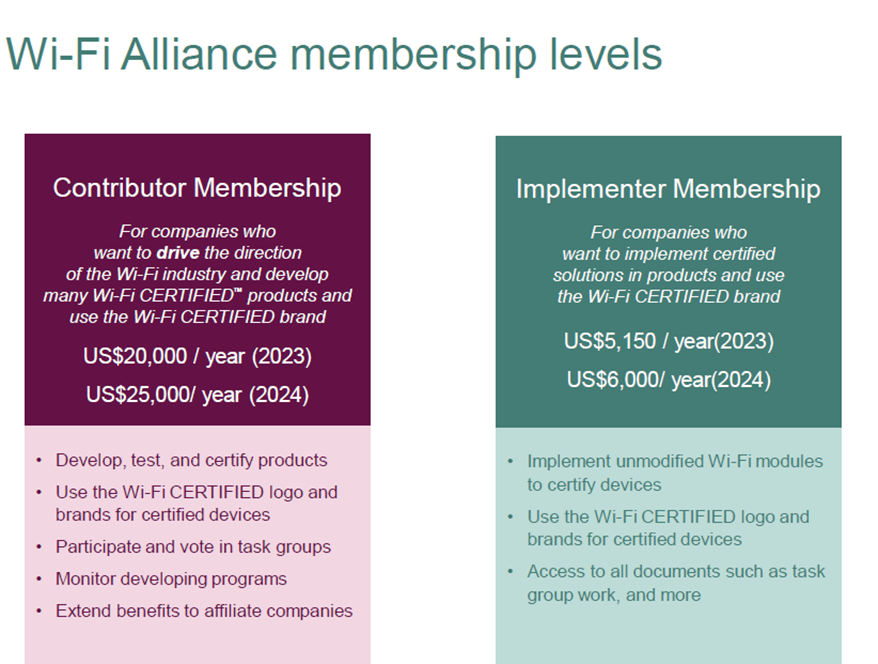
  • Which membership level shall be applied in Wi-Fi alliance for being QuickTrack?

If you agree with QuickTrack program and are willing to participate in the partnership as end product developer with Raytac Corp. (solution provider), Implementer membership will be cost effective option for you.

Company like Raytac Corp. served as solution provider or require professional Wi-Fi alliance support, company own/multiple programs oriented or needs tasks management shall refer to the membership of top one – Contributor.

Source: https://www.wi-fi.org/membership

https://www.wi-fi.org/membership/membership-benefits

Raytac Corp. is about to launch WiFi module AN7002Q in 2024 ;

Keep your attention to the blog post recently.

Edited by Sales Manager: Jocelyn Tsai

Raytac Corporation 勁達國際電子股份有限公司
Bluetooth & WiFi module maker based on Nordic nRF54, nRF53, nRF52, nRF7002 solution
BT5.4 &BT5.3 & BT5.2 & BT5.1 Qualified, FCC/IC/CE/Telec/KC/RCM/SRRC/NCC Pre-Certified. Bluetooth Solution: nRF54, nRF5340, nRF52840, nRF52833, nRF52832, nRF52820, nRF52811, nRF52810, nRF52805, nRF51822 WiFi Solution: nRF7002
www.raytac.com
email:service@raytac.com
Tel: +886.2.3234.0208

How To Get Started With nRF5340 Module Program Coding and Compiling

Intro:

As the chipset of nRF5340 is built by Dual Core structure (net core and application core), we need to proceed the coding and compiling process individually to net core & application core.

After the coding and compiling process done, we could get the separate zephyr.hex file respectively which are used for BLE module FW.

 Firmware Development Steps : Code Building / Compiling

Case Study : 

A. NON-Audio Project

     nRFConnect SDK V2.6.0

     Nordic Example code – “peripheral_uart”

  1. Nordic example code of “hci_ipc” extracted for coding and we will get zephyr.hex file for net core
  2. Nordic example code of “peripheral_uart” extracted for coding and we will get zephyr.hex file for application core

Step 1. Net core Layer

1a) Activate “Open VS Code” IDE in NCS V2.6.0

1b) Select “Add an existing application” and extract “hci_ipc” file moving forward

1c) Click “Add Build Configuration” icon

1d) Select “nrf5340dk_nrf5340_cpunet” and check Nordic boards then Execute “Build Configuration”

1e) zephyr.hex file is successfully generated for net core layer if the coding process is properly executed

B. Project with Audio inquiry

  nRFConnect SDK V2.6.0

    Nordic Example code – “nrf5340_audio

  1. Nordic example code of “hci_ipc” extracted for coding and we will get zephyr.hex file for net core
  2. Nordic example code of “nrf5340_audio” extracted for coding and we will get zephyr.hex file for application core

Step 2. Application core Layer:

2a) Activate “Open VS Code” IDE in NCS V2.6.0

2b) Select “Add an existing application” and extract “hci_ipc” file moving forward

2c) Click “Add Build Configuration” icon

2d) Select “nrf5340dk_nrf5340_cpuapp” and check Nordic boards, then Execute “Build Configuration”

2e) zephyr.hex file is successfully generated for application core layer if the coding process is properly executed

Find more nRF5340 module development resources in below links:

How To Get started with MDBT53/53V Demo Board Set up (MDBT53-DB-40/MDBT53V-DB-40)

How To USE Nordic Connect SDK (NCS) Flashing Built Code into nRF5340 Module

Edited by Account Manager: Jocelyn Tsai

Raytac Corporation 勁達國際電子股份有限公司 
Bluetooth & WiFi module maker based on Nordic nRF54, nRF53, nRF52, nRF7002 solution
BT5.4 &BT5.3 & BT5.2 & BT5.1 Qualified, FCC/IC/CE/Telec/KC/RCM/SRRC/NCC Pre-Certified. Bluetooth Solution: nRF54, nRF5340, nRF52840, nRF52833, nRF52832, nRF52820, nRF52811, nRF52810, nRF52805, nRF51822 WiFi Solution: nRF7002
www.raytac.com
email:sales@raytac.com
Tel: +886.2.3234.020

How To USE Nordic Connect SDK (NCS) Flashing Built Code into nRF5340 Module

Edited by Jocelyn Tsai / Account Manager

Intro:  With the ready built code of zephyr.hex file for net core and application core individually, we would like to proceed code flashing into the MDBT53/53V Nordic nRF5340 BLE module.

  • Ready Built Code Programming Steps

Step1. 

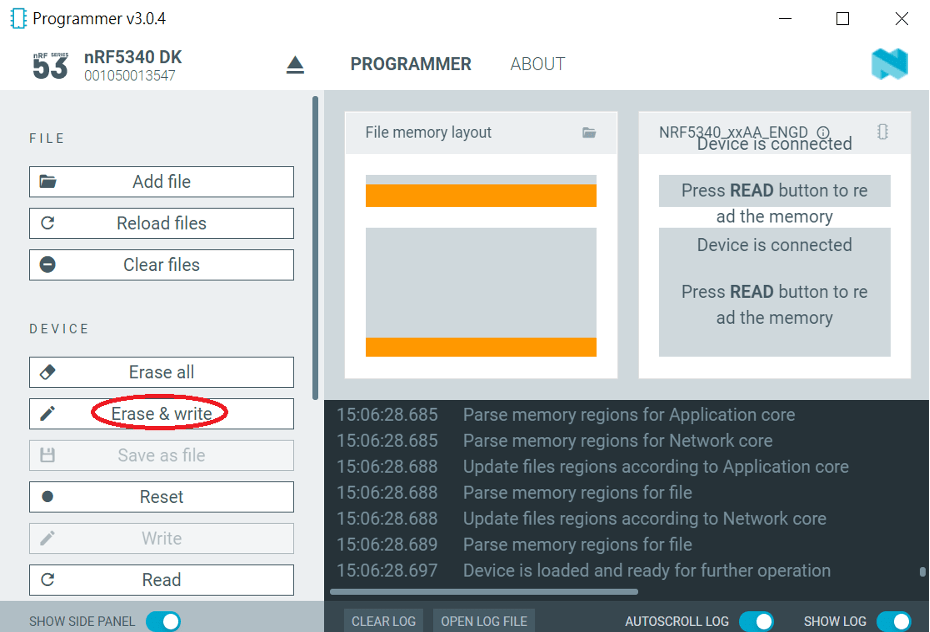
Execute nRF Connect >>  Programmer  > > Open

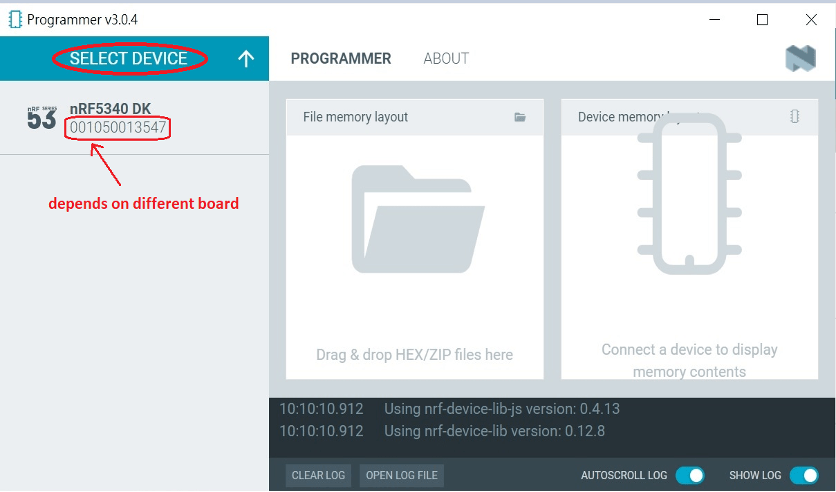
Step2.

Click “SELECT DEVICE” >> Find icon of “nRF5340 DK” which is detected by the programmer app

Step3.

Click icon of “nRF5340 DK” >> “Erase All” to remove the flash memory from MDBT53/53V BLE Module

Step4.

Click “Add File” to load the net core zephyr.hex and application core zephyr.hex both into programmer

Step5.

Do “Erase & Write ” to execute the flashing process for both zephyr.hex into memory of MDBT53/53V Module.

Step6.

To validate the wireless broadcast of default name “Nordic_UART_Service” from MDBT53/53V Module, please check on the “nRF Connect for mobile” APP and do “Scan device” through your mobile.   

Once the device name is detected in your mobile , the wireless connection is successfully done.

There are some more useful resources in the below links:
Hardware set up works
“How To Get started with Nordic nRF5340 Project by Raytac MDBT53/MDBT53V Development Kit Demo Board"
Firmware development:
“How To Get Started With nRF5340 Module Program Coding and Compiling" (Click Me)

Edited by Account Manager: Jocelyn Tsai

Raytac Corporation 勁達國際電子有限公司
A BT5.2 & BT5.1 & BT5 module maker based on Nordic nRF53 & nRF52 solution 
(nRF5340 & nRF52840 & nRF52833 & nRF52832 & nRF52820 & nRF52811 & nRF52810 & nRF52805)
www.raytac.com email: service@raytac.com Tel: +886.2.3234.0208

How To Get started with Nordic nRF5340 Project by Raytac MDBT53/MDBT53V Development Kit Demo Board

Edited by Jocelyn Tsai / Account Manager

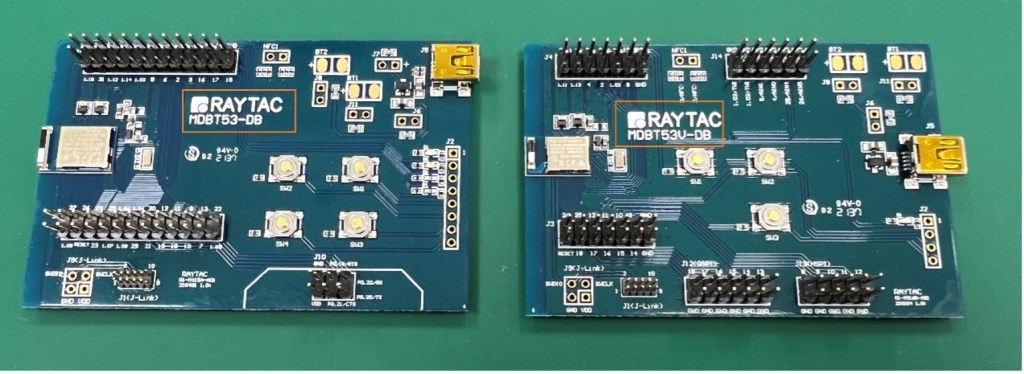
Here provides the easy introduction to the article of Hardware & Firmware Set up with step-by-step guidelines for nRF5340 Module demo board MDBT53-DB-40/MDBT53V-DB-40.

  1. Hardware Set Up
  2. Software Kits Resource & Preparation
  3. To recognize your nRFConnect SDK version case by case

1. Hardware Set Up

  • 1 x Nordic nRF5340-DK Board: PCA10095(2.0.0)
  • 1 x MDBT53-DB-40 or 1x MDBT53V-DB-40
  • 1 x IDC Wire 
  • 1 x Power Micro USB
  • 1 x Power Mini USB

**Reminder: Both “Nordic nRF5340-DK” and “Raytac MDBT53/53V Demo BD” should be included into the working network for program development.

Where to buy MDBT53-DB-40 , MDBT53V-DB-40
MDBT53-DB-40 (nRF5340 Solution)
MDBT53V-DB-40 (nRF5340 Solution)

  • Using Nordic DK as J-Link ( nRF5340 DK ONLY) Connects with MDBT53/53V DB by IDC wire.
  • Powered up MDBT53/53V DB by Mini USB wire.
  • Powered up the nRF5340-DK by Micro USB wire.


2.Software Kits Resource & Preparation

Download nRF Connect For Desktop (Please Click Me)

Download nRF Command Line Tools (Please Click Me)

Preparation

a. Prepared with the latest version of nRF Connect for Desktop

Selected version 3.12.0 Windows 32-bit and 64-bit

nrfconnect-setup-3.12.0-ia32.exe

b. Prepared with the latest version of nRF Command Line Tools

Selected version 10.18.1 Windows X86 64

nrf-Command-Line-Tools-10.18.1-x64.exe

**Note: SEGGER J-LINK Upgrade message might pop up while you’re doing above download.

 If you’re initiating Segger Embedded Studio (SES) application, please check the guideline here

c. Locate all the necessary kits for programming in PC (Check Software/Application list)


3. To recognize your nRFConnect SDK version case by case

Intro: The preparation of nRF Connect SDK Vx.x.x(NCS SDK version, ) and Nordic Example code will help you get through the program code building and trace debug in VS Code IDE or Segger Embedded Studio IDE. Here’s the brief way to recognize your nRFConnect SDK version which suits your project development.

Step1.

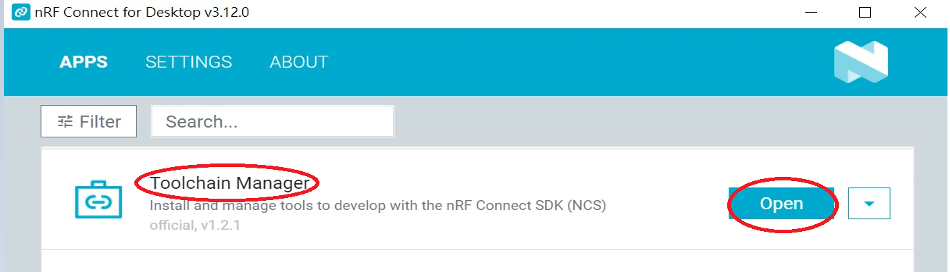
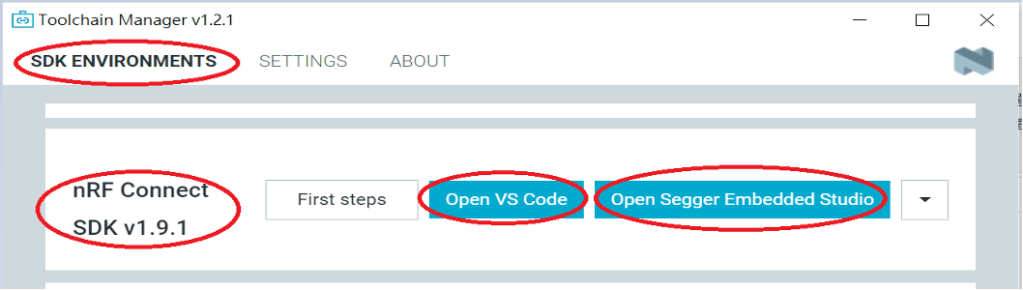
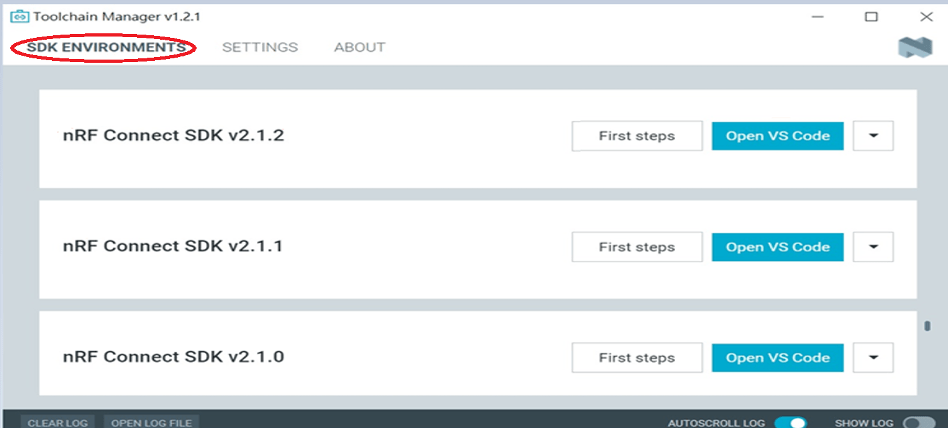
  Activated your “nRF Connect for Desktop”  >> “Toolchain Manager” >> “Open” >> “Install”

(**Note: The development nRF Connect SDK(NCS) provides with free VS Code IDE and Segger Embedded Studio IDE as compiling system)

Step2.

To recognize your project is with or without Audio inquiry and download the “nRF Connect SDK(NCS)” by the following classification.

A.) Project with Non-Audio case

Option1. Go with NCS V1.9.1 (Included) and previous version.

There’re either “Open VS Code” or “Open Segger Embedded Studio” IDE options could be selected for program coding.

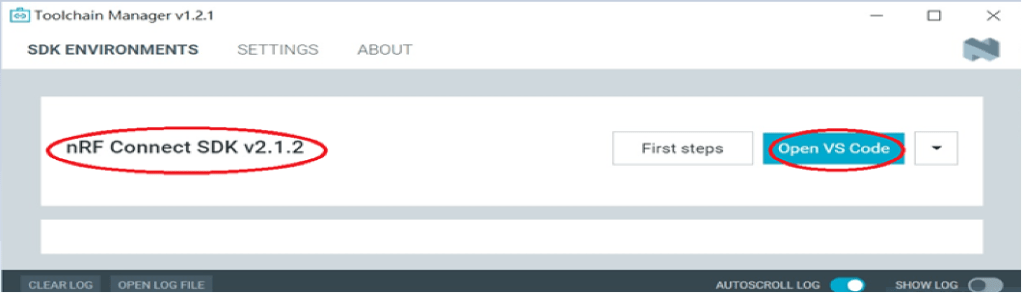
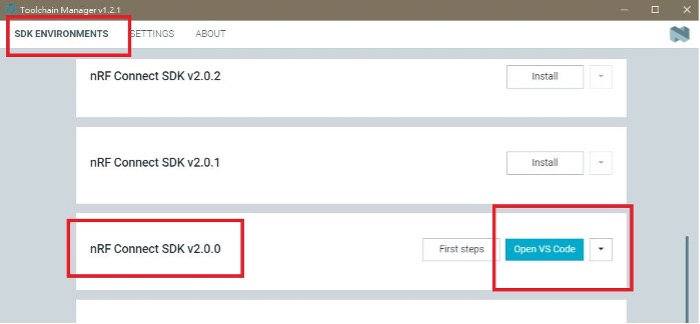
Option2. Go with NCS V2.0.0(included) and the later.

 There’s simply “Open VS Code” IDE that could be run for program coding.

B.) Project with “Audio” inquiry

You would only have option of NCS V2.0.0(included) and the later version working in “Open VS Code” IDE.

Step3.

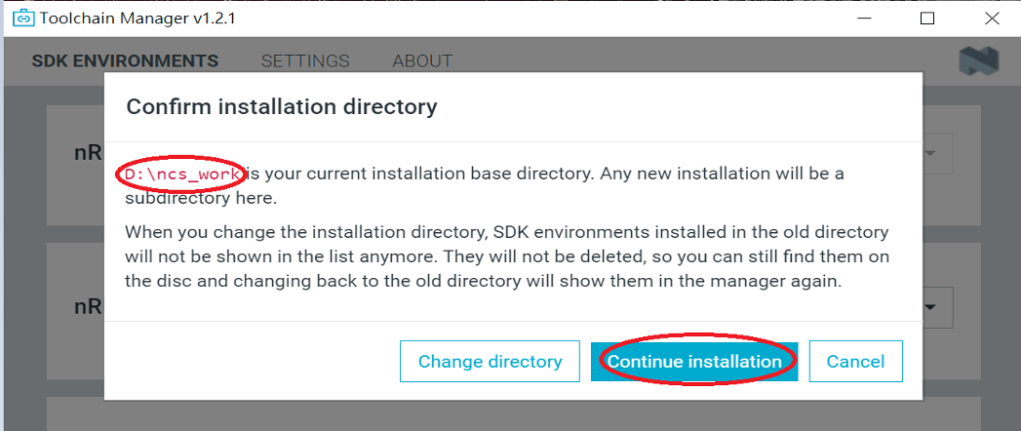
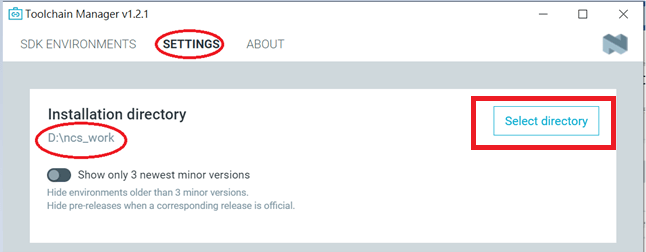
 Please make sure the nRFConnect SDK is installed at same base directory with compiling system  (the root of Open VS Code)

(This is using D:\ncs-work base as example.)    

If the base is not directing to the same, do “Select directory’” to re-direct the route.

Step4.

nRFConnect SDK Vx.x.x Download ready

Find more information about nRF5340 Module firmware development resources in below link!

“How To USE Nordic Connect SDK (NCS) Flashing Built Code into nRF5340 Module" , Please click this link! 

“How To Get Started With nRF5340 Module Program Coding and Compiling" Please click this link


Raytac Corporation 勁達國際電子有限公司
A BT5.2 & BT5.1 & BT5 module maker based on Nordic nRF53 & nRF52 solution 
(nRF5340 & nRF52840 & nRF52833 & nRF52832 & nRF52820 & nRF52811 & nRF52810 & nRF52805)
www.raytac.com email: service@raytac.com Tel: +886.2.3234.0208

New Distribution Partnership in Greater China Region

Raytac Corporation, a leading supplier of Bluetooth modules, announced a new distribution partnership with Weltrend Semiconductor, Inc. Weltrend has strong FAE team and their extensive footprint of distribution facilities makes them a valuable distribution partner. “We look forward to building our relationship and expanding the Greater China region to serve more customers.”

As a world-renowned supplier of BLE Bluetooth module, Raytac is dedicated to launching various kinds of modules to fulfill all developers’ needs and demands. Raytac’s modules are covered all Nordic solutions, including nRF51822, nRF52810, nRF52811, nRF52820, nRF52832, nRF52833, nRF52840 and nRF5340. Moreover, the modules are fully certified with not only Bluetooth SIG (QDID/DID/BQB), but also regional safety regulation in main areas such as FCC (USA), CE (EU), IC (Canada), TELEC (Japan), KC (Korea), SRRC (China), FCC(Taiwan), RCM (ANZ) , etc.

Raytac aims to build up a value chain to provide customers with a cost-effective and speed-time-to-market solution. Raytac also offers AT Command service allowing customers to adopt easily in IoT field.

WELTREND SEMICONDUCTOR,INC.KAOHSIUNG BRANCH(Taipei Office) Address: 11F-6, No. 736, Chungcheng Rd. Chungho District, New Taipei City., Taiwan http://www.weltrend.com.tw  Tel: +886.2.8226.9297

Raytac Corporation 勁達國際電子有限公司
A BT5.2 & BT5.1 & BT5 module maker based on Nordic nRF53 & nRF52 solution 
(nRF5340 & nRF52840 & nRF52833 & nRF52832 & nRF52820 & nRF52811 & nRF52810 & nRF52805)
www.raytac.com email: sales@raytac.com Tel: +886.2.3234.0208