Raytac Corporation
http://raytaccorp.blogspot.tw/2016/06/nordic-semiconductor-launches-nrf51824.html
Raytac Corporation
A BT4.1 & BT4.2 module maker based on Nordic nRF51 & nRF52 solution
(nRF51822 & nRF51422 & nRF52832 & nRF51802)
Tel: +886.2.3234.0208
email: service@raytac.com
日本での代理店への連絡は下記の通り。
株式会社フクミ (Fukumi corporation)
消費材企画開発Gr. LBTチーム (Consumer Products R&D Group, LBT team)
榊 和優 (Kazumasa Sakaki)
Tel : 03-5687-2890 (+81-3-5687-2890)
Mail : lbt_bt@fukumi.co.jp
株式会社フクミのブログから引用。詳細は下記Link先へ。
nRFgoはNordic社が提供する開発用スタートキットです。
(内容)
2x nRFgo motherboards
2x USB cables
4x 10-ribbon flat cables
8x 2-lead patch cables
1x nRFgo display add-on module
Printed ‘Getting Started Guide’
*Digi key等で5万円程度で購入が出来ます。
今回は開発したファームウェアをモジュールに焼きこむためのソフトウェアnRFgo Studioについて
Tipsです。
現時点(2016年6月7日)では、最新バージョンが「1.21.2」となっていますが、
Raytac社が比較検証したところ「1.19.x」のバージョンが書き込み速度が一番早いようです。
生産時にnRFgoとnRFgo Studioを使用して大量にコーディングをしている場合は特にですが、
余計なコストを発生させない為にも以前のバージョン1.19.xを使用したいところです。
環境依存こそあるかもしれませんが、最新バージョンが優れているという概念を捨て
以前のバージョンも保持しておくことが必要だという事ですね。
Raytac Corporation
Raytac Corporation
A BT4.1 & BT4.2 module maker based on Nordic nRF51 & nRF52 solution
(nRF51822 & nRF51422 & nRF52832 & nRF51802)
Tel: +886.2.3234.0208
email: service@raytac.com
日本での代理店への連絡は下記の通り。
株式会社フクミ (Fukumi corporation)
消費材企画開発Gr. LBTチーム (Consumer Products R&D Group, LBT team)
榊 和優 (Kazumasa Sakaki)
Tel : 03-5687-2890 (+81-3-5687-2890)
Mail : lbt_bt@fukumi.co.jp
株式会社フクミのブログから引用。詳細は下記Link先へ。
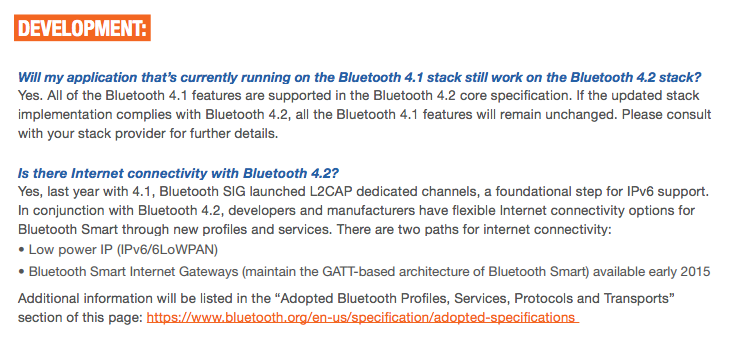
Bluetooth SmartとBluetooth Smart Readyについて
SIGの説明を引用しながら紹介したいと思います。
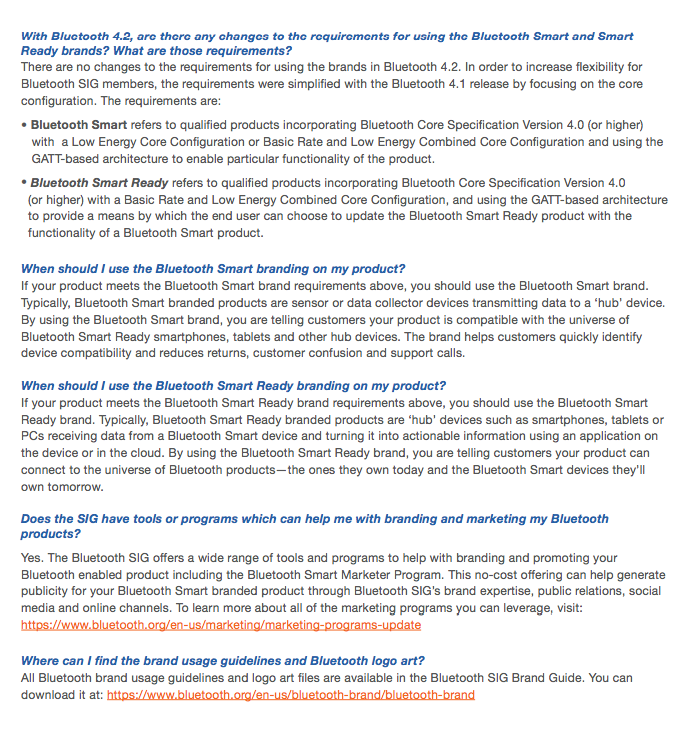
■Bluetooth Smart/Ready機器とは?
<Bluetooth Smart>

Bluetooth Smartとは極低電力で動作する無線通信規格のBluetooth Low Energy(BLE)に
対応していることを示すブランド名のことです。
Bluetooth Smart 機器は、特定のタイプの情報(戸締りした?血糖値はどのくらい?今日の体重はどのくらい?等)を
収集することを目的としており、それらを Bluetooth Smart Ready 機器に送信します。
このような機器には心拍数モニター、血糖測定器、スマートウォッチ、窓およびドアのセキュリティセンサー、
カーキーリモコン、血圧測定用カフ(上腕に巻いて用いる、細長い袋状の布)などがあります。
<Bluetooth Smart Ready>

Bluetooth Smart ReadyとはBluetooth Low Evergy(BLE)とBluetooth Clasiccの両方が
実装されていることを示すブランド名のことです。
Bluetooth Smart Ready 機器は、既にユーザーの手にある何十億台もの Bluetooth 機器等
(電話機、タブレット、パソコン、テレビ、セットトップボックスやゲーム機など)に接続するのに最も効果的な手段です。
これらの機器は従来のBluetooth(Bluetooth Classic)やBluetooth Smartから送信されたデータを効率的に受信し、
データを役立つ情報に変換するアプリケーションに送られます。
■Bluetooth Smart マークを使用する利点
製品パッケージ、販売促進用品、ウェブサイトなどに Bluetooth Smart および Bluetooth Smart Ready マークを使用すると、以下のような非常に大きなマーケティング優位性があります。
・広く認められた信頼されているブランドマークで製品のお試しと購入が増加
-調査ではブランド識別はお試しと購入を後押し
-Bluetooth ブランドは消費者に 97% 以上の認知度がある
・明確な機器の互換性識別で消費者の混乱を取り除き、返品が減少
-消費者はどの機器が自分のスマート機器と互換性があるのかを知りたい
・長期的な最終顧客ロイヤルティを構築
-Bluetooth Smart および Bluetooth Smart Ready マークは将来の仕様バージョンに
わたって、購入の障壁と今後の機器アップグレードに関する消費者の混乱を低減します
■どうすれば製品にマークを付けることができるのか?
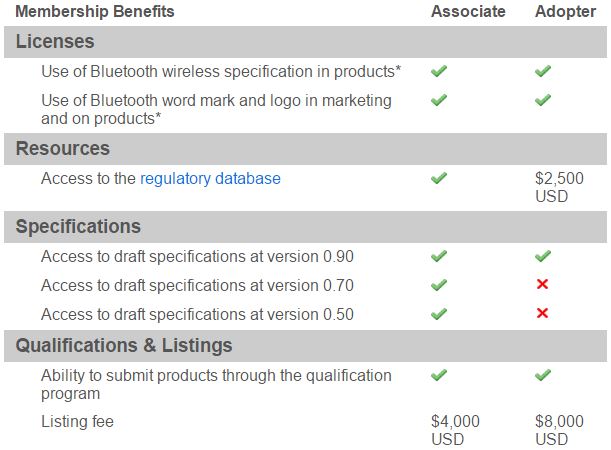
Bluetooth SIG の主要な目的の一つは、全て Bluetooth 製品が適切に認証され、
Bluetooth 使用許諾契約に従っていることをメンバーが確実にするために支援することです。
SIG によって管理されるオンラインツールを使って、
メンバーは完了すべき2つの段階のプロセス(認証および申告)があります。
*Bluetooth Smart Ready マークを付けるには、機器は2つの基準を満たす必要があります。
・ベーシックレートとローエナジーの複合コア構成を備える BT4.0 (またはそれ以降) を内蔵
・エンドユーザーが Bluetooth Smart Ready 製品で Bluetooth Smart 製品の機能性のアップデートを
選択できる手段を提供にするために GATT 基盤アーキテクチャを使用
*Bluetooth Smart マークを付けるには、機器は 2 つの基準を満たす必要があります。
・ローエナジーコア構成またはベーシックレートとローエナジーの複合コア構成を備えるBT4.0(またはそれ以降) を内蔵
・製品の特定機能を有効にするために GATT 基盤アーキテクチャを使用
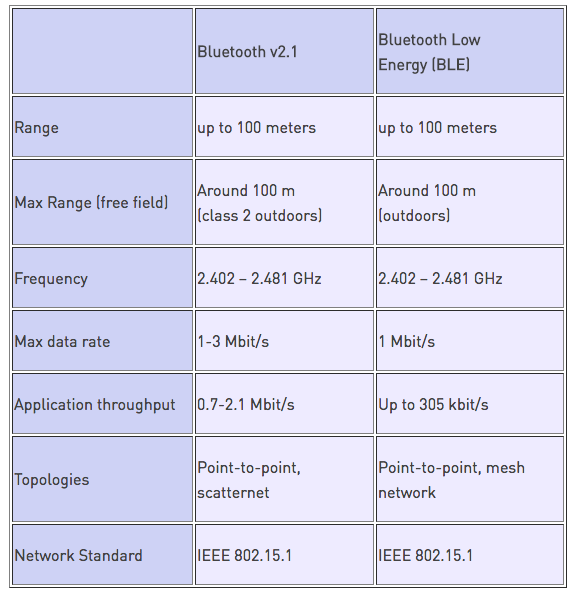
Like all communication technologies, Bluetooth is a better fit for some applications than other. If you’re considering to use Bluetooth, there are some basic things that are really good to know! Here’s an outline of the primary factors that determine the effective range of Bluetooth communications, plus some ways to improve it with networking.
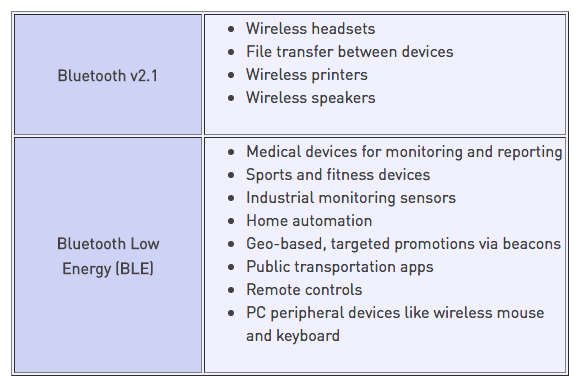
Bluetooth was originally designed to exchange a lot of data at close range in continuous, streaming data applications. The devices are able to both send and receive data at the same time. This is perfect for many common consumer products, such as computer headsets, where the two devices are close together.
When Bluetooth Low Energy (BLE, formerly called Bluetooth Smart) hit the market in 2011, the key advantage over earlier versions was lower power consumption over the same range, but with lower bandwidth. It’s intended for devices that only need to exchange small amounts of data periodically, extending battery life by months or even years.
There are many factors affecting Bluetooth range, typically:
While the radio performance and antennas are pretty static for a given Bluetooth device, the surroundings can vary a lot. Outdoors, in an open field, you can get a range of up to a hundred meters. But that is a rare situation. Indoors, obstacles like concrete walls will attenuate the radio signal and the effective range will be drastically reduced. In normal use, ten meters is a good guide to what can be achieved between two Bluetooth devices indoors.
When developing a Bluetooth device, you can give your device a better range by selecting the Bluetooth chip with the best receiver sensitivity and output power, and making sure that you use a good antenna.
Sometimes you may need to use Bluetooth over hundreds or thousands of meters. In the next section we will discuss how to extend Bluetooth range using networks.

You can connect Bluetooth devices to multiple distributed gateways connected to the internet. The Bluetooth devices can communicate with each other, and with online services, via these gateways. This is an ideal solution if the devices are spread over a large geographical area. Each hub can usually only handle a few directly connected devices, which is another limitation of Bluetooth. You are likely to run into a situation where you want to handle hundreds or even thousands of Bluetooth devices in a relatively small area, such as an office building. For this you need to use a Mesh Network to connect the gateway and the local Bluetooth devices.

The number of devices that require low-power operation and communication with other devices – and online services – is growing daily. In order to support this, BLE introduced support for Mesh Networks. A Mesh Network allows you to connect a large number of Bluetooth devices over a wider area. In this situation, all devices, or “nodes”, in the same mesh are able to communicate with each other, either directly or via one or more intermediate nodes, as long as each node is close enough to at least two others.
This way, the network does not depend on a central gateway to pass all traffic.
Just like the Internet, data packets can find the most efficient route via any nodes between the sender and the receiver.
In a Mesh Network you can also use a “broadcasting” approach, where all nodes within the Mesh Network receive the same message, and then interpret it and take appropriate action.

One example could be a smart lighting system. Each switch or bulb is a node on a Mesh Network using Bluetooth Low Energy. Each bulb is configured to know which room it’s in. The message is broadcast from Node 1, a light switch, via the mesh. The connected light bulbs in Room 1 receive this message, but they will not act upon it, as they know they are not in Room 2. The message is passed along and when it reaches the bulbs in Room 2, they turn on. Room 2 could be hundreds of meters away from Room 1, but will still receive the message via the other nodes in between. This way there could be a thousand or more rooms, all with lighting controlled from anywhere, using a Bluetooth Low Energy Network.
Raytac Corporation
Raytac Corporation

Raytac Corporation