Secure DFU OTA for nRF52832 solution modules: Creating hex/zip file for implementation – Part 2(Combining/merging built files)

Following up – Part 1: Bootloader & Application (Click for article link),

We will be focusing on:

in this article.

IC: nRF52832
DK: PCA10040 (for nRF52832)
SDK: 16.0.0
Softdevice: s132_nrf52_7.0.1_softdevice.hex
IDE: Keil C
PC: Win 10


Step 1. Execute the combine batch file in bootloader (nrf52832_bootloader_setting_merge.bat) and generate file of nrf52832_bootloader_secure_combin_settings.hex :

@echo off
title = [ J-Link Tool ] %CD%
set nrfDir=C:\Program Files (x86)\Nordic Semiconductor\nrf5x\bin
set BS= nrf52832_bootloader_secure_settings.hex
set BL= nrf52832_xxaa_s132.hex
set BSBLCombind= nrf52832_bootloader_secure_combin_settings.hex
set path=%nrfDir%;%path%
pause
echo ———–merge image file——————-
mergehex.exe -m %BS% %BL% -o %BSBLCombind%
pause


Step 2. Create a Final.hex file by 3-in-1 batch file(nrf52832_3in1_merge.bat)
※Note : This hex file is created for the production line to pre-load firmware into modules prior to shipment.

@echo off
title = [ J-Link Tool ] %CD%
set nrfDir=C:UsersuserDesktopNordic BLEnRF5_merge toolsnRF52 bin
set SD= s140_nrf52_7.2.0_softdevice.hex
set BLT= nrf52832_bootloader_secure_combin_settings.hex
set APP= nrf52832_xxaa.hex
set SD_BLT=SD_BLT.hex
set Finalfile=Final.hex
set path=%nrfDir%;%path%
pause
echo ———–merge image file——————-
mergehex.exe -m %SD% %BLT% -o %SD_BLT%
pause
mergehex.exe -m %SD_BLT% %APP% -o %Finalfile%
pause


Step 3. Create a DFU(OTA).zip file of nrf52832_xxaa.zip
※Note : This zip file is created for end device DFU(OTA) implementation.

nrfutil pkg generate –hw-version 52 –sd-req 0xCB –application-version 0xFF –application
nrf52832_xxaa.hex –key-file private.pem nrf52832_xxaa.zip

The DFU OTA zip file will be derived.

※Note :
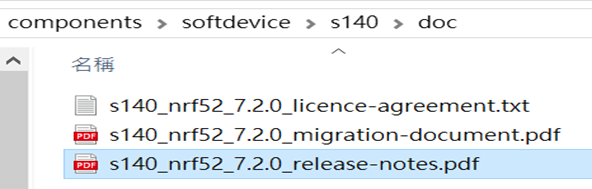
The “0xCB" appeared in the above DOS code(in red font) is the FWID(Firmware ID) for s140_nrf52_7.2.0_softdevice.hex;
FWID can be found from the soft device documents on the Nordic website.


Step 4: Run DFU OTA (On mobile in this example)


4A. Install the nRF Connect APP on mobile, with DFU OTA file: nrf52832_xxaa.zip. (Download link)


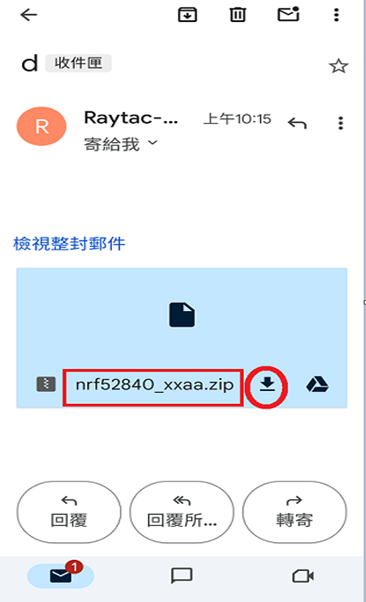
4B. Send nrf52832_xxaa.zip via email to mobile device after combination is done on PC, then download it.


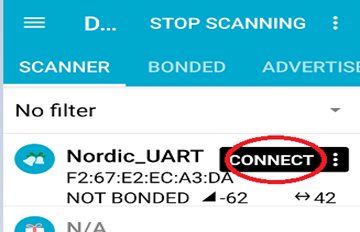
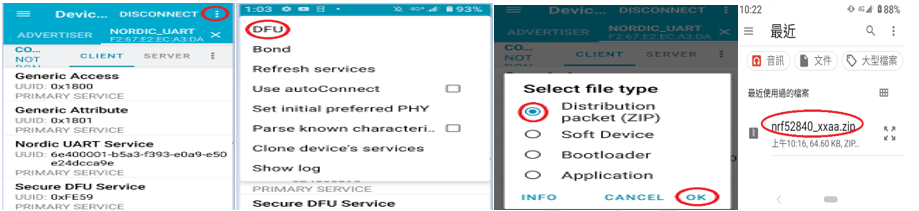
4C. Open nRF Connect APP and run connection;


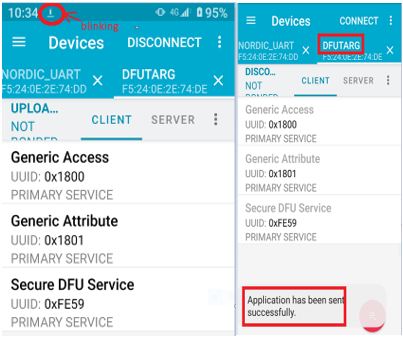
4D. Execute DFU and select “Distribution packet(ZIP)", thus starting the DFU OTA process.


4E. Start DFU OTA → exit the APP after DFU OTA is completed → restart the mobile device.


Secure DFU OTA for nRF52832 solution modules: Guide to create hex/zip file for implementation
Detailed links of articles:
Part 1: Bootloader & Application (Click for article link)
Part 2: Combining & merging built files


Technical guidelines provided by R&D Manager: Mr. MW Lee
Edited by Sales Manager: Ms. Mandy Chao


Raytac Corporation 勁達國際電子股份有限公司 
Raytac Corporation: A Bluetooth, Wi-Fi, and LoRa Module Maker based on
Nordic nRF54; nRF53: nRF52; nRF51; nRF7002
Semtech Specification: SX1262

Bluetooth Specification: BT5.4 ; BT5.3; BT5.2.
Wi-Fi Specification: Wi-Fi 6
LoRa Specification: LoRaWAN

All products are FCC/IC/CE/Telec/KC/RCM/SRRC/NCC Pre-Certified.
http://www.raytac.com
email: sales@raytac.com
Tel: +886-2-3234-0208

Secure DFU OTA for nRF52832 solution modules: Guide to create hex/zip file for implementation – Part 1(Bootloader & Application)

Below are the guidelines to implement Secure DFU OTA by using Raytac’s nRF52832 modules, SDK16.0.0.
It consists of 2 parts:

Part 1: Bootloader & Application


Part 2: Combining and merging built files (Article link)

In this article, we will be focusing on Part 1: Bootloader & Application.


Path: ..\nRF5_SDK_16.0.0_98a08e2\examples\dfu\secure_bootloader\pca10040_s132_ble\arm5_no_packs
Specifically for nRF52832, programmers need to embed ECC(Elliptic Curve Cryptography) into the bootloader.


Step 1. ’micro_ecc_lib_nrf52.lib’ library can be found in the path below, but we need to boot it up first.


Step 2. Unzip ’micro-ecc-master.zip’ to the below path(create a new “micro-ecc” file first).


Step 3. Run ’gcc-arm-none-eabi-7-2018-q2-update-win32.exe’.


Step 4. Make sure the Environment variables in Win10 are set as below. (Follow the steps 1 to 6)


Step 5. Open DOS → run the “make” command under armgcc path → generate’micro_ecc_lib_nrf52.lib’


Step 6. Add ’micro_ecc_lib_nrf52.lib’ into folder: nRF_micro-ecc


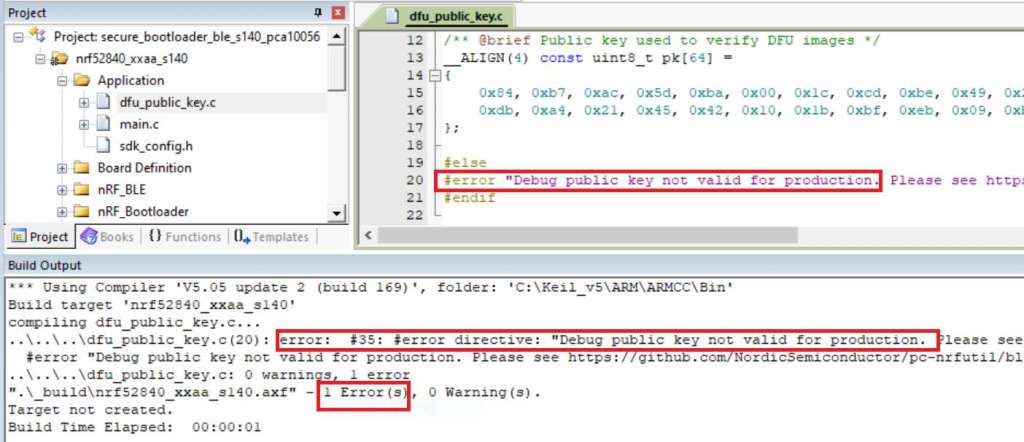
Step 7. An error may occur while building bootloader without a public key:
(Shown in red frames in below screenshot)


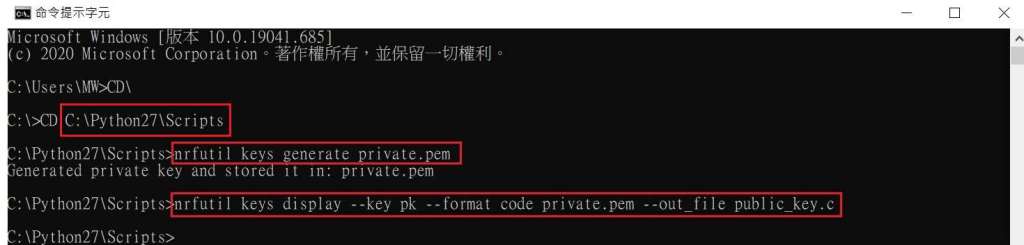
Step 8. How to generate the public key file in Bootloader?
A. Visit DOS at path: ..\Python27\Scripts
B. Then execute:

nrfutil keys generate private.pem
nrfutil keys display --key pk --format code private.pem --out_file public_key.c


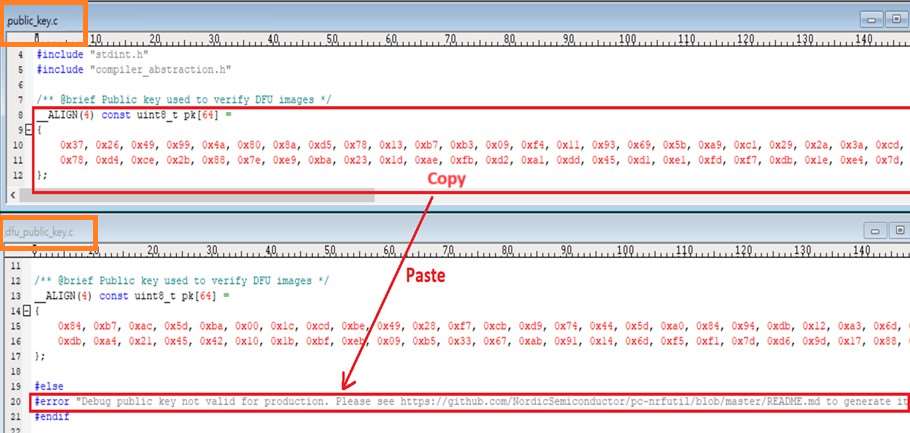
Step 9. Copy the pk[64] code from (public_key.c) into (dfu_public_key.c)
(Shown in red frames in below screenshot)

※Note: Make sure to save the 3 generated files:
private.pem
public_key.c
dfu_public_key.c


Step 10. Generate the bootloader file: nrf52832_xxaa_s132.hex after re-compiling the code files.


Application


Path:
..\nRF5_SDK_16.0.0_98a08e2\examples\ble_peripheral\ble_app_uart\pca10040\s132\arm5_no_packs
Before building Application code , some amendments need to be made regarding DFU-related settings and code inside Application:


Step 1. Add code in definition in C/C++ :
BL_SETTINGS_ACCESS_ONLY NRF_DFU_SVCI_ENABLED NRF_DFU_TRANSPORT_BLE=1
(Total 3 steps definitions need to be set up)


Step 2. Add the 3 paths shown below in C/C++ to make DFU work.


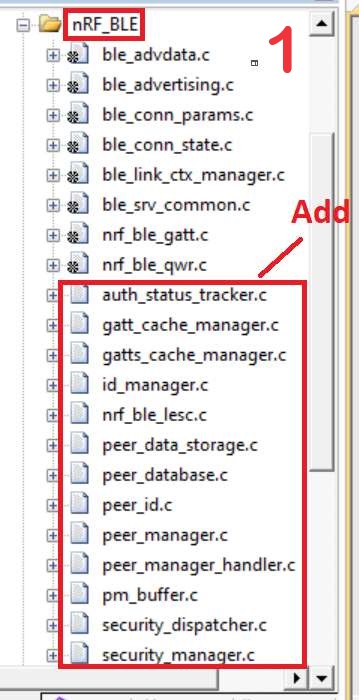
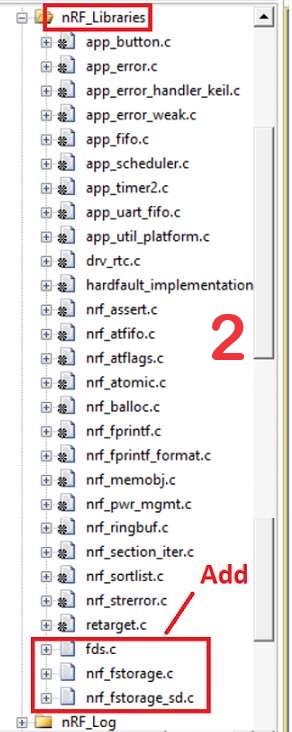
Step 3. Add the .c files inside red frame in (Screenshots 1 & 2)
and add the 2 groups of (nRF_DFU & nRF_SVC)(Screenshot 4) under Project(Screenshot 3)


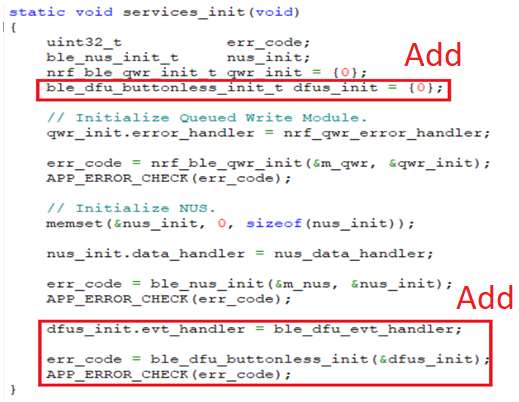
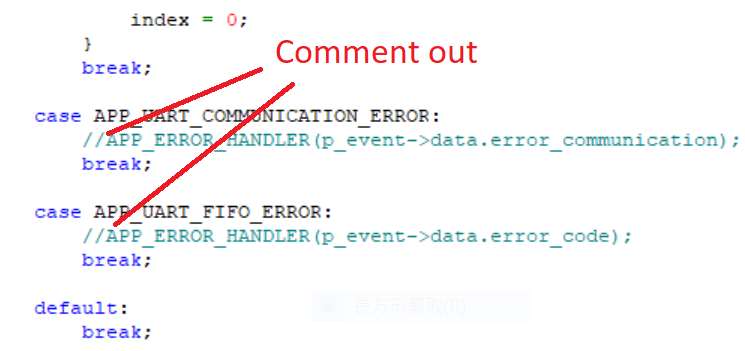
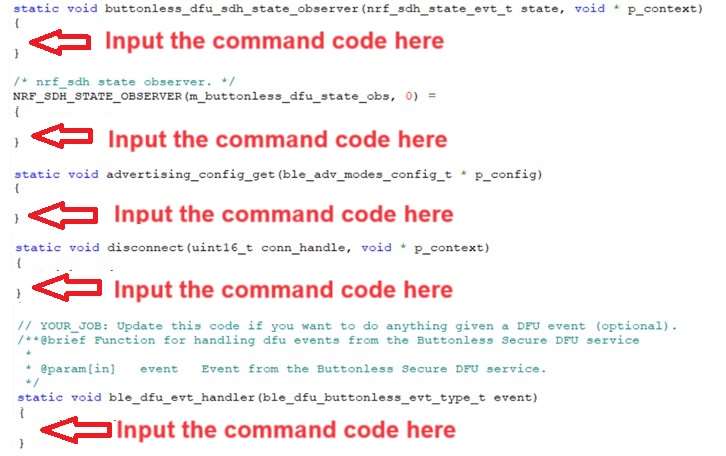
Step 4. Add code into main.c file in Application (..\examples\ble_peripheral\ble_app_uart\main.c)
(Please refer to: main.c file at: ..\examples\ble_peripheral\ ble_app_buttonless_dfu)


Step 5.
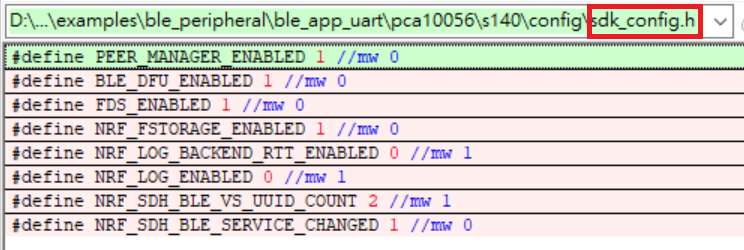
The code of file: sdk_config.h (..\examples\ble_peripheral\ble_app_uart\pca10040\s132\config\sdk_config.h)

inside Application needs to be modified.


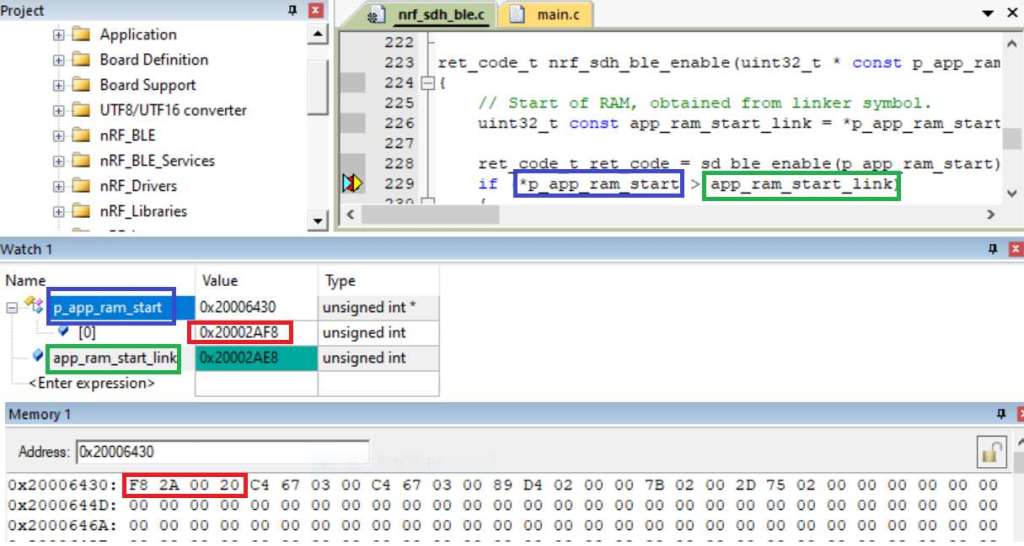
Step 6. Adjust the IRAM1 value in Target after implementing DFU service:
Make sure the IRAM1 Value of *p_app_ram_start is modified from default: 0x20002AD8 0xD528 to
0x20002AE8 0xD518, as shown in the red frame in the bottom right corner.
In this case, the program should run/advertise successfully.


Step 7. Create a file of: nrf52832_xxaa.hex after building application code files.


Step 8. Create a bootloader setting file of nrf52832_bootloader_secure_settings.hex via DOS.
nrfutil settings generate –family NRF52 –application nrf52832_xxaa.hex –application-version 3 —
bootloader-version 2 –bl-settings-version 1 nrf52832_bootloader_secure_settings.hex –no-backup

※Stay tuned for Part 2: Combining and merging built files in the next article, scheduled release in next week(04-Sep-2024).


Technical guidelines provided by R&D Manager: Mr. MW Lee
Edited by Sales Manager: Ms. Mandy Chao


Raytac Corporation 勁達國際電子股份有限公司 
Raytac Corporation: A Bluetooth, Wi-Fi, and LoRa Module Maker based on
Nordic nRF54; nRF53: nRF52; nRF51; nRF7002
Semtech Specification: SX1262

Bluetooth Specification: BT5.4 ; BT5.3; BT5.2.
Wi-Fi Specification: Wi-Fi 6
LoRa Specification: LoRaWAN

All products are FCC/IC/CE/Telec/KC/RCM/SRRC/NCC Pre-Certified.
http://www.raytac.com
email: sales@raytac.com
Tel: +886-2-3234-0208

Secure DFU OTA for nRF52840 solution modules: Guide to create hex/zip file for implementation – #3(Combining/merging built files)

Following up – Part A: Bootloader (Click for article link) and Part B: Application (Click for article link)

We will be focusing on:

in this article.

IC: nRF52840
DK: PCA10056 (for nRF52840)
SDK: 17.1.0
Softdevice: s140_nrf52_7.2.0_softdevice.hex
IDE: Keil C
PC: Win 10


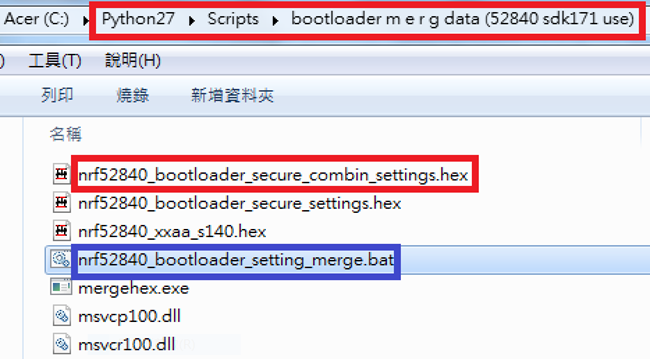
Step 1. Execute the combine batch file in bootloader (nrf52840_bootloader_setting_merge.bat) and generate file of nrf52840_bootloader_secure_combin_settings.hex :

@echo off
title = [ J-Link Tool ] %CD%
set nrfDir=C:\Program Files (x86)\Nordic Semiconductor\nrf5x\bin
set BS= nrf52840_bootloader_secure_settings.hex
set BL= nrf52840_xxaa_s140.hex
set BSBLCombind= nrf52840_bootloader_secure_combin_settings.hex
set path=%nrfDir%;%path%
pause
echo ———–merge image file——————-
mergehex.exe -m %BS% %BL% -o %BSBLCombind%
pause


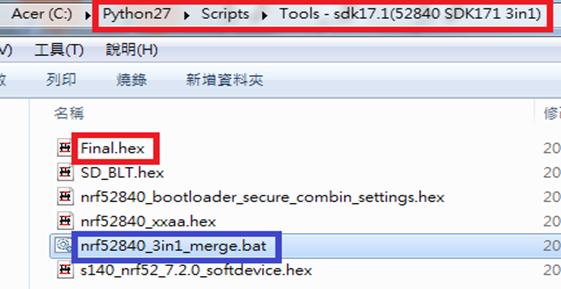
Step 2. Create a Final.hex file by 3-in-1 batch file(nrf52840_3in1_merge.bat)
※Note : This hex file is created for the production line to pre-load firmware into modules prior to shipment.

@echo off
title = [ J-Link Tool ] %CD%
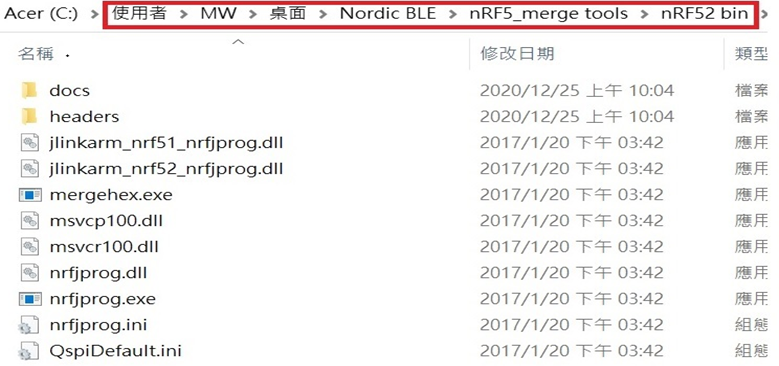
set nrfDir=C:\Users\user\Desktop\Nordic BLE\nRF5_merge tools\nRF52 bin
set SD= s140_nrf52_7.2.0_softdevice.hex
set BLT= nrf52840_bootloader_secure_combin_settings.hex
set APP= nrf52840_xxaa.hex
set SD_BLT=SD_BLT.hex
set Finalfile=Final.hex
set path=%nrfDir%;%path%
pause
echo ———–merge image file——————-
mergehex.exe -m %SD% %BLT% -o %SD_BLT%
pause
mergehex.exe -m %SD_BLT% %APP% -o %Finalfile%
pause


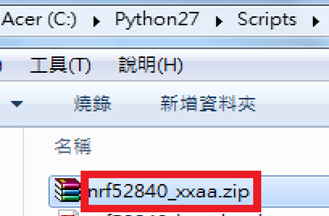
Step 3. Create a DFU(OTA).zip file of nrf52840_xxaa.zip
※Note : This zip file is created for end device DFU(OTA) implementation.

nrfutil pkg generate –hw-version 52 –sd-req 0x100 –application-version 0xFF –application
nrf52840_xxaa.hex –key-file private.pem nrf52840_xxaa.zip

The DFU OTA zip file will be derived.

※Note :
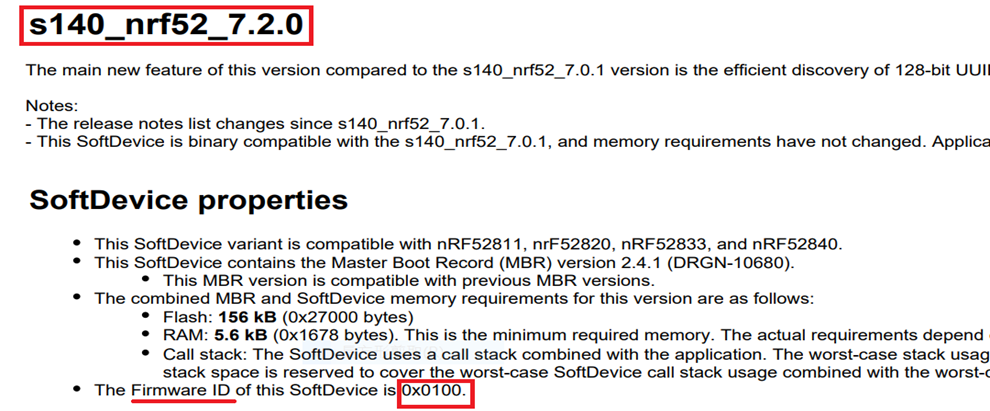
The “0x100" appeared in the above DOS code(in red font) is the FWID(Firmware ID) for s140_nrf52_7.2.0_softdevice.hex;
FWID can be found from the soft device documents on the Nordic website.


Step 4: Run DFU OTA (On mobile in this example)


4A. Install the nRF Connect APP on mobile, with DFU OTA file: nrf52840_xxaa.zip. (Download link)


4B. Send nrf52840_xxaa.zip via email to mobile device after combination is done on PC, then download it.


4C. Open nRF Connect APP and run connection;


4D. Execute DFU and select “Distribution packet(ZIP)", thus starting the DFU OTA process.


4E. Start DFU OTA → exit the APP after DFU OTA is completed → restart the mobile device.


Secure DFU OTA for nRF52840 solution modules: Guide to create hex/zip file for implementation
Detailed links of articles:
Part A: Bootloader (Click for article link)
Part B: Application
(Click for article link)
Part C: Combining and merging built files
(Click for article link)


Technical guidelines provided by R&D Manager: Mr. MW Lee
Edited by Sales Manager: Mr. Tony Yin

Raytac Corporation 勁達國際電子股份有限公司 
Bluetooth & WiFi module maker based on Nordic nRF54, nRF53, nRF52, nRF7002 solution
BT5.4 &BT5.3 & BT5.2 & BT5.1 Qualified, FCC/IC/CE/Telec/KC/RCM/SRRC/NCC Pre-Certified.
Bluetooth Solution: nRF54, nRF5340, nRF52840, nRF52833, nRF52832, nRF52820, nRF52811, nRF52810, nRF52805, nRF51822
WiFi Solution: nRF7002
http://www.raytac.com
email: service@raytac.com
Tel: +886-2-3234-0208

Secure DFU OTA for nRF52840 solution modules: Guide to create hex/zip file for implementation – #2(Application)

Following up-Part A: Bootloader (Click for article link)

We will be focusing on:

in this article.

IC: nRF52840
DK: PCA10056 (for nRF52840)
SDK: 17.1.0
Softdevice: s140_nrf52_7.2.0_softdevice.hex
IDE: Keil C
PC: Win 10


Path: nRF5_SDK_17.1.0_ddde560\examples\ble_peripheral\ble_app_uart\pca10056\s140\arm5_no_packs

Before building Application code , some amendments need to be made regarding DFU-related settings and code inside Application:

Step 1.


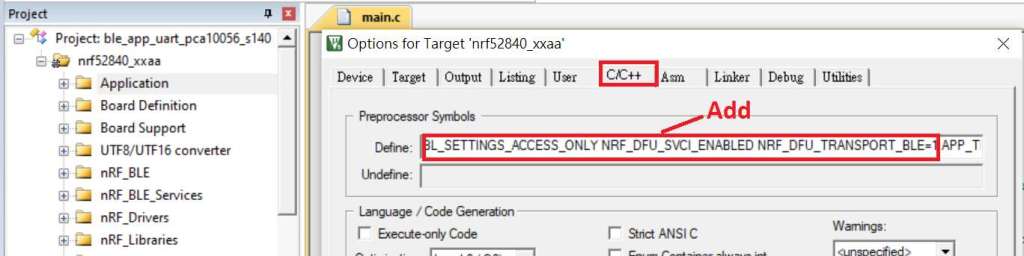
1A. Add code in definition in C/C++ :
BL_SETTINGS_ACCESS_ONLY NRF_DFU_SVCI_ENABLED NRF_DFU_TRANSPORT_BLE=1
(Total 3 steps definitions need to be set up)


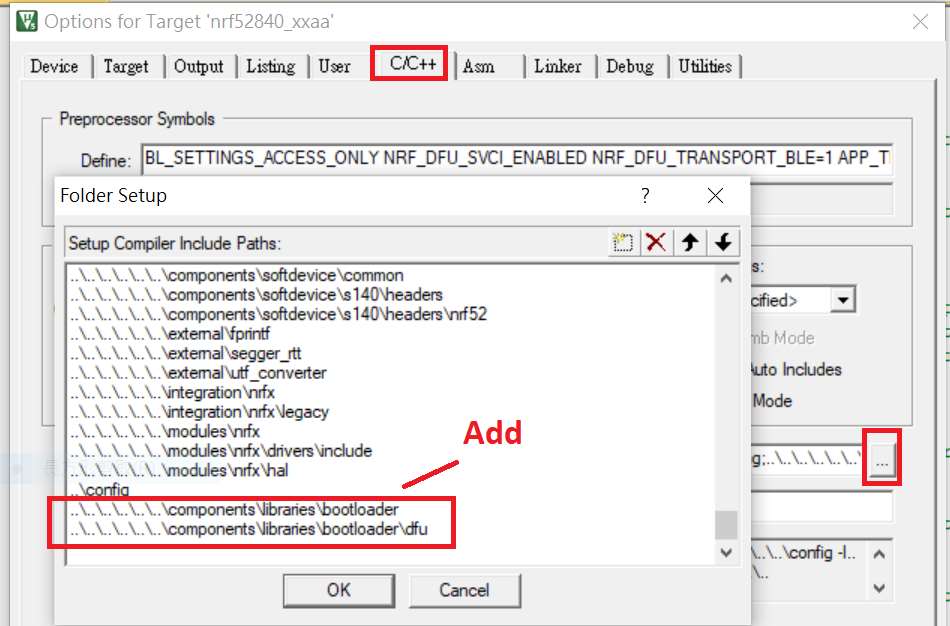
1B. Add “include path” in C/C++


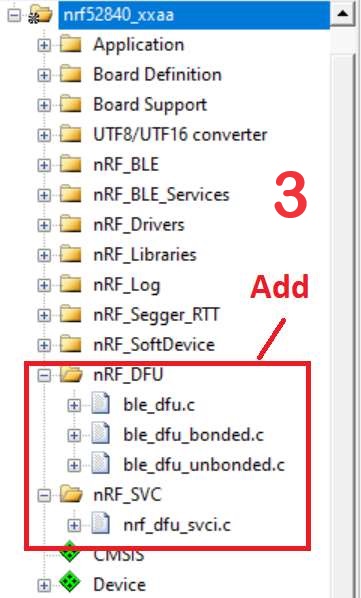
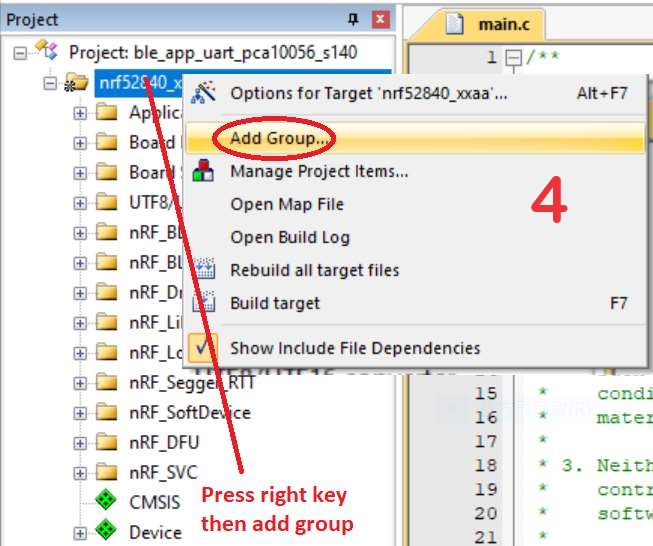
1C. Add the .c files inside red frame in (Screenshots 1 & 2)
and the 2 groups of (nRF_DFU & nRF_SVC)(Screenshot 3) under Project(Screenshot 4)


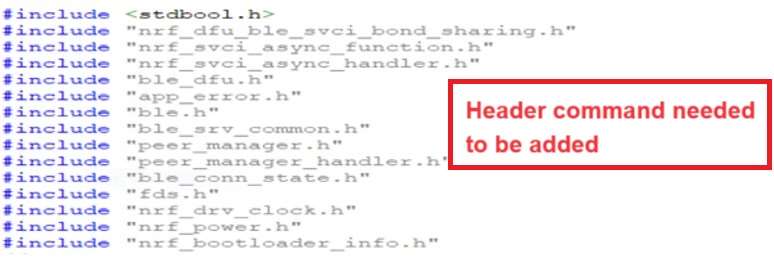
1D. Add code into main.c file in Application (..\examples\ble_peripheral\ble_app_uart\main.c)
(Please refer to: main.c file at: ..\examples\ble_peripheral\ ble_app_buttonless_dfu)


1E. The code of file: sdk_config.h (..\examples\ble_peripheral\ble_app_uart\pca10056\s140\config\
sdk_config.h) inside Application needs to be modified.


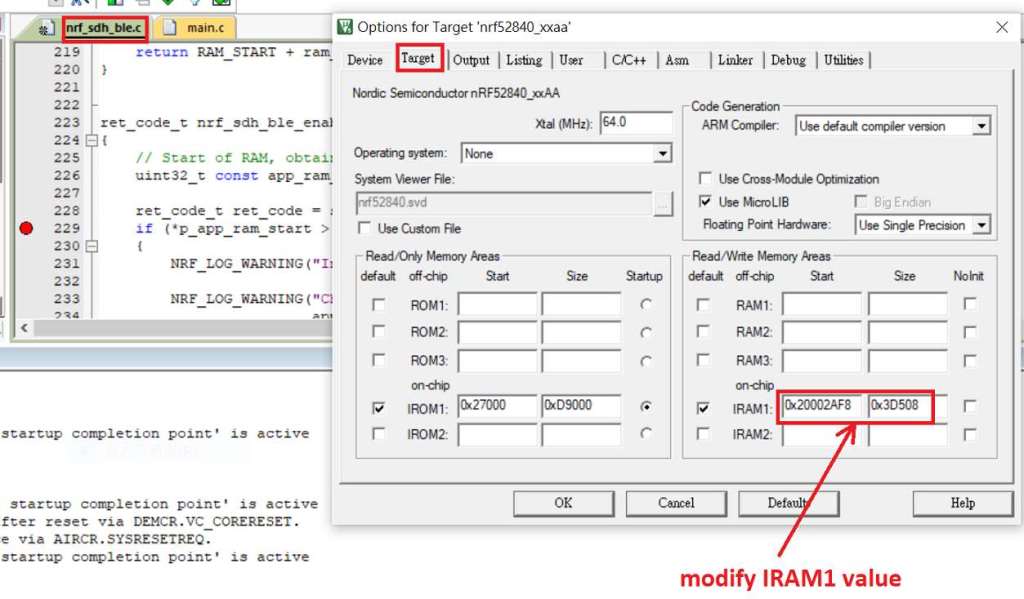
1F. Adjust the IRAM1 value in Target after implementing DFU service:
Check on the IRAM1 Value of *p_app_ram_start to be modified from default: 0x20002AE8 0x3D518 to 0x20002AF8 0x3D508, as shown in the red frame in the bottom right corner.
In this case, the program should run successfully.


1G: Create a file of: nrf52840_xxaa.hex after building application code files.


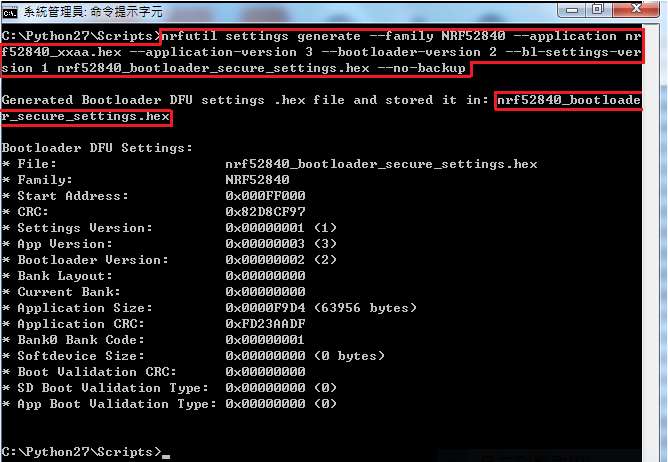
Step 2. Create a bootloader setting file of nrf52840_bootloader_secure_settings.hex : (via DOS)

nrfutil settings generate –family NRF52840 –application nrf52840_xxaa.hex –application-version 3 — bootloader-version 2 –bl-settings-version 1 nrf52840_bootloader_secure_settings.hex –no-backup


※Stay tuned for #3 – Part C: Combining and merging built files in the next article,

scheduled release in next week(05/06/2024).


Technical guidelines provided by R&D Manager: Mr. MW Lee
Edited by Sales Manager: Mr. Tony Yin

Raytac Corporation 勁達國際電子股份有限公司 
Bluetooth & WiFi module maker based on Nordic nRF54, nRF53, nRF52, nRF7002 solution
BT5.4 &BT5.3 & BT5.2 & BT5.1 Qualified, FCC/IC/CE/Telec/KC/RCM/SRRC/NCC Pre-Certified.
Bluetooth Solution: nRF54, nRF5340, nRF52840, nRF52833, nRF52832, nRF52820, nRF52811, nRF52810, nRF52805, nRF51822
WiFi Solution: nRF7002
http://www.raytac.com
email: service@raytac.com
Tel: +886-2-3234-0208

Secure DFU OTA for nRF52840 solution modules: Guide to create hex/zip file for implementation – #1(Bootloader)

Below are the following steps to implement Secure DFU OTA by using nRF52840 chip set, SDK17.1.0.
It consists of 3 parts:

Part A: Bootloader

Part B: Application (Click for article link)

Part C: Combining and merging built files (Click for article link)

In this article, we will be focusing on Part A: Bootloader.

Path: nRF5_SDK_17.1.0_ddde560\examples\dfu\secure_bootloader\pca10056_s140_ble\arm5_no_packs


Step 1. An error may occur while building bootloader without a public key:
(Shown in red frames in below screenshot)


Step 2. How to generate the public key file in Bootloader?
A. Visit DOS at path: ..\Python27\Scripts
B. Then execute:

nrfutil keys generate private.pem
nrfutil keys display --key pk --format code private.pem --out_file public_key.c


Step 3. Copy the pk[64] code from (public_key.c) into (dfu_public_key.c)
(Shown in red frames in below screenshot)

※Note: Make sure to save the 3 generated files:
private.pem
public_key.c
dfu_public_key.c


Step 4. Generate the bootloader file: nrf52840_xxaa_s140.hex after re-compiling the code files.


※Stay tuned for #2 – Part B: Application in the next article, scheduled release in next week(29/05/2024).


Technical guidelines provided by R&D Manager: Mr. MW Lee
Edited by Sales Manager: Mr. Tony Yin


Raytac Corporation 勁達國際電子股份有限公司 
Bluetooth & WiFi module maker based on Nordic nRF54, nRF53, nRF52, nRF7002 solution
BT5.4 &BT5.3 & BT5.2 & BT5.1 Qualified, FCC/IC/CE/Telec/KC/RCM/SRRC/NCC Pre-Certified.
Bluetooth Solution: nRF54, nRF5340, nRF52840, nRF52833, nRF52832, nRF52820, nRF52811, nRF52810, nRF52805, nRF51822
WiFi Solution: nRF7002
http://www.raytac.com
email: service@raytac.com
Tel: +886-2-3234-0208

Optimizing functionality on nRF52 – Introducing Raytac bluetooth module with enabled Access Port Protection

Definition of Approtect (Access Port Protection):

In Nordic Semiconductor products, the enhanced APprotect feature has been integrated into the nRF52 series microcontrollers. APprotect (Access Port Protection) is a crucial security feature designed to safeguard the device’s application, compiled code, with read-back protection mechanism, against unauthorized access and modifications. This protection is essential for preventing unauthorized access and software tampering.

Effectively leveraging the improved Approtect feature on nRF52 series microcontrollers to enhance device application security and reliability is a significant concern for current developers and engineers.

This year, Raytac Corporation has launched low-energy Bluetooth modules for the third edition IC nRF52840 APprotection Solution and nRF52832 APprotection Solution.

These modules not only retain the functionalities of the original nRF52840 and nRF52832 low-energy Bluetooth modules but also comprehensively upgrade security by adding the APprotect feature to prevent hackers from accessing and rewriting programs without authorization.

Here is a detailed explanation of the nRF52 third edition low-energy Bluetooth modules by Raytac Corporation:

  • Raytac Corporation APProtection Bluetooth Module Series:

The encoding principle is to use ‘EN’ after the original model number to represent ‘encrypted’ instead of ‘V2’.

For example, in the nRF52840 series, the Raytac model MDBT50Q-1MV2 has “V2″ replaced with “EN" for the third edition, hence the third edition model is named MDBT50Q-1MEN.

MDBT50Q Ceramic Antenna Series:

MDBT50Q-1MEN :
Equipped with a ceramic antenna module suitable for long-distance or complex environment wireless transmission.

MDBT50Q-P PCB Antenna Series:

MDBT50Q-P1MEN:
Equipped with a PCB antenna module suitable for general environment wireless transmission.


Designed for external antenna requirements,

MDBT50Q-U1MEN:

This module features a u.FL connector for external antenna use, suitable for ultra-long-distance wireless transmission.


Specification:
[nRF52840] MDBT50Q-1MEN & MDBT50Q-P1MEN Spec (Ver.A)
[nRF52840] MDBT50Q-U1MEN Spec (Ver.A)


Development Board:

MDBT50Q-DB : An excellent choice for those who want to delve deeper into and conduct more tests with the Nordic nRF52840. This development and debugging board based on the MDBT50Q-1MV2 (ceramic antenna) module has all GPIOs of the module pulled out, facilitating rapid connection to other devices for firmware development and verification using jumper wires.


The same encoding principle applies to the nRF52832 series, and the MDBT42Q series follows suit.


MDBT42Q Ceramic Antenna Series:

MDBT42Q-512KEN comes with a ceramic antenna module, suitable for long-distance or complex environment wireless transmissions.

MDBT42Q-P PCB Antenna Series:

MDBT42Q-P512KEN  features a PCB antenna module, suitable for general environment wireless transmissions.

MDBT42Q-U512KEN , designed for external antenna requirements, comes with a u.FL connector module suitable for ultra-long-distance wireless transmissions.


Specification:
[nRF52832] MDBT42Q-512KEN & MDBT42Q-P512KEN Spec (Ver.A)
[nRF52832] MDBT42Q-U512KEN Spec (Ver.A)


Development Board:

MDBT42Q-DB development board is based on the MDBT42Q-512KV2 (ceramic antenna) module and is designed for development and debugging purposes.


Other Reference Links:

Nordic 3rd Party Modules/Modems(Raytac’s modules are all qualified Nordic 3rd Party Bluetooth low energy module, please go following website for more detailed information.)

  • Module Appearance: The third edition features an additional black dot in the bottom left corner of the metal shell for easy identification of its purpose.
  • While the device with readback protection enabled, issuing ERASEALL command is a must and the only method to unlock the device before proceeding with programming.

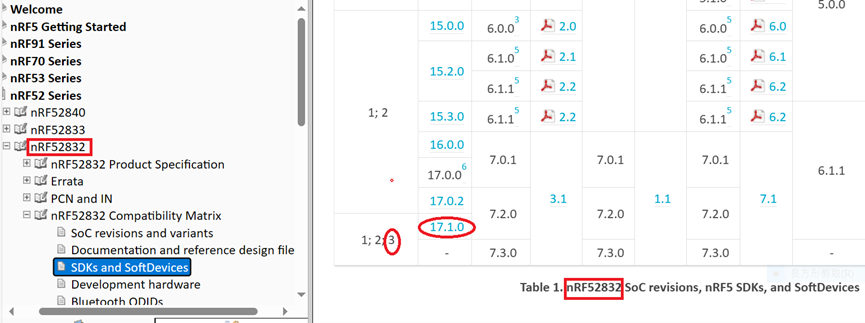
  • It is recommended to use nRF_SDK v17.1.0 or later versions to write code for the third edition.

Credit to Nordic Infocenter website :https://infocenter.nordicsemi.com/topic/comp_matrix_nrf52840/COMP/nrf52840/nRF52840_ic_rev_sdk_sd_comp_matrix.html

Credit to Nordic Infocenter website:
https://infocenter.nordicsemi.com/topic/comp_matrix_nrf52832/COMP/nrf52832/ic_rev_sdk_sd_comp_matrix.html


  • For further clarity on the differences between the second edition IC Bluetooth modules and the third edition IC Bluetooth modules, the following table and links are provided for reference:
Nordic nRF52840
* Supporting BT5 Long Range Feature
* Built in USB interface
Raytac nRF52840 module spectrum covers MDBT50Q-1MV2, MDBT50Q-P1MV2 and MDBT50Q-U1MV2 series with Chip Antenna, PCB Antenna and u.FL connector for External Antenna option for selection.
MDBT50Q-1MV2MDBT50Q-1MENMDBT50Q-P1MV2MDBT50Q-P1MENMDBT50Q-U1MV2MDBT50Q-U1MEN


* BT5.4 & BT5.2 & BT5.1 & BT5 Bluetooth Specification Certified.
32-bit ARM® Cortex™ M4F CPU
Chip AntennaPCB Antennau.FL connector for external antenna
Dimension: 10.5 x 15.5 x 2.05 mmDimension: 10.5 x 15.5 x 2.0 mmDimension: 10.5 x 15.5 x 2.05 mm
GPIO 48
1MB Flash  256kB RAM
Nordic nRF52840 V2 SoC Solution*Nordic nRF52840 V3 SoC SolutionNordic nRF52840 V2 SoC Solution*Nordic nRF52840 V3 SoC SolutionNordic nRF52840 V2 SoC Solution*Nordic nRF52840 V3 SoC Solution
 *Supports APProtect (Access Port Protection) Features * Supports APProtect (Access Port Protection) Features * Supports APProtect (Access Port Protection) Features
 *Recommend developing or recompiling the codes with nRF SDK v17.1.0 or latter version to have compatibility with this module *Recommend developing or recompiling the codes with nRF SDK v17.1.0 or latter version to have compatibility with this module *Recommend developing or recompiling the codes with nRF SDK v17.1.0 or latter version to have compatibility with this module
Nordic nRF52832
Raytac nRF52832 module spectrum covers MDBT42Q, MDBT42 and MDBT42V series with both Chip Antenna and PCB Antenna option for selection.
MDBT42Q-512KV2MDBT42Q-512KENMDBT42Q-P512KV2MDBT42Q-P512KENMDBT42Q-U512KV2MDBT42Q-U512KEN


BT5.4 & BT5.2 & BT5.1 & BT5 Bluetooth Specification Certified.
32-bit ARM® Cortex™ M4F CPU
Chip AntennaPCB Antennau.FL connector for external antenna
Dimension: 10 x 16 x 2.2 mm
GPIO 32
512kB Flash 64kB RAM
Nordic nRF52832 V2 SoC Solution*Nordic nRF52832 V3 SoC SolutionNordic nRF52832 V2 SoC Solution*Nordic nRF52832 V3 SoC SolutionNordic nRF52832 V2 SoC Solution*Nordic nRF52832 V3 SoC Solution
 *Supports APProtect (Access Port Protection) Features *Supports APProtect (Access Port Protection) Features *Supports APProtect (Access Port Protection) Features
 *Recommend developing or recompiling the codes with nRF SDK v17.1.0 or latter version to have compatibility with this module *Recommend developing or recompiling the codes with nRF SDK v17.1.0 or latter version to have compatibility with this module *Recommend developing or recompiling the codes with nRF SDK v17.1.0 or latter version to have compatibility with this module

Edited by Sales Manager: Ms. Mandy Chao

Raytac Corporation 勁達國際電子股份有限公司
Bluetooth & WiFi module maker based on Nordic nRF54, nRF53, nRF52, nRF7002 solution
BT5.4 &BT5.3 & BT5.2 & BT5.1 Qualified, FCC/IC/CE/Telec/KC/RCM/SRRC/NCC Pre-Certified. Bluetooth Solution: nRF54, nRF5340, nRF52840, nRF52833, nRF52832, nRF52820, nRF52811, nRF52810, nRF52805, nRF51822 WiFi Solution: nRF7002
www.raytac.com
email:service@raytac.com
Tel: +886.2.3234.0208
New Distribution Partnership in India Region – Millennium Semiconductors

Raytac Corporation, a globally recognized third-party Bluetooth module supplier endorsed by Nordic Semiconductor, has announced a strategic collaboration with Millennium Semiconductor, a specialized electronic agent, starting from November 2023. The establishment of this partnership aims to jointly expand into the Indian market and provide comprehensive services to customers in different regions. Raytac Corporation has consistently focused on the wireless field, earning a reputation as a leading provider of Bluetooth Low Energy modules with outstanding technological capabilities. Additionally, Raytac offers the latest WiFi + BLE modules and a complete range of solutions from Nordic.

The product lineup includes series such as nRF54, nRF5340, nRF52840, nRF52833, nRF52832, nRF52820, nRF52811, nRF52810, nRF52805, nRF51822, all of which have obtained qualifications for BT5.4, BT5.3, BT5.2, and BT5.1. Furthermore, the nRF7002 represents the first device in our array of distinct Wi-Fi products, seamlessly combining with Nordic’s established ultra-low power technologies. Raytac Corporation’s modules have received Bluetooth (QDID/DID/BQB) and regulatory certifications from various countries and regions, including FCC (USA), CE (Europe), IC (Canada),TELEC (Japan), KC (Korea), SRRC (China), NCC (Taiwan), RCM (Australia/New Zealand), and others.

In addition to delivering excellent performance and transmission distances, Raytac Corporation’s modules are relatively compact in size, offering a diverse range of module series choices. This flexibility empowers developers to design without being constrained by module dimensions. Furthermore, the inclusion of AT Command by Raytac facilitates a quick entry for developers into the realms of Bluetooth and the Internet of Things.

Millennium Semiconductors India Private Limited, 

17/18/19, 2nd Floor, Mahalaxmi Heights, Mumbai-Pune Road, Pimpri, Pune 411 018, Maharashtra, INDIA.

+91 20 67177100 / 151, +91 9130015701

info@millenniumsemi.com

Edited by Sales Manager: Ms. Mandy Chao

Raytac Corporation

勁達國際電子股份有限公司
Bluetooth & WiFi module maker based on Nordic nRF54, nRF53, nRF52, nRF7002 solution
BT5.4 &BT5.3 & BT5.2 & BT5.1 Qualified, FCC/IC/CE/Telec/KC/RCM/SRRC/NCC Pre-Certified. Bluetooth Solution: nRF54, nRF5340, nRF52840, nRF52833, nRF52832, nRF52820, nRF52811, nRF52810, nRF52805, nRF51822 WiFi Solution: nRF7002
www.raytac.com
email:service@raytac.com
Tel: +886.2.3234.0208
SRRC Certification Update – Document No. 129

About SRRC Certification:

SRRC, or the State Radio Regulation Committee, is a mandatory certification required by the National Radio Management Committee of the Ministry of Industry and Information Technology of China. All wireless products sold within China must obtain certification, commonly referred to as SRRC certification, which involves approval of the wireless transmission equipment model.

SRRC Document No. 129:

Document No. 129 introduces various interference avoidance technical requirements for wireless transmission equipment, including “pre-transmission scanning," “monitoring and avoidance," and “Medium Utilization (MU)" for equivalent occupancy rate.

a. “Pre-transmission scanning" and “monitoring and avoidance" mechanisms involve monitoring and listening to the wireless channel before or during signal transmission. By setting appropriate detection threshold levels, the channel’s occupancy status is determined to select an idle channel for access.

b. The “equivalent occupancy rate" mechanism requires wireless transmission equipment to self-adjust based on parameters such as “Duty Cycle" and “transmission power," ensuring the “equivalent occupancy rate" remains at a lower level (not exceeding 10%).


1.     Certificate Validity Period:
Enforced from October 15, 2023. During this period, both old and new policies can be applied. Certificates obtained under the old regulation (Document No. 353) are valid until December 31, 2025. However, certificates obtained by complying with the requirements of Document No. 129 will be valid for 5 years.


2.     Sample Requirements:
2.1   The quantity of conducted samples prepared according to the old regulation remains unchanged: 5 samples.
2.2   The major change introduced by Document No. 129 is the addition of interference avoidance technical requirements. The interference avoidance test items include:
1.     Maximum channel occupancy time
2.     Minimum channel idle time
3.     Minimum silence period duration
4.     Detection of unused signals
5.     Detection threshold
6.     Short control signal duty cycle
7.     Equivalent occupancy rate.


Differences between Old and New Regulations:


Edited by Sales Manager: Ms. Vicky Huang

Raytac Corporation 勁達國際電子股份有限公司

Bluetooth & WiFi module maker based on Nordic nRF54, nRF53, nRF52, nRF7002 solution
BT5.4 &BT5.3 & BT5.2 & BT5.1 Qualified, FCC/IC/CE/Telec/KC/RCM/SRRC/NCC Pre-Certified.
Bluetooth Solution: nRF54, nRF5340, nRF52840, nRF52833, nRF52832, nRF52820, nRF52811, nRF52810, nRF52805, nRF51822 WiFi Solution: nRF7002
http://www.raytac.com
email:service@raytac.com
Tel: +886.2.3234.0208


Tips for Nordic’s nRF52840 DK to successfully detect Raytac’s MDBT50Q-DB-40 Demo Board

WHY Nordic’s DK cannot DETECT Raytac’s modules?

Some tips to fix this problem

Nordic’S board no : PCA10056 (nRF52840)

Raytac’s board no : MDBT50Q-DB-40 (nRF52840)


1. Update the version of nRF Command Line Tools from below link
https://www.nordicsemi.com/Products/Development-tools/nRF-Command-Line-Tools/Download?lang=en#infotabs

2. Update the version of jlink driver from below link.
https://www.segger.com/downloads/jlink/JLink_Windows_V780c_x86_64.exe


3. Update the version of nRF Connect for desktop.
nRF connect for desktop V4.1.2
Programmer V3.0.9


4. Add jumper wire for GND shown as the below red arrow to avoid the different power reference between these 2 boards.


5. Make sure that IDE cable connects correctly. Red edge of IDE cable should connect to PIN 1 of both boards.

6. Supply power to VDD of Raytac’s demo board before flashing.


Edited by Sales Manager: Ms. Gracie Chuang

Raytac Corporation 勁達國際電子股份有限公司

Bluetooth & WiFi module maker based on Nordic nRF54, nRF53, nRF52, nRF7002 solution
BT5.4 &BT5.3 & BT5.2 & BT5.1 Qualified, FCC/IC/CE/Telec/KC/RCM/SRRC/NCC Pre-Certified.
Bluetooth Solution: nRF54, nRF5340, nRF52840, nRF52833, nRF52832, nRF52820, nRF52811, nRF52810, nRF52805, nRF51822 WiFi Solution: nRF7002
https://www.raytac.com
email:service@raytac.com
Tel: +886.2.3234.0208
Important Notice:Upcoming price increase in Bluetooth SIG Membership Fees and DID

The Bluetooth SIG Board of Directors(BoD) has granted its approval for a 15% increase in member fees, effective from January 1,2024. This decision comes after careful consideration of the organization’s financial situation and the need to cover the rising costs of current and futrue member services throughout 2024.

Bluetooth

Feel free to explore the mission and operations of the Bluetooth SIG by visiting the provided web pages below:

Raytac Corporation 勁達國際電子有限公司
A Bluetooth & WiFi module maker based on Nordic nRF53, nRF52, nRF70 solution 
www.raytac.com email: service@raytac.com Tel: +886.2.3234.0208