Understanding LE Audio: BIS and CIS Explored

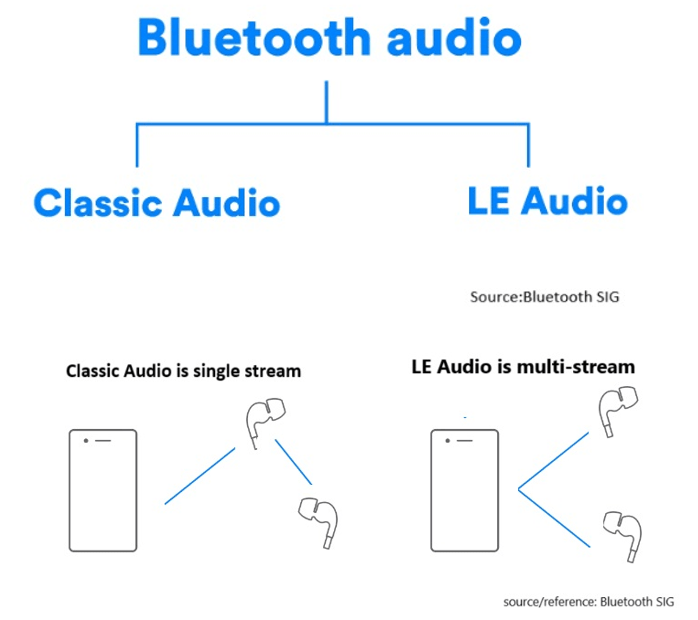
LE Audio, introduced with Bluetooth 5.2, brings significant advancements to audio technology by using the Low Complexity Communication Codec (LC3). Compared to older codecs like SBC, LC3 provides better audio quality while reducing power consumption, making it ideal for devices like wireless earphones and hearing aids.
In this article, we’ll explore two key modes in LE Audio: Broadcast Isochronous Stream (BIS) and Connected Isochronous Stream (CIS). These modes cater to different use cases, offering flexible audio experiences.


What is Broadcast Isochronous Stream (BIS)?

BIS enables one-way audio broadcasting from a single source to multiple devices simultaneously without pairing.
Several BIS streams can form a Broadcast Isochronous Group (BIG), allowing synchronized multi-stream transmission, ideal for environments where many users need access to the same audio content, such as events or museum tours. Any device that supports LE Audio can receive the broadcast, making it an accessible and versatile solution for shared audio experiences.


Here’s a chart including BIS and BIG:


Example Use Case: Concerts and Events
Imagine attending a large outdoor concert where BIS technology is used to broadcast live music directly from the stage to the audience’s devices, such as smartphones and wireless earphones. BIS can broadcast live music from the stage directly to attendees’ devices, ensuring everyone hears the performance in real-time, regardless of location.

Example Use Case: Museum Tours
In a museum setting, Broadcast Isochronous Stream (BIS) can be used to deliver audio guides directly to visitors’ smartphones or rented devices. Visitors can receive synchronized audio guides on their smartphones, enriching their experience and offering multi-language support.


What is Connected Isochronous Stream (CIS)?
CIS focuses on direct, device-to-device connections. The audio stream is transmitted between paired devices with two-way communication, creating a connected and dedicated audio experience.
It’s ideal for personalized experiences like hearing aids or wireless earphones. Multiple CIS streams can be synchronized using a Connected Isochronous Group (CIG) for simultaneous audio transmission while maintaining the benefits of a personalized connection.


Here’s a chart including CIS and CIG:


Example Use Case: Wireless Earphones
Imagine a user connecting their wireless earphones to a smartphone via CIS. When two Bluetooth earphones are connected simultaneously, multiple CIS streams can be grouped into a Connected Isochronous Group (CIG) to achieve synchronized audio transmission across both devices and also enables high-fidelity audio streaming, ensuring clear and immersive sound.
With CIS, each user can adjust volume or equalizer settings independently without impacting others, creating a truly personalized listening experience. CIS provides a significant upgrade over traditional Bluetooth audio by delivering richer sound quality with lower latency.

Example Use Case: Hearing Aids
Connected Isochronous Stream (CIS) is especially beneficial for hearing aids, allowing individuals with hearing impairments to directly connect their devices to a TV, smartphone, or other audio sources. CIS enables real-time adjustments to improve speech clarity or reduce background noise, ensuring the audio is clear and effective. Users can have a closer and more immersive audio experience, which is crucial for enhancing social interactions and supporting daily activities.


How BIS and CIS are grouped into BIG and CIG

Summary


BIS vs. CIS: Which Fits Your Needs?

  • BIS is suitable for shared audio experiences, such as public events and guided tours, where multiple users need simultaneous access.
  • CIS is designed for personalized audio, offering low-latency and high-quality sound for individual users or synchronized multi-device setups.

LE Audio is set to change everyday audio experiences with richer, more versatile audio solutions. Whether it’s concerts, museums, or hearing aids, BIS and CIS provide innovative ways to enhance audio quality and efficiency.


Edited by Sales Manager: Ms. Mandy Chao


Raytac Corporation 勁達國際電子股份有限公司 
A Bluetooth, Wi-Fi, and LoRa Module Maker based on
Nordic nRF54; nRF53: nRF52; nRF51; nRF7002
Semtech Specification: SX1262

Bluetooth Specification: BT5.4 ; BT5.3 ; BT5.2.
Wi-Fi Specification: Wi-Fi 6
LoRa Specification: LoRaWAN

All products are FCC/IC/CE/Telec/KC/RCM/SRRC/NCC/WPC Pre-Certified.
http://www.raytac.com
email: sales@raytac.com
Tel: +886-2-3234-0208

Secure DFU OTA for nRF52832 solution modules: Guide to create hex/zip file for implementation – Part 1(Bootloader & Application)

Below are the guidelines to implement Secure DFU OTA by using Raytac’s nRF52832 modules, SDK16.0.0.
It consists of 2 parts:

Part 1: Bootloader & Application


Part 2: Combining and merging built files (Article link)

In this article, we will be focusing on Part 1: Bootloader & Application.


Path: ..\nRF5_SDK_16.0.0_98a08e2\examples\dfu\secure_bootloader\pca10040_s132_ble\arm5_no_packs
Specifically for nRF52832, programmers need to embed ECC(Elliptic Curve Cryptography) into the bootloader.


Step 1. ’micro_ecc_lib_nrf52.lib’ library can be found in the path below, but we need to boot it up first.


Step 2. Unzip ’micro-ecc-master.zip’ to the below path(create a new “micro-ecc” file first).


Step 3. Run ’gcc-arm-none-eabi-7-2018-q2-update-win32.exe’.


Step 4. Make sure the Environment variables in Win10 are set as below. (Follow the steps 1 to 6)


Step 5. Open DOS → run the “make” command under armgcc path → generate’micro_ecc_lib_nrf52.lib’


Step 6. Add ’micro_ecc_lib_nrf52.lib’ into folder: nRF_micro-ecc


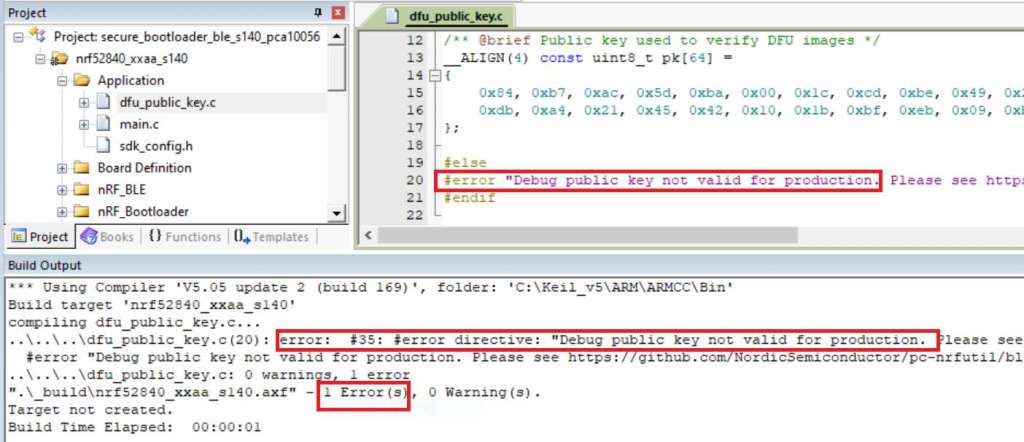
Step 7. An error may occur while building bootloader without a public key:
(Shown in red frames in below screenshot)


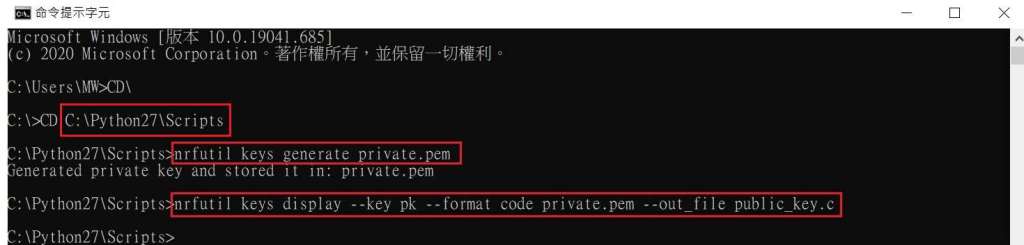
Step 8. How to generate the public key file in Bootloader?
A. Visit DOS at path: ..\Python27\Scripts
B. Then execute:

nrfutil keys generate private.pem
nrfutil keys display --key pk --format code private.pem --out_file public_key.c


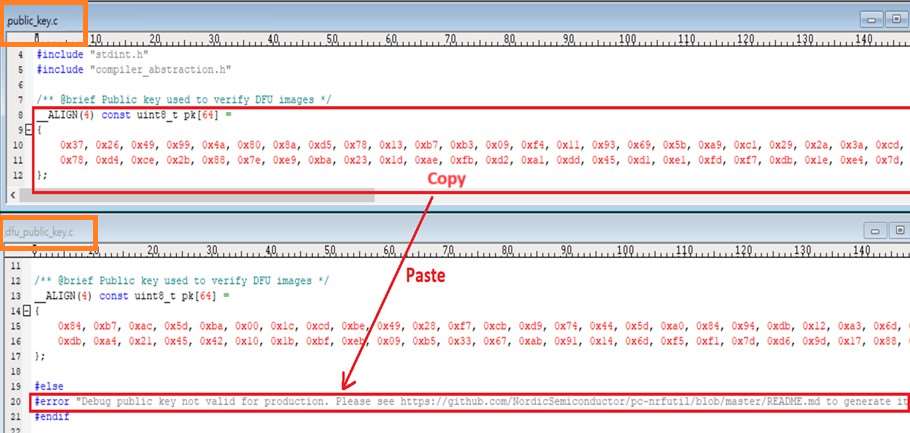
Step 9. Copy the pk[64] code from (public_key.c) into (dfu_public_key.c)
(Shown in red frames in below screenshot)

※Note: Make sure to save the 3 generated files:
private.pem
public_key.c
dfu_public_key.c


Step 10. Generate the bootloader file: nrf52832_xxaa_s132.hex after re-compiling the code files.


Application


Path:
..\nRF5_SDK_16.0.0_98a08e2\examples\ble_peripheral\ble_app_uart\pca10040\s132\arm5_no_packs
Before building Application code , some amendments need to be made regarding DFU-related settings and code inside Application:


Step 1. Add code in definition in C/C++ :
BL_SETTINGS_ACCESS_ONLY NRF_DFU_SVCI_ENABLED NRF_DFU_TRANSPORT_BLE=1
(Total 3 steps definitions need to be set up)


Step 2. Add the 3 paths shown below in C/C++ to make DFU work.


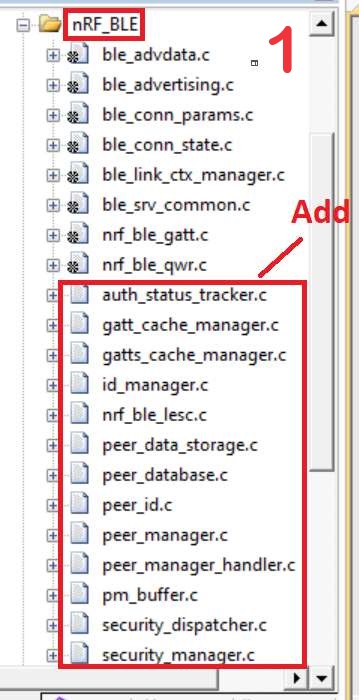
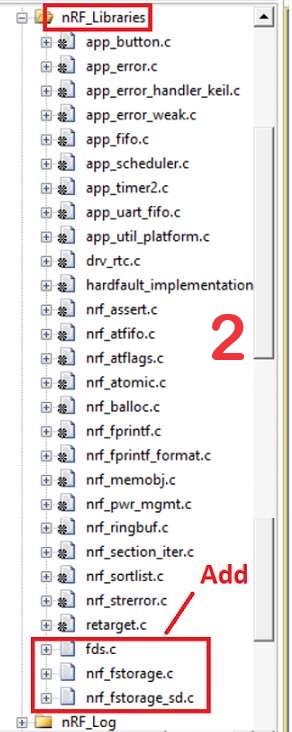
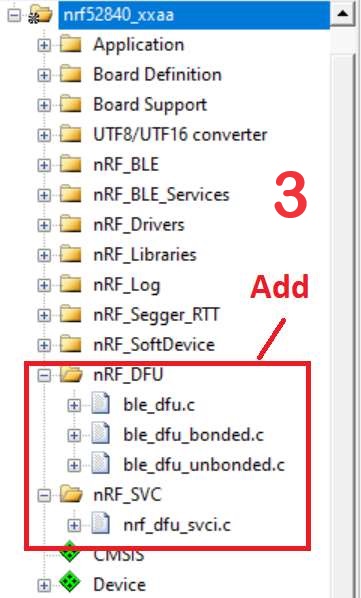
Step 3. Add the .c files inside red frame in (Screenshots 1 & 2)
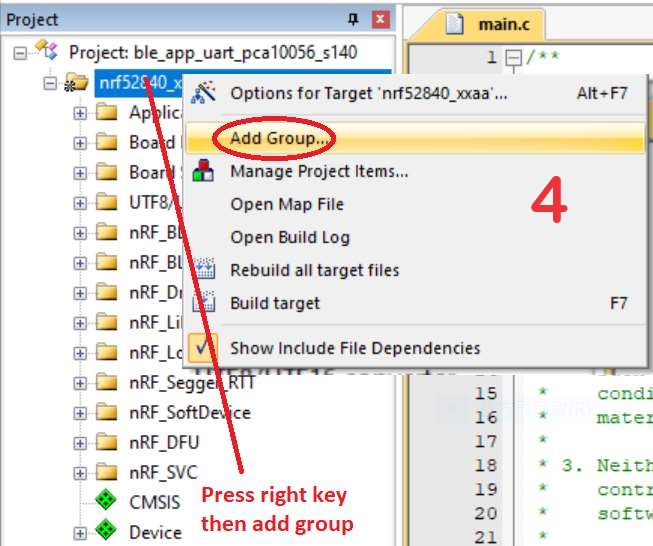
and add the 2 groups of (nRF_DFU & nRF_SVC)(Screenshot 4) under Project(Screenshot 3)


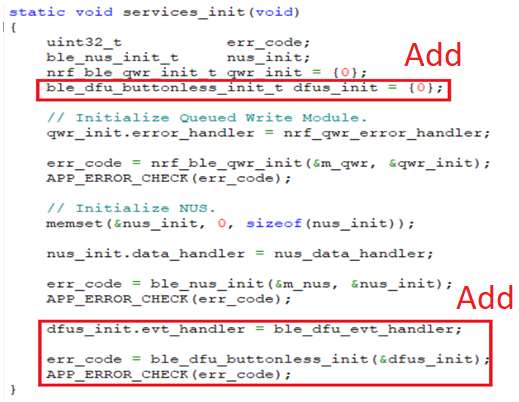
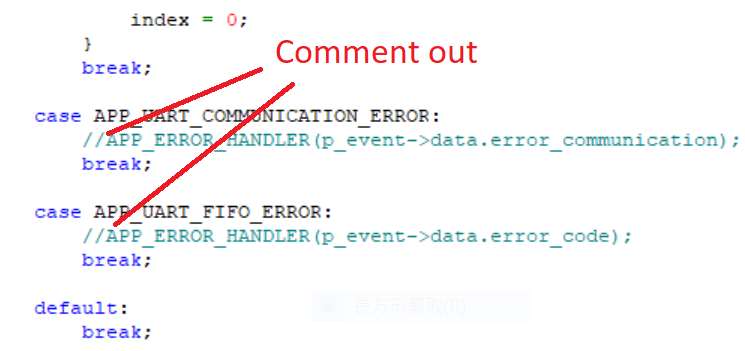
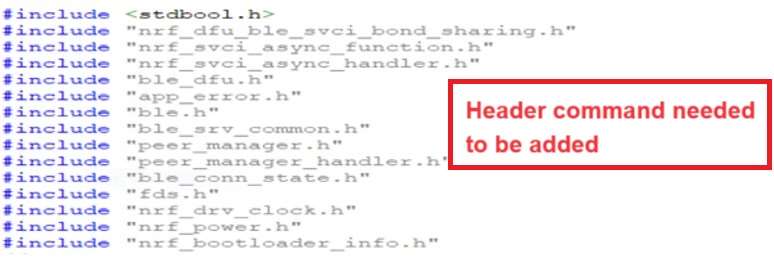
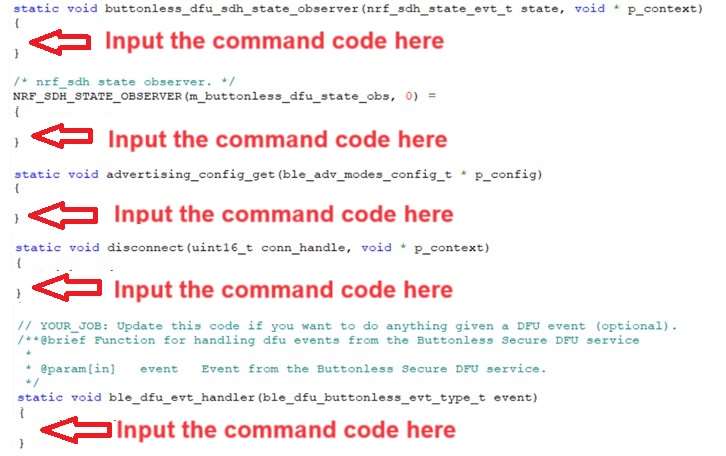
Step 4. Add code into main.c file in Application (..\examples\ble_peripheral\ble_app_uart\main.c)
(Please refer to: main.c file at: ..\examples\ble_peripheral\ ble_app_buttonless_dfu)


Step 5.
The code of file: sdk_config.h (..\examples\ble_peripheral\ble_app_uart\pca10040\s132\config\sdk_config.h)

inside Application needs to be modified.


Step 6. Adjust the IRAM1 value in Target after implementing DFU service:
Make sure the IRAM1 Value of *p_app_ram_start is modified from default: 0x20002AD8 0xD528 to
0x20002AE8 0xD518, as shown in the red frame in the bottom right corner.
In this case, the program should run/advertise successfully.


Step 7. Create a file of: nrf52832_xxaa.hex after building application code files.


Step 8. Create a bootloader setting file of nrf52832_bootloader_secure_settings.hex via DOS.
nrfutil settings generate –family NRF52 –application nrf52832_xxaa.hex –application-version 3 —
bootloader-version 2 –bl-settings-version 1 nrf52832_bootloader_secure_settings.hex –no-backup

※Stay tuned for Part 2: Combining and merging built files in the next article, scheduled release in next week(04-Sep-2024).


Technical guidelines provided by R&D Manager: Mr. MW Lee
Edited by Sales Manager: Ms. Mandy Chao


Raytac Corporation 勁達國際電子股份有限公司 
Raytac Corporation: A Bluetooth, Wi-Fi, and LoRa Module Maker based on
Nordic nRF54; nRF53: nRF52; nRF51; nRF7002
Semtech Specification: SX1262

Bluetooth Specification: BT5.4 ; BT5.3; BT5.2.
Wi-Fi Specification: Wi-Fi 6
LoRa Specification: LoRaWAN

All products are FCC/IC/CE/Telec/KC/RCM/SRRC/NCC Pre-Certified.
http://www.raytac.com
email: sales@raytac.com
Tel: +886-2-3234-0208

Secure DFU OTA for nRF52840 solution modules: Guide to create hex/zip file for implementation – #3(Combining/merging built files)

Following up – Part A: Bootloader (Click for article link) and Part B: Application (Click for article link)

We will be focusing on:

in this article.

IC: nRF52840
DK: PCA10056 (for nRF52840)
SDK: 17.1.0
Softdevice: s140_nrf52_7.2.0_softdevice.hex
IDE: Keil C
PC: Win 10


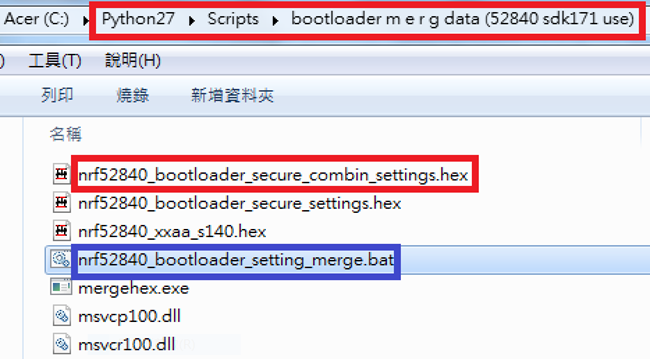
Step 1. Execute the combine batch file in bootloader (nrf52840_bootloader_setting_merge.bat) and generate file of nrf52840_bootloader_secure_combin_settings.hex :

@echo off
title = [ J-Link Tool ] %CD%
set nrfDir=C:\Program Files (x86)\Nordic Semiconductor\nrf5x\bin
set BS= nrf52840_bootloader_secure_settings.hex
set BL= nrf52840_xxaa_s140.hex
set BSBLCombind= nrf52840_bootloader_secure_combin_settings.hex
set path=%nrfDir%;%path%
pause
echo ———–merge image file——————-
mergehex.exe -m %BS% %BL% -o %BSBLCombind%
pause


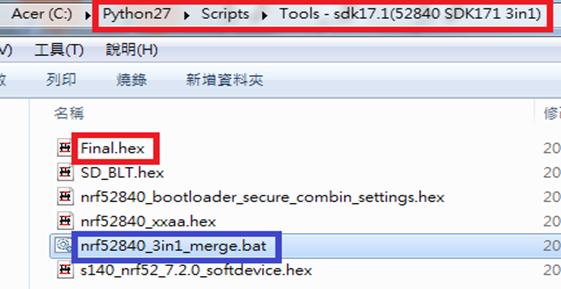
Step 2. Create a Final.hex file by 3-in-1 batch file(nrf52840_3in1_merge.bat)
※Note : This hex file is created for the production line to pre-load firmware into modules prior to shipment.

@echo off
title = [ J-Link Tool ] %CD%
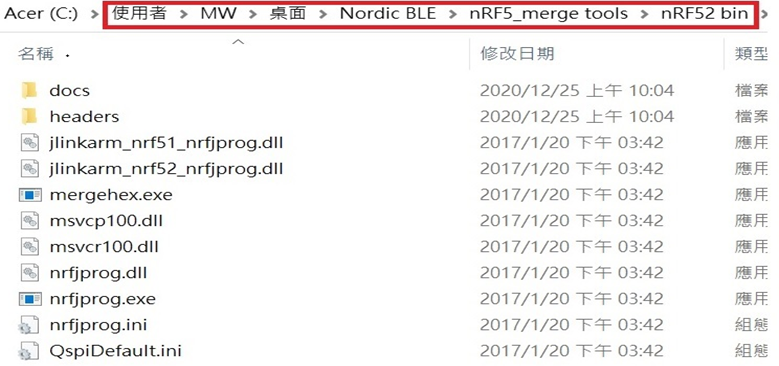
set nrfDir=C:\Users\user\Desktop\Nordic BLE\nRF5_merge tools\nRF52 bin
set SD= s140_nrf52_7.2.0_softdevice.hex
set BLT= nrf52840_bootloader_secure_combin_settings.hex
set APP= nrf52840_xxaa.hex
set SD_BLT=SD_BLT.hex
set Finalfile=Final.hex
set path=%nrfDir%;%path%
pause
echo ———–merge image file——————-
mergehex.exe -m %SD% %BLT% -o %SD_BLT%
pause
mergehex.exe -m %SD_BLT% %APP% -o %Finalfile%
pause


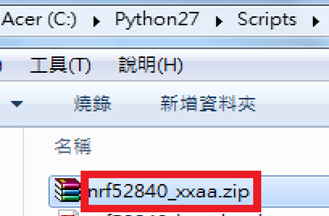
Step 3. Create a DFU(OTA).zip file of nrf52840_xxaa.zip
※Note : This zip file is created for end device DFU(OTA) implementation.

nrfutil pkg generate –hw-version 52 –sd-req 0x100 –application-version 0xFF –application
nrf52840_xxaa.hex –key-file private.pem nrf52840_xxaa.zip

The DFU OTA zip file will be derived.

※Note :
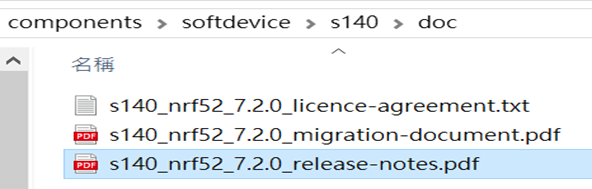
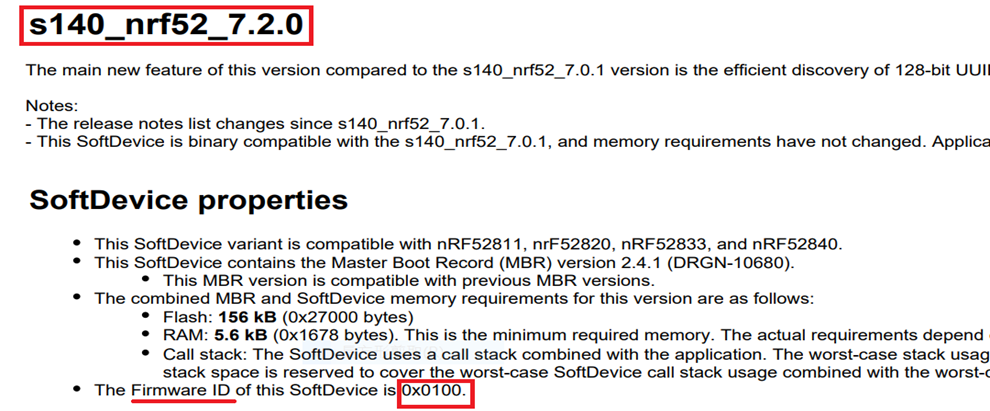
The “0x100" appeared in the above DOS code(in red font) is the FWID(Firmware ID) for s140_nrf52_7.2.0_softdevice.hex;
FWID can be found from the soft device documents on the Nordic website.


Step 4: Run DFU OTA (On mobile in this example)


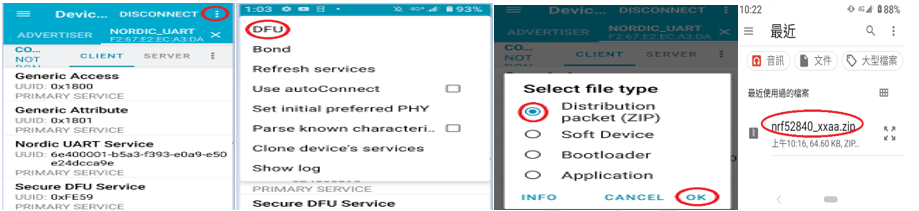
4A. Install the nRF Connect APP on mobile, with DFU OTA file: nrf52840_xxaa.zip. (Download link)


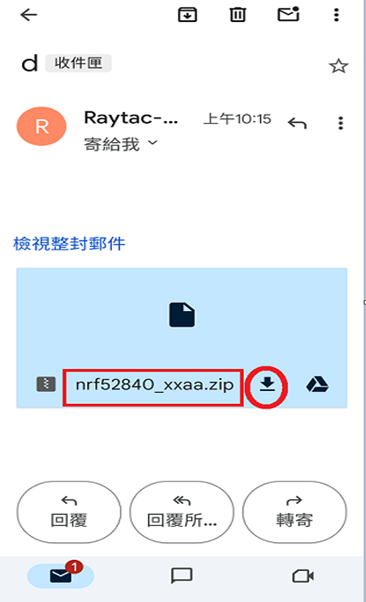
4B. Send nrf52840_xxaa.zip via email to mobile device after combination is done on PC, then download it.


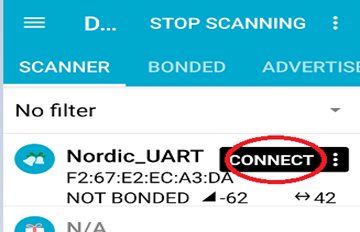
4C. Open nRF Connect APP and run connection;


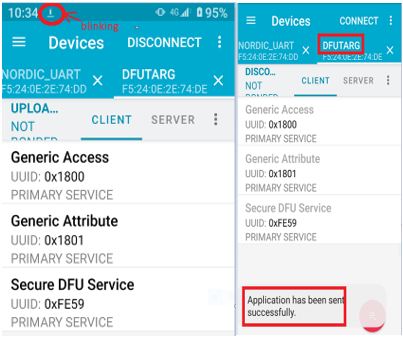
4D. Execute DFU and select “Distribution packet(ZIP)", thus starting the DFU OTA process.


4E. Start DFU OTA → exit the APP after DFU OTA is completed → restart the mobile device.


Secure DFU OTA for nRF52840 solution modules: Guide to create hex/zip file for implementation
Detailed links of articles:
Part A: Bootloader (Click for article link)
Part B: Application
(Click for article link)
Part C: Combining and merging built files
(Click for article link)


Technical guidelines provided by R&D Manager: Mr. MW Lee
Edited by Sales Manager: Mr. Tony Yin

Raytac Corporation 勁達國際電子股份有限公司 
Bluetooth & WiFi module maker based on Nordic nRF54, nRF53, nRF52, nRF7002 solution
BT5.4 &BT5.3 & BT5.2 & BT5.1 Qualified, FCC/IC/CE/Telec/KC/RCM/SRRC/NCC Pre-Certified.
Bluetooth Solution: nRF54, nRF5340, nRF52840, nRF52833, nRF52832, nRF52820, nRF52811, nRF52810, nRF52805, nRF51822
WiFi Solution: nRF7002
http://www.raytac.com
email: service@raytac.com
Tel: +886-2-3234-0208

Secure DFU OTA for nRF52840 solution modules: Guide to create hex/zip file for implementation – #2(Application)

Following up-Part A: Bootloader (Click for article link)

We will be focusing on:

in this article.

IC: nRF52840
DK: PCA10056 (for nRF52840)
SDK: 17.1.0
Softdevice: s140_nrf52_7.2.0_softdevice.hex
IDE: Keil C
PC: Win 10


Path: nRF5_SDK_17.1.0_ddde560\examples\ble_peripheral\ble_app_uart\pca10056\s140\arm5_no_packs

Before building Application code , some amendments need to be made regarding DFU-related settings and code inside Application:

Step 1.


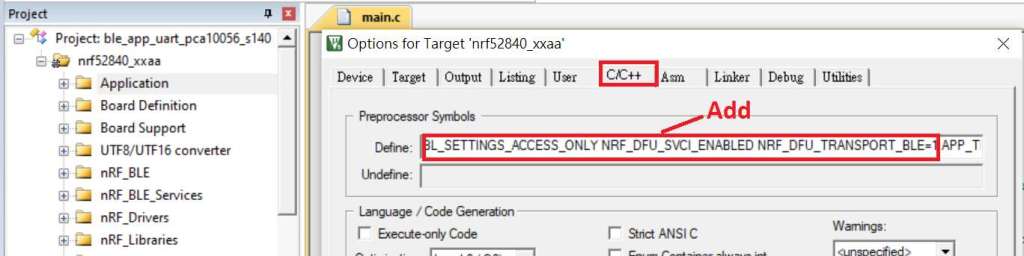
1A. Add code in definition in C/C++ :
BL_SETTINGS_ACCESS_ONLY NRF_DFU_SVCI_ENABLED NRF_DFU_TRANSPORT_BLE=1
(Total 3 steps definitions need to be set up)


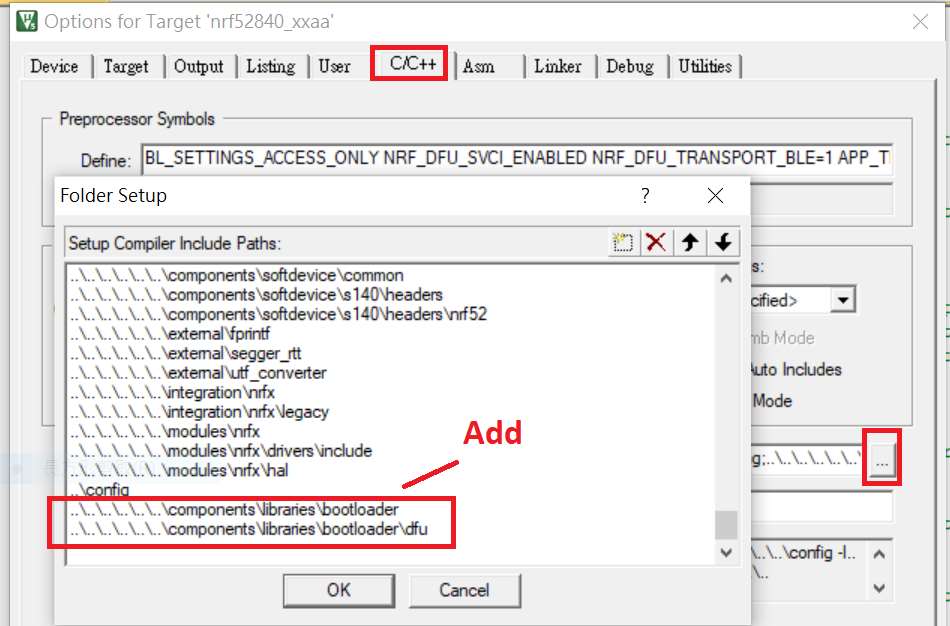
1B. Add “include path” in C/C++


1C. Add the .c files inside red frame in (Screenshots 1 & 2)
and the 2 groups of (nRF_DFU & nRF_SVC)(Screenshot 3) under Project(Screenshot 4)


1D. Add code into main.c file in Application (..\examples\ble_peripheral\ble_app_uart\main.c)
(Please refer to: main.c file at: ..\examples\ble_peripheral\ ble_app_buttonless_dfu)


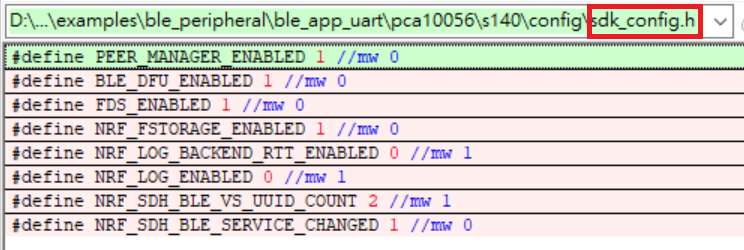
1E. The code of file: sdk_config.h (..\examples\ble_peripheral\ble_app_uart\pca10056\s140\config\
sdk_config.h) inside Application needs to be modified.


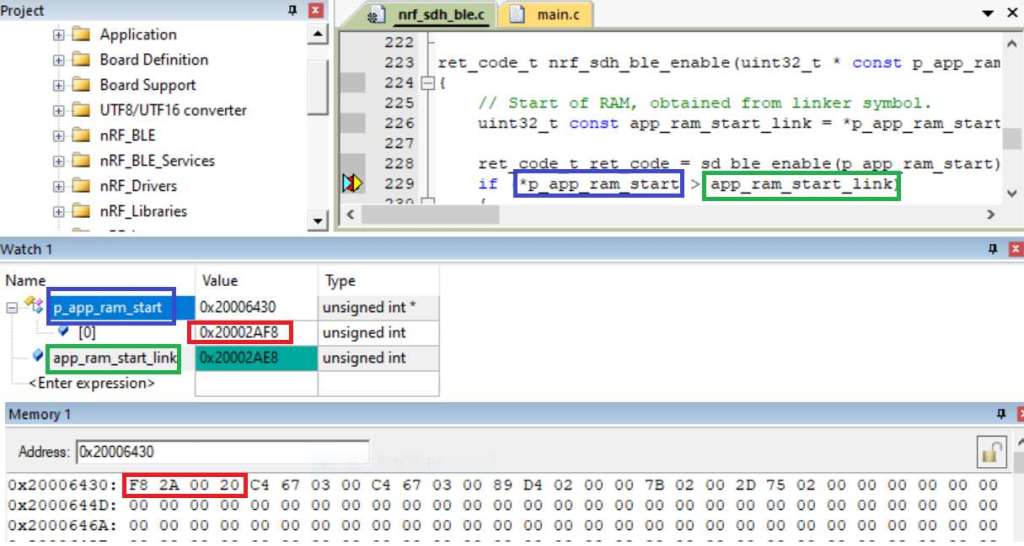
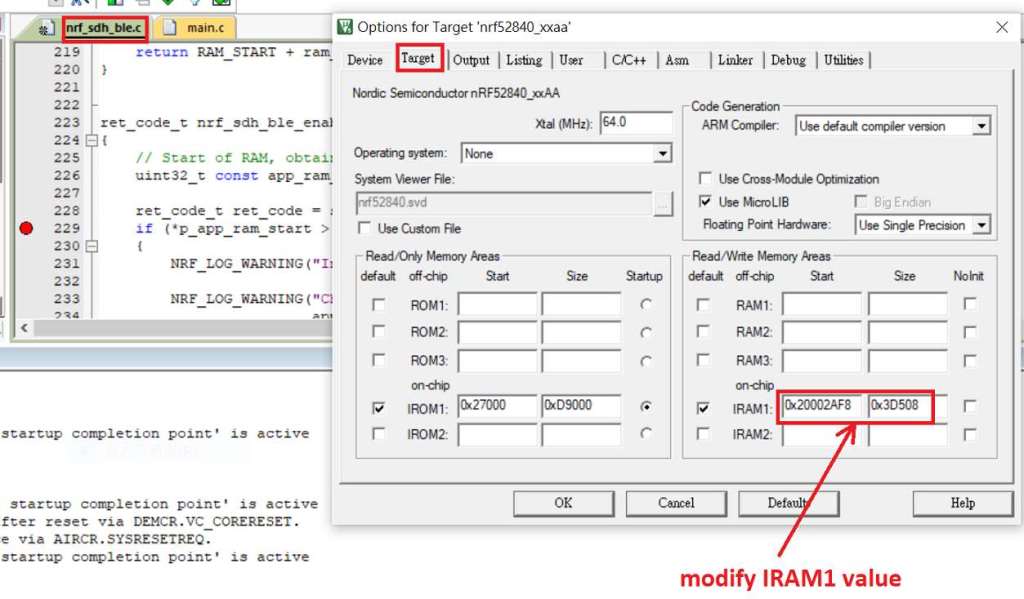
1F. Adjust the IRAM1 value in Target after implementing DFU service:
Check on the IRAM1 Value of *p_app_ram_start to be modified from default: 0x20002AE8 0x3D518 to 0x20002AF8 0x3D508, as shown in the red frame in the bottom right corner.
In this case, the program should run successfully.


1G: Create a file of: nrf52840_xxaa.hex after building application code files.


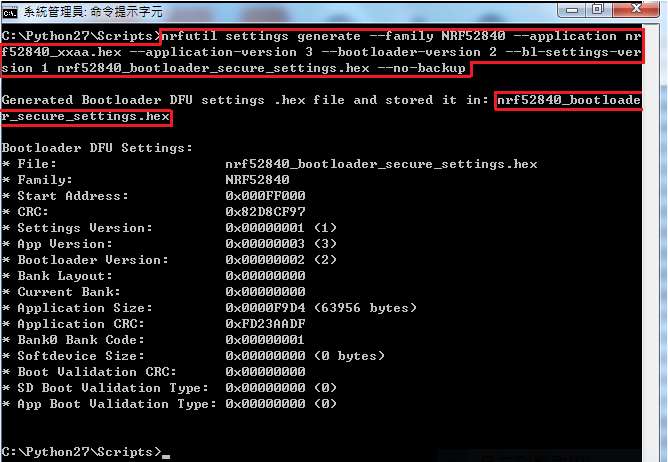
Step 2. Create a bootloader setting file of nrf52840_bootloader_secure_settings.hex : (via DOS)

nrfutil settings generate –family NRF52840 –application nrf52840_xxaa.hex –application-version 3 — bootloader-version 2 –bl-settings-version 1 nrf52840_bootloader_secure_settings.hex –no-backup


※Stay tuned for #3 – Part C: Combining and merging built files in the next article,

scheduled release in next week(05/06/2024).


Technical guidelines provided by R&D Manager: Mr. MW Lee
Edited by Sales Manager: Mr. Tony Yin

Raytac Corporation 勁達國際電子股份有限公司 
Bluetooth & WiFi module maker based on Nordic nRF54, nRF53, nRF52, nRF7002 solution
BT5.4 &BT5.3 & BT5.2 & BT5.1 Qualified, FCC/IC/CE/Telec/KC/RCM/SRRC/NCC Pre-Certified.
Bluetooth Solution: nRF54, nRF5340, nRF52840, nRF52833, nRF52832, nRF52820, nRF52811, nRF52810, nRF52805, nRF51822
WiFi Solution: nRF7002
http://www.raytac.com
email: service@raytac.com
Tel: +886-2-3234-0208

Secure DFU OTA for nRF52840 solution modules: Guide to create hex/zip file for implementation – #1(Bootloader)

Below are the following steps to implement Secure DFU OTA by using nRF52840 chip set, SDK17.1.0.
It consists of 3 parts:

Part A: Bootloader

Part B: Application (Click for article link)

Part C: Combining and merging built files (Click for article link)

In this article, we will be focusing on Part A: Bootloader.

Path: nRF5_SDK_17.1.0_ddde560\examples\dfu\secure_bootloader\pca10056_s140_ble\arm5_no_packs


Step 1. An error may occur while building bootloader without a public key:
(Shown in red frames in below screenshot)


Step 2. How to generate the public key file in Bootloader?
A. Visit DOS at path: ..\Python27\Scripts
B. Then execute:

nrfutil keys generate private.pem
nrfutil keys display --key pk --format code private.pem --out_file public_key.c


Step 3. Copy the pk[64] code from (public_key.c) into (dfu_public_key.c)
(Shown in red frames in below screenshot)

※Note: Make sure to save the 3 generated files:
private.pem
public_key.c
dfu_public_key.c


Step 4. Generate the bootloader file: nrf52840_xxaa_s140.hex after re-compiling the code files.


※Stay tuned for #2 – Part B: Application in the next article, scheduled release in next week(29/05/2024).


Technical guidelines provided by R&D Manager: Mr. MW Lee
Edited by Sales Manager: Mr. Tony Yin


Raytac Corporation 勁達國際電子股份有限公司 
Bluetooth & WiFi module maker based on Nordic nRF54, nRF53, nRF52, nRF7002 solution
BT5.4 &BT5.3 & BT5.2 & BT5.1 Qualified, FCC/IC/CE/Telec/KC/RCM/SRRC/NCC Pre-Certified.
Bluetooth Solution: nRF54, nRF5340, nRF52840, nRF52833, nRF52832, nRF52820, nRF52811, nRF52810, nRF52805, nRF51822
WiFi Solution: nRF7002
http://www.raytac.com
email: service@raytac.com
Tel: +886-2-3234-0208

What’s New In BT5.4 Bluetooth Specification?

Bluetooth Core Specification 5.4 released in 2023 introduces four significant capabilities to the existing specifications.

1. Periodic Advertising with Response(PAwR)

PAwR is one of the key feature. Prior to Bluetooth 5.4, connectionless bidirectional communication is not possible. PAwR now allows bidirectional transfer of data in connectionless mode between a single central device and a large number of multiple devices (up to 32,640) in a star network topology. 

2. Encrypted Adverting Data (EAD)

EAD provides a standardized approach to the secure broadcasting of data in advertising packets and enables the encrypted data over-the-star network to be decrypted only by devices that have shared the key material previously. This security feature protects PAwR communications to safeguard against data tampering, human error, and data leaks.

3. LE GATT Security Levels Characteristic(SLC)

When a GATT Client attempts to access a server attributes (characteristics, descriptors), attributes permissions are checked. If permissions are insufficient, the access is denied and all GATT features will not work properly. With SLC, the client can upgrade its security level to reattempt access of the previous failed operation. SLC enables devices to identify the security mode and level for all their GATT functionality.

4. Advertising Coding Selection

For LE Coded PHY, a Forward Error Correction (FEC) algorithm is used which results in significantly longer transmission distances. FEC parameter (S) uses one of two values (S=2 or S=8) and controls how much data is made to fix errors and how much Bluetooth range may be achieved. Prior to Bluetooth 5.4, specifying the value of the S coding parameter was not impossible. Bluetooth 5.4 allows the host to specify the value of the coding parameter S (S=2 or S=8) when the LE Coded PHY is selected for use with extended advertising.

Main beneficiary market of Bluetooth 5.4

The combination of these features enables ultra-low power, efficient radio usage and secure star networks that can be deployed in large scale ESL (Electronic Shelf Labels) and sensor applications with transferring a small amount of data. Devices accept slightly longer advertising-delay to exchange an extended battery life. It’s easy to see the retail industry as well as the market for ESL and shelf sensors will benefit greatly. ESL are devices that display pricing information for product on retail store shelves. They use small electronic paper displays powered by batteries and can replace traditional paper labels. Besides, ESL use wireless technology and a central hub device to transmit data, allowing retailers to automate pricing and replace traditional manual processes, and creating more efficient in-store operations.

Edited by Account Manager: Ms. Gracie Chuang

Raytac Corporation 勁達國際電子有限公司
A Bluetooth & WiFi module maker based on Nordic nRF53, nRF52, nRF70 solution 
www.raytac.com email: service@raytac.com Tel: +886.2.3234.0208                             
Bluetooth Solution:  BT5.4 & BT5.3 & BT5.2 & BT5.1 & BT4.2 with nRF5340, nRF52840, nRF52833, nRF52832, nRF52820, nRF52811, nRF52810, nRF52805, nRF51822                                                                                         WiFi Solution: nRF7002 

How to Get nRF52840 & nRF52833 Module Zephyr Project Started

Zephyr is hosted by The Linux Foundation, which is an open source to build a small, scalable, real-time operating system (RTOS) across multiple architectures. Zephyr Project’s is aiming to provide a collaborative effort between technologies to reduce the cost and accelerate time to market for Internet of Things (IoT) industry.

Nordic, the leading wireless solution provider across Bluetooth, WiFI, LTE, NB-IOT, provides documentation for developers which are interested in starting Zephyr projects. Nordic Zephyr Project Support Page.

Raytac, a Taiwan base professional module maker built up various form factor modules based on Nordic solution, has listed both nRF52833 / MDBT50Q-DB-33 and nRF52840 / MDBT50Q-DB-40 module demo boards in Zephyr support boards data base. Believed these completed and comprehensive support boards reference design can provide all developers a break through path toward success.

Raytac Corporation 勁達國際電子有限公司
A BT5.2 & BT5.1 & BT5 module maker based on Nordic nRF53 & nRF52 solution 
(nRF5340 & nRF52840 & nRF52833 & nRF52832 & nRF52820 & nRF52811 & nRF52810 & nRF52805)
www.raytac.com email: service@raytac.com Tel: +886.2.3234.0208
How To Get started with Nordic nRF5340 Project by Raytac MDBT53/MDBT53V Development Kit Demo Board

Edited by Jocelyn Tsai / Account Manager

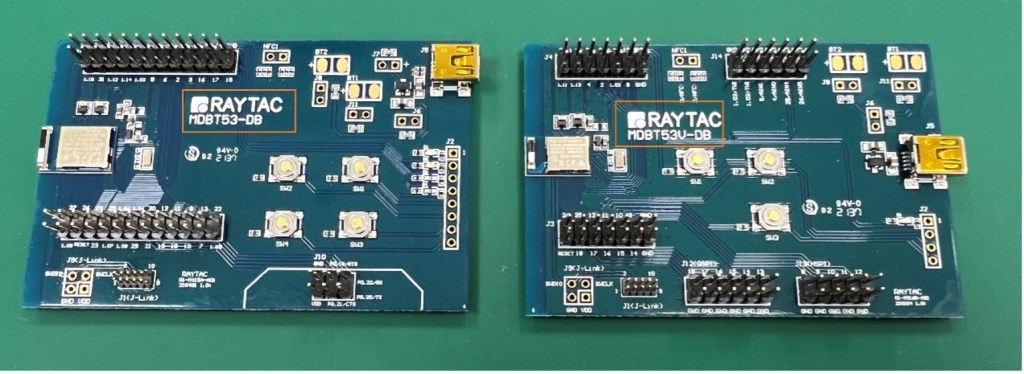
Here provides the easy introduction to the article of Hardware & Firmware Set up with step-by-step guidelines for nRF5340 Module demo board MDBT53-DB-40/MDBT53V-DB-40.

  1. Hardware Set Up
  2. Software Kits Resource & Preparation
  3. To recognize your nRFConnect SDK version case by case

1. Hardware Set Up

  • 1 x Nordic nRF5340-DK Board: PCA10095(2.0.0)
  • 1 x MDBT53-DB-40 or 1x MDBT53V-DB-40
  • 1 x IDC Wire 
  • 1 x Power Micro USB
  • 1 x Power Mini USB

**Reminder: Both “Nordic nRF5340-DK” and “Raytac MDBT53/53V Demo BD” should be included into the working network for program development.

Where to buy MDBT53-DB-40 , MDBT53V-DB-40
MDBT53-DB-40 (nRF5340 Solution)
MDBT53V-DB-40 (nRF5340 Solution)

  • Using Nordic DK as J-Link ( nRF5340 DK ONLY) Connects with MDBT53/53V DB by IDC wire.
  • Powered up MDBT53/53V DB by Mini USB wire.
  • Powered up the nRF5340-DK by Micro USB wire.


2.Software Kits Resource & Preparation

Download nRF Connect For Desktop (Please Click Me)

Download nRF Command Line Tools (Please Click Me)

Preparation

a. Prepared with the latest version of nRF Connect for Desktop

Selected version 3.12.0 Windows 32-bit and 64-bit

nrfconnect-setup-3.12.0-ia32.exe

b. Prepared with the latest version of nRF Command Line Tools

Selected version 10.18.1 Windows X86 64

nrf-Command-Line-Tools-10.18.1-x64.exe

**Note: SEGGER J-LINK Upgrade message might pop up while you’re doing above download.

 If you’re initiating Segger Embedded Studio (SES) application, please check the guideline here

c. Locate all the necessary kits for programming in PC (Check Software/Application list)


3. To recognize your nRFConnect SDK version case by case

Intro: The preparation of nRF Connect SDK Vx.x.x(NCS SDK version, ) and Nordic Example code will help you get through the program code building and trace debug in VS Code IDE or Segger Embedded Studio IDE. Here’s the brief way to recognize your nRFConnect SDK version which suits your project development.

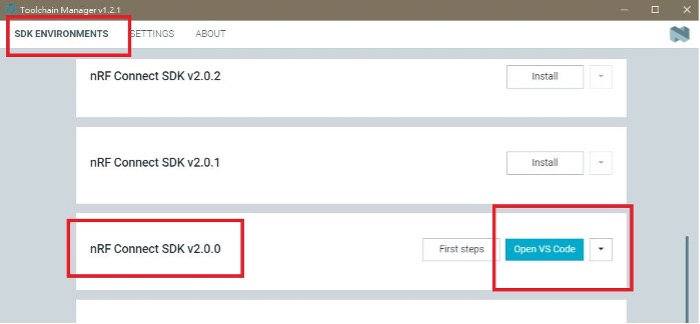
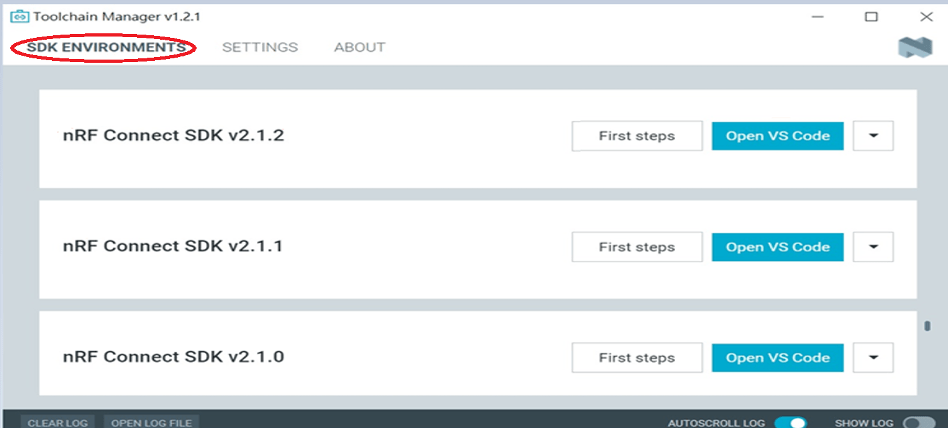
Step1.

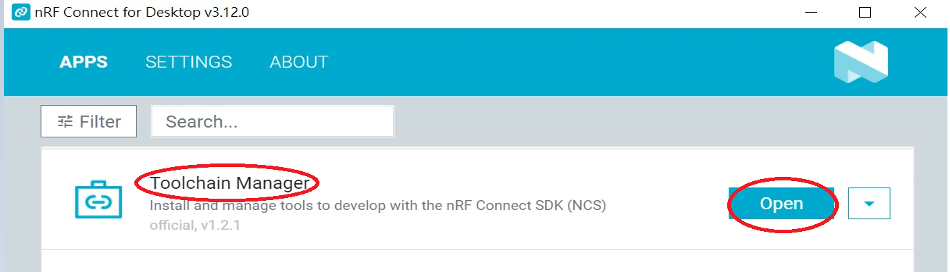
  Activated your “nRF Connect for Desktop”  >> “Toolchain Manager” >> “Open” >> “Install”

(**Note: The development nRF Connect SDK(NCS) provides with free VS Code IDE and Segger Embedded Studio IDE as compiling system)

Step2.

To recognize your project is with or without Audio inquiry and download the “nRF Connect SDK(NCS)” by the following classification.

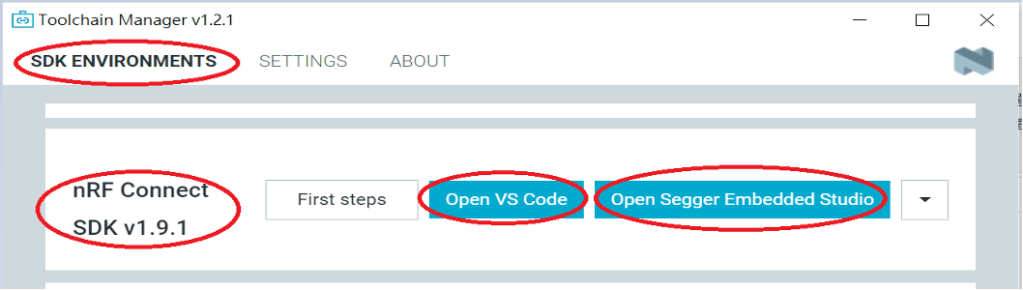
A.) Project with Non-Audio case

Option1. Go with NCS V1.9.1 (Included) and previous version.

There’re either “Open VS Code” or “Open Segger Embedded Studio” IDE options could be selected for program coding.

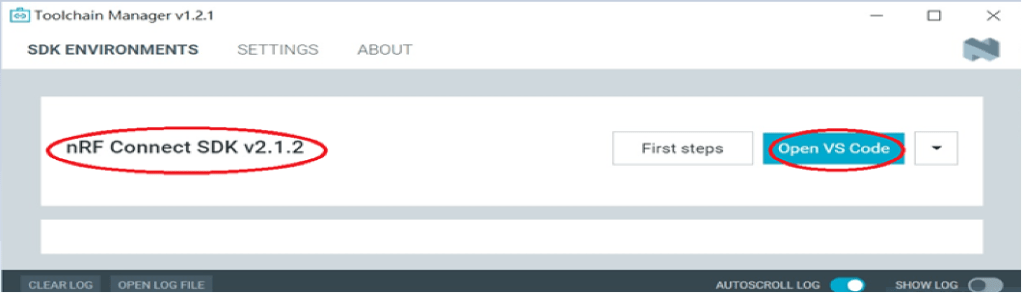
Option2. Go with NCS V2.0.0(included) and the later.

 There’s simply “Open VS Code” IDE that could be run for program coding.

B.) Project with “Audio” inquiry

You would only have option of NCS V2.0.0(included) and the later version working in “Open VS Code” IDE.

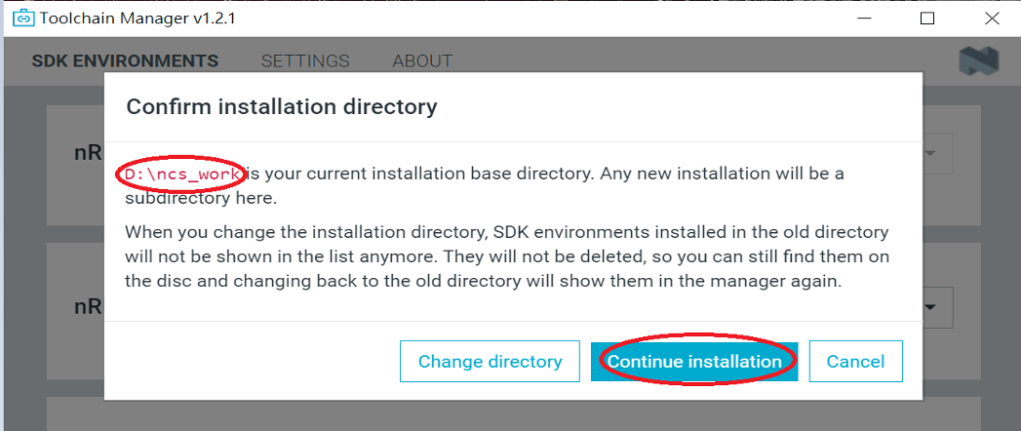
Step3.

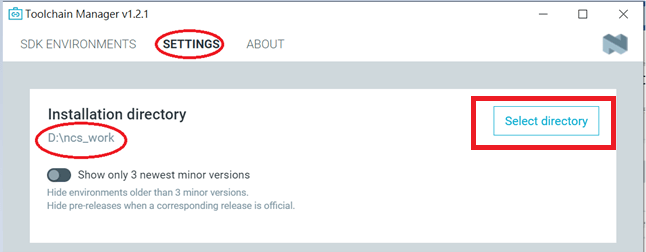
 Please make sure the nRFConnect SDK is installed at same base directory with compiling system  (the root of Open VS Code)

(This is using D:\ncs-work base as example.)    

If the base is not directing to the same, do “Select directory’” to re-direct the route.

Step4.

nRFConnect SDK Vx.x.x Download ready

Find more information about nRF5340 Module firmware development resources in below link!

“How To USE Nordic Connect SDK (NCS) Flashing Built Code into nRF5340 Module" , Please click this link! 

“How To Get Started With nRF5340 Module Program Coding and Compiling" Please click this link


Raytac Corporation 勁達國際電子有限公司
A BT5.2 & BT5.1 & BT5 module maker based on Nordic nRF53 & nRF52 solution 
(nRF5340 & nRF52840 & nRF52833 & nRF52832 & nRF52820 & nRF52811 & nRF52810 & nRF52805)
www.raytac.com email: service@raytac.com Tel: +886.2.3234.0208
Find nRF5340 module here!

Where to find nRF5340 module quickly? The nRF5340 a dual core solution deployed with 2 Arm Cortex M33 processors. Not only provide faster and powerful for advanced applications, but also LE audio. Raytac knows your anxiety and already distributed the modules available in several channels aimed to provide a speedy and comfortable way to get it.

Buy From Amazon
By From Digi-Key

Raytac Corporation 勁達國際電子有限公司
A BT5.2 & BT5.1 & BT5 module maker based on Nordic nRF53 & nRF52 solution 
(nRF5340 & nRF52840 & nRF52833 & nRF52832 & nRF52820 & nRF52811 & nRF52810 & nRF52805)
www.raytac.com email: service@raytac.com Tel: +886.2.3234.0208
Raytac nRF53 Module BT5.2 Qualified, FCC/IC/CE/Telec/KC Pre-Certified

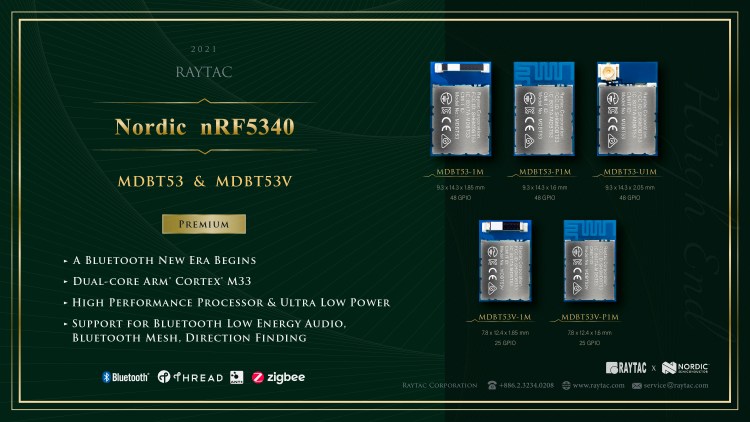
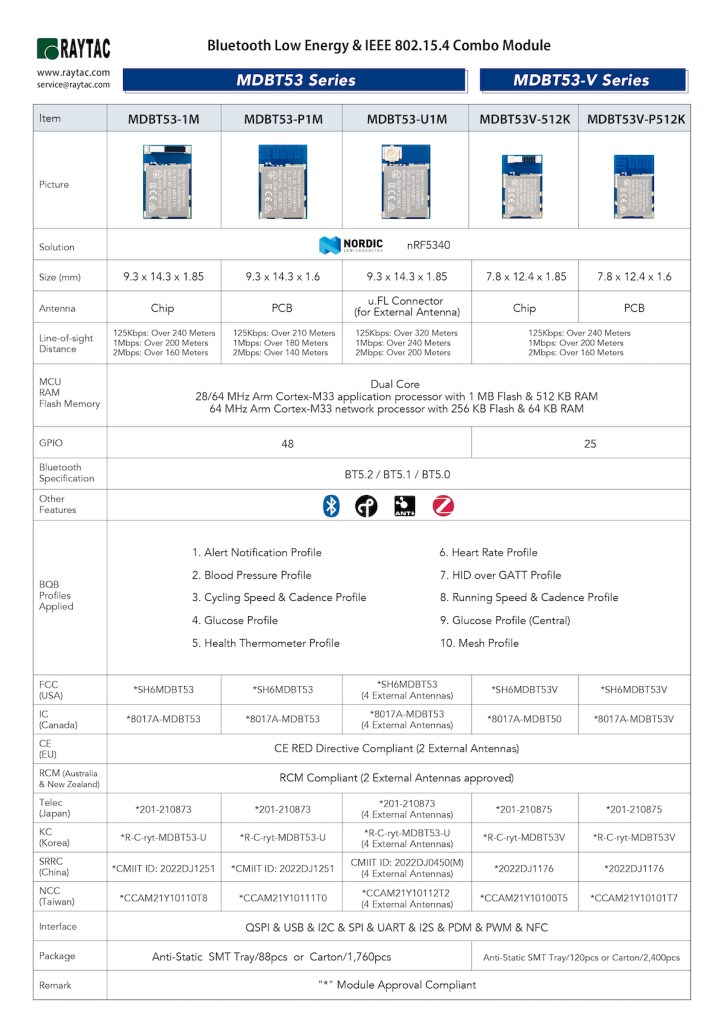
The nRF5340 is the world’s first wireless SoC with two Arm® Cortex®-M33 processors. The architecture is including an “Application Processor" which deployed a 1M Flash 512K RAM; and a “Network Processor’ which deployed a 256K Flash and 64K RAM. With the IoT applications has become more and more complex nowadays, nRF5340 is exact the solution to meet higher specification demand of technology and provide an easier and quick path toward project success.

Raytac deployed nRF5340 SoC to built up 2 series of module which are MDBT53 & MDBT53V . Both modules now have been completed BT5.2 qualification; FCC/IC/CE/Telec/KC/SRRC/NCC pre-certified. Quoted from Nordic Blog: First nRF5340 modules eliminate processor trade-off for developers, Raytac offer a range of qualified and certified modules based on Nordic technology which can immediately save the cost, time and complex process of the testing works. Shorten the Time to Market and Get the thing done quickly and effectively is what the advantage Raytac module can bring over to you.

Raytac Corporation 勁達國際電子有限公司
A BT5.2 & BT5.1 & BT5 module maker based on Nordic nRF53 & nRF52 solution 
(nRF5340 & nRF52840 & nRF52833 & nRF52832 & nRF52820 & nRF52811 & nRF52810 & nRF52805)
www.raytac.com email: service@raytac.com Tel: +886.2.3234.0208