Secure DFU OTA for nRF52832 solution modules: Creating hex/zip file for implementation – Part 2(Combining/merging built files)

Following up – Part 1: Bootloader & Application (Click for article link),

We will be focusing on:

in this article.

IC: nRF52832
DK: PCA10040 (for nRF52832)
SDK: 16.0.0
Softdevice: s132_nrf52_7.0.1_softdevice.hex
IDE: Keil C
PC: Win 10


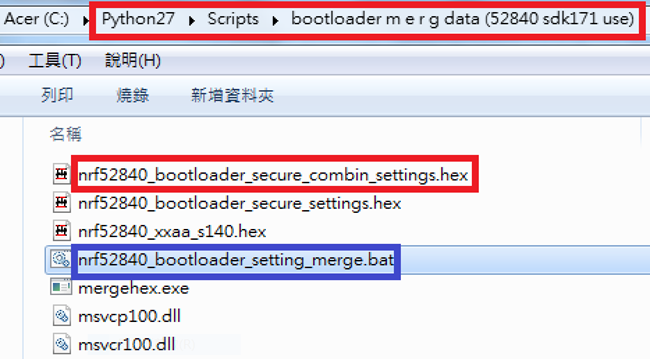
Step 1. Execute the combine batch file in bootloader (nrf52832_bootloader_setting_merge.bat) and generate file of nrf52832_bootloader_secure_combin_settings.hex :

@echo off
title = [ J-Link Tool ] %CD%
set nrfDir=C:\Program Files (x86)\Nordic Semiconductor\nrf5x\bin
set BS= nrf52832_bootloader_secure_settings.hex
set BL= nrf52832_xxaa_s132.hex
set BSBLCombind= nrf52832_bootloader_secure_combin_settings.hex
set path=%nrfDir%;%path%
pause
echo ———–merge image file——————-
mergehex.exe -m %BS% %BL% -o %BSBLCombind%
pause


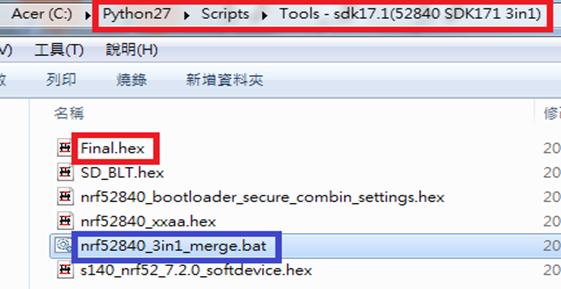
Step 2. Create a Final.hex file by 3-in-1 batch file(nrf52832_3in1_merge.bat)
※Note : This hex file is created for the production line to pre-load firmware into modules prior to shipment.

@echo off
title = [ J-Link Tool ] %CD%
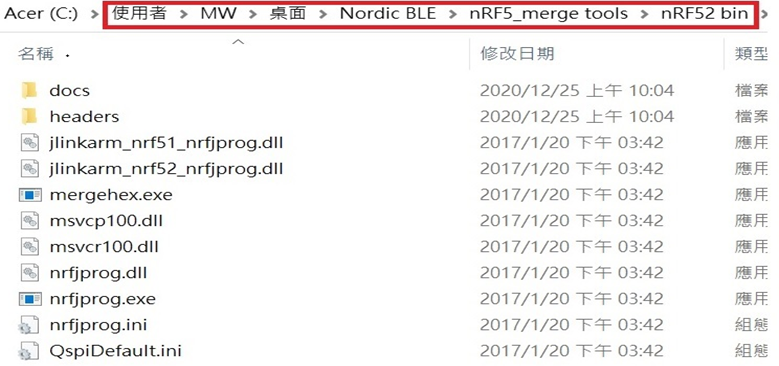
set nrfDir=C:UsersuserDesktopNordic BLEnRF5_merge toolsnRF52 bin
set SD= s140_nrf52_7.2.0_softdevice.hex
set BLT= nrf52832_bootloader_secure_combin_settings.hex
set APP= nrf52832_xxaa.hex
set SD_BLT=SD_BLT.hex
set Finalfile=Final.hex
set path=%nrfDir%;%path%
pause
echo ———–merge image file——————-
mergehex.exe -m %SD% %BLT% -o %SD_BLT%
pause
mergehex.exe -m %SD_BLT% %APP% -o %Finalfile%
pause


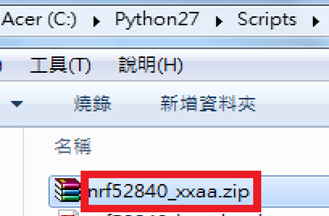
Step 3. Create a DFU(OTA).zip file of nrf52832_xxaa.zip
※Note : This zip file is created for end device DFU(OTA) implementation.

nrfutil pkg generate –hw-version 52 –sd-req 0xCB –application-version 0xFF –application
nrf52832_xxaa.hex –key-file private.pem nrf52832_xxaa.zip

The DFU OTA zip file will be derived.

※Note :
The “0xCB" appeared in the above DOS code(in red font) is the FWID(Firmware ID) for s140_nrf52_7.2.0_softdevice.hex;
FWID can be found from the soft device documents on the Nordic website.


Step 4: Run DFU OTA (On mobile in this example)


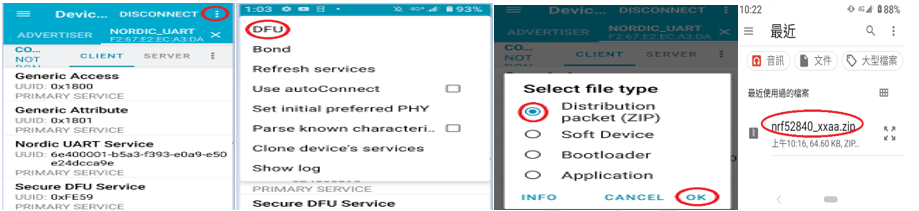
4A. Install the nRF Connect APP on mobile, with DFU OTA file: nrf52832_xxaa.zip. (Download link)


4B. Send nrf52832_xxaa.zip via email to mobile device after combination is done on PC, then download it.


4C. Open nRF Connect APP and run connection;


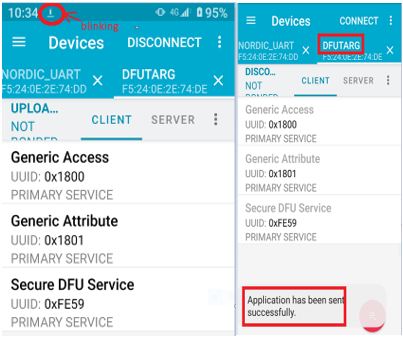
4D. Execute DFU and select “Distribution packet(ZIP)", thus starting the DFU OTA process.


4E. Start DFU OTA → exit the APP after DFU OTA is completed → restart the mobile device.


Secure DFU OTA for nRF52832 solution modules: Guide to create hex/zip file for implementation
Detailed links of articles:
Part 1: Bootloader & Application (Click for article link)
Part 2: Combining & merging built files


Technical guidelines provided by R&D Manager: Mr. MW Lee
Edited by Sales Manager: Ms. Mandy Chao


Raytac Corporation 勁達國際電子股份有限公司 
Raytac Corporation: A Bluetooth, Wi-Fi, and LoRa Module Maker based on
Nordic nRF54; nRF53: nRF52; nRF51; nRF7002
Semtech Specification: SX1262

Bluetooth Specification: BT5.4 ; BT5.3; BT5.2.
Wi-Fi Specification: Wi-Fi 6
LoRa Specification: LoRaWAN

All products are FCC/IC/CE/Telec/KC/RCM/SRRC/NCC Pre-Certified.
http://www.raytac.com
email: sales@raytac.com
Tel: +886-2-3234-0208

Secure DFU OTA for nRF52832 solution modules: Guide to create hex/zip file for implementation – Part 1(Bootloader & Application)

Below are the guidelines to implement Secure DFU OTA by using Raytac’s nRF52832 modules, SDK16.0.0.
It consists of 2 parts:

Part 1: Bootloader & Application


Part 2: Combining and merging built files (Article link)

In this article, we will be focusing on Part 1: Bootloader & Application.


Path: ..\nRF5_SDK_16.0.0_98a08e2\examples\dfu\secure_bootloader\pca10040_s132_ble\arm5_no_packs
Specifically for nRF52832, programmers need to embed ECC(Elliptic Curve Cryptography) into the bootloader.


Step 1. ’micro_ecc_lib_nrf52.lib’ library can be found in the path below, but we need to boot it up first.


Step 2. Unzip ’micro-ecc-master.zip’ to the below path(create a new “micro-ecc” file first).


Step 3. Run ’gcc-arm-none-eabi-7-2018-q2-update-win32.exe’.


Step 4. Make sure the Environment variables in Win10 are set as below. (Follow the steps 1 to 6)


Step 5. Open DOS → run the “make” command under armgcc path → generate’micro_ecc_lib_nrf52.lib’


Step 6. Add ’micro_ecc_lib_nrf52.lib’ into folder: nRF_micro-ecc


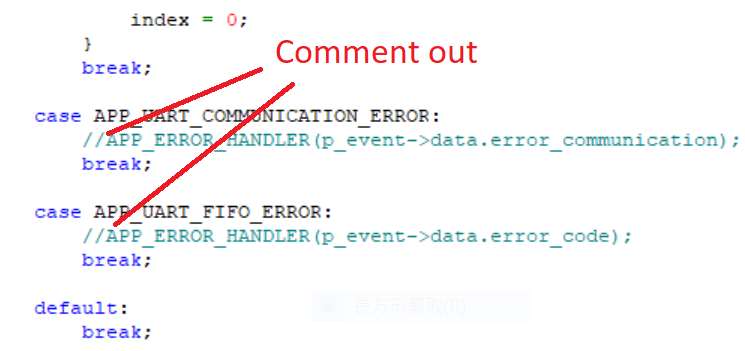
Step 7. An error may occur while building bootloader without a public key:
(Shown in red frames in below screenshot)


Step 8. How to generate the public key file in Bootloader?
A. Visit DOS at path: ..\Python27\Scripts
B. Then execute:

nrfutil keys generate private.pem
nrfutil keys display --key pk --format code private.pem --out_file public_key.c


Step 9. Copy the pk[64] code from (public_key.c) into (dfu_public_key.c)
(Shown in red frames in below screenshot)

※Note: Make sure to save the 3 generated files:
private.pem
public_key.c
dfu_public_key.c


Step 10. Generate the bootloader file: nrf52832_xxaa_s132.hex after re-compiling the code files.


Application


Path:
..\nRF5_SDK_16.0.0_98a08e2\examples\ble_peripheral\ble_app_uart\pca10040\s132\arm5_no_packs
Before building Application code , some amendments need to be made regarding DFU-related settings and code inside Application:


Step 1. Add code in definition in C/C++ :
BL_SETTINGS_ACCESS_ONLY NRF_DFU_SVCI_ENABLED NRF_DFU_TRANSPORT_BLE=1
(Total 3 steps definitions need to be set up)


Step 2. Add the 3 paths shown below in C/C++ to make DFU work.


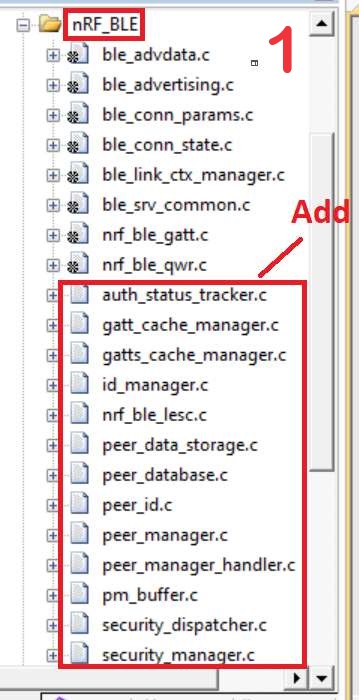
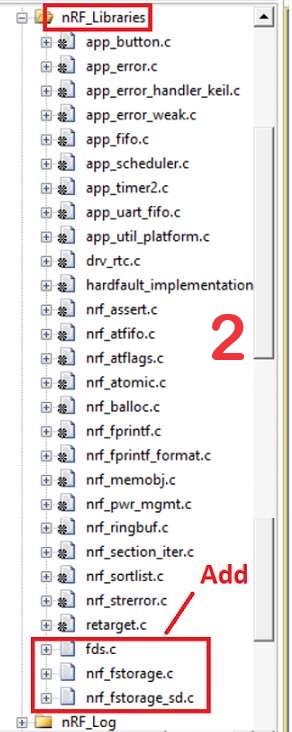
Step 3. Add the .c files inside red frame in (Screenshots 1 & 2)
and add the 2 groups of (nRF_DFU & nRF_SVC)(Screenshot 4) under Project(Screenshot 3)


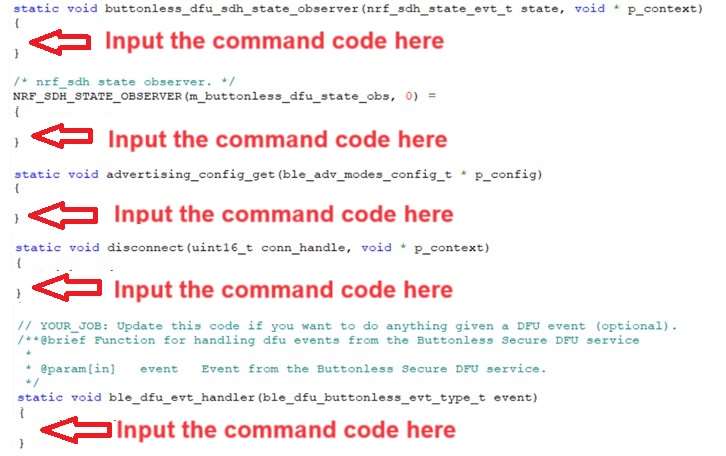
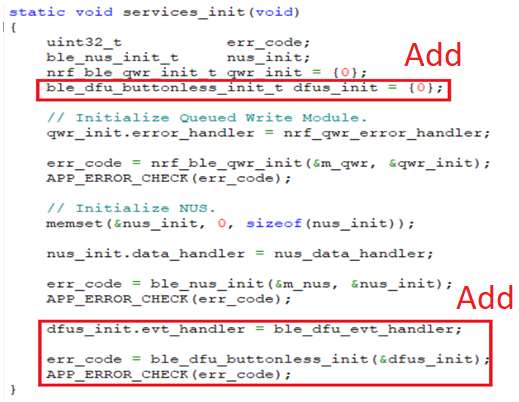
Step 4. Add code into main.c file in Application (..\examples\ble_peripheral\ble_app_uart\main.c)
(Please refer to: main.c file at: ..\examples\ble_peripheral\ ble_app_buttonless_dfu)


Step 5.
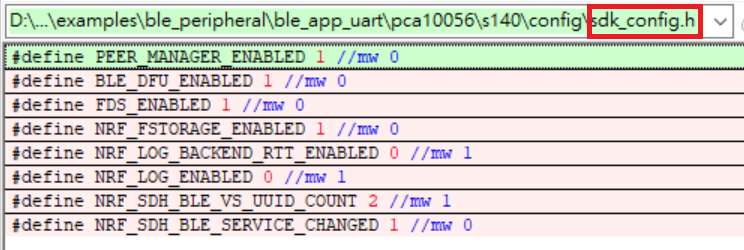
The code of file: sdk_config.h (..\examples\ble_peripheral\ble_app_uart\pca10040\s132\config\sdk_config.h)

inside Application needs to be modified.


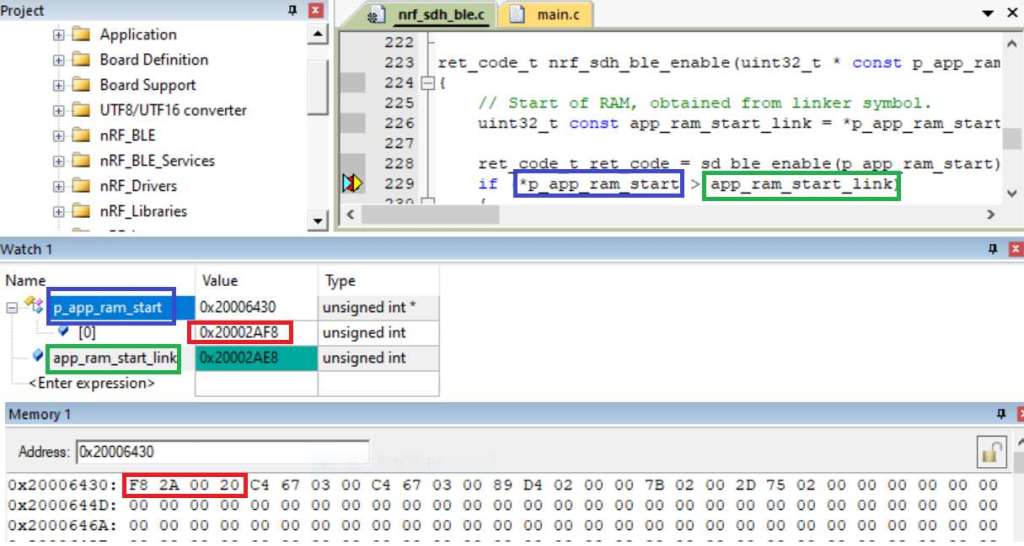
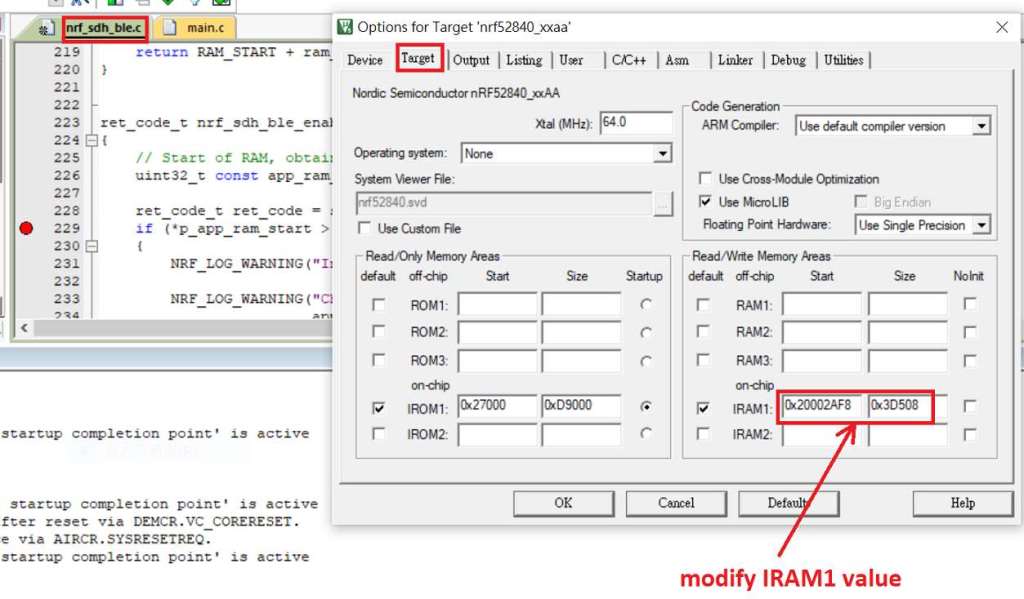
Step 6. Adjust the IRAM1 value in Target after implementing DFU service:
Make sure the IRAM1 Value of *p_app_ram_start is modified from default: 0x20002AD8 0xD528 to
0x20002AE8 0xD518, as shown in the red frame in the bottom right corner.
In this case, the program should run/advertise successfully.


Step 7. Create a file of: nrf52832_xxaa.hex after building application code files.


Step 8. Create a bootloader setting file of nrf52832_bootloader_secure_settings.hex via DOS.
nrfutil settings generate –family NRF52 –application nrf52832_xxaa.hex –application-version 3 —
bootloader-version 2 –bl-settings-version 1 nrf52832_bootloader_secure_settings.hex –no-backup

※Stay tuned for Part 2: Combining and merging built files in the next article, scheduled release in next week(04-Sep-2024).


Technical guidelines provided by R&D Manager: Mr. MW Lee
Edited by Sales Manager: Ms. Mandy Chao


Raytac Corporation 勁達國際電子股份有限公司 
Raytac Corporation: A Bluetooth, Wi-Fi, and LoRa Module Maker based on
Nordic nRF54; nRF53: nRF52; nRF51; nRF7002
Semtech Specification: SX1262

Bluetooth Specification: BT5.4 ; BT5.3; BT5.2.
Wi-Fi Specification: Wi-Fi 6
LoRa Specification: LoRaWAN

All products are FCC/IC/CE/Telec/KC/RCM/SRRC/NCC Pre-Certified.
http://www.raytac.com
email: sales@raytac.com
Tel: +886-2-3234-0208

Secure DFU OTA for nRF52840 solution modules: Guide to create hex/zip file for implementation – #3(Combining/merging built files)

Following up – Part A: Bootloader (Click for article link) and Part B: Application (Click for article link)

We will be focusing on:

in this article.

IC: nRF52840
DK: PCA10056 (for nRF52840)
SDK: 17.1.0
Softdevice: s140_nrf52_7.2.0_softdevice.hex
IDE: Keil C
PC: Win 10


Step 1. Execute the combine batch file in bootloader (nrf52840_bootloader_setting_merge.bat) and generate file of nrf52840_bootloader_secure_combin_settings.hex :

@echo off
title = [ J-Link Tool ] %CD%
set nrfDir=C:\Program Files (x86)\Nordic Semiconductor\nrf5x\bin
set BS= nrf52840_bootloader_secure_settings.hex
set BL= nrf52840_xxaa_s140.hex
set BSBLCombind= nrf52840_bootloader_secure_combin_settings.hex
set path=%nrfDir%;%path%
pause
echo ———–merge image file——————-
mergehex.exe -m %BS% %BL% -o %BSBLCombind%
pause


Step 2. Create a Final.hex file by 3-in-1 batch file(nrf52840_3in1_merge.bat)
※Note : This hex file is created for the production line to pre-load firmware into modules prior to shipment.

@echo off
title = [ J-Link Tool ] %CD%
set nrfDir=C:\Users\user\Desktop\Nordic BLE\nRF5_merge tools\nRF52 bin
set SD= s140_nrf52_7.2.0_softdevice.hex
set BLT= nrf52840_bootloader_secure_combin_settings.hex
set APP= nrf52840_xxaa.hex
set SD_BLT=SD_BLT.hex
set Finalfile=Final.hex
set path=%nrfDir%;%path%
pause
echo ———–merge image file——————-
mergehex.exe -m %SD% %BLT% -o %SD_BLT%
pause
mergehex.exe -m %SD_BLT% %APP% -o %Finalfile%
pause


Step 3. Create a DFU(OTA).zip file of nrf52840_xxaa.zip
※Note : This zip file is created for end device DFU(OTA) implementation.

nrfutil pkg generate –hw-version 52 –sd-req 0x100 –application-version 0xFF –application
nrf52840_xxaa.hex –key-file private.pem nrf52840_xxaa.zip

The DFU OTA zip file will be derived.

※Note :
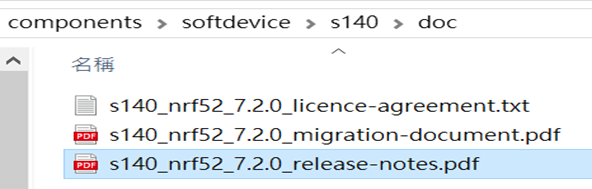
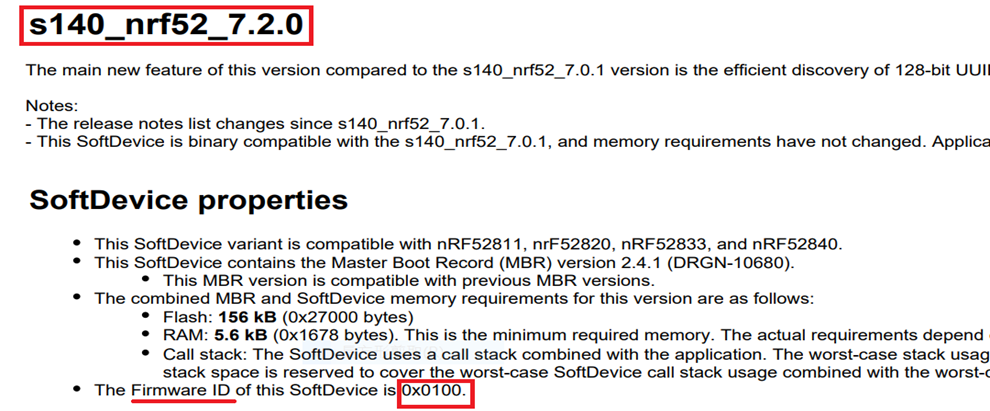
The “0x100" appeared in the above DOS code(in red font) is the FWID(Firmware ID) for s140_nrf52_7.2.0_softdevice.hex;
FWID can be found from the soft device documents on the Nordic website.


Step 4: Run DFU OTA (On mobile in this example)


4A. Install the nRF Connect APP on mobile, with DFU OTA file: nrf52840_xxaa.zip. (Download link)


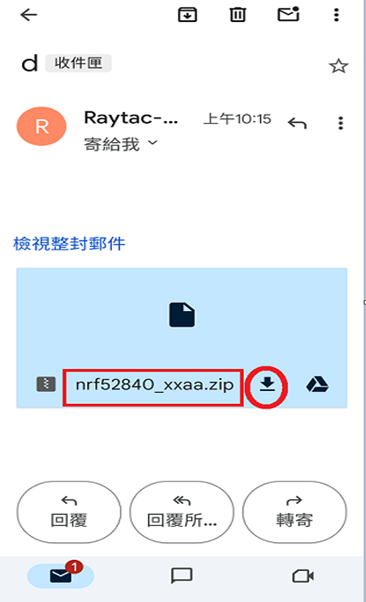
4B. Send nrf52840_xxaa.zip via email to mobile device after combination is done on PC, then download it.


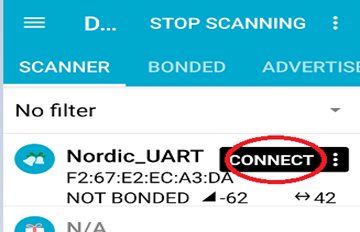
4C. Open nRF Connect APP and run connection;


4D. Execute DFU and select “Distribution packet(ZIP)", thus starting the DFU OTA process.


4E. Start DFU OTA → exit the APP after DFU OTA is completed → restart the mobile device.


Secure DFU OTA for nRF52840 solution modules: Guide to create hex/zip file for implementation
Detailed links of articles:
Part A: Bootloader (Click for article link)
Part B: Application
(Click for article link)
Part C: Combining and merging built files
(Click for article link)


Technical guidelines provided by R&D Manager: Mr. MW Lee
Edited by Sales Manager: Mr. Tony Yin

Raytac Corporation 勁達國際電子股份有限公司 
Bluetooth & WiFi module maker based on Nordic nRF54, nRF53, nRF52, nRF7002 solution
BT5.4 &BT5.3 & BT5.2 & BT5.1 Qualified, FCC/IC/CE/Telec/KC/RCM/SRRC/NCC Pre-Certified.
Bluetooth Solution: nRF54, nRF5340, nRF52840, nRF52833, nRF52832, nRF52820, nRF52811, nRF52810, nRF52805, nRF51822
WiFi Solution: nRF7002
http://www.raytac.com
email: service@raytac.com
Tel: +886-2-3234-0208

Secure DFU OTA for nRF52840 solution modules: Guide to create hex/zip file for implementation – #2(Application)

Following up-Part A: Bootloader (Click for article link)

We will be focusing on:

in this article.

IC: nRF52840
DK: PCA10056 (for nRF52840)
SDK: 17.1.0
Softdevice: s140_nrf52_7.2.0_softdevice.hex
IDE: Keil C
PC: Win 10


Path: nRF5_SDK_17.1.0_ddde560\examples\ble_peripheral\ble_app_uart\pca10056\s140\arm5_no_packs

Before building Application code , some amendments need to be made regarding DFU-related settings and code inside Application:

Step 1.


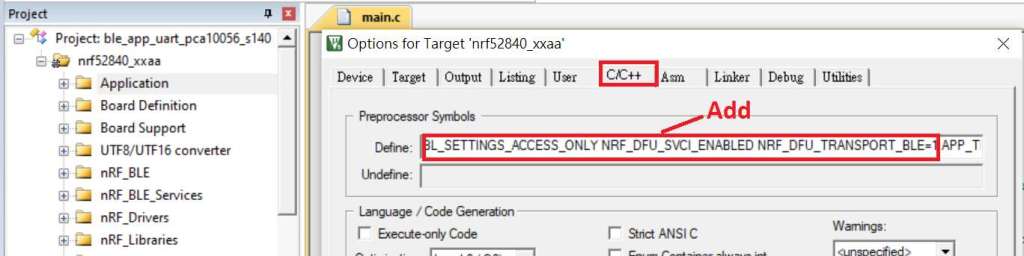
1A. Add code in definition in C/C++ :
BL_SETTINGS_ACCESS_ONLY NRF_DFU_SVCI_ENABLED NRF_DFU_TRANSPORT_BLE=1
(Total 3 steps definitions need to be set up)


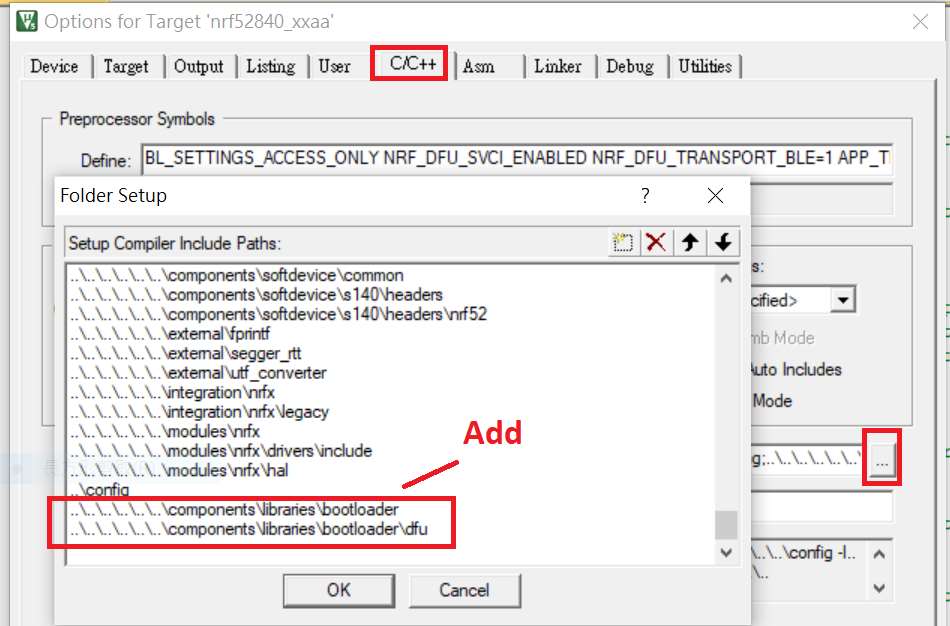
1B. Add “include path” in C/C++


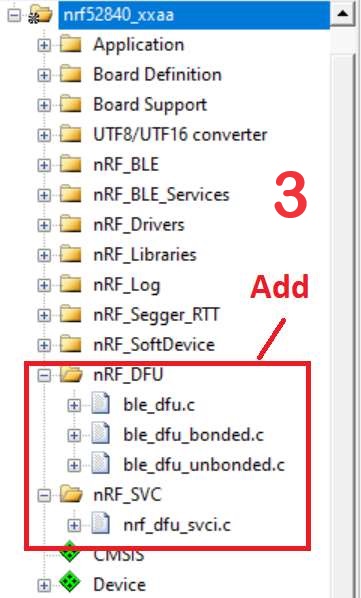
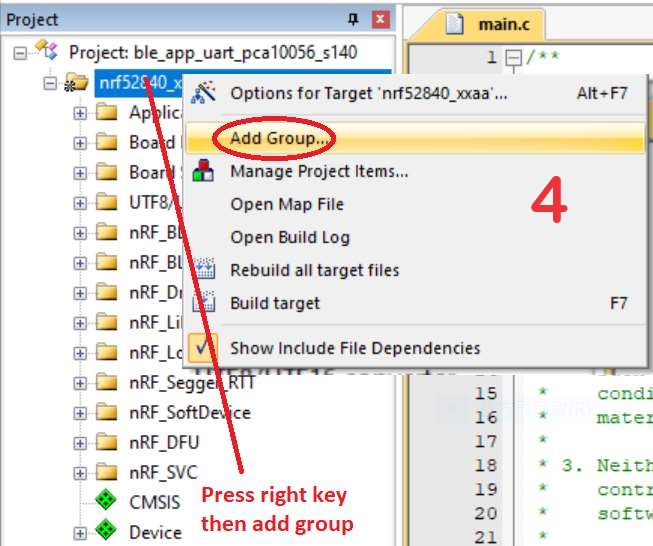
1C. Add the .c files inside red frame in (Screenshots 1 & 2)
and the 2 groups of (nRF_DFU & nRF_SVC)(Screenshot 3) under Project(Screenshot 4)


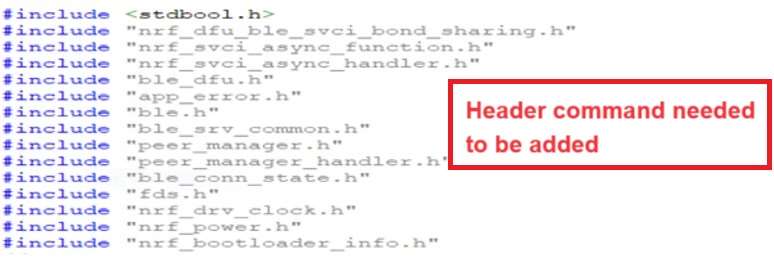
1D. Add code into main.c file in Application (..\examples\ble_peripheral\ble_app_uart\main.c)
(Please refer to: main.c file at: ..\examples\ble_peripheral\ ble_app_buttonless_dfu)


1E. The code of file: sdk_config.h (..\examples\ble_peripheral\ble_app_uart\pca10056\s140\config\
sdk_config.h) inside Application needs to be modified.


1F. Adjust the IRAM1 value in Target after implementing DFU service:
Check on the IRAM1 Value of *p_app_ram_start to be modified from default: 0x20002AE8 0x3D518 to 0x20002AF8 0x3D508, as shown in the red frame in the bottom right corner.
In this case, the program should run successfully.


1G: Create a file of: nrf52840_xxaa.hex after building application code files.


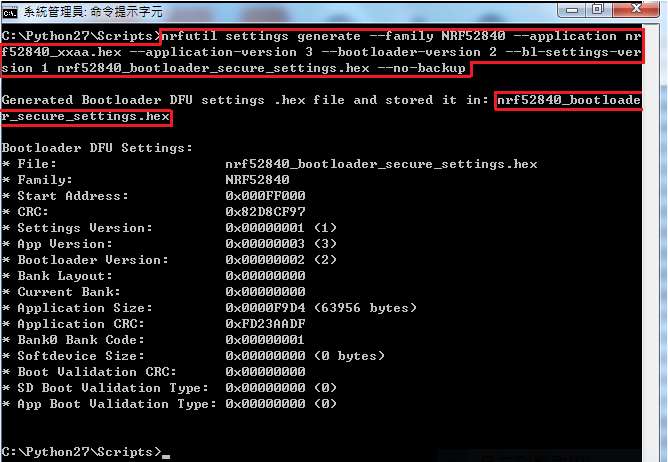
Step 2. Create a bootloader setting file of nrf52840_bootloader_secure_settings.hex : (via DOS)

nrfutil settings generate –family NRF52840 –application nrf52840_xxaa.hex –application-version 3 — bootloader-version 2 –bl-settings-version 1 nrf52840_bootloader_secure_settings.hex –no-backup


※Stay tuned for #3 – Part C: Combining and merging built files in the next article,

scheduled release in next week(05/06/2024).


Technical guidelines provided by R&D Manager: Mr. MW Lee
Edited by Sales Manager: Mr. Tony Yin

Raytac Corporation 勁達國際電子股份有限公司 
Bluetooth & WiFi module maker based on Nordic nRF54, nRF53, nRF52, nRF7002 solution
BT5.4 &BT5.3 & BT5.2 & BT5.1 Qualified, FCC/IC/CE/Telec/KC/RCM/SRRC/NCC Pre-Certified.
Bluetooth Solution: nRF54, nRF5340, nRF52840, nRF52833, nRF52832, nRF52820, nRF52811, nRF52810, nRF52805, nRF51822
WiFi Solution: nRF7002
http://www.raytac.com
email: service@raytac.com
Tel: +886-2-3234-0208

Secure DFU OTA for nRF52840 solution modules: Guide to create hex/zip file for implementation – #1(Bootloader)

Below are the following steps to implement Secure DFU OTA by using nRF52840 chip set, SDK17.1.0.
It consists of 3 parts:

Part A: Bootloader

Part B: Application (Click for article link)

Part C: Combining and merging built files (Click for article link)

In this article, we will be focusing on Part A: Bootloader.

Path: nRF5_SDK_17.1.0_ddde560\examples\dfu\secure_bootloader\pca10056_s140_ble\arm5_no_packs


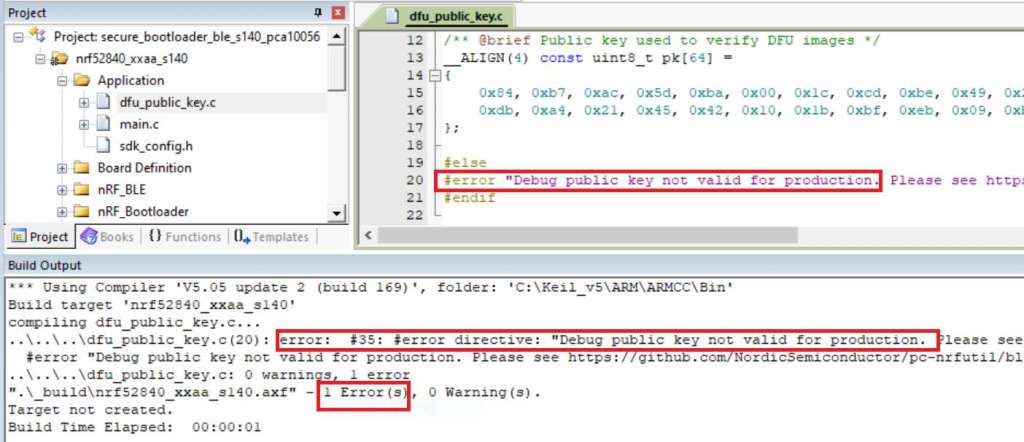
Step 1. An error may occur while building bootloader without a public key:
(Shown in red frames in below screenshot)


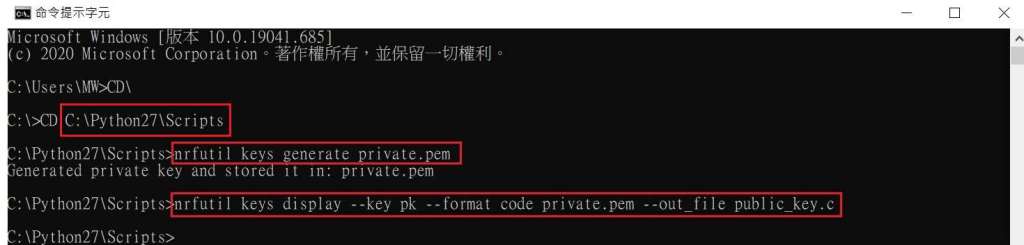
Step 2. How to generate the public key file in Bootloader?
A. Visit DOS at path: ..\Python27\Scripts
B. Then execute:

nrfutil keys generate private.pem
nrfutil keys display --key pk --format code private.pem --out_file public_key.c


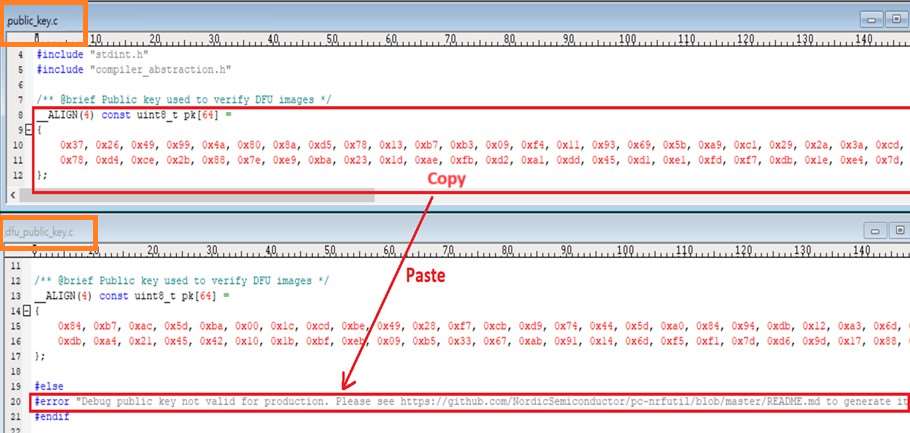
Step 3. Copy the pk[64] code from (public_key.c) into (dfu_public_key.c)
(Shown in red frames in below screenshot)

※Note: Make sure to save the 3 generated files:
private.pem
public_key.c
dfu_public_key.c


Step 4. Generate the bootloader file: nrf52840_xxaa_s140.hex after re-compiling the code files.


※Stay tuned for #2 – Part B: Application in the next article, scheduled release in next week(29/05/2024).


Technical guidelines provided by R&D Manager: Mr. MW Lee
Edited by Sales Manager: Mr. Tony Yin


Raytac Corporation 勁達國際電子股份有限公司 
Bluetooth & WiFi module maker based on Nordic nRF54, nRF53, nRF52, nRF7002 solution
BT5.4 &BT5.3 & BT5.2 & BT5.1 Qualified, FCC/IC/CE/Telec/KC/RCM/SRRC/NCC Pre-Certified.
Bluetooth Solution: nRF54, nRF5340, nRF52840, nRF52833, nRF52832, nRF52820, nRF52811, nRF52810, nRF52805, nRF51822
WiFi Solution: nRF7002
http://www.raytac.com
email: service@raytac.com
Tel: +886-2-3234-0208

Raytac Corporation at the “Embedded World 2024″

Dear Esteemed Participants,

Raytac Corporation is excited to extend our warm welcome to you once again at Embedded World 2024, scheduled to be held from April/9/2024 to April/11/2024 at the Nuremberg Exhibition Centre, Germany.

As IoT and Bluetooth Low Energy gain momentum, they emerge as essential catalysts for future development. Following Nordic Semiconductor’s lead in wireless technology, Raytac remains committed to releasing a wide range of modules to meet developers’ needs.

This year, we’re also introducing Wi-Fi modules AN 7002 alongside the nRF 7002 and nRF 54 series modules, so stay tuned for what’s to come.

Based on your requirements, we will showcase more applications of modules at the exhibition, as well as demonstrate how Raytac Corporation can save your time and expenses during the development stage and overall costs.


Raytac Corporation is delighted to invite you joining our team at:

HALL 3
Booth 3-111
M2M Area


To be a part of this dynamic convergence of ideas, innovations, and opportunities.


For more information and details into Raytac Corporation at embedded world 2024 can now be found in the preview of our digital event platform from following link:

https://www.talque.com/app#/mobile/ngx/org/wQD0JF2hF4nPuB9bezaD/vendor-detail/exibitor/MF2BLg9stimJBHyL7l6C

We eagerly anticipate your participation at the Embedded World Exhibition and the invaluable contributions you will bring to this vibrant gathering.

See you at the exhibition!


Best regards,

Edited by Sales Manager: Ms. Mandy Chao

Raytac Corporation 勁達國際電子股份有限公司

Bluetooth & WiFi module maker based on Nordic nRF54, nRF53, nRF52, nRF7002 solution

BT5.4 &BT5.3 & BT5.2 & BT5.1 Qualified, FCC/IC/CE/Telec/KC/RCM/SRRC/NCC Pre-Certified. Bluetooth Solution: nRF54, nRF5340, nRF52840, nRF52833, nRF52832, nRF52820, nRF52811, nRF52810, nRF52805, nRF51822 WiFi Solution: nRF7002

http://www.raytac.com

email:service@raytac.com

Tel: +886.2.3234.0208
Wi-Fi Alliance (WFA) – Certification program –FlexTrack & Derivative

Wi-Fi Alliance (WFA) – Certification program —Flex Track & Derivative
(The least effort option for Wi-Fi certification)


Source: https://www.wi-fi.org/certification

After reading through the article of WFA (Wi-Fi Alliance) QuickTrack program, you may try to seek for a seamless option that least effort made for a Wi-Fi certificate.

Raytac Corp. has took this Wi-Fi program topic into consideration already!

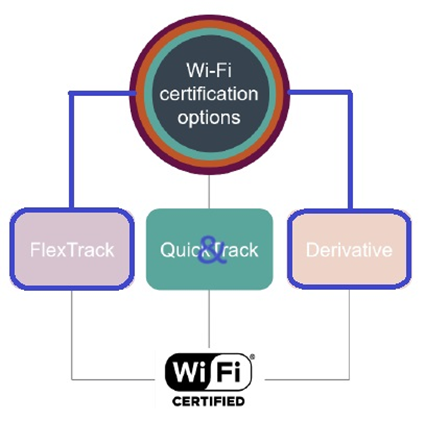
Raytac Corp. is working on the FlexTrack package as a source product so that end product developer can apply a Derivative program to grant a WFA(Wi-Fi Alliance) certificate by leveraging Raytac Corp. WFA source productNRF5340 & nRF7002 IC combo solution (MDBT53 & AN7002Q Module)

Let Raytac Corp. do the work ahead of your request, the FlexTrack program is provided with a fix option, the necessary Wi-Fi compliance & conformance have been done by Raytac Corporation, Raytac Corp. will get a WFA Certificate that you (end product developer) can simply leverage it and apply Derivative program seamlessly for getting your own Wi-Fi certificate ID as long as you’re the member of Wi-Fi alliance.

  • What benefits you (end product developer) by sticking to Raytac Corp. FlexTrack (Source product) program?

Source Product: NRF5340 & NRF7002 IC combo solution (MDBT53 & AN7002Q Module)

  1. No-Testing required: Raytac Corp. has granted the Wi-Fi certificate ID using source product (MDBT53 & AN7002Q Module) , you simply leverage Raytac Corp. Wi-Fi certified ID and apply the solution to your end product when you’re working on the certification process ; No-testing is required.

  2. Faster time-to-market end device (WiFi) : By using Raytac Corp. available WFA source product , you can get through the certification process easily without being in the process of a series of tests as long as you’re the member of Wi-Fi alliance. This helps your WiFi end device get launched at the earliest.

  3. Seamless Connectivity & Least resource required : Without involving in a series of complicate Wi-Fi compliance and conformance test, it delivers the seamless connectivity and the least effort would be took for end product developer to get Wi-Fi certificate ID.

  4. Waive cost on Wi-Fi conformance test: it significantly decreases the cost for your project budget without getting through a series of Wi-Fi compliance & conformance tests.

If you stick to Raytac Corp. combo solution (source product )- MDBT53 & AN7002Q Module, given the WiFi components are pre-certified in the FlexTrack solution, you (end product developer) will be able to use the minimal resource and least effort to get Wi-Fi certificate ID for your WiFi end device.


  • Which membership level shall be applied in Wi-Fi alliance for being Derivative?

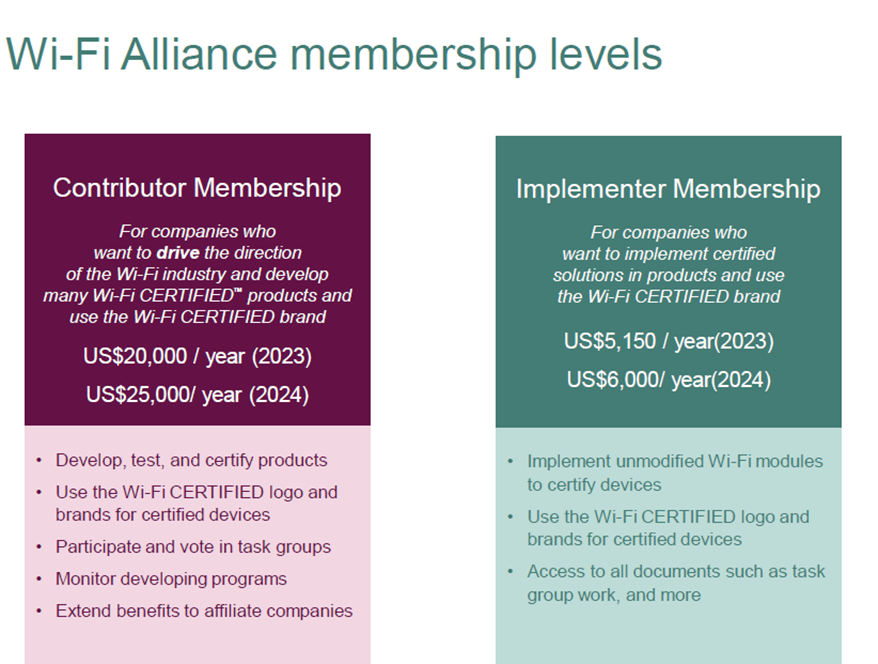
If you agree with Raytac Corp. FlexTrack program and are confident in the Raytac Corp. combo solution(source product )- MDBT53(Raytac Bluetooth Low Energy Module) & AN7002Q( Raytac Nordic Wifi Module) , Wi-Fi Implementer membership would extend this benefit for you. Being the Implementer membership and participate in the Derivative program, this is the perfect option for the budget sensitive company.


Source: https://www.wi-fi.org/membership

https://www.wi-fi.org/membership/membership-benefits

Raytac Corp. is about to launch WiFi module AN7002Q(Powered up by Nordic’s nRF7002 WiFi IC) in 2024 ;

Keep your attention to the blog posts for more upcoming WiFi-related content.

Don’t forget to visit our webiste: www.raytac.com for more Wi-Fi related news /release notices.

Edited by Sales Manager: Jocelyn Tsai

Raytac Corporation 勁達國際電子股份有限公司 
Bluetooth & WiFi module maker based on Nordic nRF54, nRF53, nRF52, nRF7002(WiFi) solution
BT5.4 &BT5.3 & BT5.2 & BT5.1 Qualified, FCC/IC/CE/Telec/KC/RCM/SRRC/NCC Pre-Certified. Bluetooth Solution: nRF54, nRF5340, nRF52840, nRF52833, nRF52832, nRF52820, nRF52811, nRF52810, nRF52805, nRF51822 WiFi Solution: nRF7002
www.raytac.com
email:service@raytac.com
Tel: +886.2.3234.020

Wi-Fi Alliance (WFA) – Certification program –QuickTrack

Wi-Fi Alliance (WFA) – Certification program –QuickTrack

 -Collaboration between Solution provider & End product developer

Source: https://www.wi-fi.org/certification

Raytac Corp. is officially a member of Wi-Fi Alliance now!

Before stepping into Wi-Fi module selection and adoption, Wi-Fi regulatory compliance will be essential for you to know.

Let’s dig into the Wi-Fi certification program and investigate the possibility of WFA Qualified Solution (provided by Solution Provider) & WFA certificate (obtained by end product developer).

  • What benefits you (end product developer) by working with Rayta Corp. (Solution Provider) for QuickTrack program?
  1. Faster time-to-market : By using available WFA Qualified Solution (provided by solution provider) to waive (or partially waive) compliance test criteria/decrease testing days for end product (WiFi Device), shorter development days would be took before product launch.
  2. Reduce test and certification costs: it significantly reduces the cost and certification days for your project with minimal resource by working with Raytac Corp. (Solution Provider) using available WFA Qualified Solution.
  3. Avoid testing redundancies: Raytac Corp. (Solution Provider) has pre-certified the core Wi-Fi architecture and protocols in Nordic WiFi module AN7002Q, the necessary qualification tests has been conducted. You (end product developer) don’t need to test on those same criteria for end product (WiFi Device) if Raytac WiFi module is implemented in your end device.
  4. Allow flexibility of Wi-Fi functionality change: In case those minor change of Wi-Fi feature which is not relates to core/essential/architecture change may be raised someday in the future , QuickTrack program delivers the qualified product base (Source product) and lower cost with conformance test (QuickTrackTool) responding to the minor change.
  • How QuickTrack certification program works?

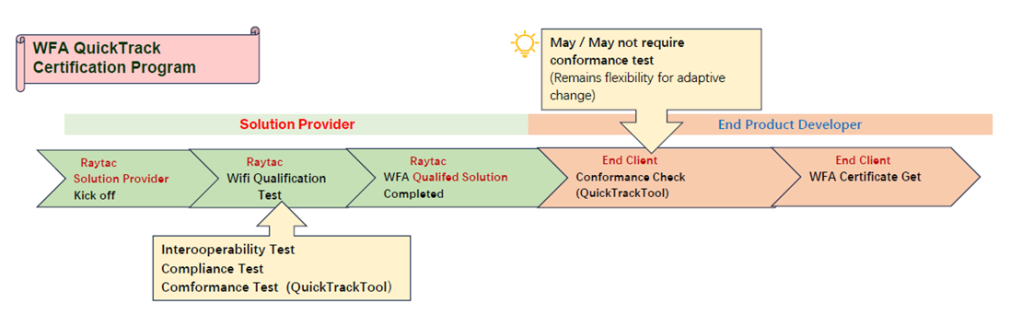
QuickTrack certification program shall be completed by 2 different parties, one is solution provider and the other is end product developer.

(Refer to the following image)

As a Solution Provider, Raytac would proceed the essential and fundamental Wi-Fi protocol/compliance test and develop this into a Qualified solution so that end product developer can leverage this solution as a base (Source Product) to obtain a certificate entitled to end product developer.

Please note the conformance check (named QuickTrack Tool) would be required before Wi-Fi alliance certifies the application.

Conformance check (QuickTrack Tool) will be reviewed for the 8 Wi-Fi components.

  1. Chipset
  2. Wi-Fi Component Firmware Version
  3. Driver
  4. RF Architecture
  5. Wi-Fi Component Operation System
  6. Physical Interface
  7. RF Components
  8. Antenna

When you adopt Raytac WFA Qualified solution, the core/essential/architecture components are pre-certified in the solution, in most of cases, no further conformance test is required, you (end product developer) will be granted to obtain the certificate after a couple of days applying process.

Raytac leaves the right to Wi-Fi alliance for the conformance review (run QuickTrackTool).

  • Which membership level shall be applied in Wi-Fi alliance for being QuickTrack?

If you agree with QuickTrack program and are willing to participate in the partnership as end product developer with Raytac Corp. (solution provider), Implementer membership will be cost effective option for you.

Company like Raytac Corp. served as solution provider or require professional Wi-Fi alliance support, company own/multiple programs oriented or needs tasks management shall refer to the membership of top one – Contributor.

Source: https://www.wi-fi.org/membership

https://www.wi-fi.org/membership/membership-benefits

Raytac Corp. is about to launch WiFi module AN7002Q in 2024 ;

Keep your attention to the blog post recently.

Edited by Sales Manager: Jocelyn Tsai

Raytac Corporation 勁達國際電子股份有限公司
Bluetooth & WiFi module maker based on Nordic nRF54, nRF53, nRF52, nRF7002 solution
BT5.4 &BT5.3 & BT5.2 & BT5.1 Qualified, FCC/IC/CE/Telec/KC/RCM/SRRC/NCC Pre-Certified. Bluetooth Solution: nRF54, nRF5340, nRF52840, nRF52833, nRF52832, nRF52820, nRF52811, nRF52810, nRF52805, nRF51822 WiFi Solution: nRF7002
www.raytac.com
email:service@raytac.com
Tel: +886.2.3234.0208
Tips for Nordic’s nRF52840 DK to successfully detect Raytac’s MDBT50Q-DB-40 Demo Board

WHY Nordic’s DK cannot DETECT Raytac’s modules?

Some tips to fix this problem

Nordic’S board no : PCA10056 (nRF52840)

Raytac’s board no : MDBT50Q-DB-40 (nRF52840)


1. Update the version of nRF Command Line Tools from below link
https://www.nordicsemi.com/Products/Development-tools/nRF-Command-Line-Tools/Download?lang=en#infotabs

2. Update the version of jlink driver from below link.
https://www.segger.com/downloads/jlink/JLink_Windows_V780c_x86_64.exe


3. Update the version of nRF Connect for desktop.
nRF connect for desktop V4.1.2
Programmer V3.0.9


4. Add jumper wire for GND shown as the below red arrow to avoid the different power reference between these 2 boards.


5. Make sure that IDE cable connects correctly. Red edge of IDE cable should connect to PIN 1 of both boards.

6. Supply power to VDD of Raytac’s demo board before flashing.


Edited by Sales Manager: Ms. Gracie Chuang

Raytac Corporation 勁達國際電子股份有限公司

Bluetooth & WiFi module maker based on Nordic nRF54, nRF53, nRF52, nRF7002 solution
BT5.4 &BT5.3 & BT5.2 & BT5.1 Qualified, FCC/IC/CE/Telec/KC/RCM/SRRC/NCC Pre-Certified.
Bluetooth Solution: nRF54, nRF5340, nRF52840, nRF52833, nRF52832, nRF52820, nRF52811, nRF52810, nRF52805, nRF51822 WiFi Solution: nRF7002
https://www.raytac.com
email:service@raytac.com
Tel: +886.2.3234.0208
Important Notice:Upcoming price increase in Bluetooth SIG Membership Fees and DID

The Bluetooth SIG Board of Directors(BoD) has granted its approval for a 15% increase in member fees, effective from January 1,2024. This decision comes after careful consideration of the organization’s financial situation and the need to cover the rising costs of current and futrue member services throughout 2024.

Bluetooth

Feel free to explore the mission and operations of the Bluetooth SIG by visiting the provided web pages below:

Raytac Corporation 勁達國際電子有限公司
A Bluetooth & WiFi module maker based on Nordic nRF53, nRF52, nRF70 solution 
www.raytac.com email: service@raytac.com Tel: +886.2.3234.0208