Navigating RF Certification: A Guide to DTM and Radio Testing

RF Test – DTM & Radio Test

When launching new products, there is a requirement for RF testing, and two methods are commonly used:

DTM (Direct Test Mode) and Radio Test.


Nordic’s SDK provides two RF testing programs: DTM (Direct Test Mode) and Radio Test. While both methods can test RF indicators, they have some distinctions. DTM follows the Bluetooth specification’s Direct Test Mode data format (referenced in Bluetooth Core Specification Version 5.2, Vol. 6, Part F.), primarily for Bluetooth certification tests.

On the other hand, Radio Test focuses on the chip’s radio indicators, making it more suitable for FCC and ETSI certifications.

Let’s delve into detailed explanations for DTM and Radio Test programs.


DTM(Direct Test Mode)

The Bluetooth Association offers a feature for testing RF characteristics. Nordic has incorporated DTM firmware into the SDK according to SIG standard documents. Customers only need to modify the Baud Rate and UART TX/RX pins to conduct RF tests.

1. Download and install nRF Connect for desktop software and nRF5 SDK from the Nordic website.

nRF Connect for desktop download:

https://www.nordicsemi.com/Software-and-tools/Development-Tools/nRF-Connect-for-desktop/Download


nRF5 SDK download:

https://www.nordicsemi.com/Software-and-tools/Software/nRF5-SDK/Download#infotabs


2. Install the Direct Test Mode program in the nRF Connect for desktop software.


3. Extract the SDK package, open the DTM example code from

nRF5_SDK_vxx\examples\dtm\direct_test_mode\ board number\blank, modify TX and RX pins based on the target board’s definitions, then compile.

Download the program to the target board connected to the PC.
(Select the appropriate sample code based on the IC/module for testing, referring to the board number below.)

IC P/Nboard number
NRF52832pca10040
NRF52810pca10040e
NRF52840pca10056
NRF52811pca10056e
NRF52833pca10100
NRF52820pca10100e

RF testing is performed using UART TX/RX commands.
The SDK program defaults to certain positions, but users can modify these two pin positions according to their product design without changing the Baud Rate setting.

UART PinnRF51nRF52
TXDP0.09P0.06
RXDP0.11P0.08


4. Use nRFConnect DTM for testing by adjusting UART TX/RX pins.

Please refer to Video tutorial from link below:
https://github.com/NordicSemiconductor/pc-nrfconnect-dtm/blob/master/resources/screenshot.gif


Radio Test

Nordic provides a tool for simpler RF testing, allowing the configuration of radio-related data such as TX power, frequency, TX carrier, and TX modulation carrier through a Command List. It doesn’t include testing for RX sensitivity; if needed, users must either write a program for this test or use DTM for testing.

1. Open from nRF5_SDK_vxx\examples\peripheral\radio_test\board number\blank
(Based on the IC/module for testing, referring to the board number below.)

IC P/Nboard number
NRF52832pca10040
NRF52810pca10040e
NRF52840pca10056
NRF52811pca10056e
NRF52833pca10100
NRF52820pca10100e


2. This test also utilizes a Command-based approach to send instructions for different parameter tests. Compared to DTM, Radio Test is more flexible, offering a wider range of RF parameters to test.
The connection method between the target board and PC, serial port modifications, and the approach with DTM are identical.


3. Use the command-Line interface (CLI) through the serial port to control and test the output power, bitrate, and channel settings of the radio parameters during testing.

Additionally, configure the CLI to enable the 32 MHz high-frequency crystal oscillator.

The application allows setting scanning mode with intervals ranging from 1 millisecond to 99 milliseconds (per 1 millisecond) for each channel.


4. Refer to the Nordic CLI commands documentation for the command testing method.

https://infocenter.nordicsemi.com/index.jsp?topic=%2Fcom.nordic.infocenter.sdk5.v15.2.0%2Fnrf_radio_test_example.html&cp=4_0_0_4_5_29_0&anchor=nrf_radio_test_example_commands

5.Testing

Lastly, we can utilize Spectrum to test PCBA RF characteristics.


Edited by Sales Manager: Ms. Vicky Huang
Raytac Corporation 勁達國際電子股份有限公司
Bluetooth & WiFi module maker based on Nordic nRF54, nRF53, nRF52, nRF7002 solution                     

BT5.4 &BT5.3 & BT5.2 & BT5.1 Qualified, FCC/IC/CE/Telec/KC/RCM/SRRC/NCC Pre-Certified.         
Bluetooth Solution:  nRF54, nRF5340, nRF52840, nRF52833, nRF52832, nRF52820, nRF52811, nRF52810, nRF52805, nRF51822    WiFi Solution: nRF7002 
https://www.raytac.com email: mailto:sales@raytac.com Tel: +886.2.3234.0208           
The “Must Know” about WPC-ETA certificate before entering Raytac Bluetooth module into India

Intro:

You will get a brief understanding of WPC-ETA certificate (India) and how it relates to Raytac low energy Bluetooth module and how it helps you entering Raytac Bluetooth module into India by passing through importing and Customs clearance procedure way efficiently.

There are some types of ETA certificate categorized by the spec of your wireless transmission product (Bluetooth/Wifi/RFID and by device using frequency spectrum).

Hereafter we’re talking about the WPC-ETA compliance regulation to specifically on “Raytac’s low energy Bluetooth module.”

Outline of the article:

  1. What is WPC Certificate/Equipment Type Approval (ETA) in India?
  2. Raytac Bluetooth module applied to WPC-ETA Regulation Category
  3. What is essential to get the ETA-SD license (ETA Approval)?
  4. How the ETA-SD license works during importing process

A. What is WPC Certificate/Equipment Type Approval (ETA) in India?

The WPC (Wireless Planning & Coordination) is the broadcasting authority and is part of the Ministry of Communications and Information Technology in India.

Products with radio and/or wireless functionality imported or manufactured or marketed in India are required to have an Equipment Type Approval certificate (ETA certificate) from the Wireless Planning and Coordination (WPC India) Wing of the Ministry of Communications of the government of India. This includes product with Bluetooth, wireless local area network access technology (Wi-Fi), small digital radios (Zigbee), and radio frequency identification (RFID) and else more. The WPC-ETA certificate is required for anyone who wants to do wireless device business in India.

B. Raytac Bluetooth module applied to WPC-ETA Regulation Category

–ETA Through Self Declaration (ETA-SD License)

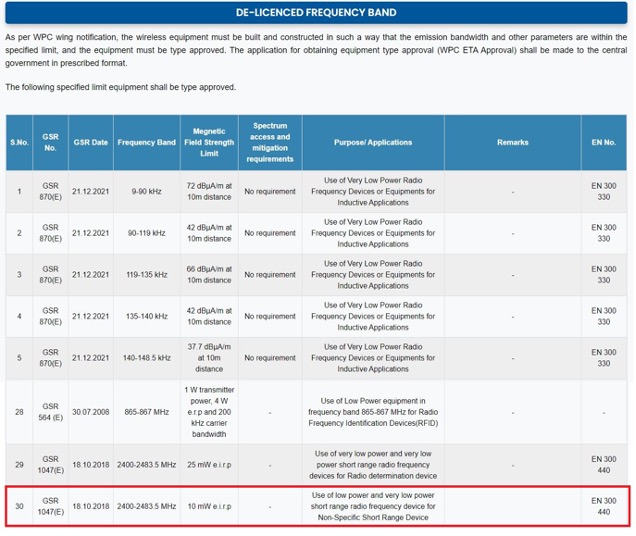
To specifically recognize what is the compliance regulation of equipment applies to Raytac Bluetooth module, we can be assured with our Bluetooth module spec located within “De-licensed Frequency Band list” , 2400-2483.5MHz / Limit with 10mW EIRP / Use of low power and very low power short range radio frequency device for Non-Specific Short range device, from the following chart which was released from WPC authority.

Once we confirm Raytac Bluetooth module spec is operated in De-License Frequency Band with low transmission power, at the mean time making sure the device is exempt from import license as per Import Policy of DGFT (Directorate General Of Foreign Trade), Ministry OM ETA-WPC-Policy-2018-19 dated 26th February 2019, free from EXIM Policy of DGFT, Raytac is granted to apply for “ETA Through Self-declaration” application procedure which was enabled by SARAL SANCHAR Portal of DoT on 12th April, 2019.

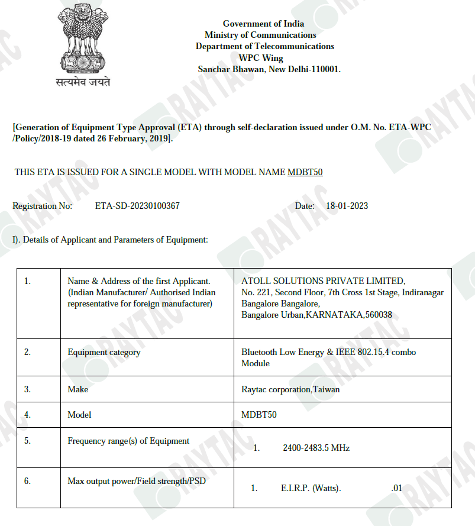
Here’s Raytac’s ETA through self-declaration (ETA-SD license) of module MDBT50 certified by WPC authority. (Please refer to the following image)

C. What is essential to get the ETA-SD license (ETA Approval)?

After getting idea of what ETA-SD license means to Raytac low energy Bluetooth module business, we need to get ready of the following points for applying the ETA Approval (ETA-SD License)

  • Applicant must be India manufacturing or authorized Indian representative
  • Making sure product exempt from import license
  • Making sure product working in the de-licensed frequency band
  • Wireless RF test report conducted by accredited laboratory
  • Details of Accreditation laboratory & Accreditation certificate issuing authority
  • Authorization letter


D. How the ETA-SD license works during importing process

  1. Once ETA through self-declaration is generated for a model, subsequently it may be utilized by other person(s) for import/usage purpose in India. It is not necessary the importing agent/manufacturer is same party to the applicant of the license.
  2. Question: How to import products falling under the category of ETA through Self-Declaration?      Answer: Such category of product(s) may be imported by submitting an undertaking to the customs along with ETA-SD License without additional payment.
  3. The ETA-SD license remains valid and NO renewal is needed until the technical parameter/design of the device is modified or altered.
  4. Generally speaking , India doesn’t follow Modular policy nor Non-Modular policy. It determines how you proceed WPC-ETA certificate by product type (Semi-finished & End-product) and product technical spec (Frequency spectrum & Max output power).  For instance: When the product is manufactured in India and its RF module(s) having ETA certificate is/are fitted inside it without any modification/alteration; then NO separate ETA is required for such finished product during import process. However, if finished product(s) are manufactured outside India, then ETA is required for each product before its import.
  5. For the product which does not fall under De-Licensed frequency band and exempt from import license, WPC/ETA Certificate shall be obtained by routine proceeding to the concerned RLO ETA certificate. Both ETA (RLO) certificate and Import license shall be submitted to Customs during importing process whereas ETA-SD license Raytac module certified is exempt from import license that is way easier to proceed.

Edited by Account Manager: Jocelyn Tsai

Raytac Corporation 勁達國際電子股份有限公司
Bluetooth & WiFi module maker based on Nordic nRF54, nRF53, nRF52, nRF7002 solution                      BT5.3 & BT5.2 & BT5.1 Qualified, FCC/IC/CE/Telec/KC/RCM/SRRC/NCC Pre-Certified.         

 Bluetooth Solution:  nRF54, nRF5340, nRF52840, nRF52833, nRF52832, nRF52820, nRF52811, nRF52810, nRF52805, nRF51822                                                                                                                                                     WiFi Solution: nRF7002 

www.raytac.com email: service@raytac.com Tel: +886.2.3234.0208