Tips for Nordic’s nRF52840 DK to successfully detect Raytac’s MDBT50Q-DB-40 Demo Board

WHY Nordic’s DK cannot DETECT Raytac’s modules?

Some tips to fix this problem

Nordic’S board no : PCA10056 (nRF52840)

Raytac’s board no : MDBT50Q-DB-40 (nRF52840)


1. Update the version of nRF Command Line Tools from below link
https://www.nordicsemi.com/Products/Development-tools/nRF-Command-Line-Tools/Download?lang=en#infotabs

2. Update the version of jlink driver from below link.
https://www.segger.com/downloads/jlink/JLink_Windows_V780c_x86_64.exe


3. Update the version of nRF Connect for desktop.
nRF connect for desktop V4.1.2
Programmer V3.0.9


4. Add jumper wire for GND shown as the below red arrow to avoid the different power reference between these 2 boards.


5. Make sure that IDE cable connects correctly. Red edge of IDE cable should connect to PIN 1 of both boards.

6. Supply power to VDD of Raytac’s demo board before flashing.


Edited by Sales Manager: Ms. Gracie Chuang

Raytac Corporation 勁達國際電子股份有限公司

Bluetooth & WiFi module maker based on Nordic nRF54, nRF53, nRF52, nRF7002 solution
BT5.4 &BT5.3 & BT5.2 & BT5.1 Qualified, FCC/IC/CE/Telec/KC/RCM/SRRC/NCC Pre-Certified.
Bluetooth Solution: nRF54, nRF5340, nRF52840, nRF52833, nRF52832, nRF52820, nRF52811, nRF52810, nRF52805, nRF51822 WiFi Solution: nRF7002
https://www.raytac.com
email:service@raytac.com
Tel: +886.2.3234.0208

How To USE Nordic Connect SDK (NCS) Flashing Built Code into nRF5340 Module

Edited by Jocelyn Tsai / Account Manager

Intro:  With the ready built code of zephyr.hex file for net core and application core individually, we would like to proceed code flashing into the MDBT53/53V Nordic nRF5340 BLE module.

  • Ready Built Code Programming Steps

Step1. 

Execute nRF Connect >>  Programmer  > > Open

Step2.

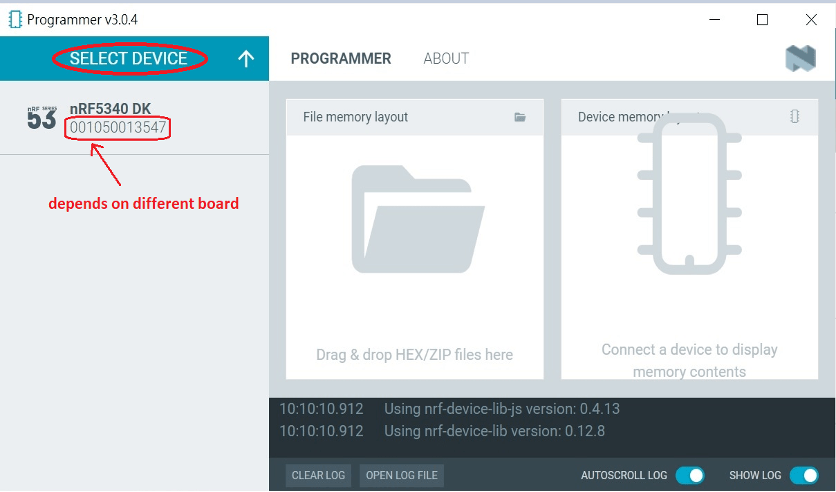
Click “SELECT DEVICE” >> Find icon of “nRF5340 DK” which is detected by the programmer app

Step3.

Click icon of “nRF5340 DK” >> “Erase All” to remove the flash memory from MDBT53/53V BLE Module

Step4.

Click “Add File” to load the net core zephyr.hex and application core zephyr.hex both into programmer

Step5.

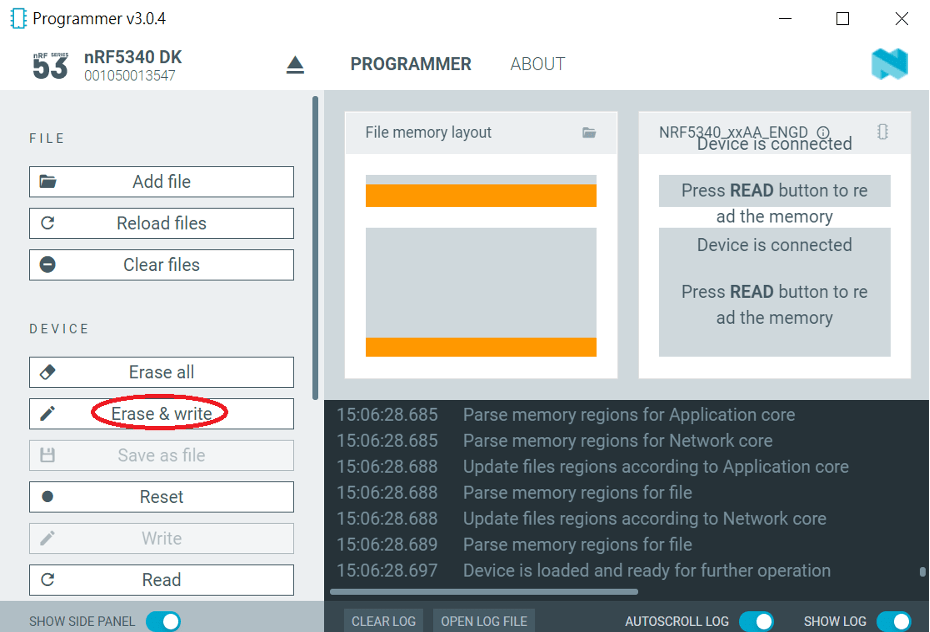
Do “Erase & Write ” to execute the flashing process for both zephyr.hex into memory of MDBT53/53V Module.

Step6.

To validate the wireless broadcast of default name “Nordic_UART_Service” from MDBT53/53V Module, please check on the “nRF Connect for mobile” APP and do “Scan device” through your mobile.   

Once the device name is detected in your mobile , the wireless connection is successfully done.

There are some more useful resources in the below links:
Hardware set up works
“How To Get started with Nordic nRF5340 Project by Raytac MDBT53/MDBT53V Development Kit Demo Board"
Firmware development:
“How To Get Started With nRF5340 Module Program Coding and Compiling" (Click Me)

Edited by Account Manager: Jocelyn Tsai

Raytac Corporation 勁達國際電子有限公司
A BT5.2 & BT5.1 & BT5 module maker based on Nordic nRF53 & nRF52 solution 
(nRF5340 & nRF52840 & nRF52833 & nRF52832 & nRF52820 & nRF52811 & nRF52810 & nRF52805)
www.raytac.com email: service@raytac.com Tel: +886.2.3234.0208