
Understanding LE Audio: BIS and CIS Explored

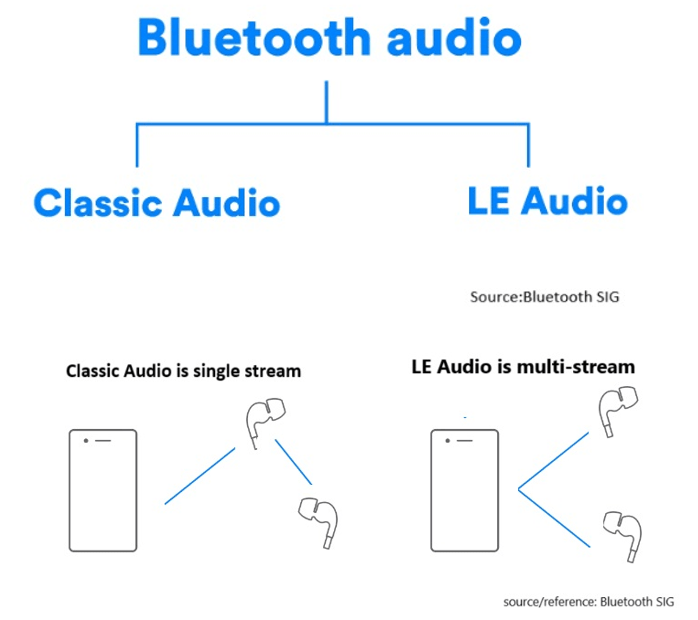
LE Audio, introduced with Bluetooth 5.2, brings significant advancements to audio technology by using the Low Complexity Communication Codec (LC3). Compared to older codecs like SBC, LC3 provides better audio quality while reducing power consumption, making it ideal for devices like wireless earphones and hearing aids.
In this article, we’ll explore two key modes in LE Audio: Broadcast Isochronous Stream (BIS) and Connected Isochronous Stream (CIS). These modes cater to different use cases, offering flexible audio experiences.


What is Broadcast Isochronous Stream (BIS)?

BIS enables one-way audio broadcasting from a single source to multiple devices simultaneously without pairing.
Several BIS streams can form a Broadcast Isochronous Group (BIG), allowing synchronized multi-stream transmission, ideal for environments where many users need access to the same audio content, such as events or museum tours. Any device that supports LE Audio can receive the broadcast, making it an accessible and versatile solution for shared audio experiences.


Here’s a chart including BIS and BIG:


Example Use Case: Concerts and Events
Imagine attending a large outdoor concert where BIS technology is used to broadcast live music directly from the stage to the audience’s devices, such as smartphones and wireless earphones. BIS can broadcast live music from the stage directly to attendees’ devices, ensuring everyone hears the performance in real-time, regardless of location.

Example Use Case: Museum Tours
In a museum setting, Broadcast Isochronous Stream (BIS) can be used to deliver audio guides directly to visitors’ smartphones or rented devices. Visitors can receive synchronized audio guides on their smartphones, enriching their experience and offering multi-language support.


What is Connected Isochronous Stream (CIS)?
CIS focuses on direct, device-to-device connections. The audio stream is transmitted between paired devices with two-way communication, creating a connected and dedicated audio experience.
It’s ideal for personalized experiences like hearing aids or wireless earphones. Multiple CIS streams can be synchronized using a Connected Isochronous Group (CIG) for simultaneous audio transmission while maintaining the benefits of a personalized connection.


Here’s a chart including CIS and CIG:


Example Use Case: Wireless Earphones
Imagine a user connecting their wireless earphones to a smartphone via CIS. When two Bluetooth earphones are connected simultaneously, multiple CIS streams can be grouped into a Connected Isochronous Group (CIG) to achieve synchronized audio transmission across both devices and also enables high-fidelity audio streaming, ensuring clear and immersive sound.
With CIS, each user can adjust volume or equalizer settings independently without impacting others, creating a truly personalized listening experience. CIS provides a significant upgrade over traditional Bluetooth audio by delivering richer sound quality with lower latency.

Example Use Case: Hearing Aids
Connected Isochronous Stream (CIS) is especially beneficial for hearing aids, allowing individuals with hearing impairments to directly connect their devices to a TV, smartphone, or other audio sources. CIS enables real-time adjustments to improve speech clarity or reduce background noise, ensuring the audio is clear and effective. Users can have a closer and more immersive audio experience, which is crucial for enhancing social interactions and supporting daily activities.


How BIS and CIS are grouped into BIG and CIG

Summary


BIS vs. CIS: Which Fits Your Needs?

  • BIS is suitable for shared audio experiences, such as public events and guided tours, where multiple users need simultaneous access.
  • CIS is designed for personalized audio, offering low-latency and high-quality sound for individual users or synchronized multi-device setups.

LE Audio is set to change everyday audio experiences with richer, more versatile audio solutions. Whether it’s concerts, museums, or hearing aids, BIS and CIS provide innovative ways to enhance audio quality and efficiency.


Edited by Sales Manager: Ms. Mandy Chao


Raytac Corporation 勁達國際電子股份有限公司 
A Bluetooth, Wi-Fi, and LoRa Module Maker based on
Nordic nRF54; nRF53: nRF52; nRF51; nRF7002
Semtech Specification: SX1262

Bluetooth Specification: BT5.4 ; BT5.3 ; BT5.2.
Wi-Fi Specification: Wi-Fi 6
LoRa Specification: LoRaWAN

All products are FCC/IC/CE/Telec/KC/RCM/SRRC/NCC/WPC Pre-Certified.
http://www.raytac.com
email: sales@raytac.com
Tel: +886-2-3234-0208

Navigating RF Certification: A Guide to DTM and Radio Testing

RF Test – DTM & Radio Test

When launching new products, there is a requirement for RF testing, and two methods are commonly used:

DTM (Direct Test Mode) and Radio Test.


Nordic’s SDK provides two RF testing programs: DTM (Direct Test Mode) and Radio Test. While both methods can test RF indicators, they have some distinctions. DTM follows the Bluetooth specification’s Direct Test Mode data format (referenced in Bluetooth Core Specification Version 5.2, Vol. 6, Part F.), primarily for Bluetooth certification tests.

On the other hand, Radio Test focuses on the chip’s radio indicators, making it more suitable for FCC and ETSI certifications.

Let’s delve into detailed explanations for DTM and Radio Test programs.


DTM(Direct Test Mode)

The Bluetooth Association offers a feature for testing RF characteristics. Nordic has incorporated DTM firmware into the SDK according to SIG standard documents. Customers only need to modify the Baud Rate and UART TX/RX pins to conduct RF tests.

1. Download and install nRF Connect for desktop software and nRF5 SDK from the Nordic website.

nRF Connect for desktop download:

https://www.nordicsemi.com/Software-and-tools/Development-Tools/nRF-Connect-for-desktop/Download


nRF5 SDK download:

https://www.nordicsemi.com/Software-and-tools/Software/nRF5-SDK/Download#infotabs


2. Install the Direct Test Mode program in the nRF Connect for desktop software.


3. Extract the SDK package, open the DTM example code from

nRF5_SDK_vxx\examples\dtm\direct_test_mode\ board number\blank, modify TX and RX pins based on the target board’s definitions, then compile.

Download the program to the target board connected to the PC.
(Select the appropriate sample code based on the IC/module for testing, referring to the board number below.)

IC P/Nboard number
NRF52832pca10040
NRF52810pca10040e
NRF52840pca10056
NRF52811pca10056e
NRF52833pca10100
NRF52820pca10100e

RF testing is performed using UART TX/RX commands.
The SDK program defaults to certain positions, but users can modify these two pin positions according to their product design without changing the Baud Rate setting.

UART PinnRF51nRF52
TXDP0.09P0.06
RXDP0.11P0.08


4. Use nRFConnect DTM for testing by adjusting UART TX/RX pins.

Please refer to Video tutorial from link below:
https://github.com/NordicSemiconductor/pc-nrfconnect-dtm/blob/master/resources/screenshot.gif


Radio Test

Nordic provides a tool for simpler RF testing, allowing the configuration of radio-related data such as TX power, frequency, TX carrier, and TX modulation carrier through a Command List. It doesn’t include testing for RX sensitivity; if needed, users must either write a program for this test or use DTM for testing.

1. Open from nRF5_SDK_vxx\examples\peripheral\radio_test\board number\blank
(Based on the IC/module for testing, referring to the board number below.)

IC P/Nboard number
NRF52832pca10040
NRF52810pca10040e
NRF52840pca10056
NRF52811pca10056e
NRF52833pca10100
NRF52820pca10100e


2. This test also utilizes a Command-based approach to send instructions for different parameter tests. Compared to DTM, Radio Test is more flexible, offering a wider range of RF parameters to test.
The connection method between the target board and PC, serial port modifications, and the approach with DTM are identical.


3. Use the command-Line interface (CLI) through the serial port to control and test the output power, bitrate, and channel settings of the radio parameters during testing.

Additionally, configure the CLI to enable the 32 MHz high-frequency crystal oscillator.

The application allows setting scanning mode with intervals ranging from 1 millisecond to 99 milliseconds (per 1 millisecond) for each channel.


4. Refer to the Nordic CLI commands documentation for the command testing method.

https://infocenter.nordicsemi.com/index.jsp?topic=%2Fcom.nordic.infocenter.sdk5.v15.2.0%2Fnrf_radio_test_example.html&cp=4_0_0_4_5_29_0&anchor=nrf_radio_test_example_commands

5.Testing

Lastly, we can utilize Spectrum to test PCBA RF characteristics.


Edited by Sales Manager: Ms. Vicky Huang
Raytac Corporation 勁達國際電子股份有限公司
Bluetooth & WiFi module maker based on Nordic nRF54, nRF53, nRF52, nRF7002 solution                     

BT5.4 &BT5.3 & BT5.2 & BT5.1 Qualified, FCC/IC/CE/Telec/KC/RCM/SRRC/NCC Pre-Certified.         
Bluetooth Solution:  nRF54, nRF5340, nRF52840, nRF52833, nRF52832, nRF52820, nRF52811, nRF52810, nRF52805, nRF51822    WiFi Solution: nRF7002 
https://www.raytac.com email: mailto:sales@raytac.com Tel: +886.2.3234.0208