
Step-by-Step Guide to Purchasing MAC Addresses from IEEE for Your Devices

Currently, the Nordic Wifi module – AN7002Q on Raytac’s AN7002Q-DB-5340 board isn’t loaded with a Wi-Fi MAC address. You can choose to use your own MAC address or request one from Raytac. Below is a complete tutorial for users who would like to purchase MAC addresses themselves.

Note: Raytac provides two free Wi-Fi MAC addresses (2.4GHz & 5GHz bands) for each AN7002Q module.
If you have a Raytac AN7002Q-DB-5340 demo board but have not received the Wi-Fi MAC addresses, please contact us at sales@raytac.com.


What is a MAC Address?

A MAC address (Media Access Control address) is a unique identifier used to identify network devices. It is typically composed of six groups of two hexadecimal digits, for example, 00:1A:2B:3C:4D:5E. The first six characters are known as the Organizationally Unique Identifier (OUI), which identifies the manufacturer or supplier of the MAC address. Manufacturers can use the OUI to identify the producer of the device.

Each network device’s MAC address should be unique. It is an important identifier used for unique identification among network devices, ensuring that devices can communicate correctly within a local area network. However, it is important to note that MAC addresses can be modified within a local network, so they should not be relied upon as the sole basis for security.


How to Obtain a MAC Address?

The application and distribution of MAC addresses are managed by IEEE (Institute of Electrical and Electronics Engineers). Here’s how to apply for a MAC address from IEEE:
Currently, MAC addresses can only be purchased directly from the IEEE Standards Association in the United States. Depending on the quantity, they can be categorized as:

MA-L (approximately 16 million addresses)
MA-M (approximately 1 million addresses)
MA-S (4096 addresses)


Purchase process

1. Register for an IEEE Account
Visit IEEE’s official website to create an account.


2. Log in and go to the MAC Address Purchase Page
After logging in, navigate to the MAC address purchase page: IEEE MAC Address Purchase
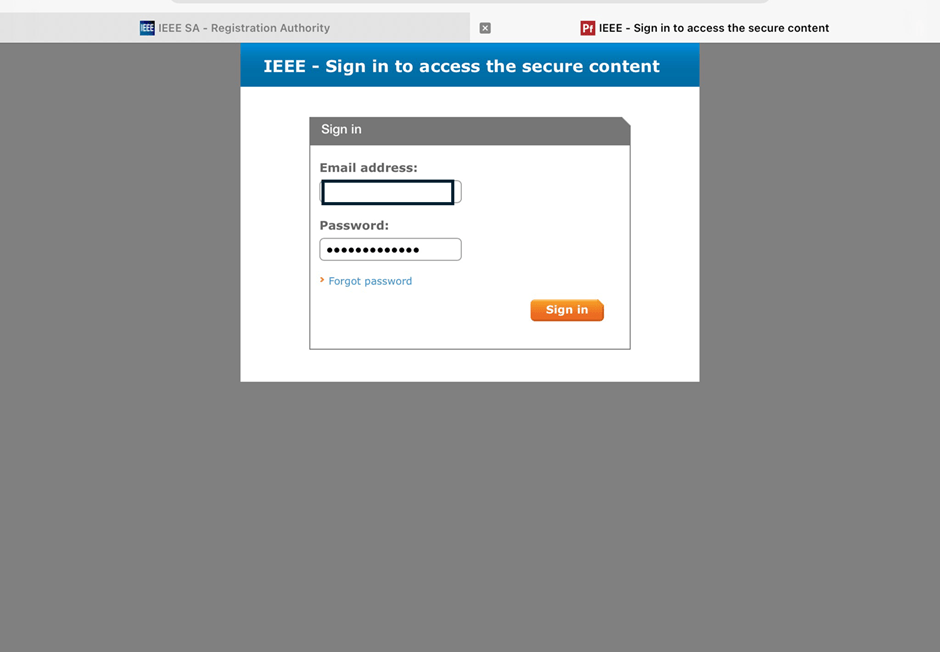
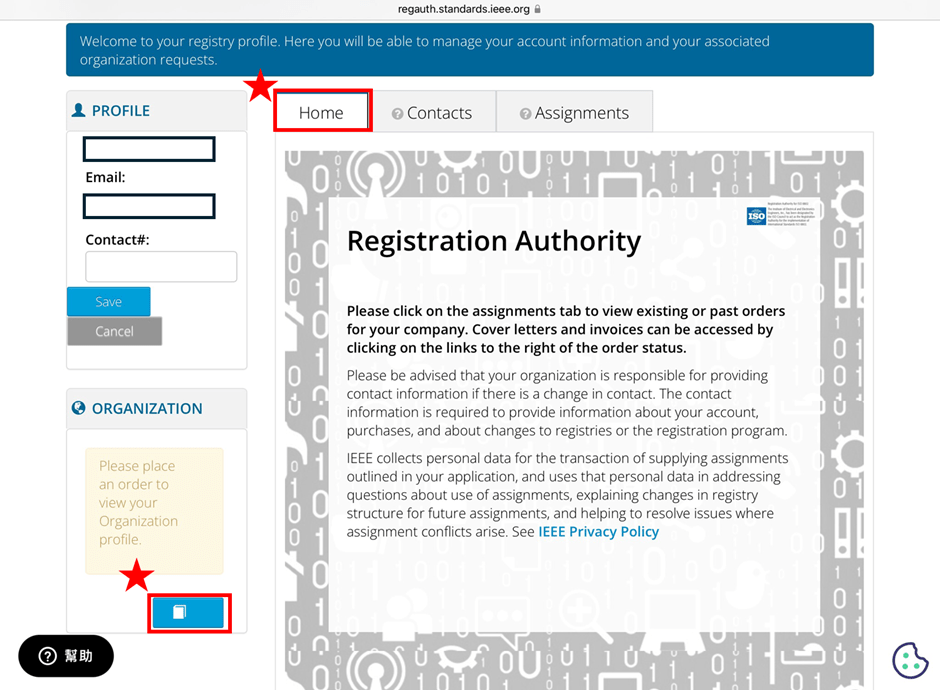
3. Select the number of MAC Addresses to purchase.
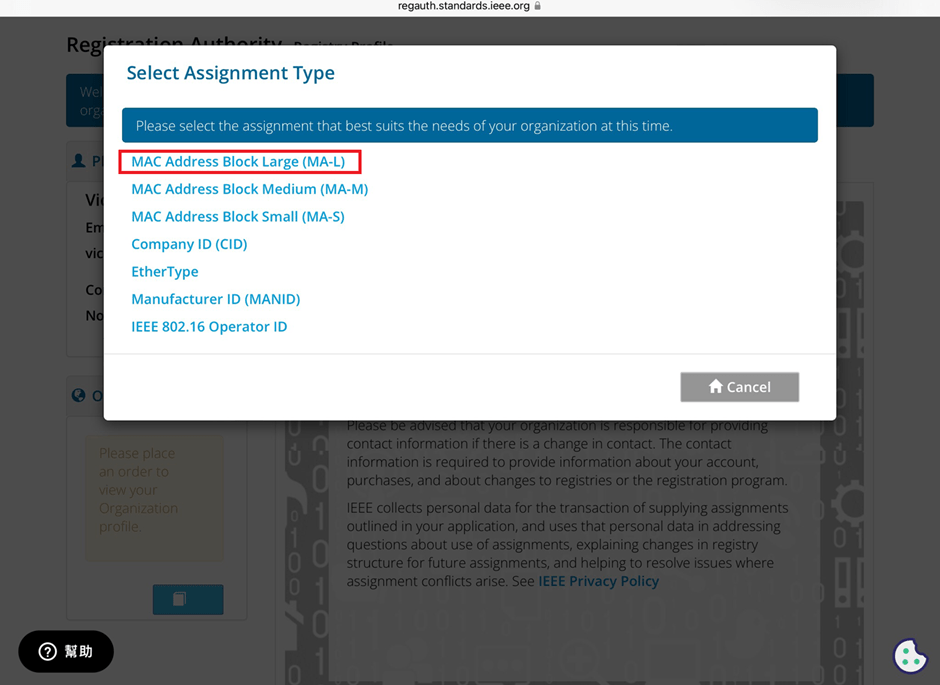

4. Fill in your purchase information by providing the required details.


5. Confirm confidentiality
Confirm whether the MAC address purchase is confidential. If you are purchasing publicly registered MA-L, select “No" for this option.


6. Choose payment method
IEEE accepts several payment methods, including mailing a U.S. bank draft, wire transfer in U.S. dollars, and online credit card payment.
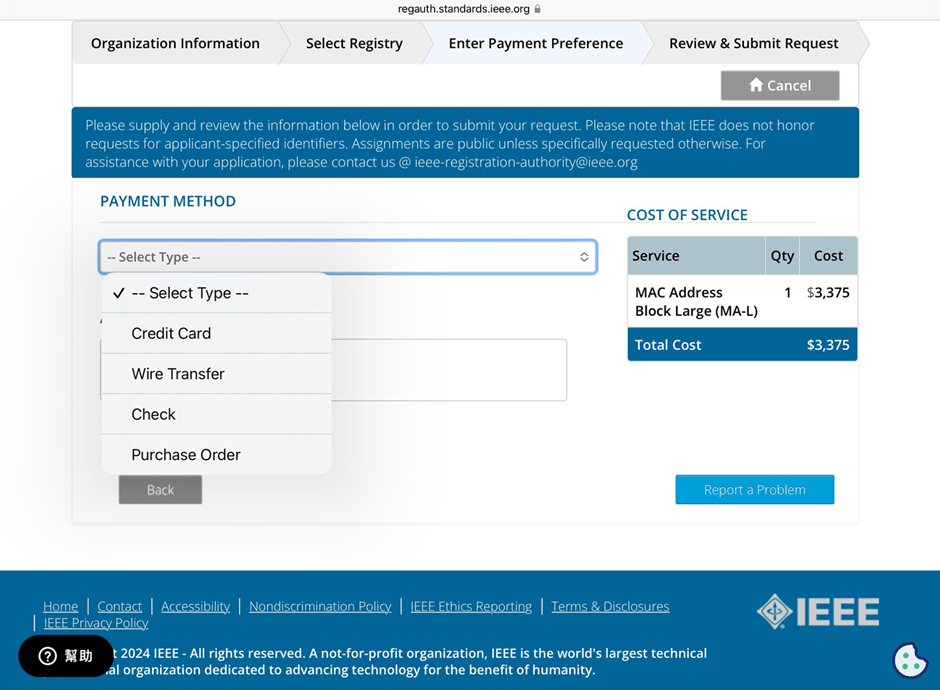

7. Receive your OUI
Within 7 working days, IEEE will send an email to the registered email address containing the purchased OUI.


After obtaining the OUI, you can retrieve all the purchased MAC addresses using code and then import them into a database or Excel for management.


Edited by Sales Manager: Ms. Vicky Huang


Raytac Corporation 勁達國際電子股份有限公司 
A Bluetooth, Wi-Fi, and LoRa Module Maker based on
Nordic nRF54; nRF53: nRF52; nRF51; nRF7002
Semtech Specification: SX1262

Bluetooth Specification: BT5.4 ; BT5.3 ; BT5.2.
Wi-Fi Specification: Wi-Fi 6
LoRa Specification: LoRaWAN

All products are FCC/IC/CE/Telec/KC/RCM/SRRC/NCC/WPC Pre-Certified.
http://www.raytac.com
email: sales@raytac.com
Tel: +886-2-3234-0208


FAQ: How to write MAC address into the OTP memory of Raytac’s nRF7002 Wi-Fi module/AN7002Q-DB-5340 DevKit

Recently we have received the FAQ: how to write MAC address into the OTP memory of Raytac’s AN7002Q-P Nordic Wi-Fi module? In this article, we’ll get this question explained to give customers a more smooth experience using the AN7002Q-nRF5340 Demo Board(AN7002Q-DB-5340).

Is there an existing Wi-Fi MAC address in the AN7002Q part on the DevKit?

Currently, the AN7002Q module on Raytac’s AN7002Q-DB-5340 board has no Wi-Fi MAC address.


When running Wi-Fi Scan code/Station code/Shell code…etc. on NCS v2.6.0 (and later versions), the AN7002Q module must have a programed Wi-Fi MAC address to function properly.

Therefore, it’s necessary to follow the below process:
1. Program the original Wi-Fi radio test code (..\nrf\samples\wifi\radio_test) into the MDBT53 section,
2. Then write the Wi-Fi MAC address in to the AN7002Q section(nRF7002 IC) via command.

After this, program the original Wi-Fi Scan code/Station code /Shell code … into the 5340, and it will function properly.

**Raytac will assign 2 Wi-Fi MAC addresses(for both 2.4GHz & 5GHz) to every AN7002Q module.
*If customers don’t have Wi-Fi MAC addresses for DevKit development yet, please reach out to
service@raytac.com


==================================================================================

Case study 1. SCAN code example


Scenario:
Following error occurred when building the SCAN example code, flash it onto the AN7002Q-DB-5340 board, and run the test.

Solution:

When running Wi-Fi scan code on NCS v.2.6.0 or later version, the OTP memory in the AN7002Q module must have a Wi-Fi MAC address programmed in for the Wi-Fi scan functionality to work properly.

(Note: OTP is a One-Time programmable memory, which means the value can only be written once.
The customer must aware of this before performing the OTP operation.)

1. Program the original Wi-Fi radio test code (..\nrf\samples\wifi\radio_test) into the MDBT53 section,
then manually input and execute the following OTP read command.

wifi_radio_ficr_prog otp_read_params

If you see both MAC0 and MAC1 display a value of 0xFF, as shown in above, it means that you haven’t written the Wi-Fi MAC address into the AN7002Q’s OTP.

2. Manually issue the OTP write command to write the Wi-Fi MAC address into the OTP.

https://docs.nordicsemi.com/bundle/ncs-latest/page/nrf/samples/wifi/radio_test/ficr.html

wifi_radio_ficr_prog otp_write_params 0x120 0xDDCCBBAA 0xFFEE

wifi_radio_ficr_prog otp_write_params 0x128 0xDDCCBBAA 0xFFEE


After you complete the above, use the OTP read command in below to check if the Wi-Fi MAC address value was written.
The MAC0 and MAC1 should display the value you’ve input from the OTP write command.

wifi_radio_ficr_prog otp_read_params

3. Program the original Wi-Fi SCAN code back into the MDBT53, the Wi-Fi scan functionality should work properly.

==================================================================================

Case study 2. Shell code example

SDK Wi-Fi example test – Running Shell Code on AN7002Q-DB-5340:

Scenario:
An error occurs while running Shell code on AN7002Q-DB-5340.

Solution:
The AN7002Q-DB-5340 is paired with nRF5340 DK for development,
but neither of the 2 boards has an external MX25R64 (Serial NOR Flash) component.
So far, only the nRF7002DK board is equipped with the MX25R64.

Therefore, while running the original Wi-Fi shell code, the program will enable SPI NOR.

When using AN7002Q-DB-5340, you should add CONFIG_SPI_NOR=n in the prj.conf file to disable SPI NOR, to turn off any configurations related to it.


Edited by Sales Manager: Ms. Mandy Chao
Technical guidance provided by R&D Manager: Mr. MW Lee
Keyword: nRF7002 MAC address


Raytac Corporation 勁達國際電子股份有限公司 
Bluetooth & WiFi module maker based on Nordic nRF54, nRF53, nRF52, nRF7002 solution
BT5.4 &BT5.3 & BT5.2 & BT5.1 Qualified, FCC/IC/CE/Telec/KC/RCM/SRRC/NCC Pre-Certified.
Bluetooth Solution: nRF54, nRF5340, nRF52840, nRF52833, nRF52832, nRF52820, nRF52811, nRF52810, nRF52805, nRF51822
WiFi Solution: nRF7002
http://www.raytac.com
email: sales@raytac.com
Tel: +886-2-3234-0208